




Candidates who have forgotten their PUBDET 2026 Application Number can retrieve it using their registered details through the official portal.
- The candidates will require their Application Number and Date of Birth to access the PUBDET 2026 rank card login page.
- For recovery of application number, the candidates will need either their registered email address or mobile number.
- After retrieving the application number, candidates can log in and download the PUBDET 2026 Rank Card for future admission activities.
- Candidates facing difficulties with the online recovery process can contact the WBJEEB helpdesk through the official portal for assistance.
Related Links:
- PUBDET 2026 Rank Card: How to Recover Forgotten Application Number on wbjeeb.nic.in
- PUBDET 2026 OBC-A and OBC-B Cutoff: Minimum Qualifying Marks
- PUBDET 2026 Expected Cutoff for SC and ST: Qualifying Marks Estimate

Key Summary
- The PUBDET 2026 Rank Card is expected to be released on the official WBJEEB portal after the declaration of the result.
- Candidates should download and preserve the rank card carefully, as it will be required during counselling, document verification, and seat allotment.
- The PUBDET 2026 Rank Card will contain details such as subject-wise marks, total score, General Merit Rank (GMR), and category rank.
PUBDET 2026 Rank Card Login: What You Need
Candidates need the required login credentials to access and download the PUBDET 2026 Rank Card from the official portal.
- The rank card login window generally requires the Application Number and Date of Birth entered during registration.
- The Application Number is issued at the time of successful PUBDET 2026 registration and is shared through the registered contact details.
- Candidates who are unable to locate the application number should check their registered email inbox, including the spam and junk folders, for the registration confirmation message.
- Candidates who still cannot find the application number can use the application number retrieval facility available on the official portal.
- Access to the PUBDET 2026 Rank Card is possible only after entering the correct login credentials.
| Credential | Details |
|---|---|
| Application Number |
Generated at the time of PUBDET 2026 registration; sent via confirmation email and SMS |
| Date of Birth |
As entered in the PUBDET 2026 application form (use the exact format shown on the login page) |
Also Check: PUBDET 2026: Is 50 Marks Safe for OBC-A and OBC-B Students?
How to Recover Forgotten PUBDET 2026 Application Number
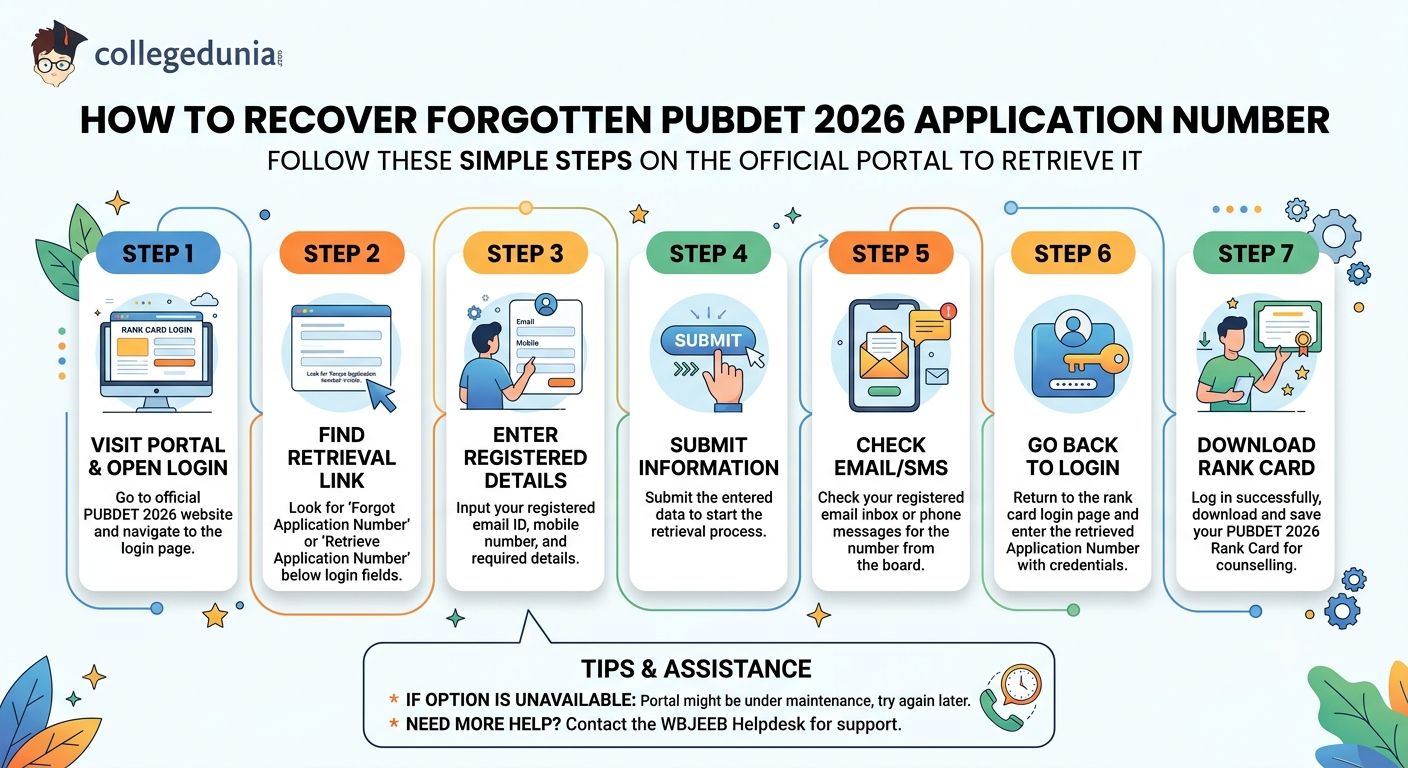
Candidates who have forgotten their PUBDET 2026 Application Number can retrieve it through the official portal by following the steps below.
- Step 1: Visit the PUBDET 2026 portal and open the rank card login page.
- Step 2: Click on the "Forgot Application Number" or "Retrieve Application Number" option available below the login window.
- Step 3: Enter the registered email ID, mobile number, and other required details.
- Step 4: Submit the information to initiate the application number retrieval process.
- Step 5: Check the registered email inbox or mobile phone for the application number sent by the board.
- Step 6: Return to the rank card login page and enter the retrieved Application Number along with the required login credentials.
- Step 7: Download and save the PUBDET 2026 Rank Card for counselling and admission purposes.
- Candidates who are unable to access the retrieval option may try again later if the portal is under maintenance or contact the WBJEEB helpdesk for assistance.
Also Check: PUBDET 2026: Is 60 Marks a Safe Score for General Category?
Ques. How long does it take to receive the recovered PUBDET 2026 application number?
Ans. In most cases, the recovered PUBDET 2026 application number is sent immediately to the candidate's registered email ID or mobile number after successful verification. However, delays may occur due to heavy traffic, server maintenance, or technical issues. Candidates should also check their spam or junk folders if the email is not visible in the inbox.
Ques. Can I download the PUBDET 2026 rank card without my application number?
Ans. No. The PUBDET 2026 application number is a mandatory login credential required to access the rank card download page. Candidates who have misplaced it must first recover the application number through the official retrieval facility or seek assistance from the WBJEEB helpdesk before they can access and download their rank card.
Steps to Download PUBDET 2026 Rank Card
Candidates can download the PUBDET 2026 Rank Card by following the steps given below.
- Step 1: Visit the official PUBDET 2026 portal and open the rank card login page.
- Step 2: Click on the PUBDET 2026 Rank Card link available under the result or latest updates section.
- Step 3: Enter the Application Number and Date of Birth in the required fields.
- Step 4: Click on the Submit or Login button to access the scorecard.
- Step 5: Check all the details displayed on the PUBDET 2026 Rank Card carefully.
- Step 6: Download and save the rank card for future admission and counselling requirements.
- The PUBDET 2026 Rank Card generally includes the candidate's name, application number, roll number, subject-wise marks, total score, General Merit Rank (GMR), and category rank.
- Candidates should keep multiple copies of the downloaded rank card ready, as it is required during counselling, document verification, and seat allotment.

Also Check: PUBDET 2026: 90 Marks Expected Rank and Top B-Pharm Colleges
Ques. Is it necessary to take a printout of the PUBDET 2026 rank card after downloading it?
Ans. Yes. Candidates are advised to keep multiple printed copies of the PUBDET 2026 rank card in addition to a digital copy. The rank card may be required during counselling registration, document verification, seat allotment, and admission reporting. Having extra copies helps avoid last-minute issues if the document needs to be submitted at different stages of the admission process.
Ques. What should candidates check immediately after downloading the PUBDET 2026 rank card?
Ans. After downloading the PUBDET 2026 rank card, candidates should verify their General Merit Rank (GMR), category rank, subject-wise marks, total score, roll number, and personal details. Any mismatch in these details can affect counselling eligibility and admission procedures. Candidates should review the rank card carefully and report discrepancies to WBJEEB before the counselling process begins.
Common PUBDET 2026 Login Issues and Fixes
Some candidates may face login or access issues while downloading the PUBDET 2026 Rank Card from the official portal.
- Candidates should carefully verify their Application Number, Date of Birth, and other login details before attempting to access the scorecard.
- If the issue continues after trying the suggested solutions, candidates should contact the WBJEEB helpdesk through the official support channels.
- While contacting the helpdesk, candidates should keep details such as full name, date of birth, application number, and any available registration acknowledgement details ready for verification.
- Providing complete registration information can help the board process and resolve the issue more quickly.
| Login Issue | Likely Cause | Fix |
|---|---|---|
| Application number not accepted |
Typing error or incorrect number used |
Use the "Forgot Application Number" option; check the original registration confirmation email/SMS |
| Date of birth mismatch error |
DOB entered in a wrong format |
Try DD/MM/YYYY and DD-MM-YYYY formats; match exactly what was entered in the application form |
| Page not loading or server error |
High traffic on the portal after release |
Try during off-peak hours such as early morning or late night; clear browser cache and cookies |
| Rank card link inactive or not visible |
Rank card not yet released by WBJEEB |
Wait for an official announcement on wbjeeb.nic.in; check again after the declared release date |
| OTP or recovery message not received |
Registered mobile number or email has changed since registration |
Contact the WBJEEB helpdesk with your name, form number, and a valid ID proof |
| Rank card PDF not downloading |
Browser pop-up blocker active or incompatible browser |
Allow pop-ups for wbjeeb.nic.in in browser settings; switch to Google Chrome or Mozilla Firefox |
Also Check: PUBDET 2026: 70 Marks Expected Rank and Programme Chances
Ques. Why is the PUBDET 2026 rank card PDF not downloading even after successful login?
Ans. The PUBDET 2026 rank card PDF may fail to download if browser pop-up blockers are enabled or if the portal is being accessed through an unsupported browser. Candidates should allow pop-ups for the official website, disable restrictive browser extensions, and try downloading the file using the latest version of Google Chrome or Mozilla Firefox.
Ques. What information should I keep ready before contacting the WBJEEB helpdesk for PUBDET 2026 login issues?
Ans. Candidates should keep their full name, date of birth, application number (if available), registered mobile number, registered email ID, and application acknowledgement details ready before contacting the WBJEEB helpdesk. Providing accurate information helps officials verify the candidate's identity quickly and resolve login, rank card access, or account recovery issues more efficiently.
PUBDET 2026 Rank Card Login: Reddit Discussion
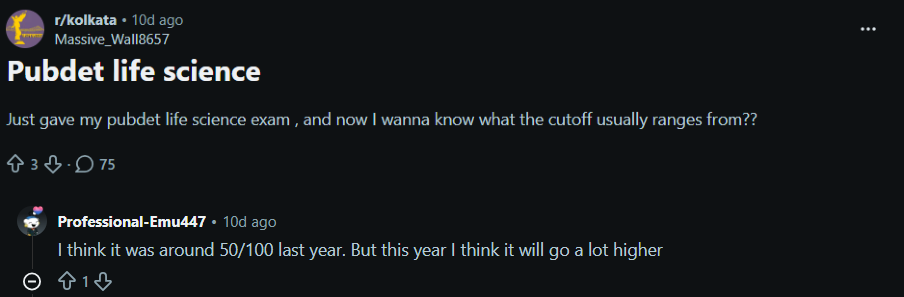
- The discussion focused on the expected PUBDET Life Science cutoff, with candidates trying to estimate the score required for admission after appearing for the entrance examination.
- Another Reddit user suggested that the Life Science cutoff was around 50 out of 100 marks in the previous year, while also predicting that the cutoff could increase noticeably this year due to changing competition levels and candidate performance trends.
PUBDET 2026 Rank Card Login FAQs
Ques. What credentials do I need to log in and download the PUBDET 2026 rank card?
Ans. You need your PUBDET 2026 application number and date of birth to log in on wbjeeb.nic.in and access the rank card download link.
Ques. How can I recover my forgotten PUBDET 2026 application number?
Ans. Visit wbjeeb.nic.in/pubdet/ and click the "Forgot Application Number" link on the rank card login page. Enter your registered email ID or mobile number and date of birth to receive your application number.
Ques. What should I do if the PUBDET 2026 portal is not loading?
Ans. Heavy traffic after a rank card release often slows or crashes the server. Clear your browser cache, switch to Chrome or Firefox, and try logging in during early morning or late night hours when traffic is lower.
Ques. My registered mobile number has changed. How do I get my PUBDET 2026 application number?
Ans. If your registered mobile number or email is no longer active, the online recovery option will not work. Contact the WBJEEB helpdesk directly through wbjeeb.nic.in with your full name, date of birth, and a copy of your identity proof.
Ques. What details are printed on the PUBDET 2026 rank card?
Ans. The PUBDET 2026 rank card typically includes your name, application number, roll number, category, category rank, overall rank (GMR), subject-wise marks, and total score. Verify all details as soon as you download it and report any discrepancy to WBJEEB immediately.
Ques. Is the PUBDET 2026 rank card mandatory for counselling?
Ans. Yes, you need the PUBDET 2026 rank card for counselling registration, document verification, and seat allotment. Keep both a printed copy and a digital copy saved safely, as it is required at all stages of the admission process.



Comments