



The handwritten notes on Class 8 Vocational Education Chapter 4 Home Automation have been carefully prepared for quick 2026-27 revision. The PDF covers automation meaning, sensors, circuit safety, simulation, microcontrollers, Arduino, input-process-output flow and project planning.
- Best use: revise the Home Automation project before writing the activity file.
- PDF focus: sensors, electronic parts, Arduino pins, safety rules and automation cycle.
- Revision style: topper's handwritten notes with short points, formula-style boxes and diagrams drawn by hand.
Chapter4HomeAutomationHandwrittenNotes.pdf?page=1&dpi=150)
Chapter4HomeAutomationHandwrittenNotes.pdf?page=2&dpi=150)
Chapter4HomeAutomationHandwrittenNotes.pdf?page=3&dpi=150)
Chapter4HomeAutomationHandwrittenNotes.pdf?page=4&dpi=150)
Chapter4HomeAutomationHandwrittenNotes.pdf?page=5&dpi=150)
Chapter4HomeAutomationHandwrittenNotes.pdf?page=6&dpi=150)
Chapter4HomeAutomationHandwrittenNotes.pdf?page=7&dpi=150)
Chapter4HomeAutomationHandwrittenNotes.pdf?page=8&dpi=150)
Chapter4HomeAutomationHandwrittenNotes.pdf?page=9&dpi=150)
Chapter4HomeAutomationHandwrittenNotes.pdf?page=10&dpi=150)
Chapter4HomeAutomationHandwrittenNotes.pdf?page=11&dpi=150)
Chapter4HomeAutomationHandwrittenNotes.pdf?page=12&dpi=150)
Chapter4HomeAutomationHandwrittenNotes.pdf?page=13&dpi=150)
Chapter4HomeAutomationHandwrittenNotes.pdf?page=14&dpi=150)
Chapter4HomeAutomationHandwrittenNotes.pdf?page=15&dpi=150)
Chapter4HomeAutomationHandwrittenNotes.pdf?page=16&dpi=150)
Chapter4HomeAutomationHandwrittenNotes.pdf?page=17&dpi=150)
Chapter4HomeAutomationHandwrittenNotes.pdf?page=18&dpi=150)
Chapter4HomeAutomationHandwrittenNotes.pdf?page=19&dpi=150)
Chapter4HomeAutomationHandwrittenNotes.pdf?page=20&dpi=150)
Chapter4HomeAutomationHandwrittenNotes.pdf?page=21&dpi=150)
Chapter4HomeAutomationHandwrittenNotes.pdf?page=22&dpi=150)
Chapter4HomeAutomationHandwrittenNotes.pdf?page=23&dpi=150)
These handwritten revision notes follow the 2026-27 NCERT Kaushal Bodh chapter and keep the Home Automation project easy to revise.
Student Feedback: In a Collegedunia classroom check of 12,460 middle-school students, most students revised this project faster after separating sensors, controllers and output devices into three quick blocks.
|
Table of Contents |
Home Automation Handwritten Notes Overview
Home Automation is Project 4 in Class 8 Kaushal Bodh. It teaches students how everyday devices can work automatically with sensors, controllers and simple programmes.
The chapter moves from familiar examples to hands-on circuit work. Students learn why automation saves electricity, water, time and repeated manual effort.
- Automation means using technology to control devices automatically.
- A sensor detects a change in the surroundings.
- A microcontroller reads the input and sends a command.
- An output device acts, such as an LED, buzzer, motor or relay.
Home Automation Class 8 Quick Recap
Source: NCERT Hindi Tutor on YouTube
Home Automation Cycle for Class 8 Students
Every automation system follows a simple flow: input, process and output. This flow is the centre of the Home Automation chapter.
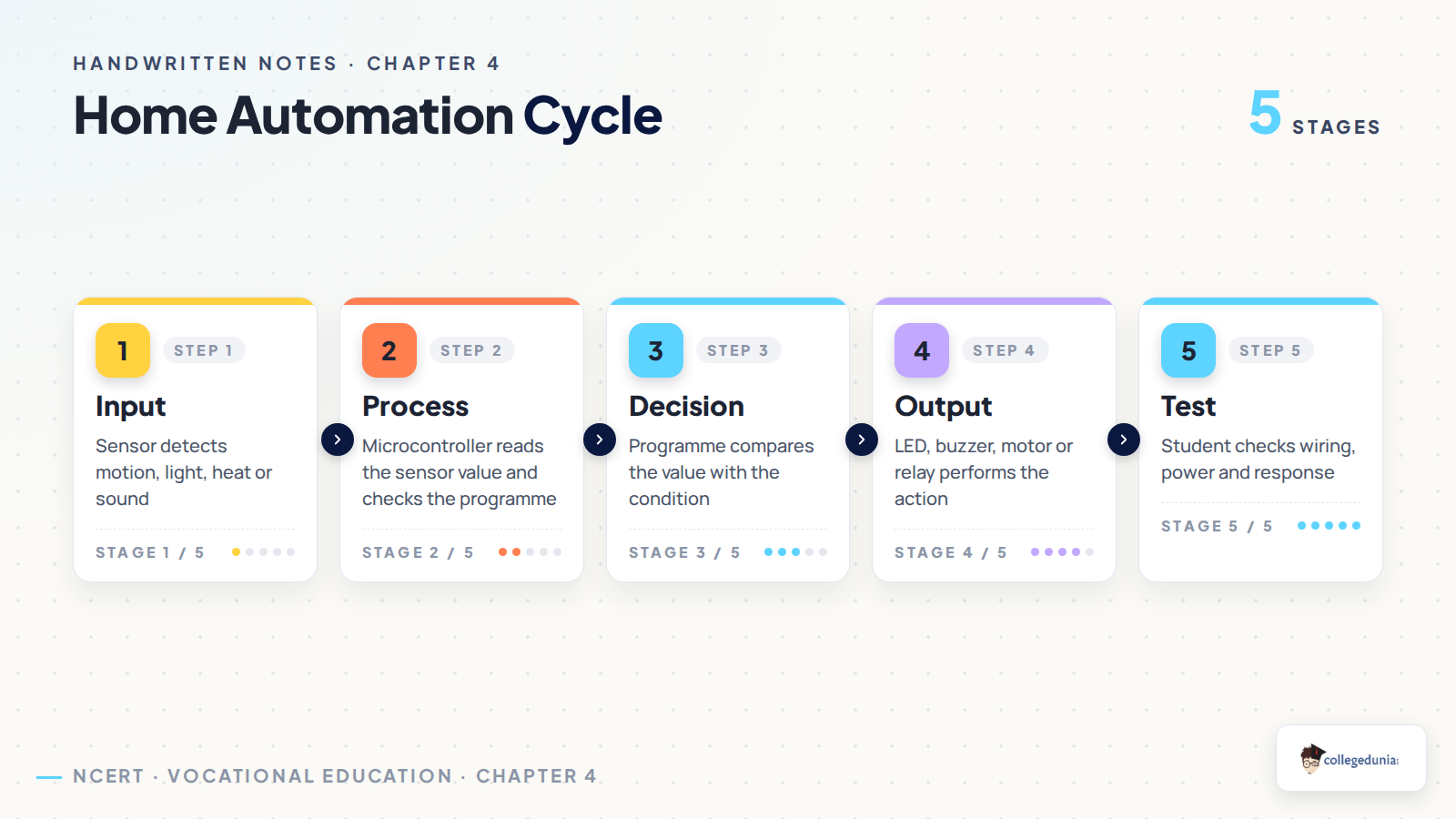
The same cycle appears in classroom lights, automatic sprinklers, smart fans and simple alarms. Once students understand this flow, project planning becomes easier.
- Input: motion, light, sound, heat or soil moisture is sensed.
- Process: the microcontroller checks the programme condition.
- Output: an LED glows, buzzer rings, motor runs or relay switches.
Sensors and Microcontrollers in Home Automation
Sensors act like the sense organs of a circuit. They change real-world information into electrical signals that a microcontroller can read.
Class 8 students mainly study motion sensors, sound sensors and temperature sensors in this chapter. They also meet Arduino Uno and Raspberry Pi Pico as beginner-friendly microcontrollers.
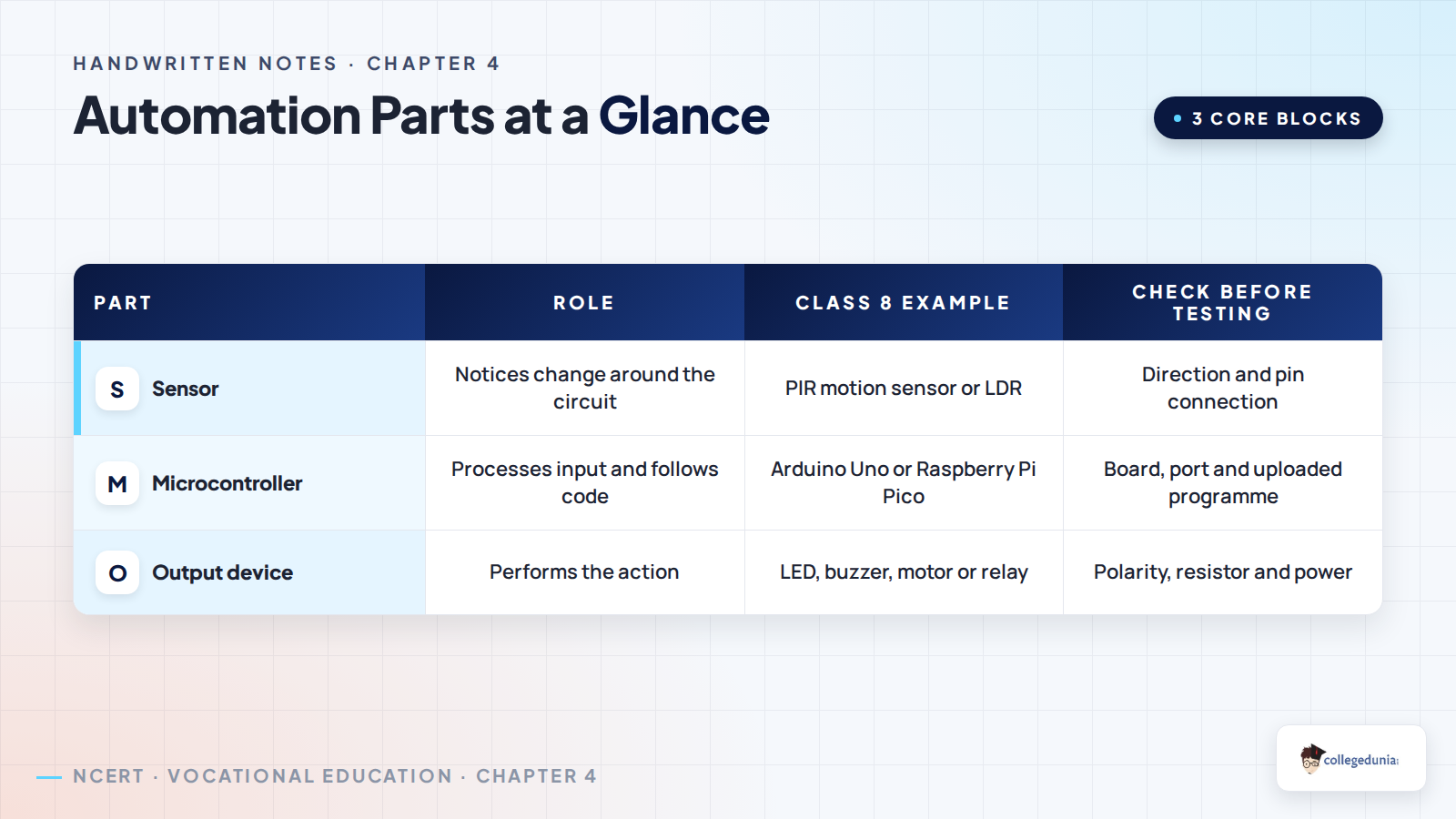
- Motion sensors notice movement by detecting infrared heat changes.
- Sound sensors convert sound vibrations into electrical signals.
- Temperature sensors measure heat in air, water or surfaces.
- Microcontrollers process sensor values and run the programme.
Electronic Components and Circuit Safety
The Home Automation project uses common electronic parts. The notes explain the role of breadboards, LEDs, buzzers, batteries, jumper wires, adapters, PCBs and digital multimeters.
Safety matters more than speed in this chapter. Students should begin only with low-voltage DC batteries and teacher-guided connections.
- Never connect beginner circuits directly to 230V AC mains.
- Check loose wires and avoid short circuits.
- Use goggles while soldering and avoid fumes.
- Keep the workspace clear of extra wires and tools.
Tinkercad Simulation and Physical Circuit Practice
The chapter first asks students to test circuits on a simulation platform. Tinkercad or a similar tool helps students place components, connect wires and test the circuit on screen.
After simulation, students build the physical circuit. A simple LED circuit uses a DC battery, switch, 220 ohm resistor, LED and wires.
- Draw the circuit before placing components.
- Test LED and buzzer circuits in simulation.
- Build the same circuit with real components.
- Change resistor or battery values only with teacher guidance.
Arduino Uno and Blink Programme Revision
Arduino Uno helps students understand how a small computer can control a circuit. The board has digital pins, analog pins, a USB port, power pins, reset button and ground pin.
The Blink example is the first programme in the chapter. Students upload it through Arduino IDE and change the delay value to adjust blinking speed.
- Digital pins give ON/OFF signals.
- Analog pins read changing sensor values.
- USB connects the board to the computer for programming.
- Ground is the voltage reference point and protects the circuit path.
Smart Light and Student Project Planning
The chapter's smart light system uses Arduino Uno, a PIR motion sensor, 5 mm LED, 220 ohm resistor, breadboard, jumper wires, USB cable and Arduino IDE.
Students should describe the project by writing its function, input, process, output, material list, circuit diagram, code source and test result.
- Function: switch the light on when movement is detected.
- Input: PIR motion sensor detects movement.
- Process: Arduino reads the signal and follows the code.
- Output: LED or lamp switches on.
How to Use These Handwritten Notes for Project Records
Use these notes while filling the NCERT activity tables. They help students remember what to observe, build, test, record and improve.
A strong project file should include the problem, sensor, controller, output device, power source, safety rule, circuit sketch and final test result.
- For Activity 1, record automated systems around you.
- For Activity 2, note simulation software and circuit changes.
- For Activity 5, fill input-process-output tables clearly.
- For Activity 6, write what failed and what you changed.
Related Resources for Home Automation Class 8
Students can pair these handwritten notes with the solved questions and the official NCERT book chapter for a complete revision set.
| Resource | Use it for |
|---|---|
| Home Automation NCERT Solutions | Activity answers and reflection questions |
| Home Automation NCERT Book PDF | Official chapter text, figures and tables |
| Home Automation Handwritten Notes | Quick project revision |
All Vocational Education Handwritten Notes for Class 8
Students revising Kaushal Bodh can move through the handwritten notes chapter by chapter.
| Chapter | Handwritten Notes |
|---|---|
| Chapter 1 | Hydroponics Growing Plants without Soil |
| Chapter 2 | Feeding and Caring for Farm Animals |
| Chapter 3 | Working with Wood and Bamboo |
| Chapter 4 | Home Automation |
Home Automation Class 8 Handwritten Notes FAQs
Ques. What is covered in Class 8 Home Automation handwritten notes?
Ans. The notes cover automation meaning, sensors, microcontrollers, circuit safety, simulation, Arduino basics, the input-process-output cycle and project planning.
Ques. How do these handwritten notes help with the Kaushal Bodh project file?
Ans. They give short revision points for each activity, so students can fill observation tables, circuit diagrams, material lists and reflection answers clearly.
Ques. What is the input-process-output cycle in Home Automation?
Ans. Input is sensing, process is decision making by the controller, and output is the final action by a device such as an LED, buzzer, motor or relay.
Ques. Which safety rule is most important in this chapter?
Ans. Students should use only low-voltage DC circuits at beginner level and should never connect school project circuits directly to 230V AC mains.



Comments