



| Updated On - Aug 4, 2026
The Maharashtra CET Cell has released the MAH BCA CET CAP 2026 Final Merit List on August 3 at bca2026.mahacet.org. Separate lists are out for Maharashtra State, All India, and Defence candidates. Check your merit status online now.

The State Common Entrance Test Cell (CET Cell), Government of Maharashtra, has released the Maharashtra Bachelor of Computer Applications Common Entrance Test (MAH BCA CET) 2026 Final Merit List on the official portal at bca2026.mahacet.org. The final merit list was published on August 3, 2026 for the Centralised Admission Process (CAP).
Three category-wise merit lists have been issued on the same date. These cover Maharashtra State candidates, All India candidates, and Maharashtra State Defence candidates. All registered candidates can now check their merit status through the official portal.
The final list follows the provisional merit list released on July 29, 2026. A grievance window was open for candidates to flag errors before finalisation. The CET Cell has confirmed that CAP registration is now closed.
Key Details of MAH BCA CET CAP 2026 Final Merit List
| Particulars | Details |
|---|---|
| Conducting Body | State CET Cell, Maharashtra |
| Programme | Bachelor of Computer Applications (BCA) |
| Merit List Type | Final Merit List |
| Release Date | August 3, 2026 |
| Provisional List Date | July 29, 2026 |
| Official Portal | bca2026.mahacet.org |
| Helpline Numbers | +91-9175108612 / 18002098851 |
How to Check the MAH BCA CET CAP 2026 Final Merit List?
Candidates can view their final merit rank in a few simple steps. Login credentials issued at the time of registration are required to access the portal.
- Visit the official website at bca2026.mahacet.org.
- Click on the Check Final Merit List Status link on the homepage.
- Enter your application number and password to log in.
- Your final merit rank will appear on the screen.
- Download and save the merit list for future reference.
Which Category Merit Lists Have Been Released?
The CET Cell has published three separate merit lists on August 3, 2026. Each list applies to a distinct candidate category.
| Merit List | Applicable Candidates |
|---|---|
| Maharashtra State Candidates | Applicants domiciled in Maharashtra |
| All India Candidates | Applicants from states other than Maharashtra |
| Maharashtra State Defence | Wards of defence personnel from Maharashtra |
What Happens After the Final Merit List?
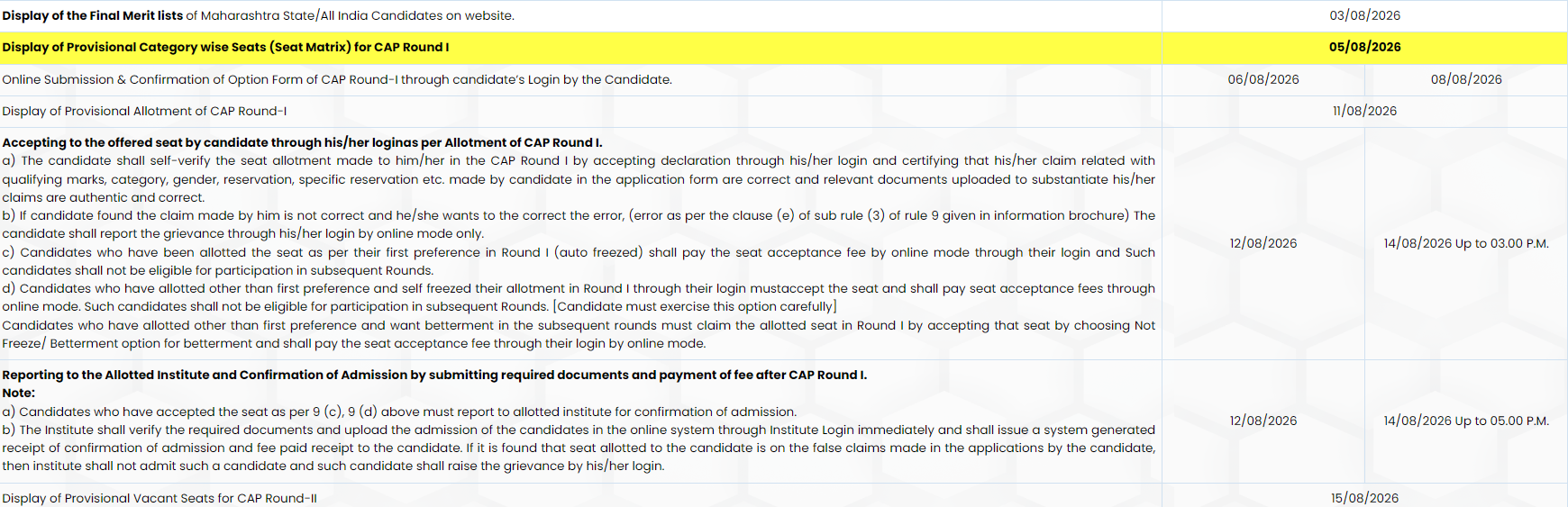
The final merit list is the base document for CAP seat allotment. The CET Cell will next open the option form window for eligible candidates. Applicants will fill choices of BCA colleges and programmes as per their preference.
Seat allotment will then follow based on merit rank, choices, and category reservation. The CET Cell has also confirmed that ACAP and Non-CAP registration will begin soon. This route is meant for candidates not covered under the main CAP process.
The CET Cell splits candidates into three streams to protect the state quota. Maharashtra State candidates compete for the majority of BCA seats. All India and Defence candidates draw from distinct reserved pools. This model ensures fair allotment across categories in every CAP round.
Action Plan for Candidates
- Log in at bca2026.mahacet.org and note your final merit rank.
- Verify your category, seat type, and reservation details on the list.
- Prepare a preference list of BCA colleges and programmes in advance.
- Keep scanned documents ready for option form filling and admission.
- Call the helpline for any technical issue with merit status login.
Watch for the CAP Round 1 option form window and ACAP/Non-CAP registration schedule on the official portal.
Also Read:
- MAH MPharm CET CAP 2026 Registration Deadline Extended to August 6; Check How to Apply
- MAH MCA CET 2026 CAP Round 1 Seat Allotment Out; Check Reporting Deadline
- MHT CET ME/MTech CAP 2026 Final Merit List Out; Check Last Date to Submit Round 1 Option Form
- MHT CET ME/MTech CAP 2026 Final Merit List Out; Check Last Date to Submit Round 1 Option Form

.jpeg?h=127&w=254&mode=stretch)





.jpeg?h=40&w=40&mode=stretch)
.jpeg?h=40&w=40&mode=stretch)


.jpeg?h=40&w=40&mode=stretch)
.jpeg?h=40&w=40&mode=stretch)
.jpeg?h=40&w=40&mode=stretch)



Comments