



Unit 2, Introduction to Python, carries around 25 of the 70 theory marks in the Class 11 Informatics Practices paper, and Brief Overview of Python is the chapter that opens it. This is the official 24 page chapter file from the 2026-27 reprint. It runs from page 31 to page 54 and takes you from the >>> prompt all the way to nested for loops.
- Brief Overview of Python is Chapter 3 of the NCERT Informatics Practices textbook for Class 11.
- It has 13 sections, from keywords and identifiers to functions, if..else and nested loops.
- The chapter closes with a 14 point Summary, 11 exercise questions and one case study.
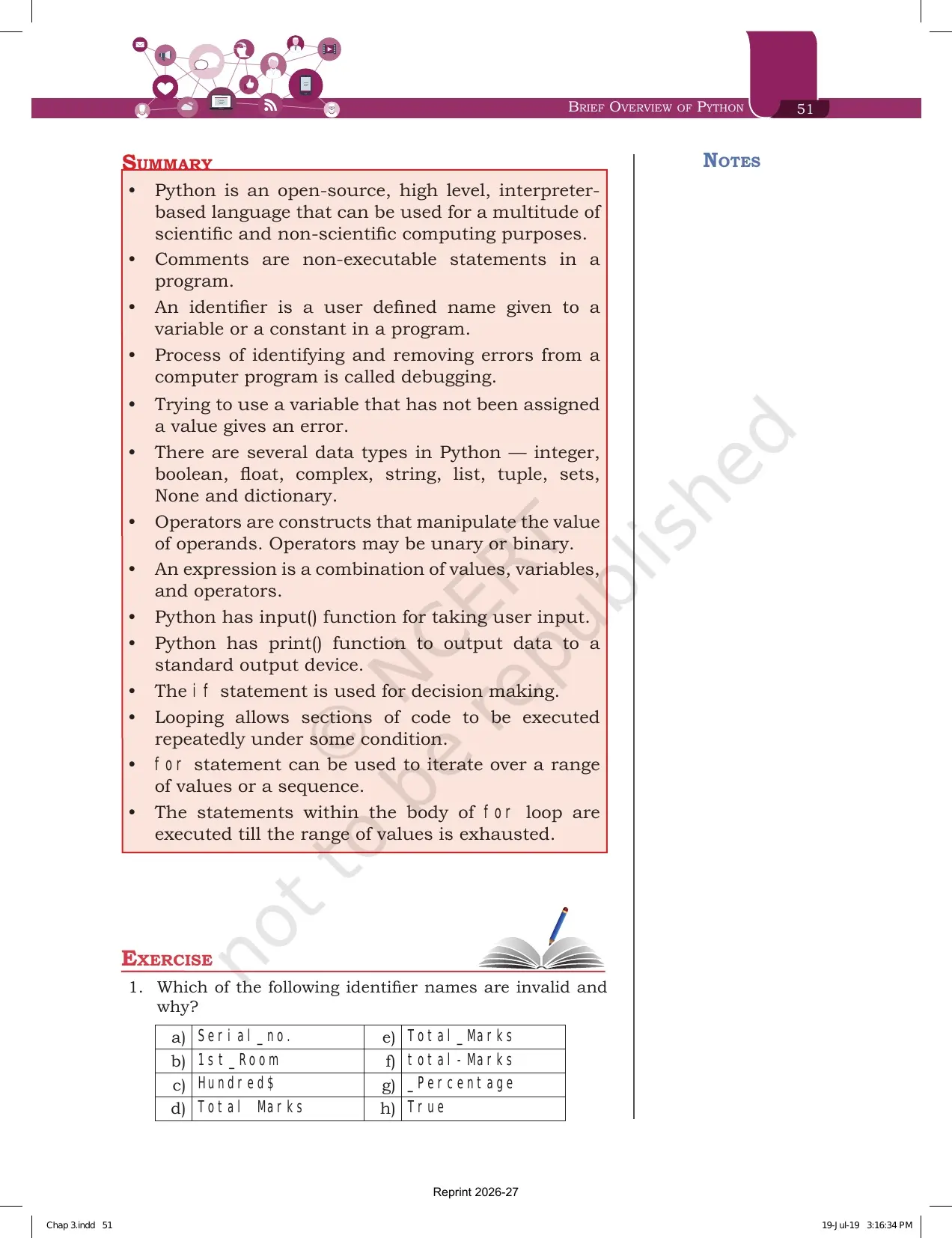
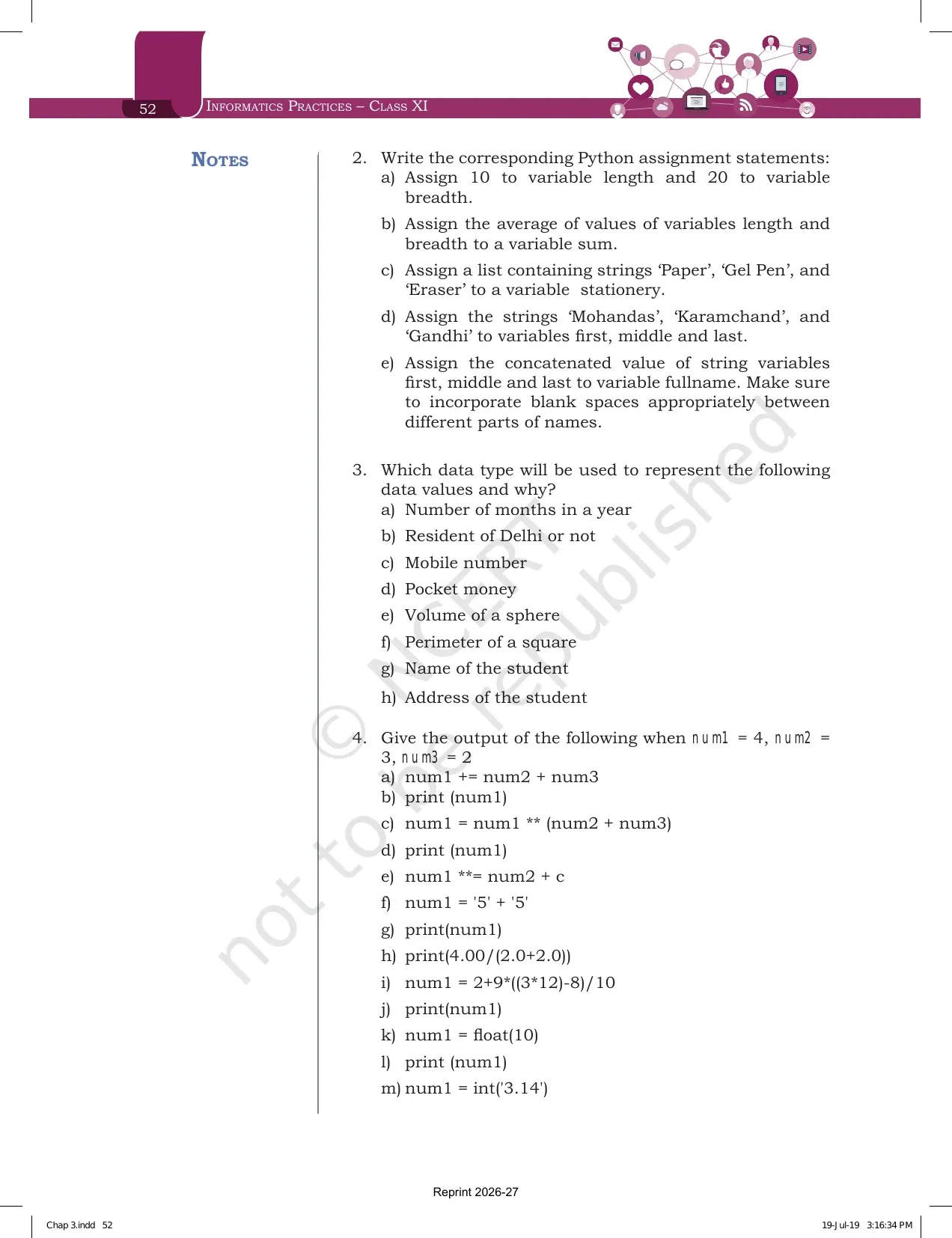
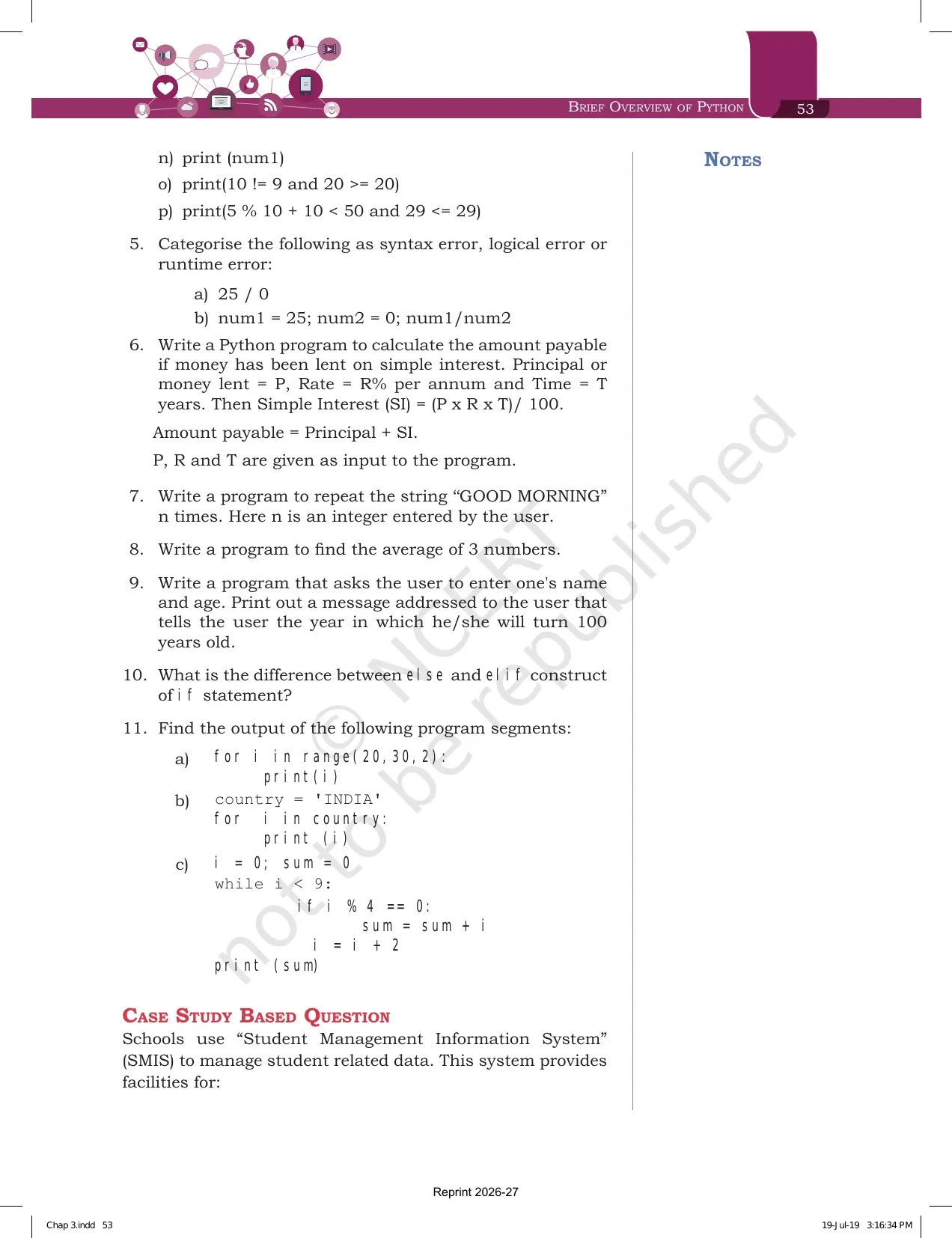
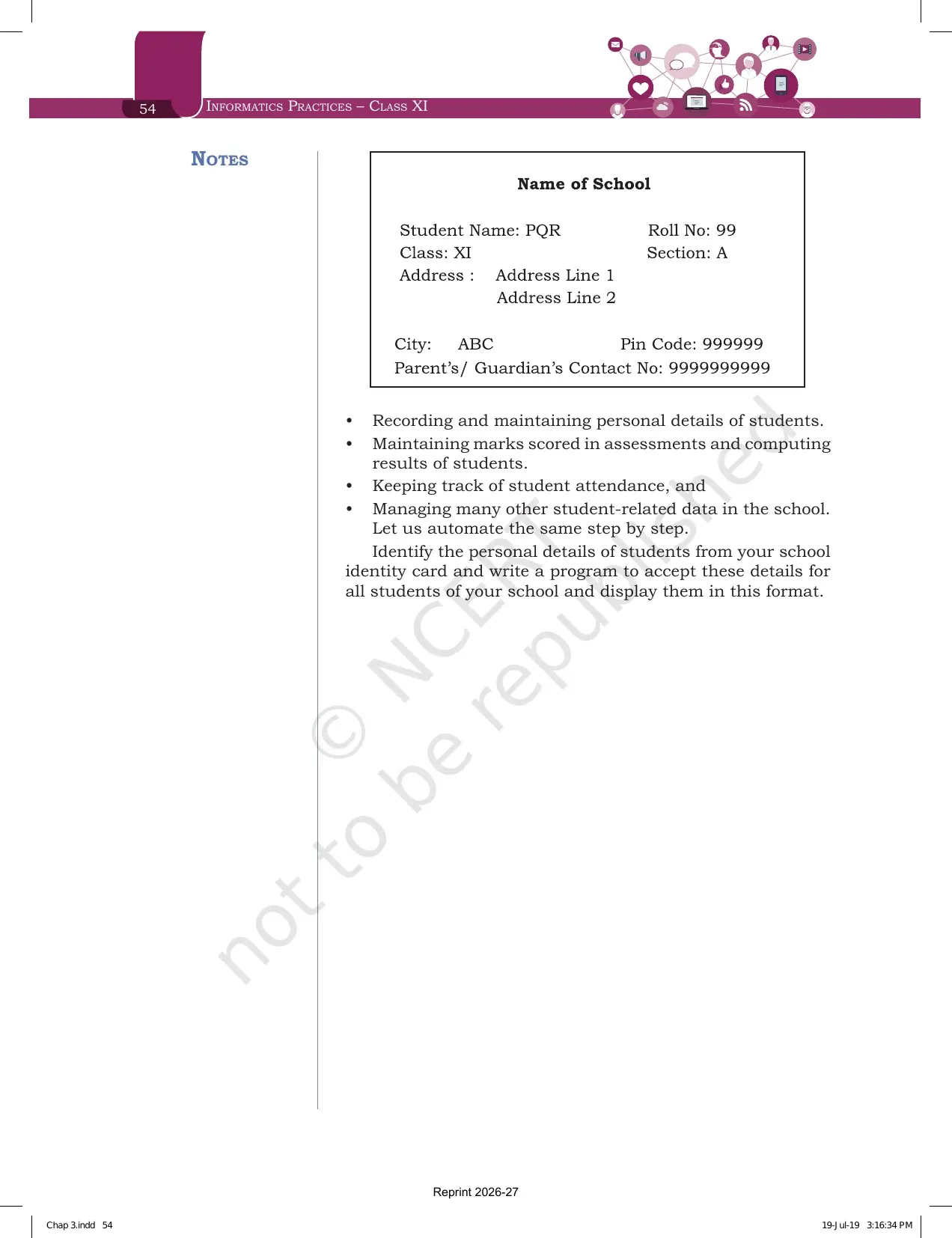
Every page of this Brief Overview of Python chapter file is the official NCERT 2026-27 reprint, checked against the printed Informatics Practices textbook for Class 11 and paired on Collegedunia with solved answers, notes and handwritten revision pages for the same chapter.
What the Brief Overview of Python Class 11 Chapter PDF Contains, Page by Page
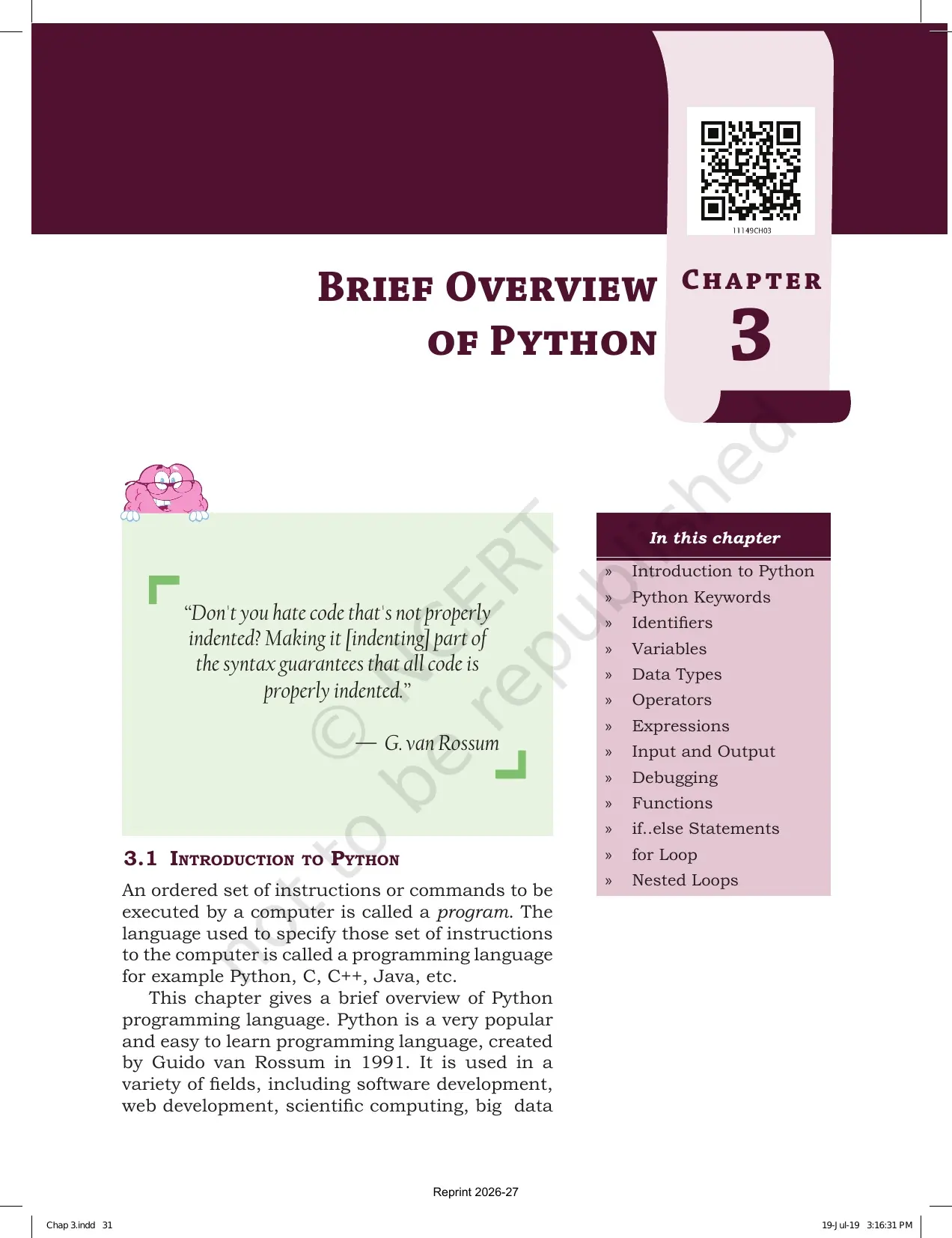
The chapter opens with a Guido van Rossum quote on indentation and a 13 point contents box. NCERT then builds Python one block at a time, so reading it in the printed order is the fastest way to learn it. Nothing later in the chapter makes sense if you skip a section.
| Section | What is printed there | Why it matters in the exam |
|---|---|---|
| 3.1 Introduction to Python | What a program is, who made Python, the shell in Figure 3.1, interactive and script mode | The one mark question on execution modes comes only from here |
| 3.2 Python Keywords | Table 3.1 with all 33 reserved words | Needed to answer exercise question 1 on invalid identifiers |
| 3.3 Identifiers | The four naming rules and the marksMaths example | A guaranteed question in every school test |
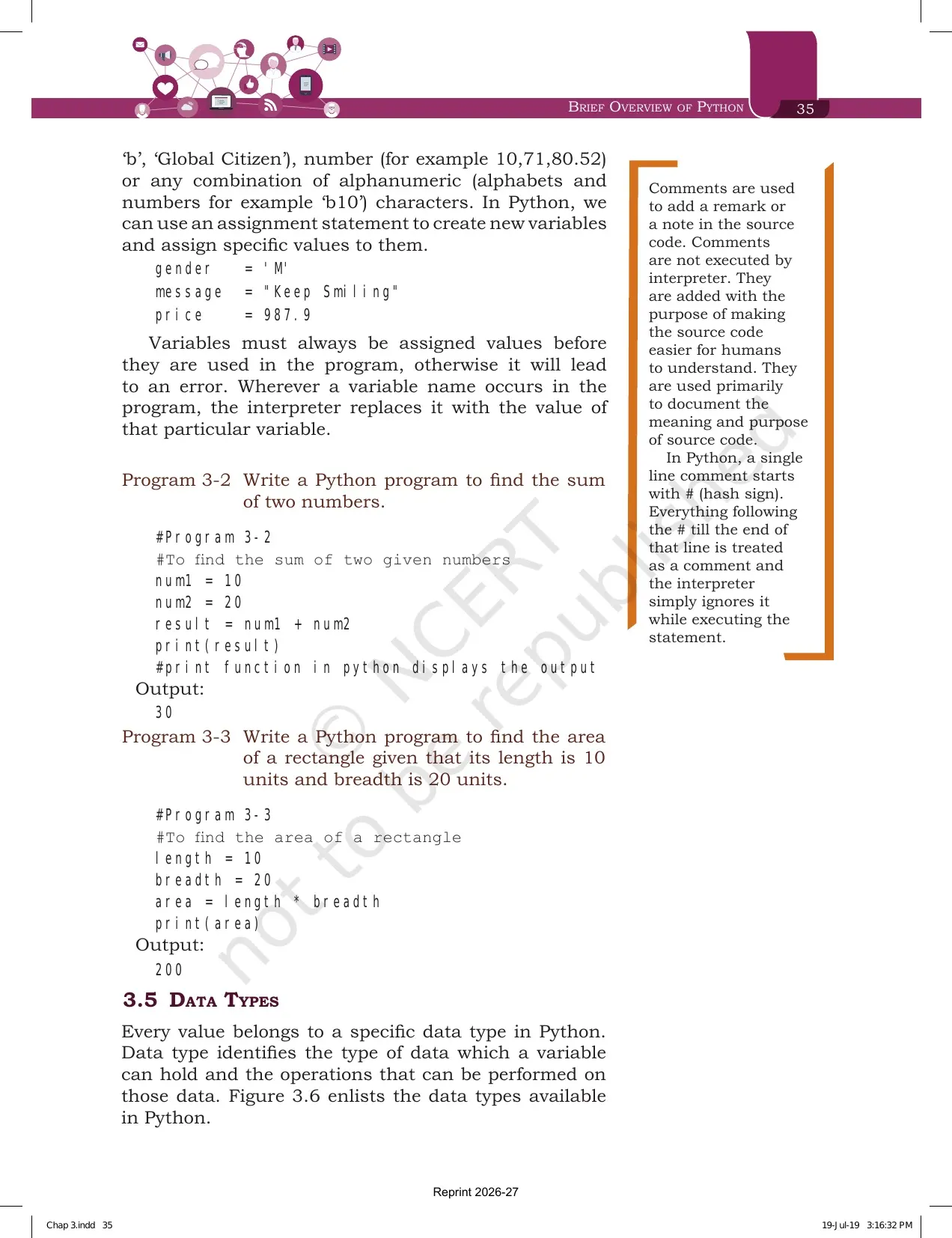
| 3.4 Variables | Assignment statements, the comment box, Programs 3-2 and 3-3 | Feeds exercise question 2 on writing assignment statements |
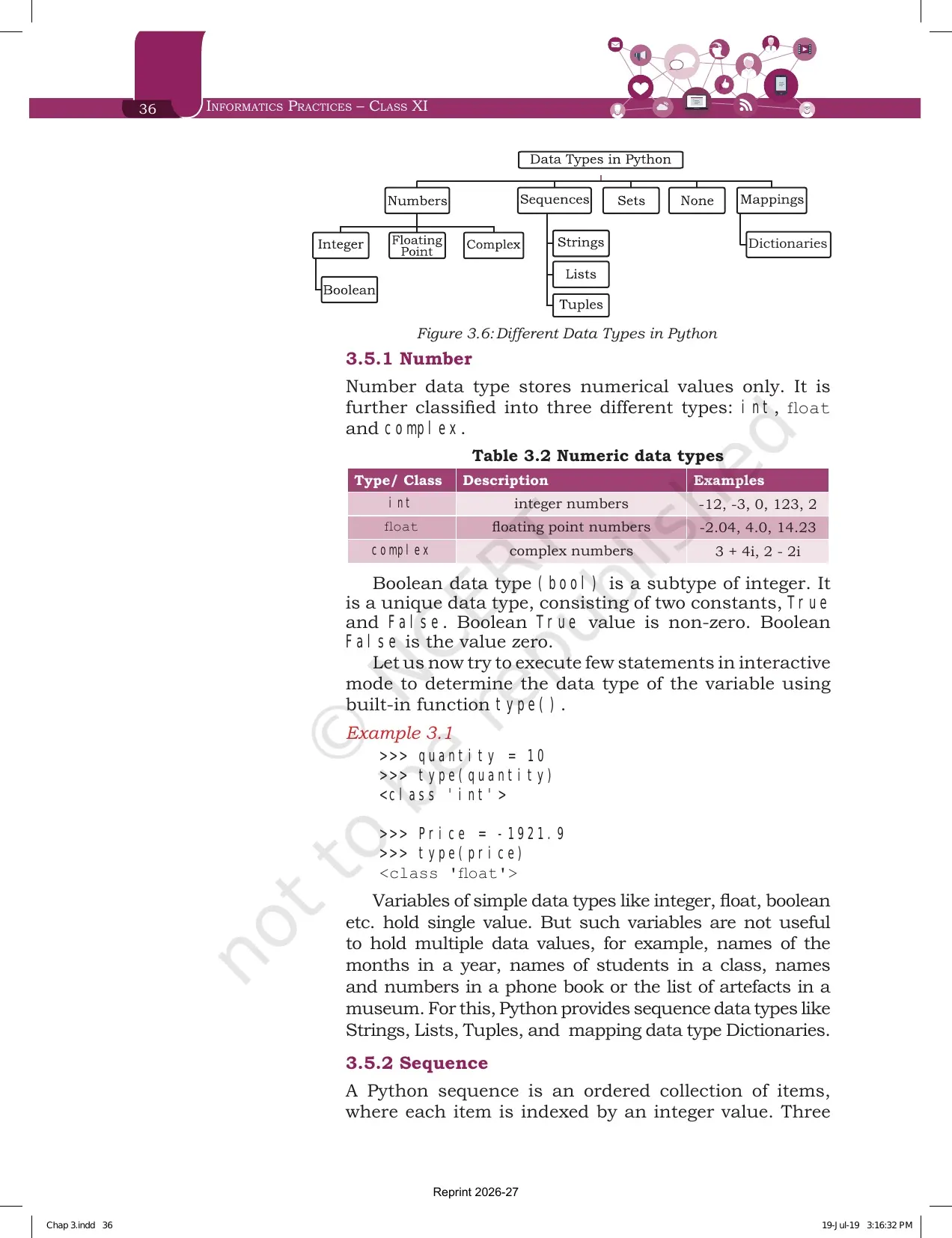
| 3.5 Data Types | Figure 3.6, Table 3.2, string, list, tuple and dictionary | Exercise question 3 asks you to pick a data type for eight values |
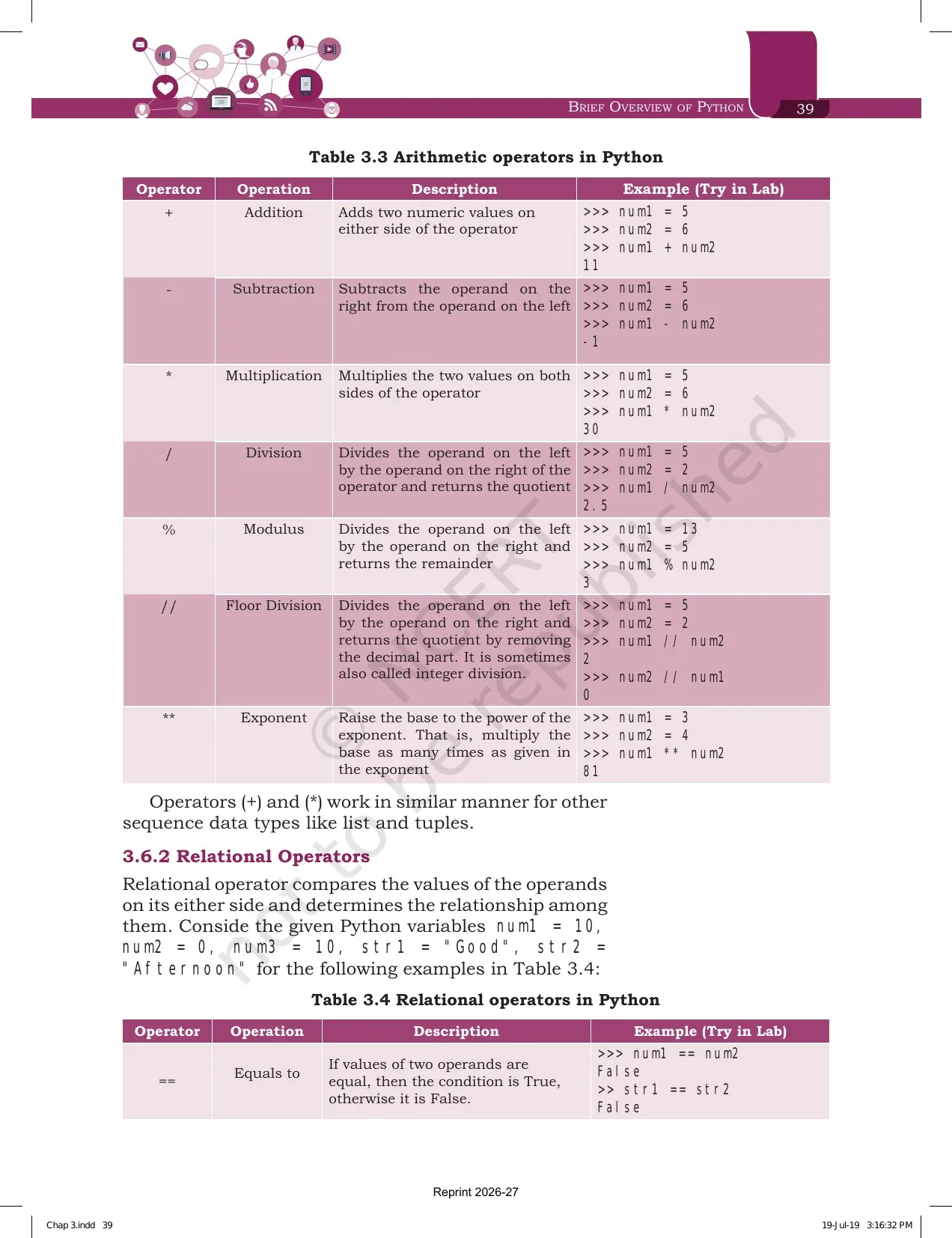
| 3.6 Operators | Tables 3.3 to 3.7 on arithmetic, relational, assignment, logical and membership operators | The largest block of the chapter and the source of output questions |
| 3.7 Expressions | Valid expressions, precedence rules, Examples 3.5, 3.6 and 3.7 | Exercise question 4 is 16 output items built on this |
| 3.8 Input and Output | input() syntax, int() conversion, print() with Example 3.10 | Every program you write in the practical file starts here |
| 3.9 Debugging | Syntax errors, logical errors and runtime errors with examples | Exercise question 5 asks you to label two error cases |
| 3.10 Functions | Function name, arguments, return value and the built-in list in Table 3.8 | A repeated 3 mark question on built-in functions |
| 3.11 if..else Statements | if, if...else and if...elif...else with Examples 3.11 and 3.12 | Exercise question 10 asks for the else against elif difference |
| 3.12 For Loop | Loop syntax, Program 3-4, the range() function and Program 3-5 | Exercise question 11 traces three loop segments |
| 3.13 Nested Loops | Program 3-6 with the full traced output of an outer and inner loop | The hardest output question in the chapter |
| Summary, page 51 | Fourteen bullet points that compress the whole chapter | The single best page for last minute revision |
| Exercise, pages 51 to 54 | 11 questions plus a case study on a Student Management Information System | School tests repeat these almost word for word |
Tip: the side margin boxes on comments, on lexicographic string comparison and on indentation are short, but each one has produced a one mark question in school tests. Read them along with the main text, not after it.
Introduction to Python and the Two Execution Modes You Must Know
Section 3.1 starts with a definition you can quote directly. An ordered set of instructions or commands to be executed by a computer is called a program, and the language used to write those instructions is a programming language. Python, C, C++ and Java are the four named examples.
Python was created by Guido van Rossum in 1991, and the programs printed in this textbook are written using Python 3.7.0. Any version of Python 3 will run them. The book lists software development, web development, scientific computing, big data and artificial intelligence as the fields where Python is used.
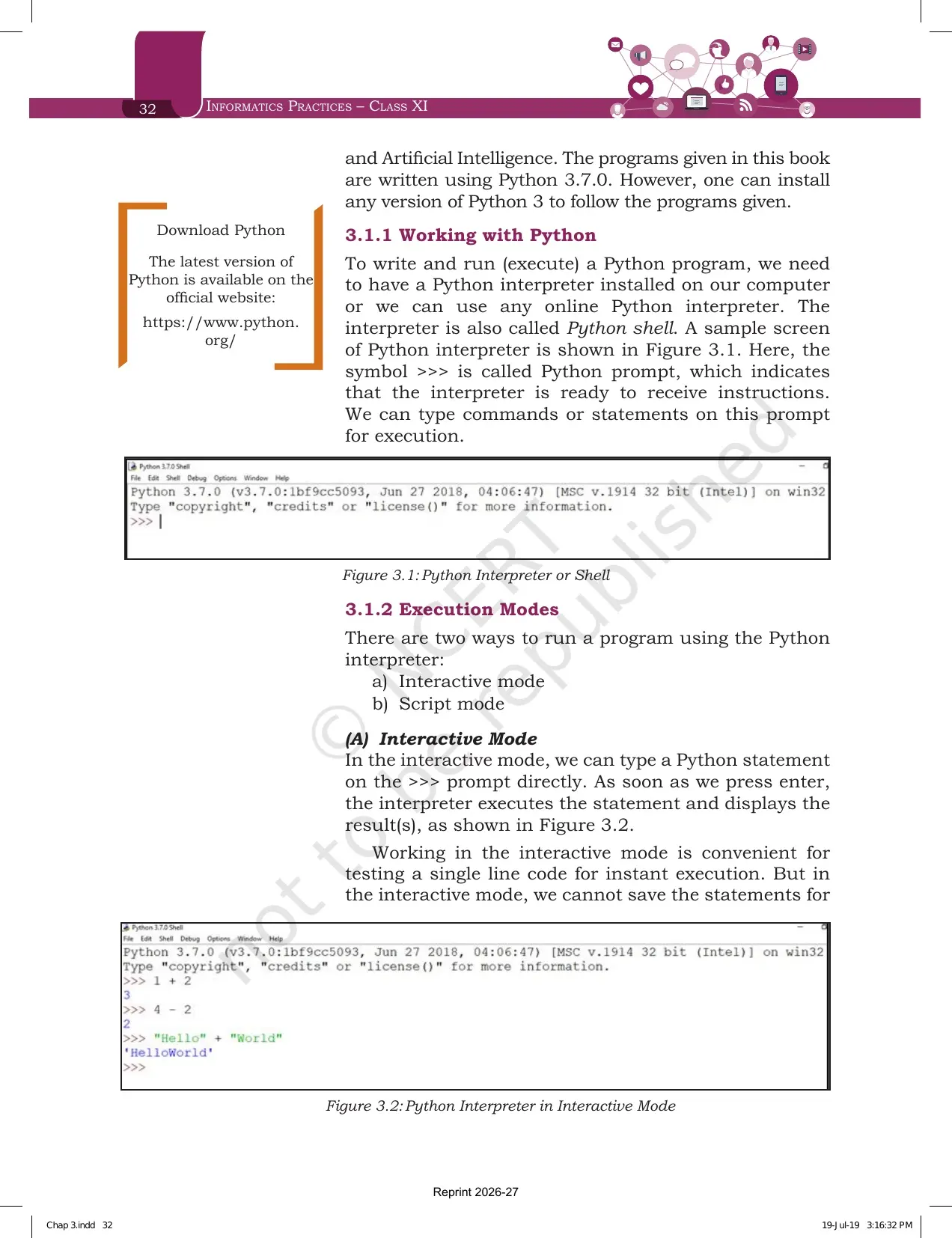
To run a program you need a Python interpreter, also called the Python shell. The symbol >>> is the Python prompt, and it means the interpreter is ready to take an instruction.
| Point | Interactive Mode | Script Mode |
|---|---|---|
| How you type the code | Straight on the >>> prompt, one statement at a time | In a file that you save first, then run |
| When the result appears | As soon as you press enter | Only after the whole file is executed |
| File extension | Nothing is saved | .py, and such files are called scripts |
| Best used for | Testing a single line of code for instant execution | Any program longer than a few lines |
| Drawback named by NCERT | Statements cannot be saved, so you retype them every time | None listed, this is the mode you should use |
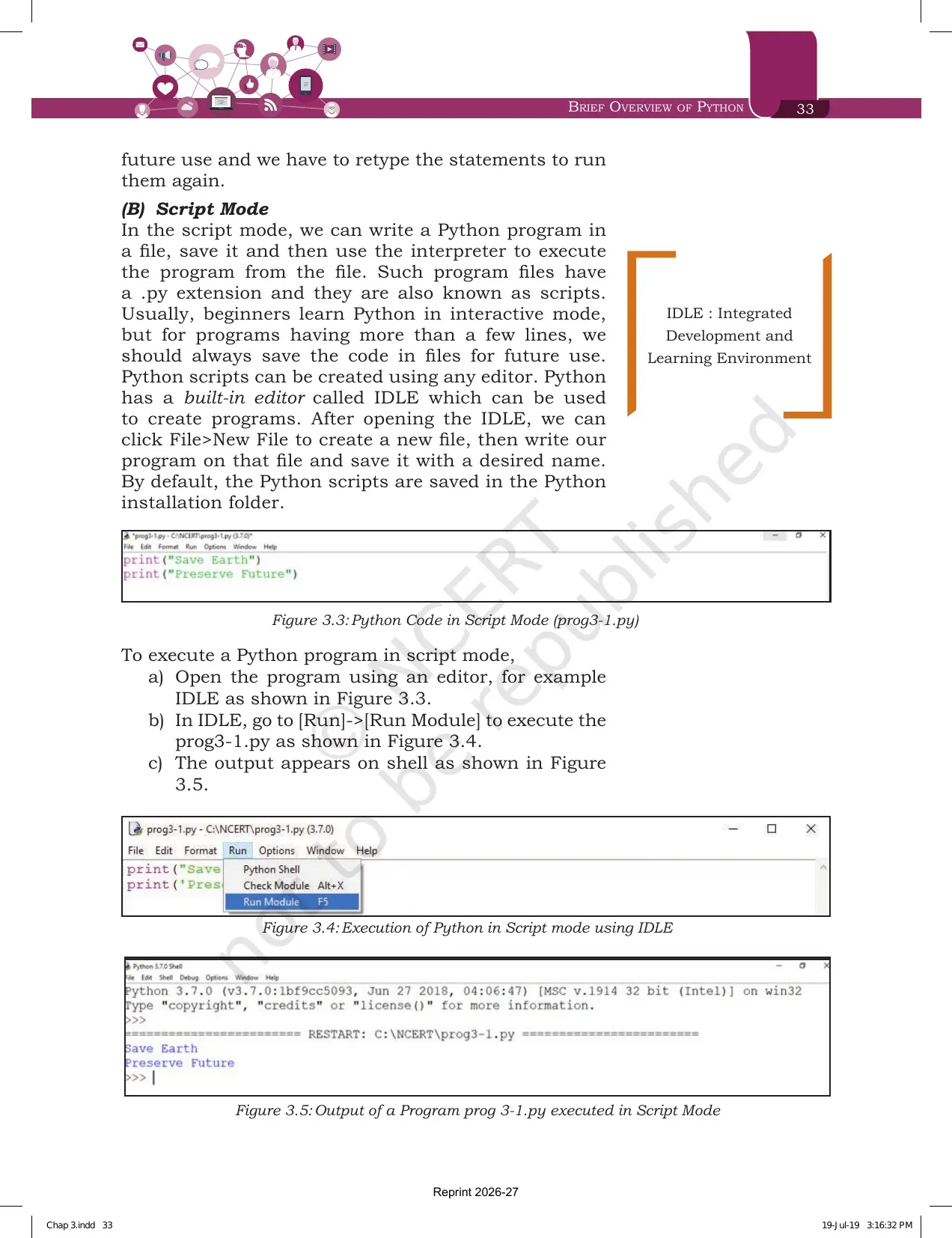
Python ships with a built-in editor called IDLE, which stands for Integrated Development and Learning Environment. The three steps to run a script through IDLE are printed with Figures 3.3, 3.4 and 3.5.
- Open the program in an editor such as IDLE.
- Go to Run, then Run Module.
- Read the output on the shell.
Brief Overview of Python Chapter 3 Explained in Video
Source: Magnet Brains on YouTube
Python Keywords and the Identifier Naming Rules That Carry Marks
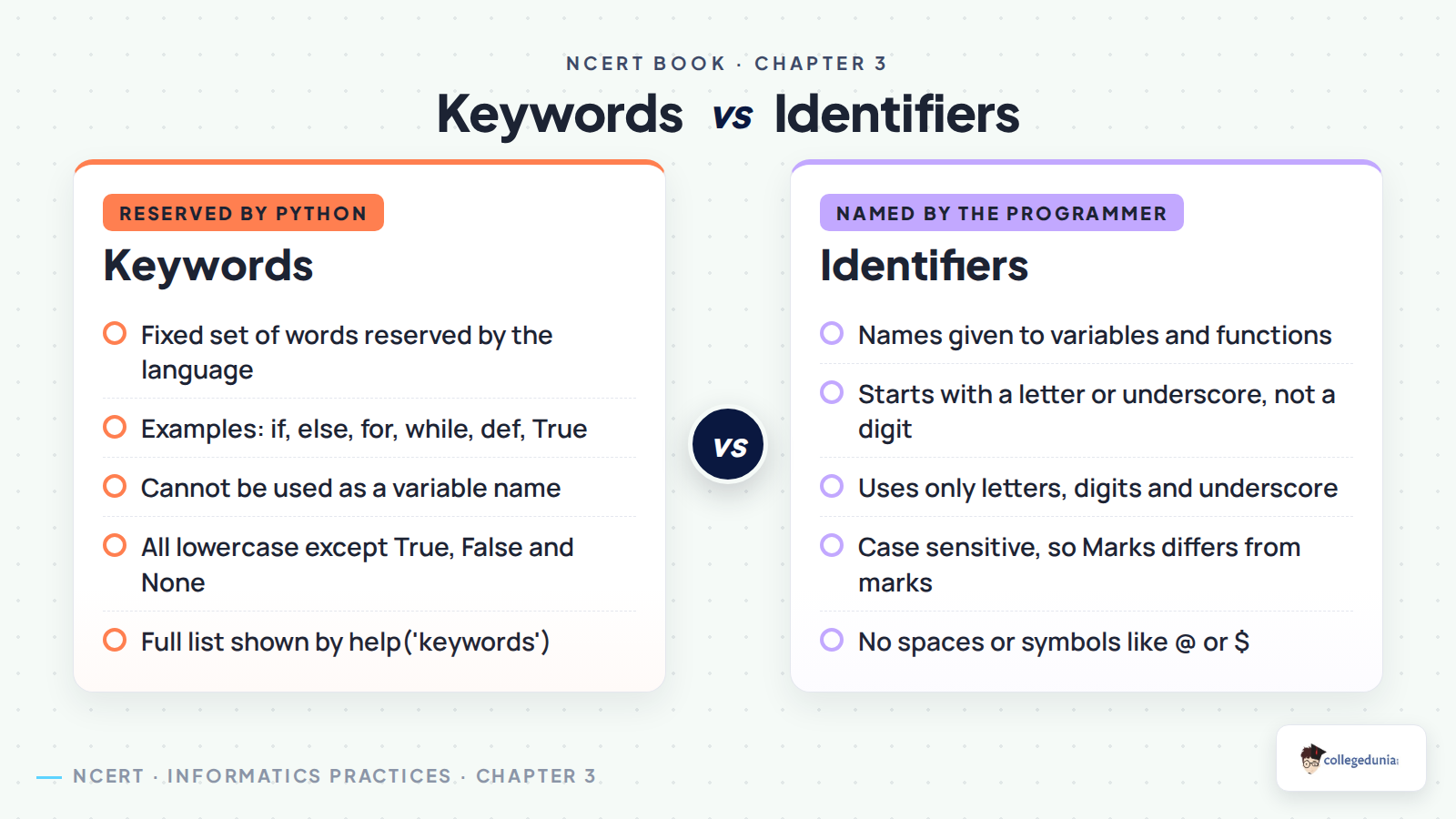
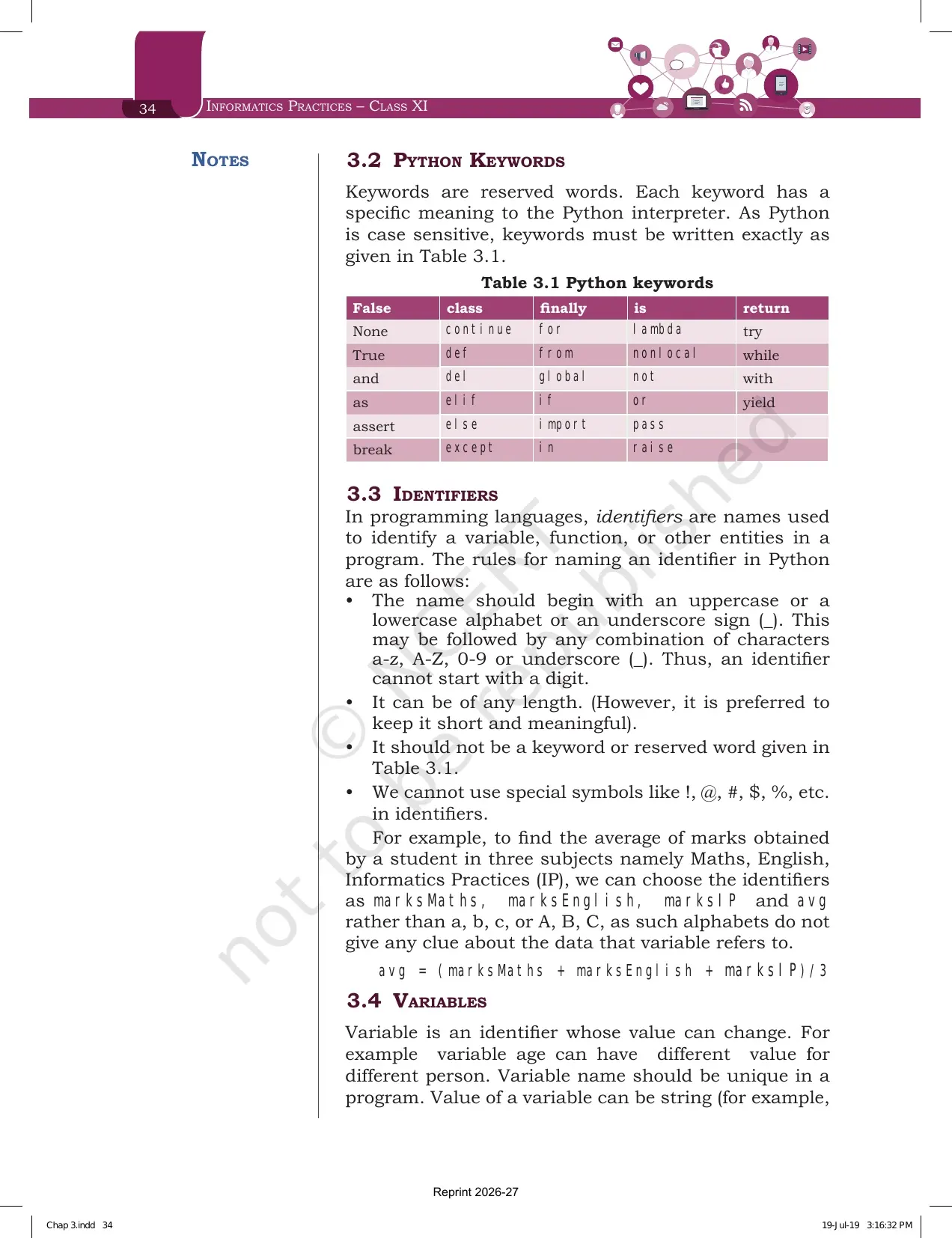
Section 3.2 is one short paragraph and one table, but it decides your answer to exercise question 1. Keywords are reserved words, and each keyword has a fixed meaning for the interpreter. Python is case sensitive, so keywords must be typed exactly as printed in Table 3.1.
| Table 3.1: the 33 Python keywords printed in the chapter | ||||
|---|---|---|---|---|
| False | class | finally | is | return |
| None | continue | for | lambda | try |
| True | def | from | nonlocal | while |
| and | del | global | not | with |
| as | elif | if | or | yield |
| assert | else | import | pass | |
| break | except | in | raise | |
Section 3.3 then defines an identifier as a name used to identify a variable, a function or another entity in a program. Four rules govern the naming, and every one of them appears in exercise question 1.
- The name must begin with an uppercase letter, a lowercase letter or an underscore, so it can never start with a digit.
- After the first character you may use any mix of a-z, A-Z, 0-9 or underscore.
- It can be of any length, though NCERT prefers short and meaningful names.
- It must not be a keyword from Table 3.1.
- Special symbols such as the exclamation mark, at sign, hash, dollar and percent are not allowed.
The worked example is worth copying. To average three subject marks, NCERT picks marksMaths, marksEnglish, marksIP and avg rather than a, b, c, because single letters give no clue about the data the variable holds.
Variables, Assignment and Comments in the Brief Overview of Python Chapter
Section 3.4 defines a variable as an identifier whose value can change. The variable age holds a different value for a different person. A variable name must be unique in a program, and its value can be a string, a number or an alphanumeric mix.
Variables must always be assigned a value before they are used, otherwise the program throws an error. Wherever the interpreter meets a variable name, it replaces it with the value of that variable. The three assignment lines printed in the chapter are gender='M', message="Keep Smiling" and price = 987.9.
The margin box on comments belongs to this section. Comments are non-executable notes that make the source code easier for a person to understand.
- A single line comment starts with the hash sign, and everything after it on that line is ignored.
- Comments are never executed by the interpreter, so they cost nothing at run time.
- They are used to document the meaning and purpose of the code.
- Both Program 3-2 and Program 3-3 open with two comment lines, which is the style your practical file should follow.
Program 3-2 adds num1 = 10 and num2 = 20 and prints 30. Program 3-3 multiplies length = 10 by breadth = 20 and prints 200. Write both from memory before you attempt exercise question 2, which asks for five assignment statements of the same shape.
Data Types in Python: Numbers, Sequences and the Dictionary Mapping Type
Section 3.5 says every value in Python belongs to a specific data type. The data type decides what a variable can hold and which operations can be performed on it. Figure 3.6 draws the full family, and the chapter then splits it into number, sequence and mapping.
| Type or class | Description | Examples printed in Table 3.2 |
|---|---|---|
| int | Integer numbers | -12, -3, 0, 123, 2 |
| float | Floating point numbers | -2.04, 4.0, 14.23 |
| complex | Complex numbers | 3 + 4i, 2 - 2i |
| bool | A subtype of integer with two constants | True is non-zero, False is the value zero |
The built-in function type() tells you the class of any variable. Example 3.1 shows quantity = 10 returning class int, and a decimal value returning class float. Simple types hold one value each, so Python adds sequence and mapping types for groups of values.
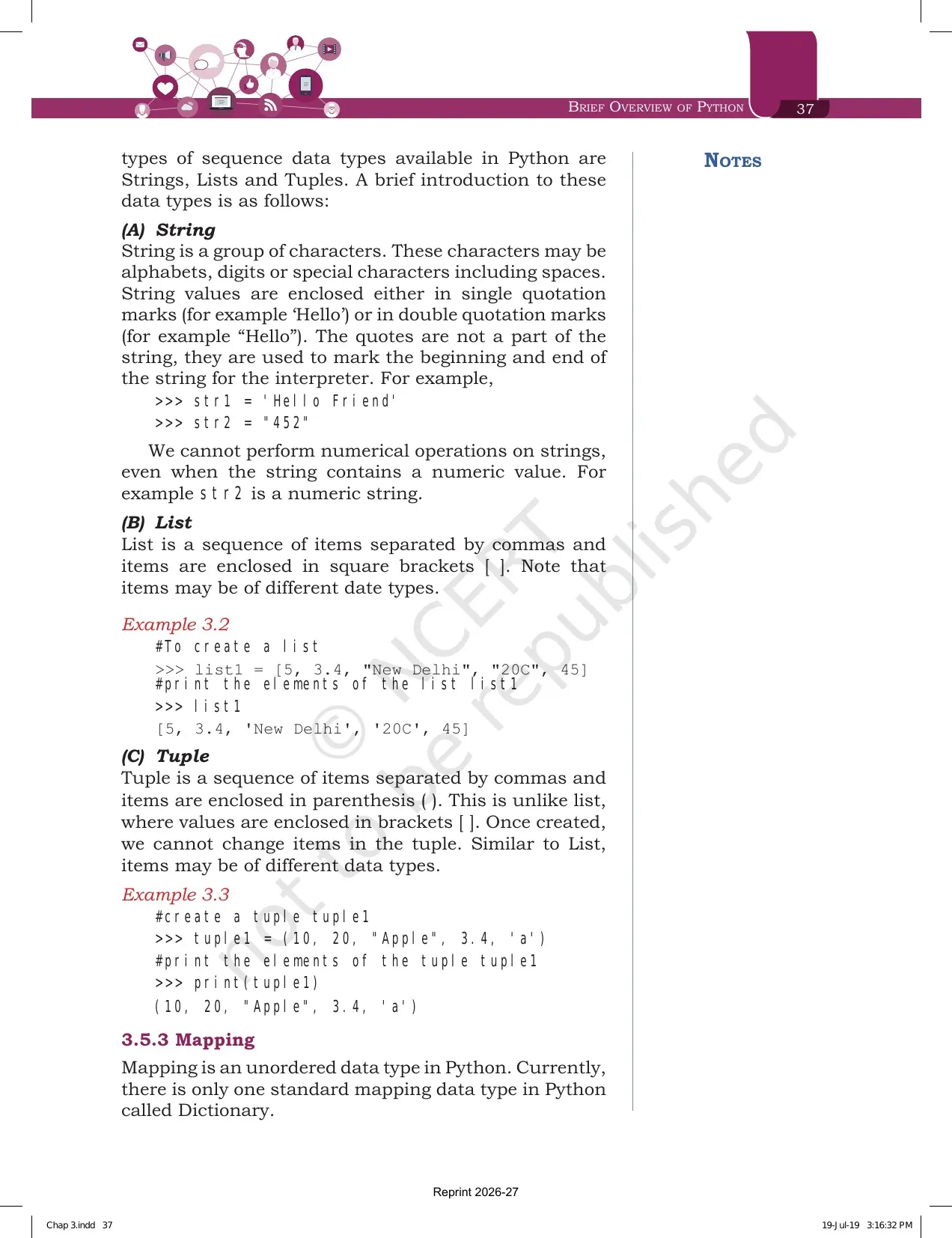
- String is a group of characters written inside single or double quotes. The quotes are not part of the string, and numeric operations cannot be performed on a string even when it looks numeric.
- List is a sequence of comma separated items inside square brackets, and the items may be of different data types.
- Tuple is a sequence of comma separated items inside parentheses. Once a tuple is created, its items cannot be changed, and that is the one line that separates it from a list.
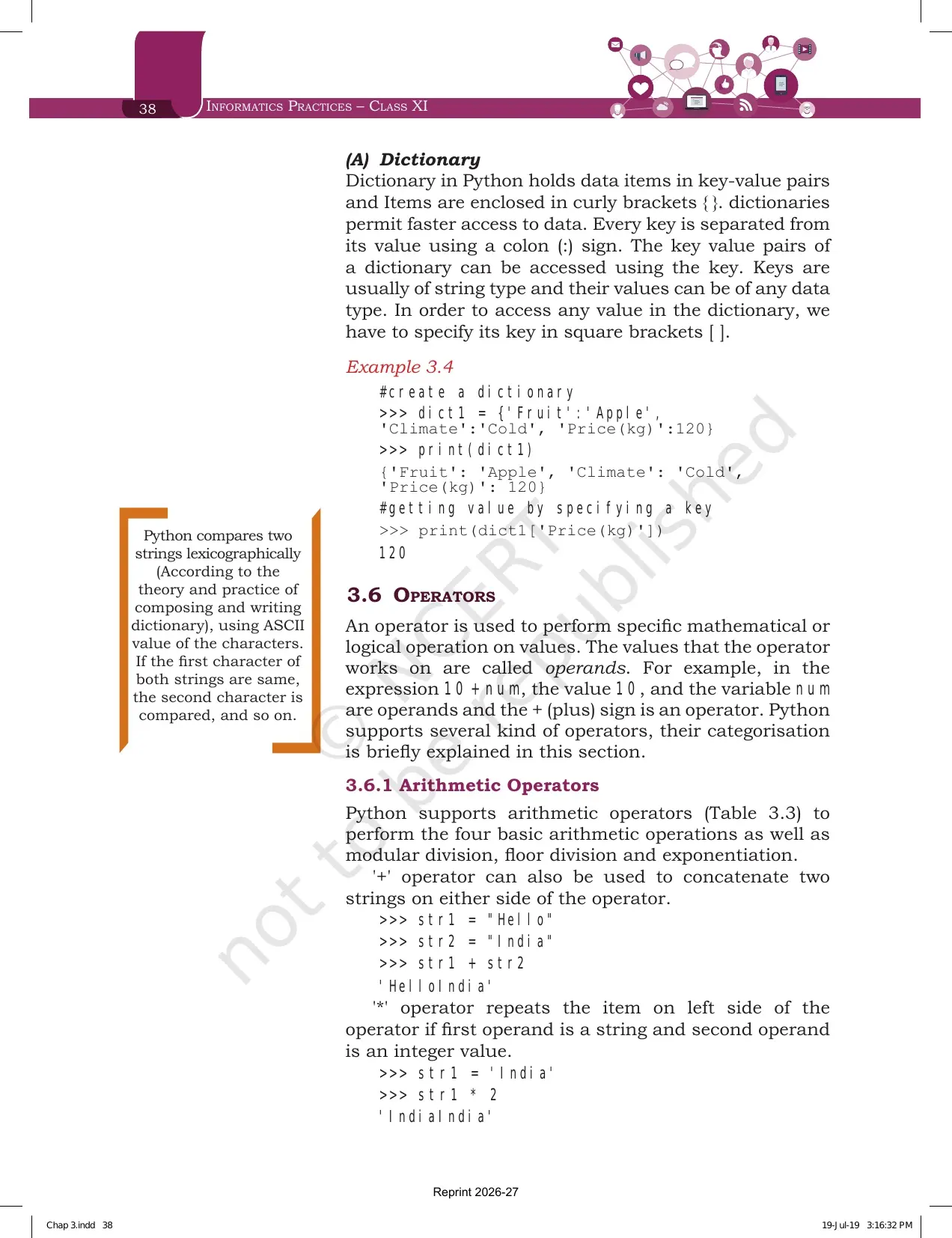
- Dictionary is the only mapping type in Python. It holds key and value pairs inside curly brackets, each key is separated from its value by a colon, and a value is fetched by writing its key inside square brackets.
The chapter's dictionary example uses dict1 with the keys Fruit, Climate and Price(kg). Printing dict1['Price(kg)'] returns 120. Dictionaries are described as permitting faster access to data, and their keys are usually of string type.
Arithmetic, Relational and Assignment Operators with Worked Examples
Section 3.6 defines an operator as a symbol that performs a mathematical or logical operation, and the values it works on are called operands. In the expression 10 + num, the value 10 and the variable num are operands, and the plus sign is the operator.
| Operator | Operation | What it does | Result printed in Table 3.3 |
|---|---|---|---|
| + | Addition | Adds the two numeric values on either side | 5 + 6 gives 11 |
| - | Subtraction | Subtracts the right operand from the left | 5 - 6 gives -1 |
| * | Multiplication | Multiplies the values on both sides | 5 * 6 gives 30 |
| / | Division | Divides left by right and returns the quotient | 5 / 2 gives 2.5 |
| % | Modulus | Divides left by right and returns the remainder | 13 % 5 gives 3 |
| // | Floor division | Returns the quotient with the decimal part removed, also called integer division | 5 // 2 gives 2, and 2 // 5 gives 0 |
| ** | Exponent | Raises the base to the power of the exponent | 3 ** 4 gives 81 |
Two special cases sit just above the table. The plus sign also joins two strings, so "Hello" + "India" gives 'HelloIndia'. The star repeats a string when the first operand is a string and the second is an integer, so 'India' * 2 gives 'IndiaIndia'. Both operators behave the same way for lists and tuples.
Relational operators compare two operands and return True or False. The chapter uses num1 = 10, num2 = 0, num3 = 10, str1="Good" and str2="Afternoon" for every example.
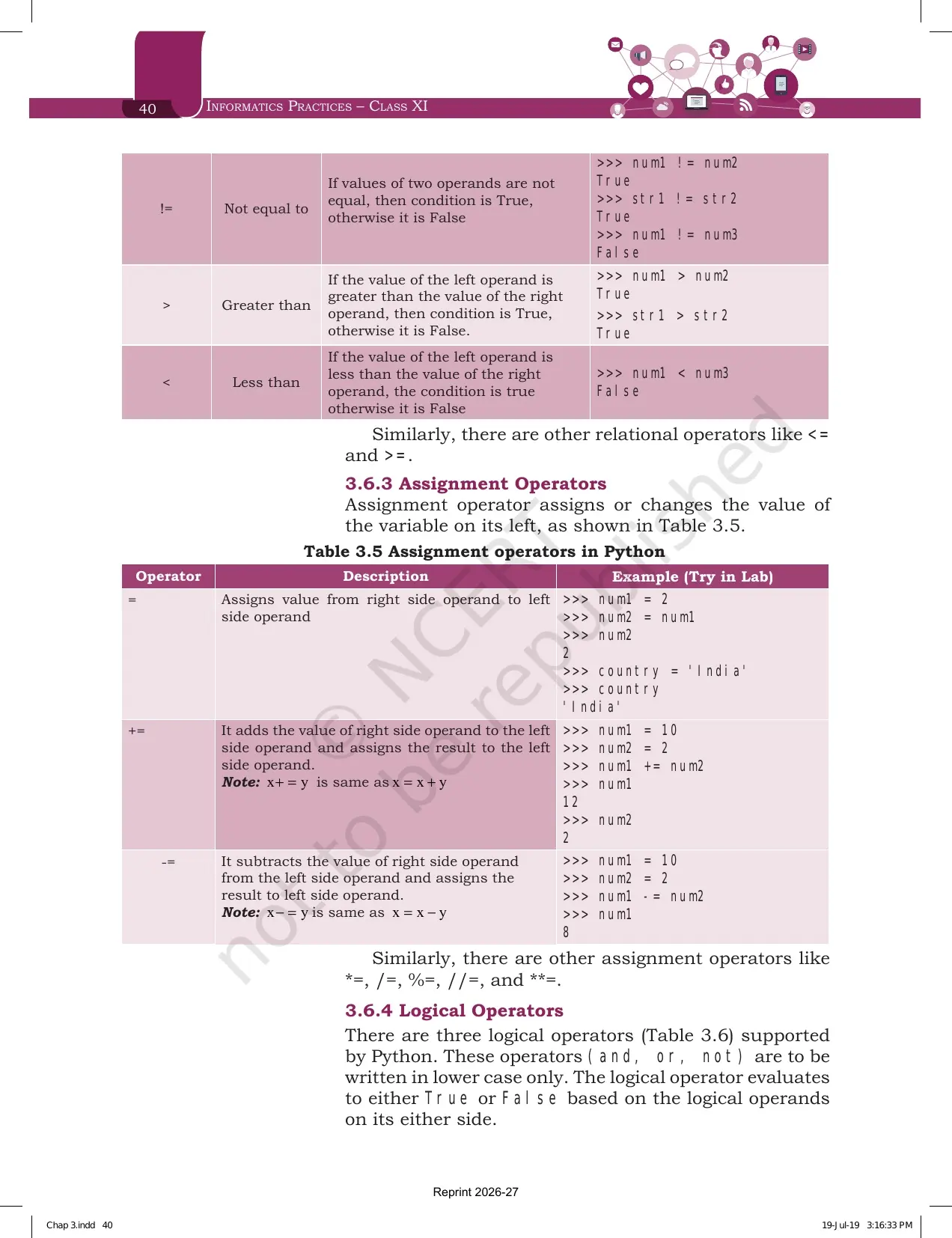
| Operator | Meaning | Example from Table 3.4 | Output |
|---|---|---|---|
| == | Equals to | num1 == num2 | False |
| != | Not equal to | num1 != num2 | True |
| > | Greater than | str1 > str2 | True |
| < | Less than | num1 < num3 | False |
| <= and >= | Less than or equal to, greater than or equal to | Named at the end of the section | True or False |
Notice that str1 > str2 returns True. The margin box explains why: Python compares two strings lexicographically using the ASCII value of the characters, and if the first characters match it moves to the second, and so on.
Assignment operators change the value of the variable on the left. The plain equals sign copies a value from right to left. The compound forms are shorthand.
- += adds the right operand to the left and stores the result on the left, so x += y is the same as x = x + y. With num1 = 10 and num2 = 2, num1 becomes 12.
- -= subtracts the right operand from the left, so x -= y is the same as x = x - y. With the same values, num1 becomes 8.
- The chapter names four more of the same family: *=, /=, %=, //= and **=.
Logical and Membership Operators Every Class 11 Student Must Practise
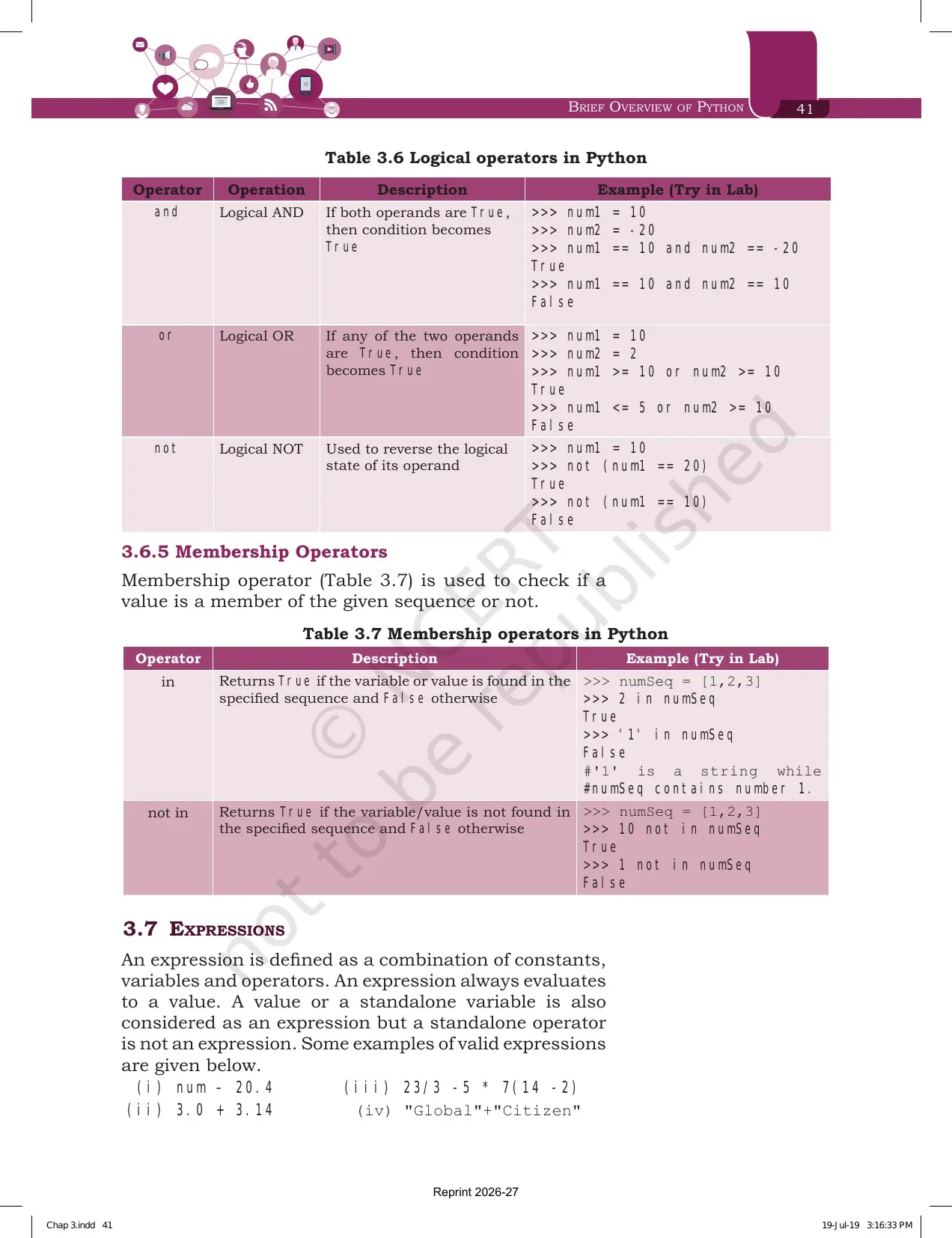
Python has exactly three logical operators, and NCERT is strict about one detail. The operators and, or and not must be written in lower case only. Each one evaluates to True or False based on the logical operands on either side.
| Operator | Rule from Table 3.6 | Example | Output |
|---|---|---|---|
| and | True only when both operands are True | num1 == 10 and num2 == -20 | True |
| and | Any one operand False makes the whole result False | num1 == 10 and num2 == 10 | False |
| or | True when any one of the two operands is True | num1 >= 10 or num2 >= 10 | True |
| not | Reverses the logical state of its operand | not (num1 == 20) | True |
Membership operators check whether a value belongs to a sequence. There are only two of them, and Table 3.7 uses the list numSeq = [1, 2, 3] for both.
- in returns True when the value is found in the sequence, so 2 in numSeq is True.
- not in returns True when the value is not found, so 10 not in numSeq is True.
- The trap printed in the table: '1' in numSeq is False, because '1' is a string while the list holds the number 1.
Expressions and Operator Precedence with the Three Solved Examples
Section 3.7 defines an expression as a combination of constants, variables and operators that always evaluates to a value. A value or a standalone variable also counts as an expression, but a standalone operator does not. The four valid expressions printed are num - 20.4, 3.0 + 3.14, 23/3 -5 * 7(14 -2) and "Global"+"Citizen".
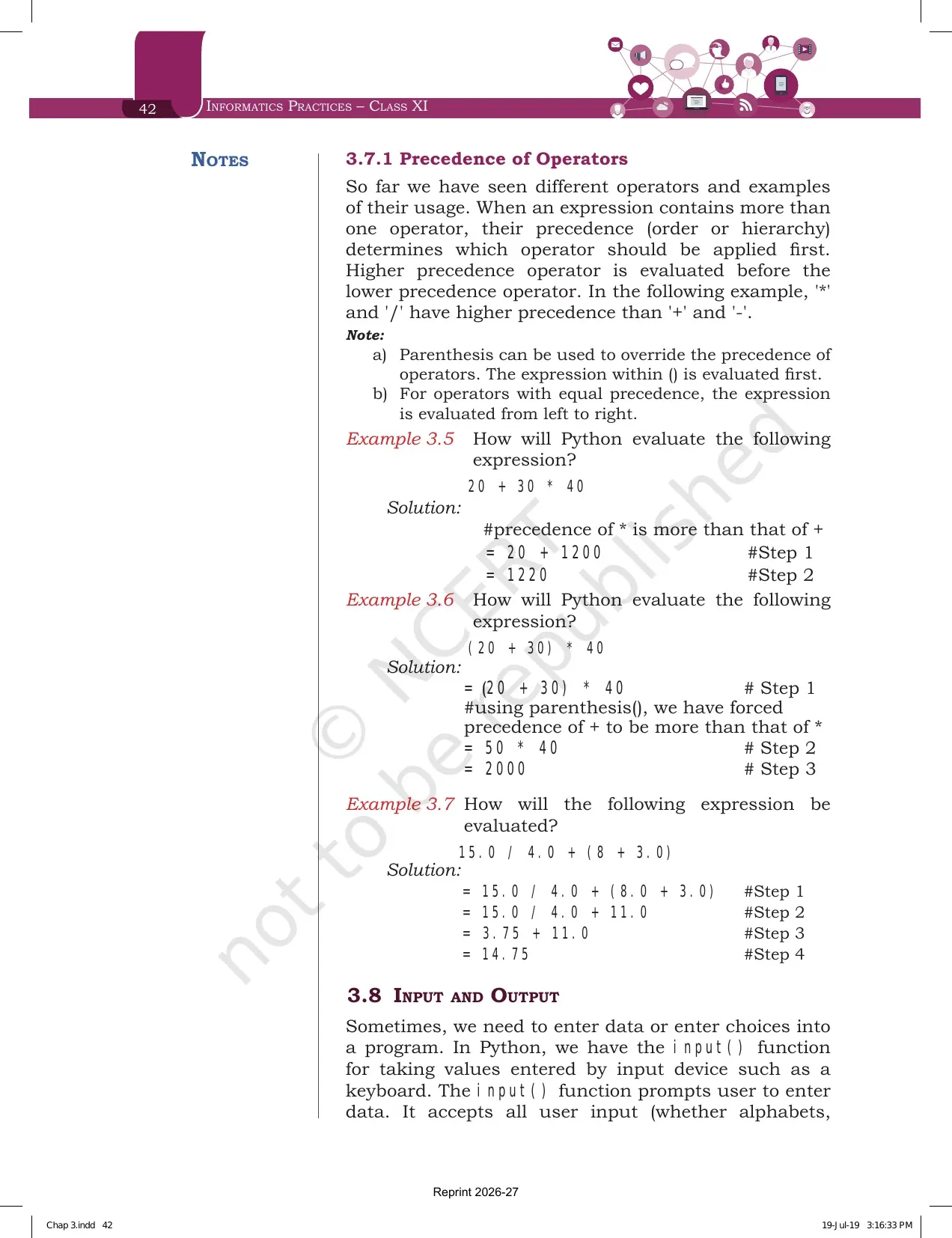
Precedence decides which operator is applied first when an expression has more than one. The higher precedence operator runs before the lower one, so the star and the slash are applied before the plus and the minus. Two notes carry the marks.
- Parentheses override precedence. Whatever sits inside the brackets is evaluated first.
- Operators of equal precedence are evaluated from left to right.
| Example | Expression | Steps as NCERT writes them | Answer |
|---|---|---|---|
| Example 3.5 | 20 + 30 * 40 | The star runs first, giving 20 + 1200 | 1220 |
| Example 3.6 | (20 + 30) * 40 | The bracket forces the plus first, giving 50 * 40 | 2000 |
| Example 3.7 | 15.0 / 4.0 + (8 + 3.0) | Bracket gives 11.0, then 15.0 / 4.0 gives 3.75, then 3.75 + 11.0 | 14.75 |
Exercise question 4 is 16 output items built on exactly this idea, including num1 = 2+9*((3*12)-8)/10. Write every intermediate step the way NCERT does above, because the step marks are given even when the final value slips.
Input and Output in Python Using input(), int() and print()
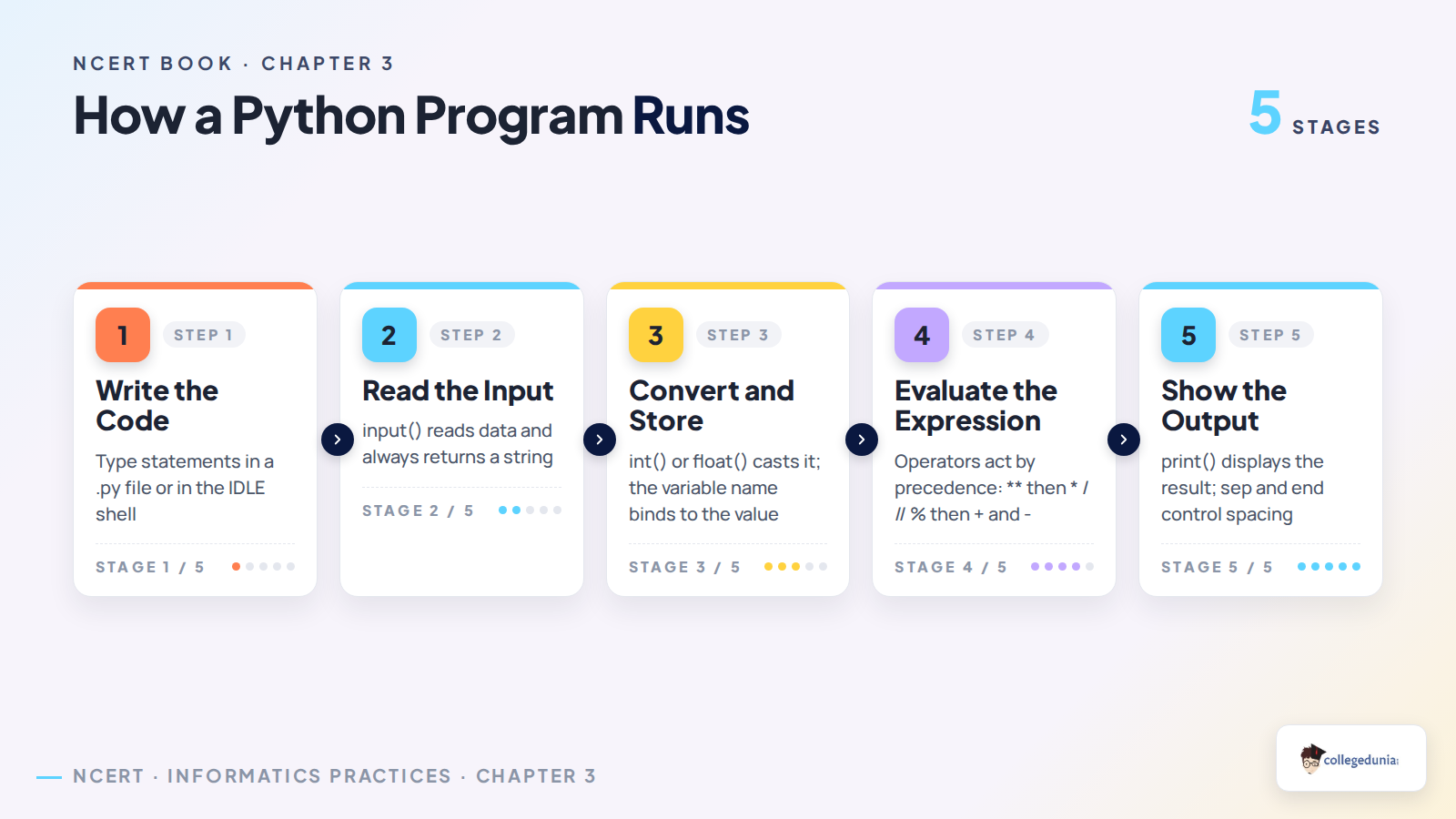
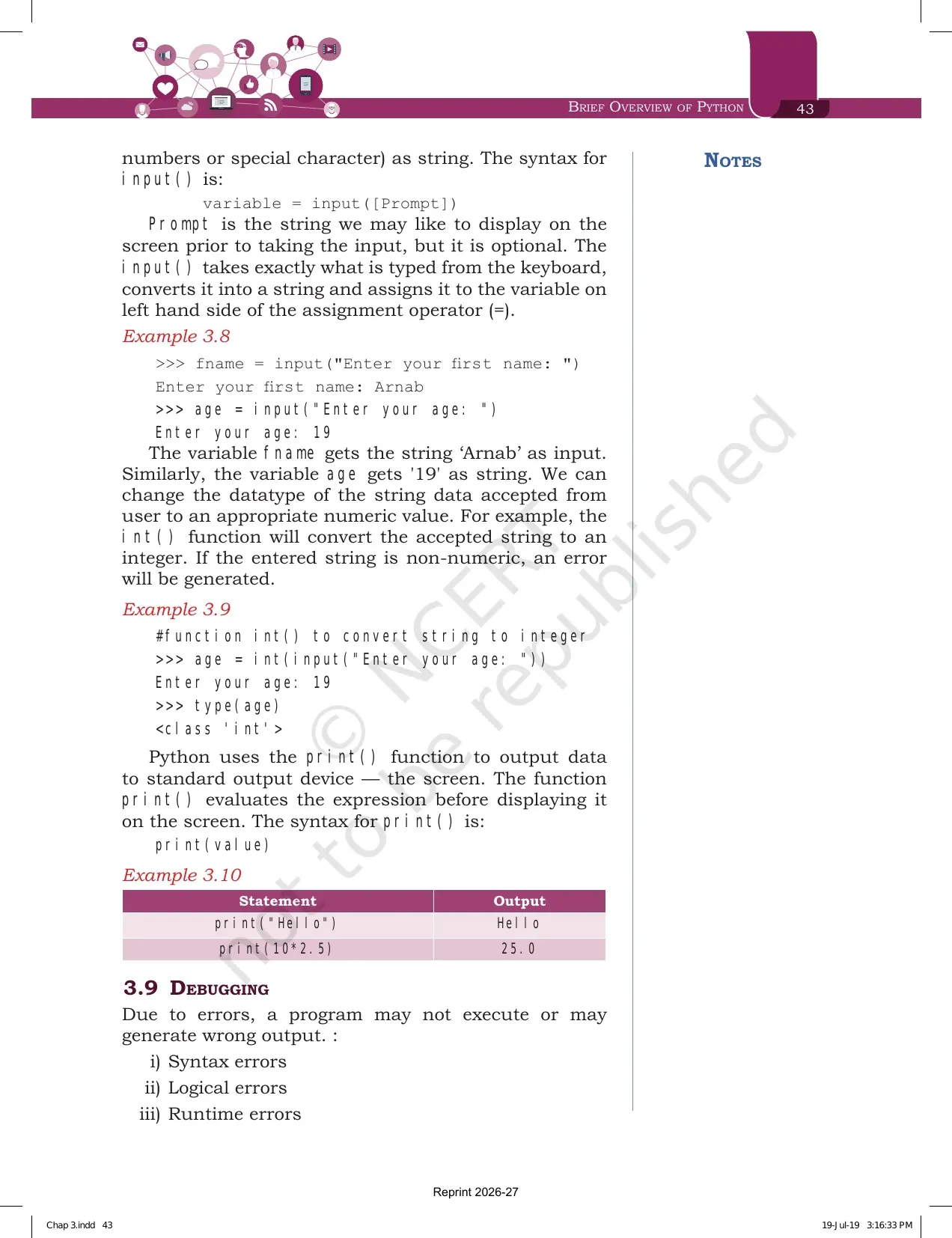
Section 3.8 covers the two functions you will use in every practical program. The syntax printed for input is variable = input([Prompt]), where the prompt is the optional message shown on screen before the user types.
The input() function accepts everything the user types as a string, even when the user types a number. In Example 3.8 the variable age receives '19' as a string, not the number 19. To do arithmetic on it you must convert the type first.
- int() converts an accepted string into an integer, as in age = int(input("Enter your age: ")).
- If the entered string is non-numeric, the conversion raises an error.
- After the conversion, type(age) returns class int, which is how Example 3.9 proves it worked.
- print() sends data to the screen, and it evaluates the expression before displaying it.
| Statement from Example 3.10 | Output | What it proves |
|---|---|---|
| print("Hello") | Hello | A string inside quotes is printed as it is |
| print(10*2.5) | 25.0 | The expression is evaluated first, and an int times a float gives a float |
Debugging: Syntax Errors, Logical Errors and Runtime Errors Compared
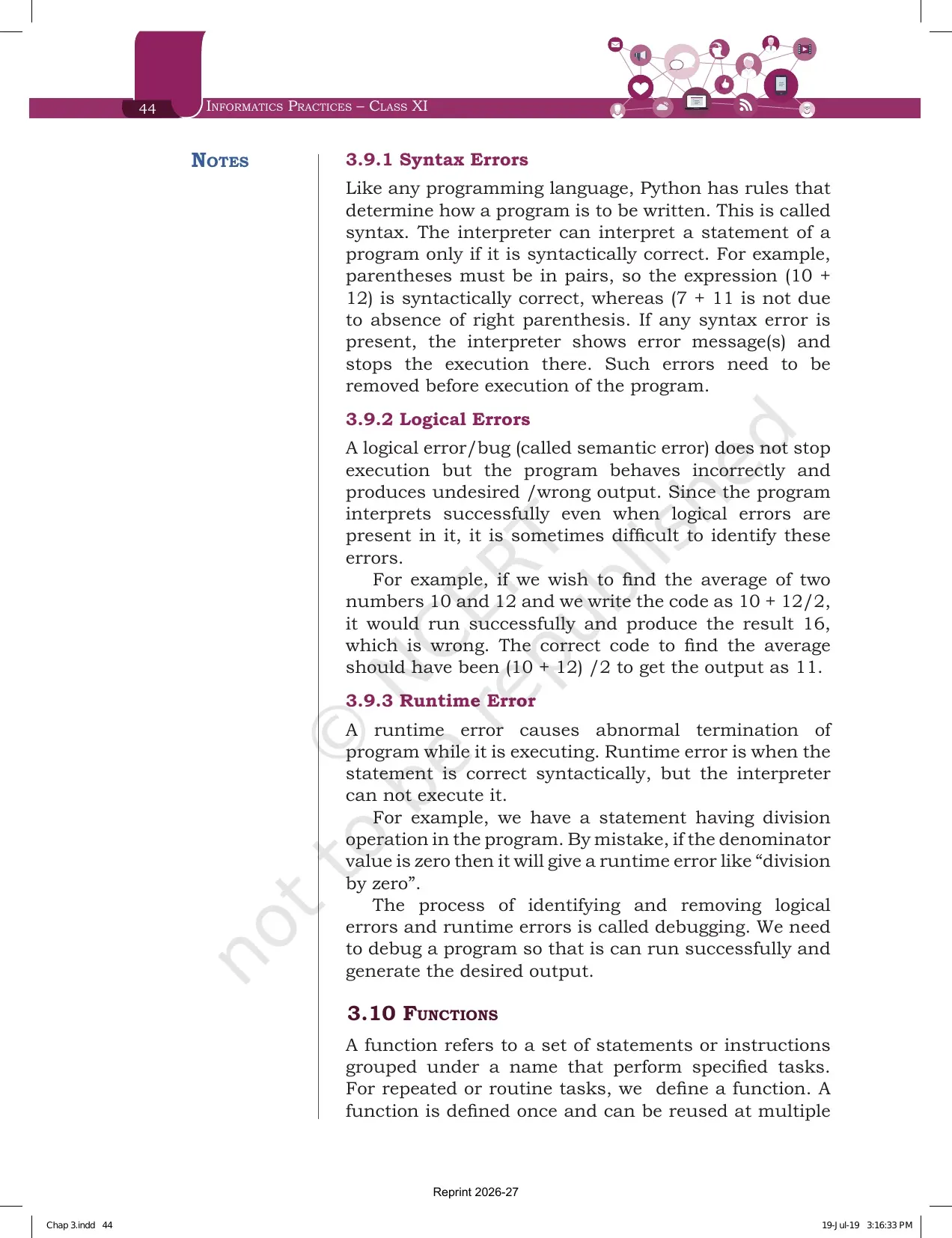
Section 3.9 lists three kinds of error, and the exam almost always asks you to tell them apart. The definition to learn is at the end of the section. The process of identifying and removing logical errors and runtime errors is called debugging.
| Error type | What NCERT says | Example printed in the chapter |
|---|---|---|
| Syntax error | The statement breaks the rules of how Python must be written, so the interpreter shows a message and stops there | (7 + 11 has no closing parenthesis, while (10 + 12) is correct |
| Logical error | Also called a semantic error. It does not stop execution, but the program behaves wrongly and gives an undesired output | 10 + 12/2 gives 16, while the correct average code (10 + 12)/2 gives 11 |
| Runtime error | The statement is correct syntactically, but the interpreter cannot execute it, so the program terminates abnormally | A division where the denominator is zero raises division by zero |
Exercise question 5 gives you 25 / 0 and a two line version with num1 = 25 and num2 = 0. Both are runtime errors, because both are written correctly but cannot be executed. Say the word runtime and add the reason, and the answer is complete.
Functions in Python and the Built-in Function Table Printed in the Chapter
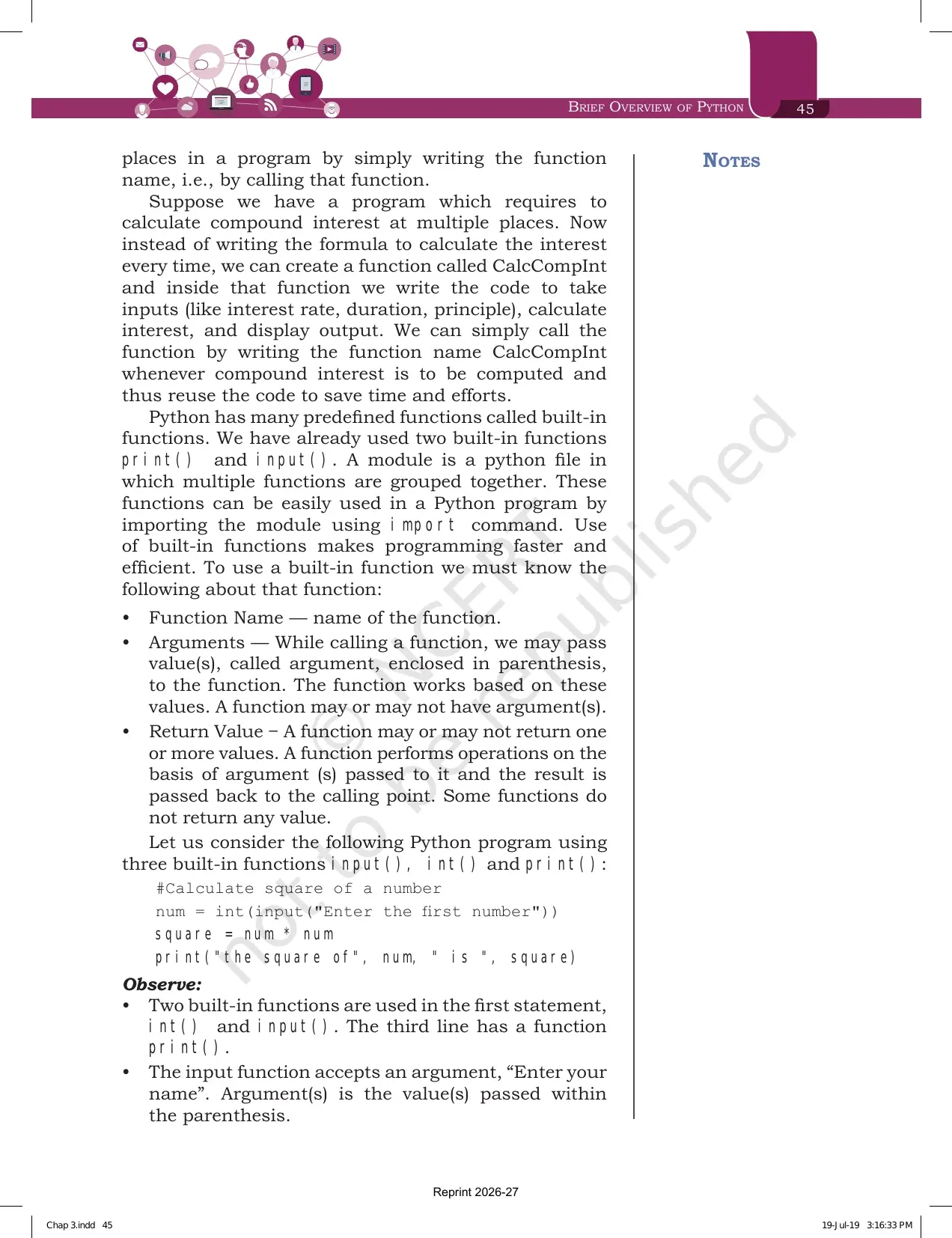
Section 3.10 defines a function as a set of statements grouped under a name that performs a specified task. You define it once and reuse it by calling its name. The example NCERT gives is a compound interest routine named CalcCompInt, written once and called wherever interest has to be computed.
Python already ships with many predefined functions called built-in functions, and you have used two of them already, print() and input(). A module is a Python file in which multiple functions are grouped together, and you bring it into your program with the import command.
- Function name is simply the name of the function.
- Arguments are the values passed inside the parentheses while calling the function. A function may have none, one or many.
- Return value is what the function passes back to the calling point. Some functions return nothing.
- In print("the square of", num, " is ", square) there are four arguments separated by commas.
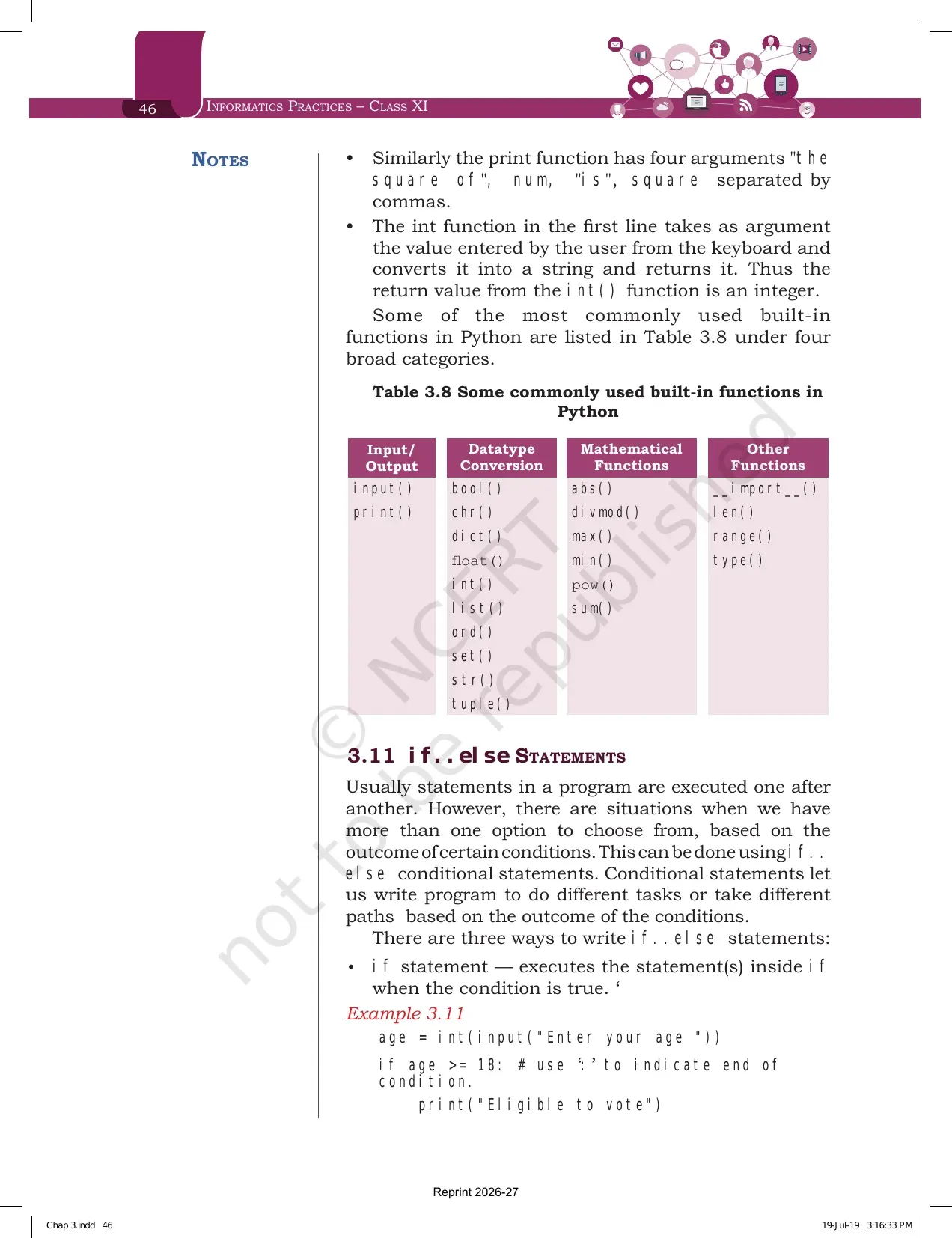
| Input and output | Data type conversion | Mathematical | Other functions |
|---|---|---|---|
| input() | bool(), chr(), dict() | abs() | __import__() |
| print() | float(), int(), list() | divmod(), max(), min() | len(), range() |
| ord(), set(), str(), tuple() | pow(), sum() | type() |
That is Table 3.8, split into four broad categories. A short answer question often asks you to name any four built-in functions with their category, so learning the column headings is enough to score it.
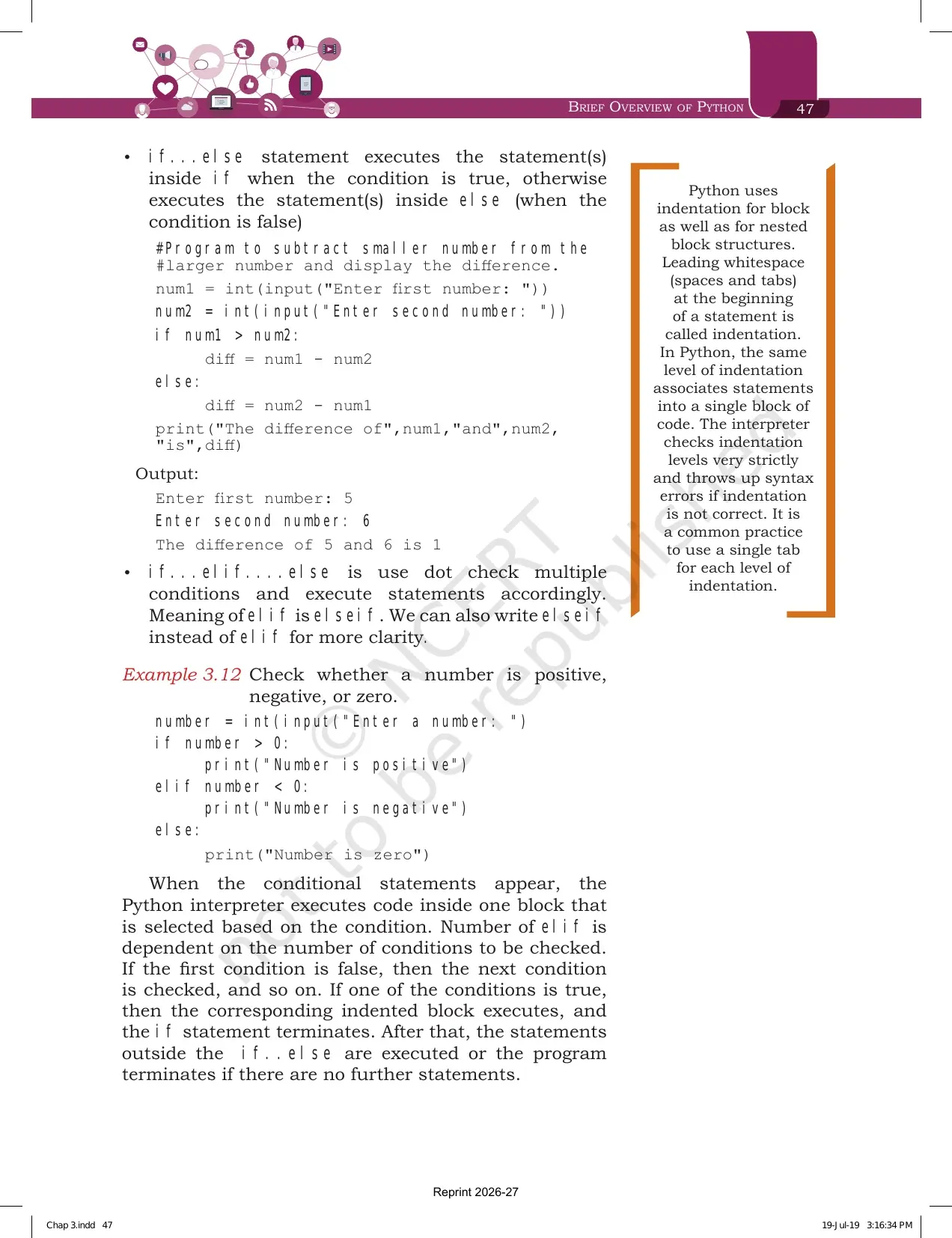
if..else, if..elif..else and Why Indentation Decides the Output
Section 3.11 explains conditional statements. Statements normally run one after another, but sometimes the program has to pick a path based on a condition. NCERT lists three ways to write it.
| Form | What it does | Example in the chapter |
|---|---|---|
| if | Runs the statements inside if only when the condition is true | Example 3.11 prints Eligible to vote when age is 18 or more |
| if...else | Runs the if block when true, otherwise runs the else block | The program that subtracts the smaller number from the larger one |
| if...elif...else | Checks multiple conditions in order. elif means else if, and elseif may also be written for clarity | Example 3.12 labels a number positive, negative or zero |
The margin box on this page is the most quoted line of the chapter. Python uses indentation for blocks as well as for nested blocks, and the interpreter checks indentation levels very strictly. Leading whitespace at the start of a statement is called indentation, the same level of indentation groups statements into one block, and wrong indentation throws a syntax error. NCERT recommends a single tab for each level.
- A colon at the end of the condition marks where the condition ends, as in if age >= 18 followed by a colon.
- When one condition is true, its indented block runs and the whole if statement ends there.
- The number of elif branches depends only on how many conditions you need to check.
- Exercise question 10 asks for the difference between else and elif, so keep the third row of the table above ready.
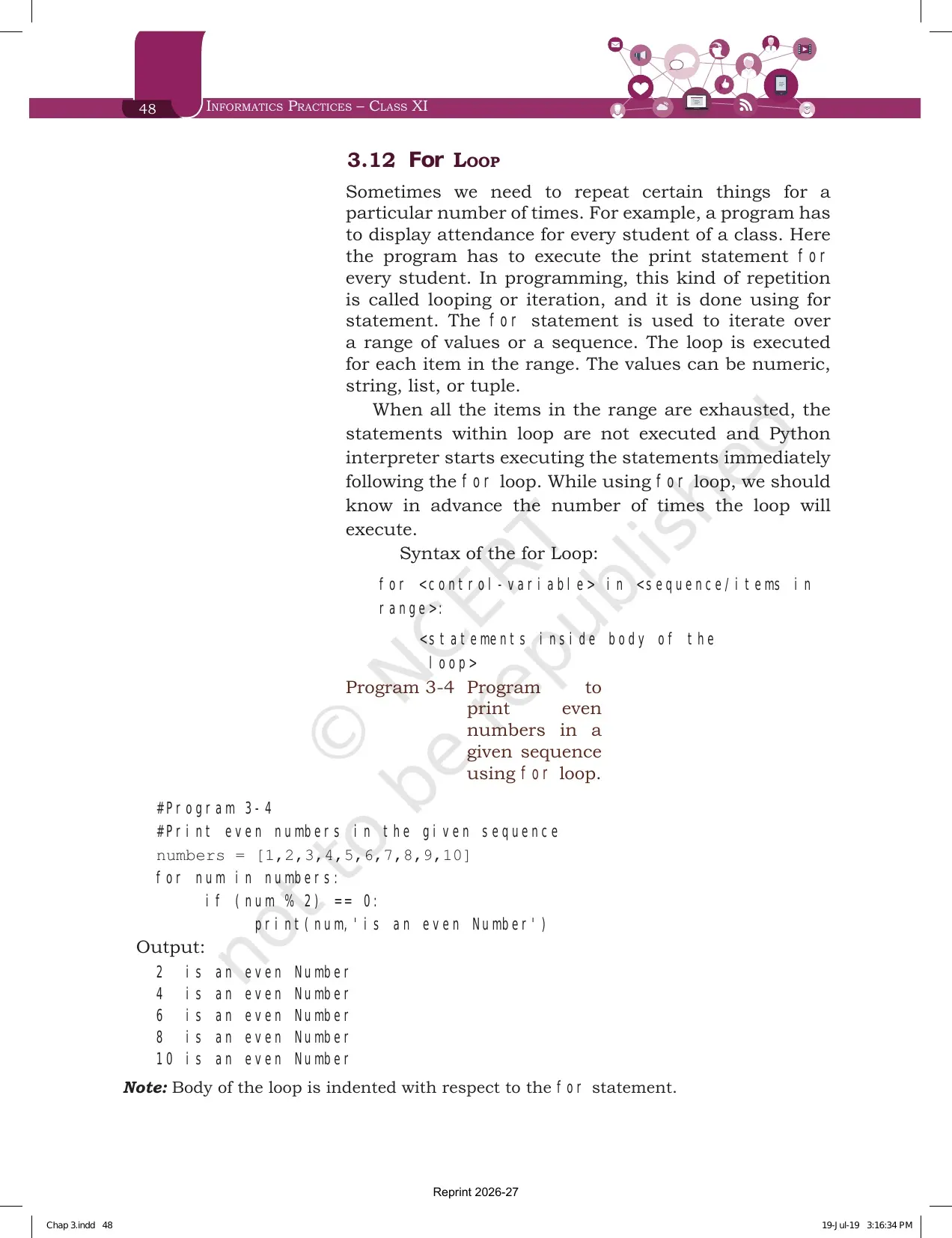
for Loop, the range() Function and Nested Loops with Traced Output
Section 3.12 introduces repetition, which programming calls looping or iteration. The for statement iterates over a range of values or a sequence, and the values may be numeric, string, list or tuple. When the items run out, the loop stops and the interpreter moves to the statement after it.
Use a for loop only when you know in advance how many times it should run. The syntax printed is for control-variable in sequence, followed by a colon, then the indented body of the loop. Program 3-4 walks a list of ten numbers and prints the five even ones.
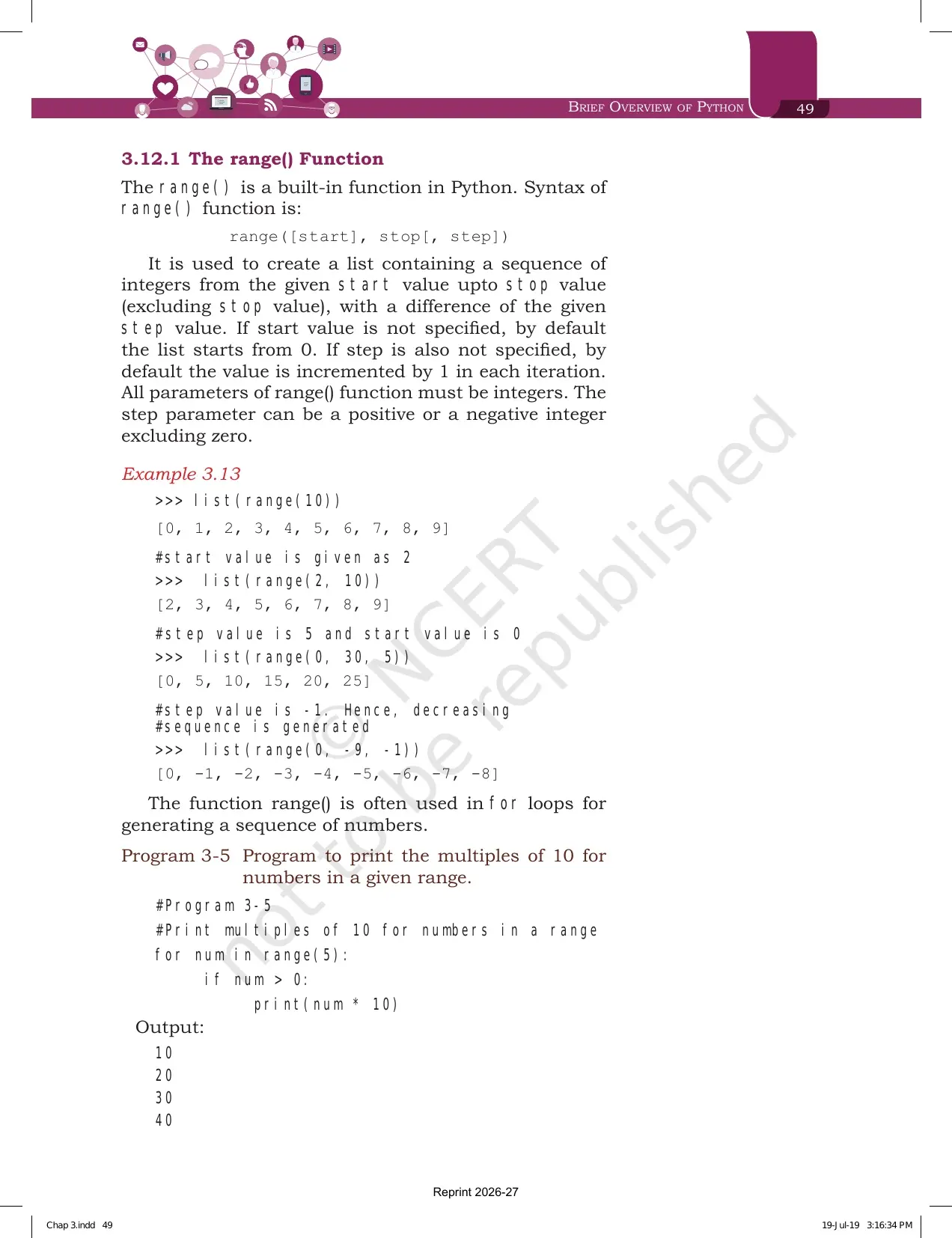
The range() function is the partner of the for loop. Its syntax is range([start], stop[, step]), and it creates a sequence of integers from the start value up to but not including the stop value.
| Call from Example 3.13 | Result | Rule it demonstrates |
|---|---|---|
| list(range(10)) | 0 to 9 | Start defaults to 0 and the stop value is excluded |
| list(range(2, 10)) | 2 to 9 | A start value can be supplied |
| list(range(0, 30, 5)) | 0, 5, 10, 15, 20, 25 | Step controls the gap between values |
| list(range(0, -9, -1)) | 0 down to -8 | A negative step generates a decreasing sequence |
Two more rules sit around that table. All parameters of range() must be integers, and the step can be positive or negative but never zero. Program 3-5 uses for num in range(5) to print 10, 20, 30 and 40.
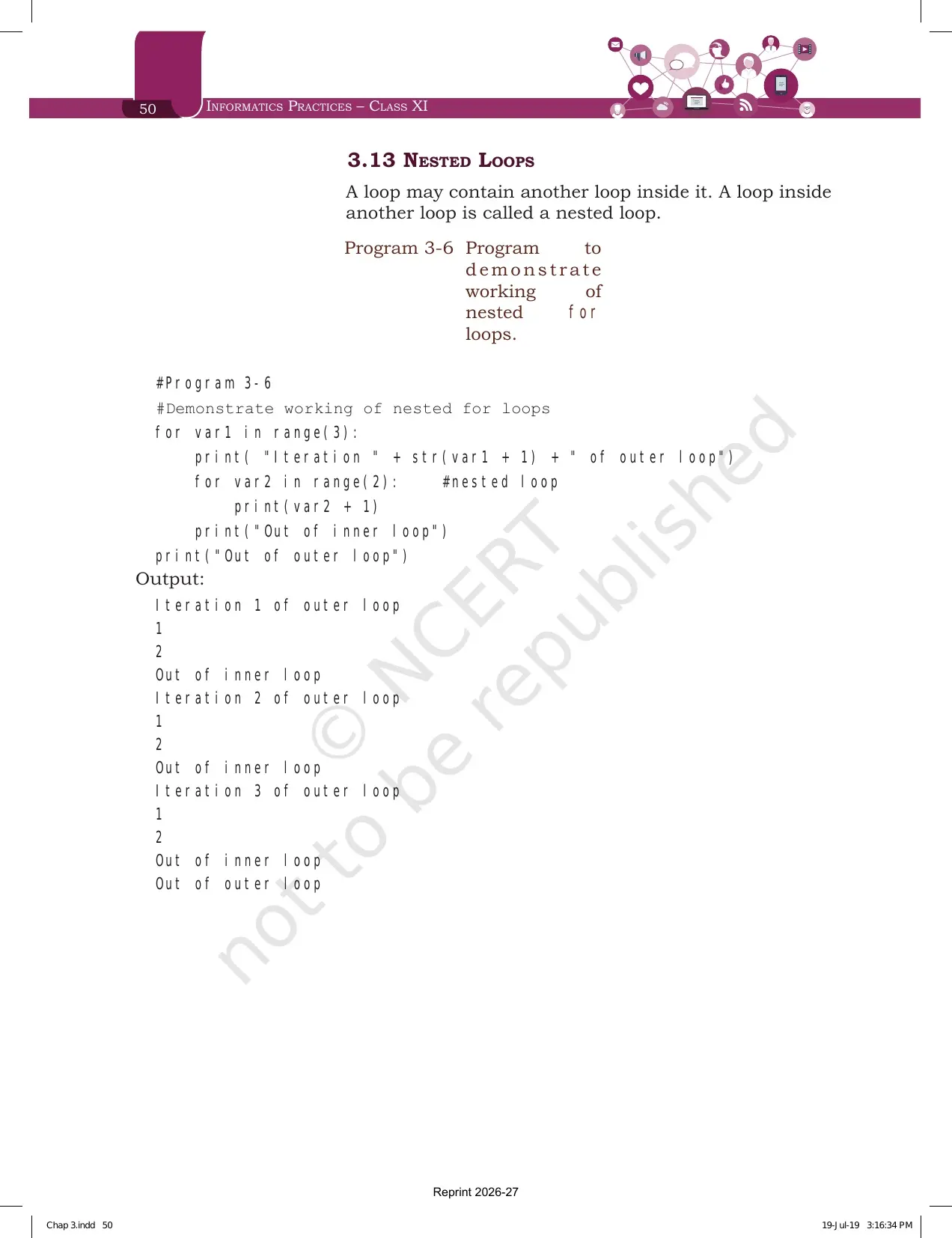
Section 3.13 is one line of theory and one program. A loop inside another loop is called a nested loop. Program 3-6 runs an outer loop three times and an inner loop twice, and the traced output on page 50 is the model answer for any nested loop question.
- The outer loop prints the iteration line first.
- The inner loop then prints 1 and 2.
- Out of inner loop is printed once per outer pass, because it sits at the outer indent level.
- Out of outer loop is printed only once at the very end.
Exercise Questions Printed at the End of the Brief Overview of Python Chapter
The chapter closes with 11 questions on pages 51 to 54, followed by a case study. Output tracing and program writing take the largest share, so keep a notebook open and actually run the code rather than reading the answers.
| Question | What it asks | Which section answers it |
|---|---|---|
| 1 | Which of eight identifier names are invalid and why | 3.2 and 3.3 |
| 2 | Write five assignment statements, including a list and a concatenated full name | 3.4 and 3.6.1 |
| 3 | Pick a data type for eight values, from months in a year to a student address | 3.5 |
| 4 | Sixteen output items on compound assignment, precedence and type conversion | 3.6 and 3.7 |
| 5 | Label two cases as syntax, logical or runtime error | 3.9 |
| 6 | Program for the amount payable under simple interest with P, R and T as input | 3.4, 3.6.1 and 3.8 |
| 7 | Program to repeat the string GOOD MORNING n times | 3.6.1 and 3.8 |
| 8 | Program to find the average of three numbers | 3.4 and 3.8 |
| 9 | Program that reads a name and age, then prints the year the user turns 100 | 3.8 |
| 10 | Difference between the else and the elif construct | 3.11 |
| 11 | Trace the output of three loop segments, including a while loop | 3.12 |
| Case study | Automate a Student Management Information System, starting with student personal details | 3.8 and 3.10 |
Question 4 is worth the most practice time. It hides three traps in one list: num1='5' + '5' joins two strings instead of adding, int('3.14') raises an error, and float(10) prints 10.0 rather than 10.
Brief Overview of Python Weightage in the Class 11 Informatics Practices Paper
The Class 11 Informatics Practices theory paper carries 70 marks with 30 marks of practical work. Brief Overview of Python opens Unit 2, which is the second heaviest unit in the course and the base for every program in your practical file.
| Unit | Approximate theory marks | Where Brief Overview of Python appears |
|---|---|---|
| Unit 1, Introduction to Computer System | Around 10 | Not applicable |
| Unit 2, Introduction to Python | Around 25 | Identifiers, data types, operators, expressions, if..else, for loop and nested loops |
| Unit 3, Database concepts and SQL | Around 30 | Not applicable |
| Unit 4, Introduction to Emerging Trends | Around 5 | Not applicable |
- Most common shape: a one mark output question on an arithmetic or relational expression.
- Second most common: a two mark question naming invalid identifiers or labelling an error type.
- Heaviest single item: a four or five mark program using input(), an if..else block and a for loop together.
- The same Python base is tested again in the Computer Science and Informatics Practices domain paper of CUET (UG).
Common Mistakes Students Make in the Brief Overview of Python Chapter
Avoid these six in the answer sheet:
- Forgetting that input() returns a string. Without int(), the value 19 behaves as '19' and arithmetic fails.
- Mixing up / and //. The single slash keeps the decimal, and the double slash removes it.
- Writing And, Or or Not with a capital letter. Python accepts only the lower case forms.
- Calling 25 / 0 a syntax error. It is written correctly, so it is a runtime error.
- Dropping the colon after an if condition or a for header, or indenting the body unevenly.
- Treating a tuple like a list. Tuple items cannot be changed once created.
A quick fix for the error type slip: ask whether the interpreter even started running the code. If it refused to start, it is a syntax error. If it started and crashed, it is a runtime error. If it finished but printed the wrong answer, it is a logical error.
Student Feedback on the Brief Overview of Python Chapter
What Class 11 Students Said About This Chapter
What 12,840 Class 11 Informatics Practices students told us in a Collegedunia poll run during the 2026-27 session:
- 68% of Class 11 students surveyed said operators and expressions was the sub topic they practised most before the paper.
- 7 out of 10 students rated the nested loop program as the hardest output question in the chapter.
- 41% lost marks by forgetting that input() hands back a string until int() converts it.
Source: 2026-27 Class 11 Informatics Practices student poll. Sample of 12,840 students from CBSE schools across 16 states.
How to Use the Brief Overview of Python PDF in a Three Block Revision Plan
This chapter is not a reading chapter. Every section has code, and the code has to be typed to stick. Keep the shell open on one side and the PDF on the other, and give the chapter about two hours split into three blocks.
- Block 1, 40 minutes. Read sections 3.1 to 3.5. Type Programs 3-2 and 3-3 in script mode, then use type() on five variables of your own. Finish with exercise questions 1, 2 and 3.
- Block 2, 40 minutes. Read sections 3.6 to 3.9. Run every row of Tables 3.3 to 3.7 in interactive mode, then work Examples 3.5, 3.6 and 3.7 on paper. Finish with exercise questions 4 and 5.
- Block 3, 40 minutes. Read sections 3.10 to 3.13. Write Programs 3-4, 3-5 and 3-6 from memory, then answer exercise questions 6 to 11 and read the Summary on page 51.
Repeat block 3 the night before the paper, because loops and conditionals carry the longest programs. Students who traced the nested loop output by hand twice reported the fewest mistakes in this unit.
How the Brief Overview of Python Chapter PDF Works with Notes, Solutions and Handwritten Notes
The book PDF gives you the original text, the tables and the exercise list. It does not give you written answers or a condensed summary. Those sit on the other Collegedunia pages for the same chapter, and using them together is faster than reading any one of them alone.
| Resource | What it adds beyond the book PDF | Link |
|---|---|---|
| NCERT Solutions | Written answers to all 11 exercise questions, including the 16 output items in question 4 and the three traced loop segments in question 11 | Brief Overview of Python Class 11 NCERT Solutions |
| Revision Notes | The keyword table, the operator tables and the error type comparison condensed into one revision file | Brief Overview of Python Class 11 Notes |
| Handwritten Notes | A topper's handwritten revision pages with the data type family drawn by hand and colour coded operator tables | Brief Overview of Python Class 11 Handwritten Notes |
Also Check: the Working with Lists and Dictionaries chapter PDF, which takes the list and dictionary types introduced here and builds the full set of operations on them.
All Chapters of Class 11 Informatics Practices in NCERT Book PDF Format
The Class 11 Informatics Practices textbook has five chapters. The first two cover computing and technology, and the last three move into Python and data handling. Every link below opens the same official NCERT file for the 2026-27 session.
| Chapter | Pages | NCERT Book PDF |
|---|---|---|
| Chapter 1 | 14 | Computer System Class 11 NCERT Book PDF |
| Chapter 2 | 16 | Emerging Trends Class 11 NCERT Book PDF |
| Chapter 3 | 24 | Brief Overview of Python Class 11 NCERT Book PDF (you are here) |
| Chapter 4 | 26 | Working with Lists and Dictionaries Class 11 NCERT Book PDF |
| Chapter 5 | 14 | Understanding Data Class 11 NCERT Book PDF |
Brief Overview of Python Class 11 Informatics Practices Chapter 3 NCERT Book PDF FAQs
Questions Class 11 Students Ask Most About the Brief Overview of Python Chapter PDF
Ques. Where can I download the NCERT Class 11 Informatics Practices Chapter 3 Brief Overview of Python PDF?
Ans. You can download it free from the card at the top of this page. It is the official NCERT chapter file for the 2026-27 session and carries all 24 pages, including Table 3.1 with the keywords, the five operator tables, the Summary on page 51 and the 11 exercise questions.
Ques. What topics are covered in Chapter 3 Brief Overview of Python?
Ans. Thirteen heads are listed on the chapter opener: Introduction to Python, Python Keywords, Identifiers, Variables, Data Types, Operators, Expressions, Input and Output, Debugging, Functions, if..else Statements, for Loop and Nested Loops. Inside those, the chapter also covers execution modes, comments, the range() function and built-in functions.
Ques. Who created Python and which version does the NCERT textbook use?
Ans. Python was created by Guido van Rossum in 1991. The programs printed in the Class 11 Informatics Practices textbook are written using Python 3.7.0, though the book says any version of Python 3 will run them. The chapter opens with a quote from Guido van Rossum on why indentation is part of the syntax.
Ques. What is the difference between interactive mode and script mode in Python?
Ans. In interactive mode you type a statement on the Python prompt and the interpreter runs it the moment you press enter, which is convenient for testing a single line. Nothing is saved, so you have to retype the statements. In script mode you write the program in a file with a .py extension, save it, and then run the whole file through the interpreter.
Ques. What are the rules for naming an identifier in Python?
Ans. The name must begin with an uppercase letter, a lowercase letter or an underscore, so it cannot start with a digit. After that you may use any combination of a-z, A-Z, 0-9 or underscore. It can be of any length, it must not be a keyword from Table 3.1, and special symbols such as the exclamation mark, at sign, hash, dollar and percent are not allowed.
Ques. How many keywords are listed in the Class 11 Informatics Practices Python chapter?
Ans. Table 3.1 lists 33 reserved words, from False, None and True through class, def, elif, else, for, if, import, in, lambda, not, or, pass, return, while, with and yield. Python is case sensitive, so every keyword has to be typed exactly as it appears in the table.
Ques. What are the data types available in Python according to the NCERT textbook?
Ans. Figure 3.6 groups them into number, sequence and mapping. Number covers int, float and complex, with bool as a subtype of integer holding True and False. Sequence covers string, list and tuple. Mapping has only one standard type, the dictionary, which stores key and value pairs inside curly brackets.
Ques. What is the difference between a list and a tuple in Python?
Ans. Both are sequences of comma separated items that may hold different data types. A list is written inside square brackets and its items can be changed after it is created. A tuple is written inside parentheses and its items cannot be changed once created. That single point about changing items is what the difference question is looking for.
Ques. What is the difference between the / and // operators in Python?
Ans. The single slash performs normal division and returns the quotient with the decimal part, so 5 divided by 2 gives 2.5. The double slash performs floor division and returns the quotient with the decimal part removed, so 5 floor divided by 2 gives 2. Floor division is sometimes called integer division.
Ques. What are syntax errors, logical errors and runtime errors?
Ans. A syntax error breaks the rules of how Python must be written, so the interpreter shows a message and stops. A logical error does not stop execution but produces a wrong output, as when 10 + 12/2 gives 16 instead of 11. A runtime error means the statement is correct but cannot be executed, such as division by zero. Identifying and removing logical and runtime errors is called debugging.
Ques. Why does input() need int() around it in a Python program?
Ans. The input() function takes exactly what is typed from the keyboard and converts it into a string, even when the user types a number. So age would hold '19' as a string and arithmetic on it would fail. Wrapping it as int(input()) converts the accepted string into an integer. If the entered string is non-numeric, the conversion raises an error.
Ques. What is the difference between else and elif in Python?
Ans. elif means else if. It adds another condition to test when the earlier condition turns out false, and a program can have as many elif branches as it has conditions to check. else carries no condition at all. It is the final block that runs when every condition above it has failed, and there can be only one else in an if statement.
Ques. How does the range() function work in a for loop?
Ans. The syntax is range([start], stop[, step]). It creates a sequence of integers from the start value up to the stop value, excluding the stop value. If start is not given it defaults to 0, and if step is not given the value increases by 1 each time. All parameters must be integers, and the step can be positive or negative but never zero.
Ques. What is a nested loop in Class 11 Informatics Practices?
Ans. A loop placed inside another loop is called a nested loop. Program 3-6 in the chapter runs an outer loop three times and an inner loop twice for every outer pass. The line printed at the outer indent level appears once per outer pass, and the final line outside both loops appears only once, which is exactly what the traced output on page 50 shows.
Ques. Is Brief Overview of Python part of the 2026-27 Class 11 Informatics Practices syllabus?
Ans. Yes. Brief Overview of Python is Chapter 3 of the NCERT Informatics Practices textbook for Class 11 and opens Unit 2, Introduction to Python. The PDF on this page is the current 2026-27 reprint that CBSE schools follow, and the same Python base is also tested in the CUET (UG) domain paper.



Comments