




The NCERT Class 11 Informatics Practices Chapter 4 Working with Lists and Dictionaries book PDF brings together every list method, dictionary method and traversal pattern that the CBSE paper actually tests. It is the official 26 page chapter file from the 2026-27 reprint, it runs from page 55 to page 80, and it is the second chapter of Unit 2, Introduction to Python.
- Working with Lists and Dictionaries is Chapter 4 of the NCERT Informatics Practices textbook for Class 11.
- It has 9 sections, from list indexing and slicing to dictionary methods such as get(), keys() and items().
- The chapter ends with a 12 point Summary, 8 exercise questions, 10 programming problems and a case study set.
Every page of this Working with Lists and Dictionaries chapter file is the official NCERT 2026-27 reprint, checked against the printed Informatics Practices textbook for Class 11 and paired on Collegedunia with solved answers, notes and handwritten revision pages for the same chapter.
What the Working with Lists and Dictionaries Class 11 Chapter PDF Contains, Page by Page
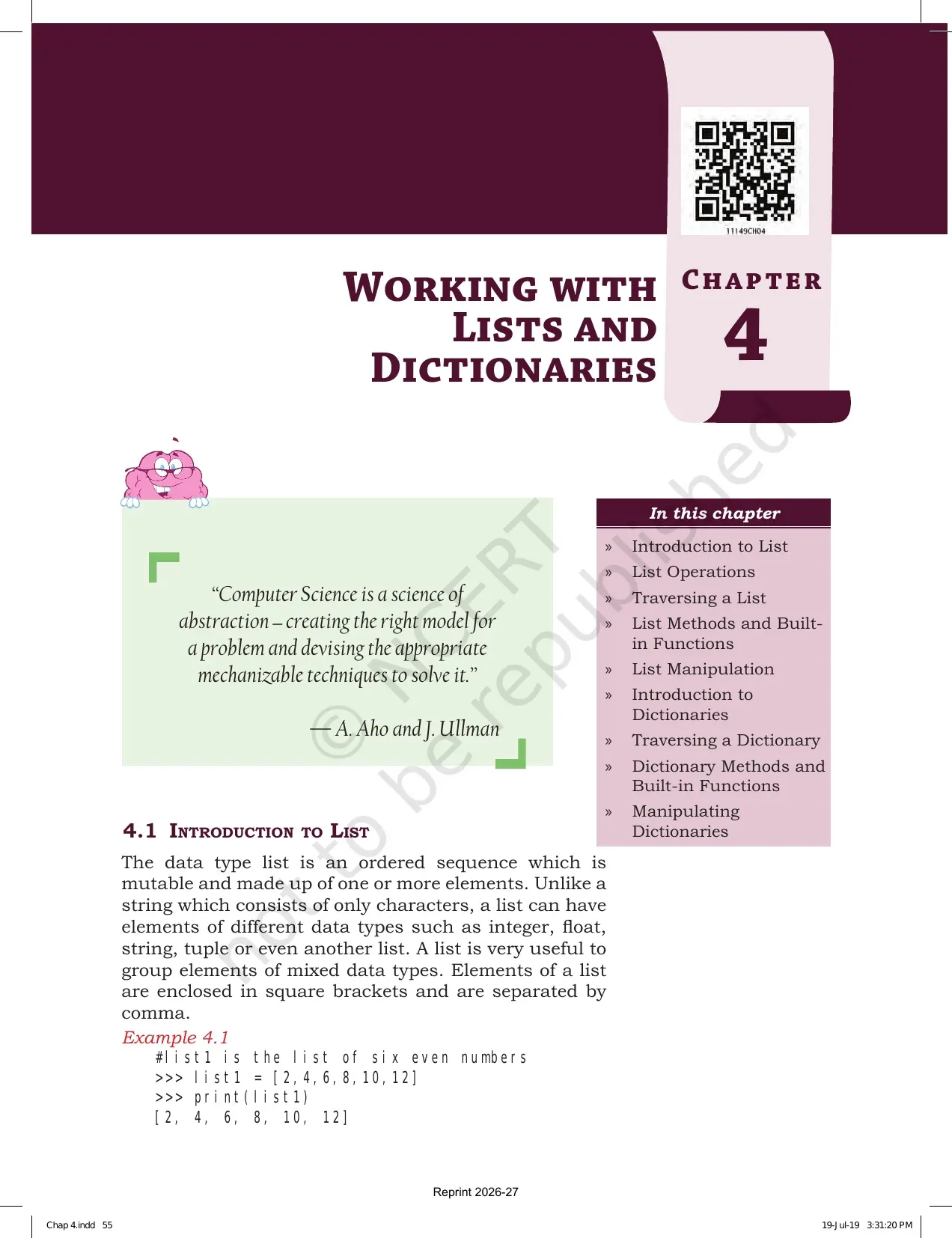
The chapter opens with a quote from A. Aho and J. Ullman on abstraction and a nine point contents box. NCERT builds lists first, then dictionaries, and the second half assumes you already know the first. Read it in the printed order and nothing feels new.
| Section | What is printed there | Why it matters in the exam |
|---|---|---|
| 4.1 Introduction to List | Definition of a list, Example 4.1 with four lists, indexing, negative indexing and mutability | Index and length questions come only from here |
| 4.2 List Operations | Concatenation, repetition, membership and the full slicing block | The largest source of output questions in the chapter |
| 4.3 Traversing a List | The for loop form and the range() with len() form, both with output | Exercise question 3 is exactly this pattern |
| 4.4 List Methods and Built-in Functions | Table 4.1 with 14 methods, each with a worked example | Feeds exercise questions 1, 2 and 5 |
| 4.5 List Manipulation | Program 4-1 menu driven operations, Program 4-2 average marks, Program 4-3 search | The model programs for your practical file |
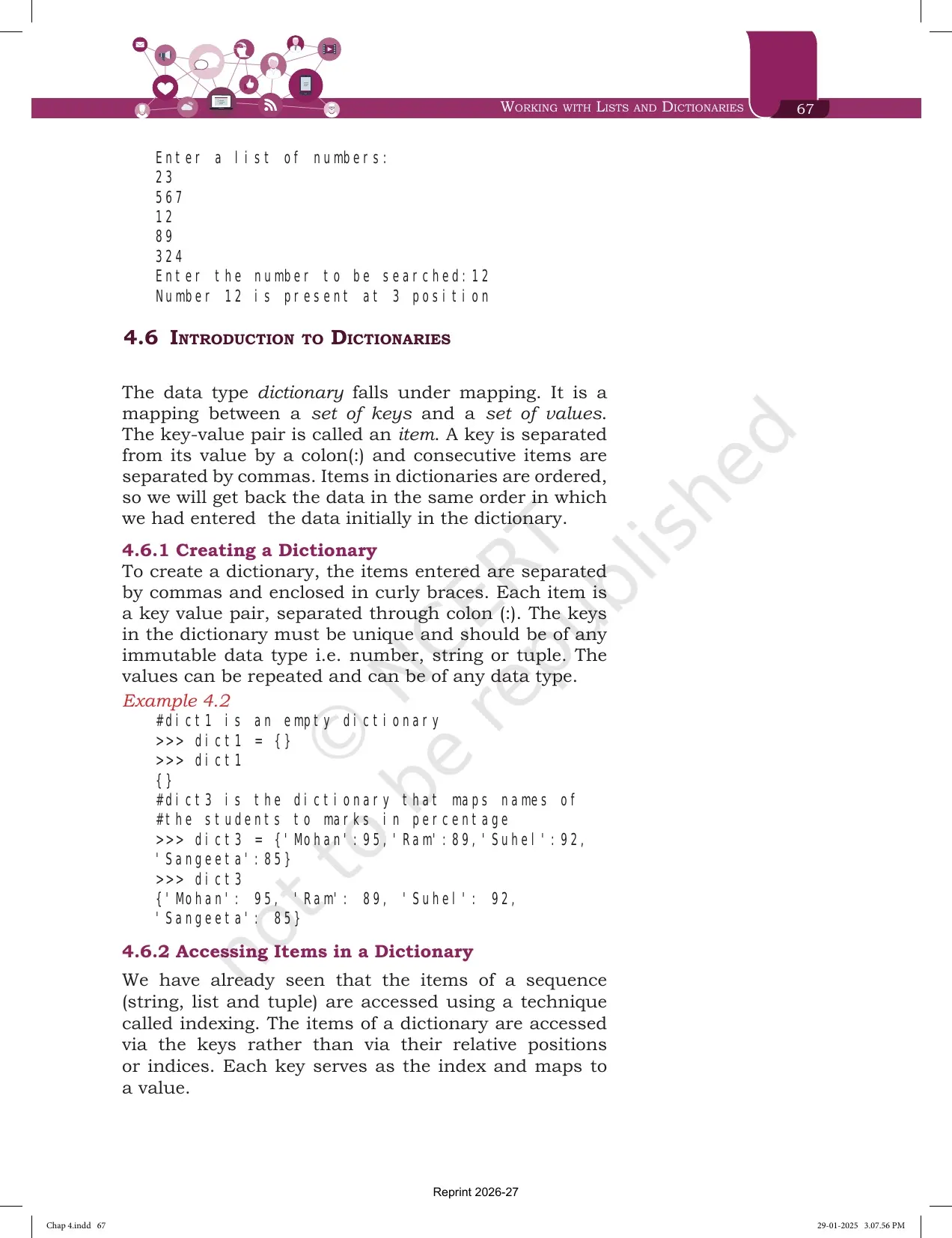
| 4.6 Introduction to Dictionaries | Key value pairs, creating, accessing, membership and mutability | Every dictionary answer starts with this definition |
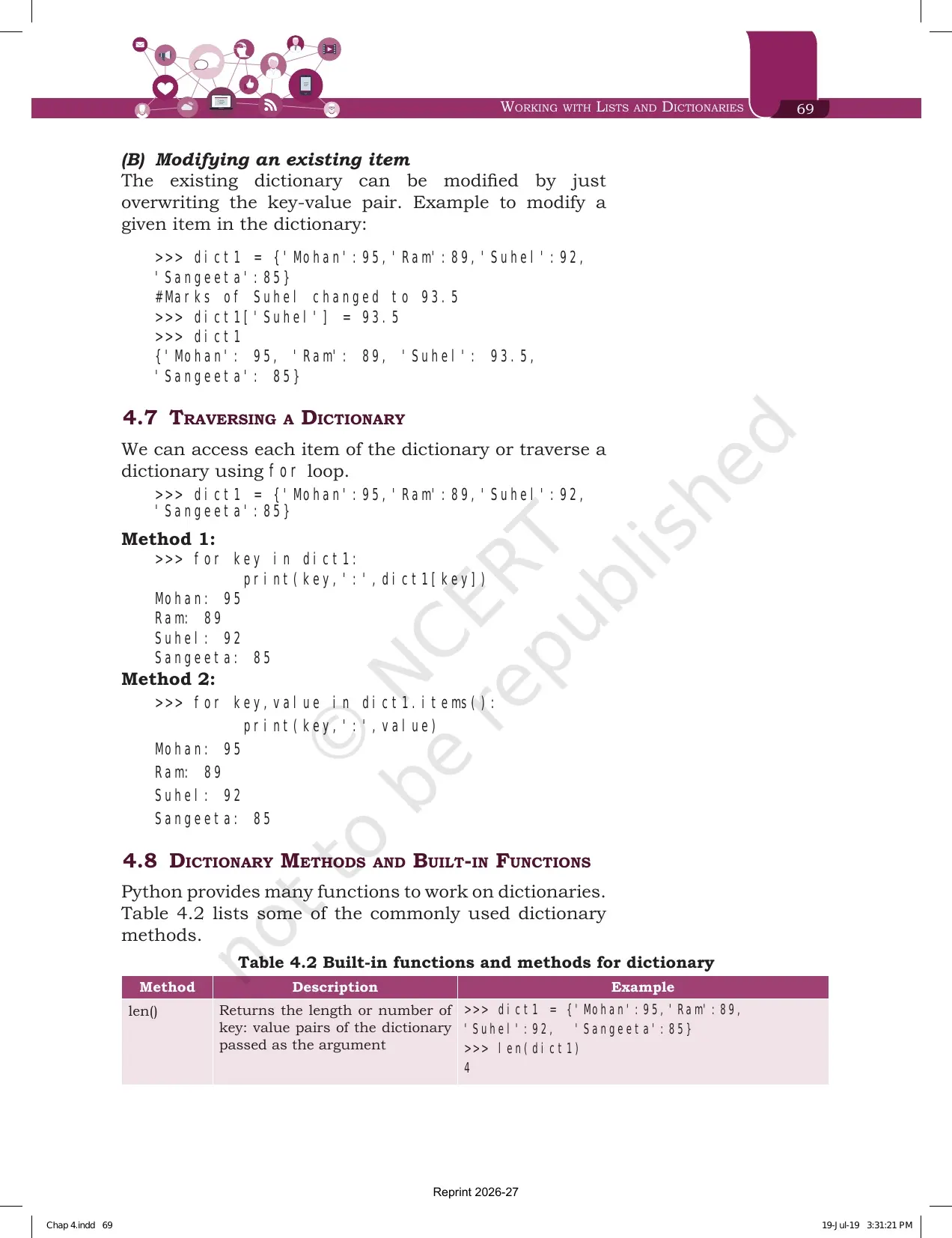
| 4.7 Traversing a Dictionary | Method 1 with the key alone and Method 2 with items() | A guaranteed two mark question |
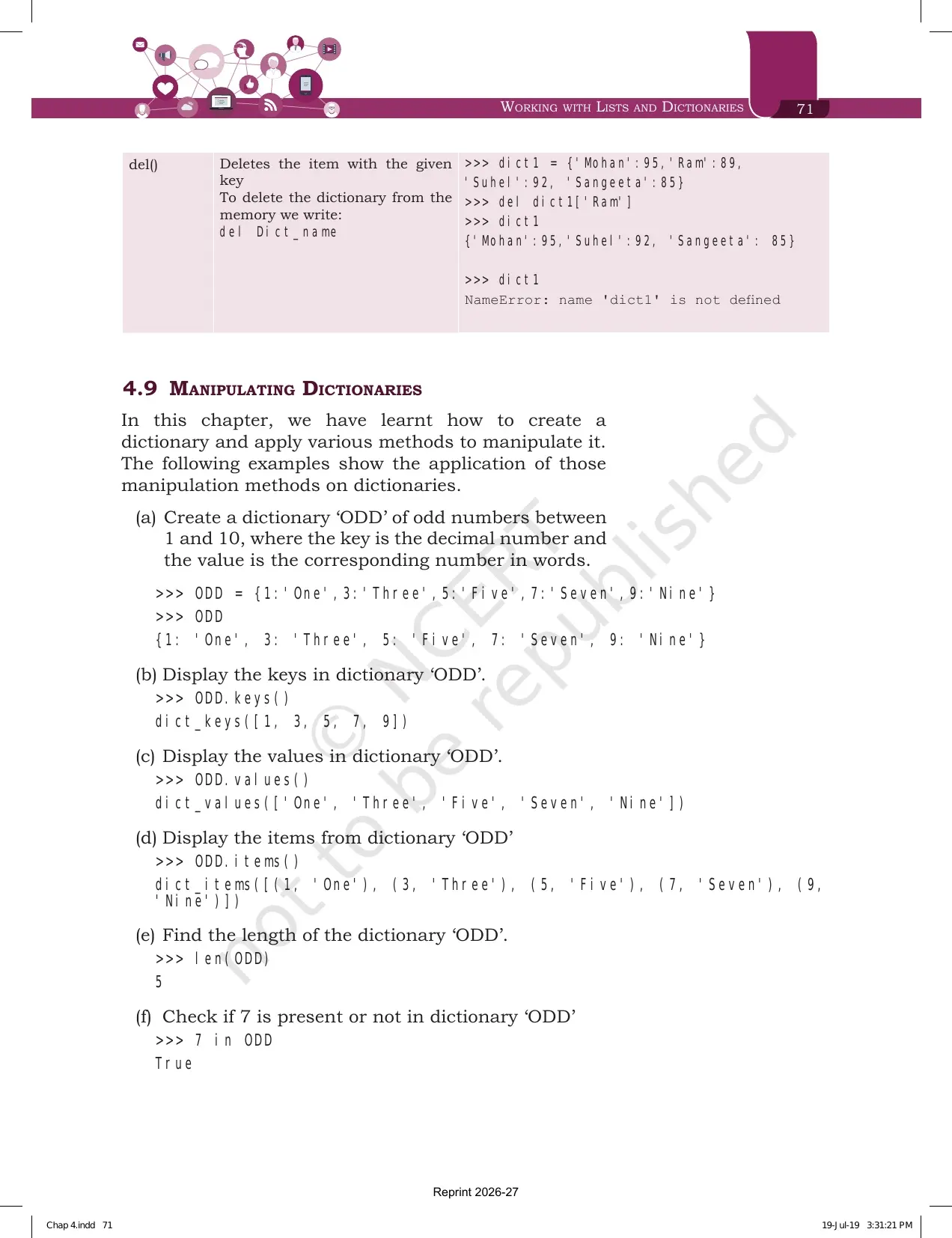
| 4.8 Dictionary Methods and Built-in Functions | Table 4.2 with len(), dict(), keys(), values(), items(), get(), update(), clear() and del | Exercise question 8 is eight outputs built on this table |
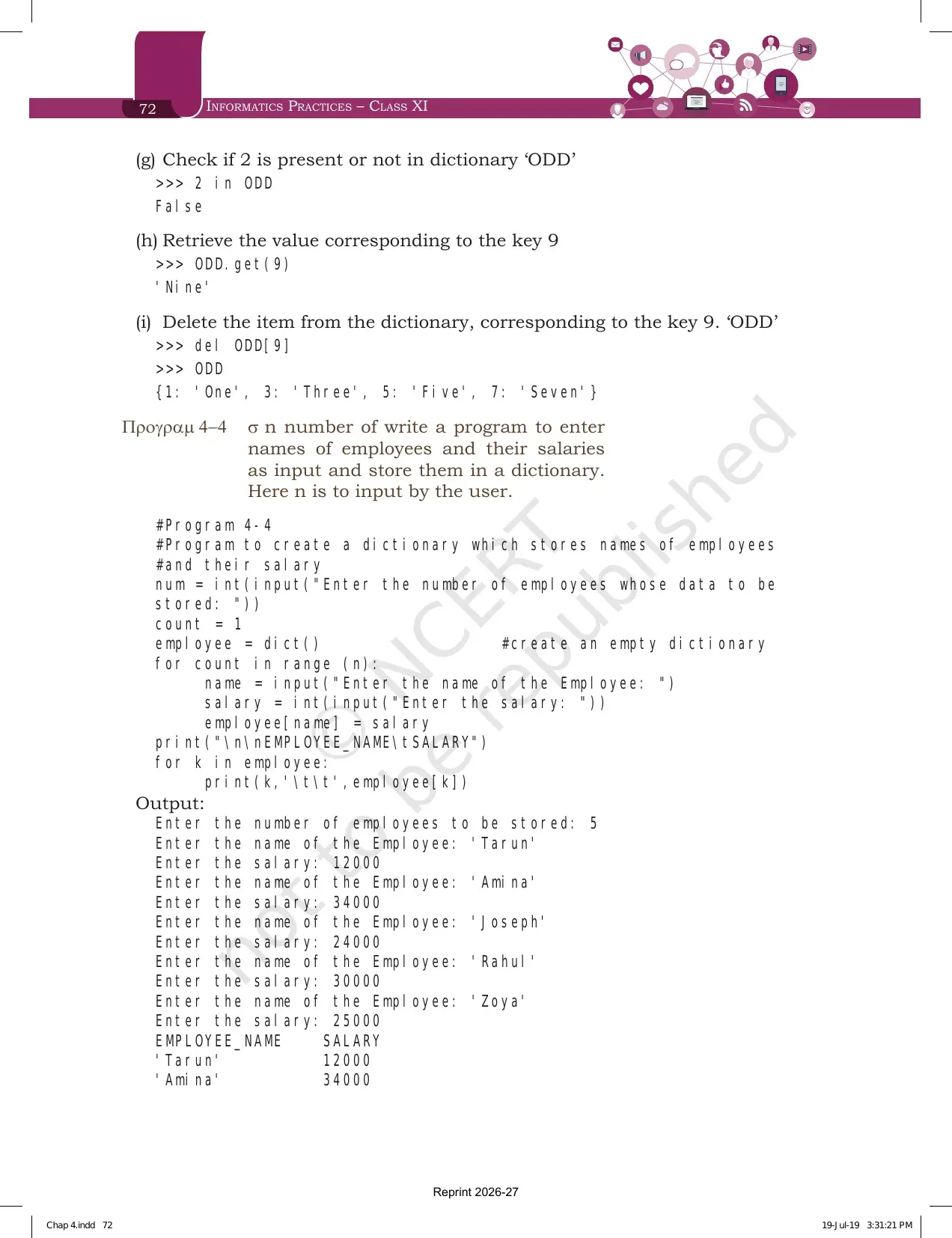
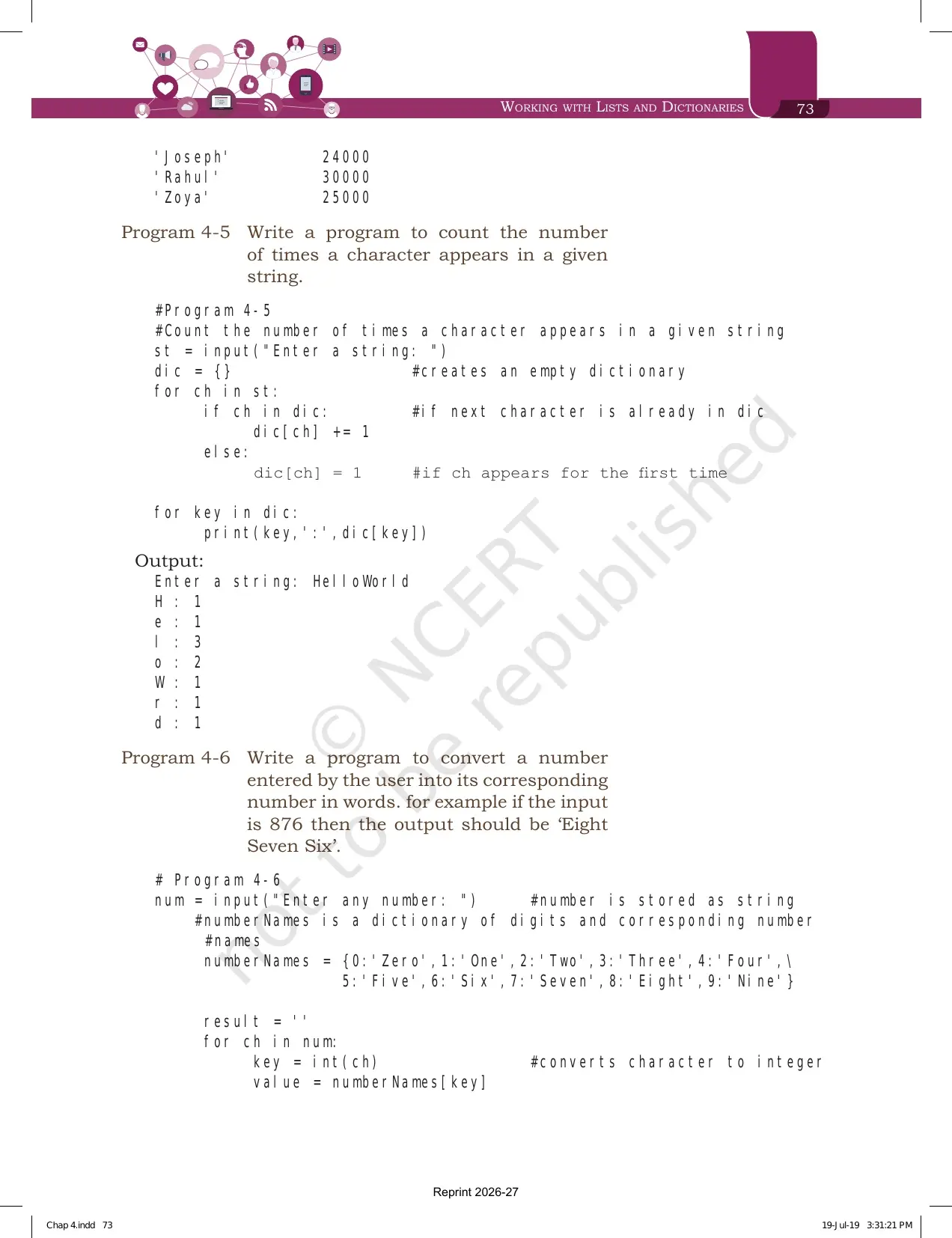
| 4.9 Manipulating Dictionaries | The ODD dictionary worked in nine steps, plus Programs 4-4, 4-5 and 4-6 | The quickest revision block in the chapter |
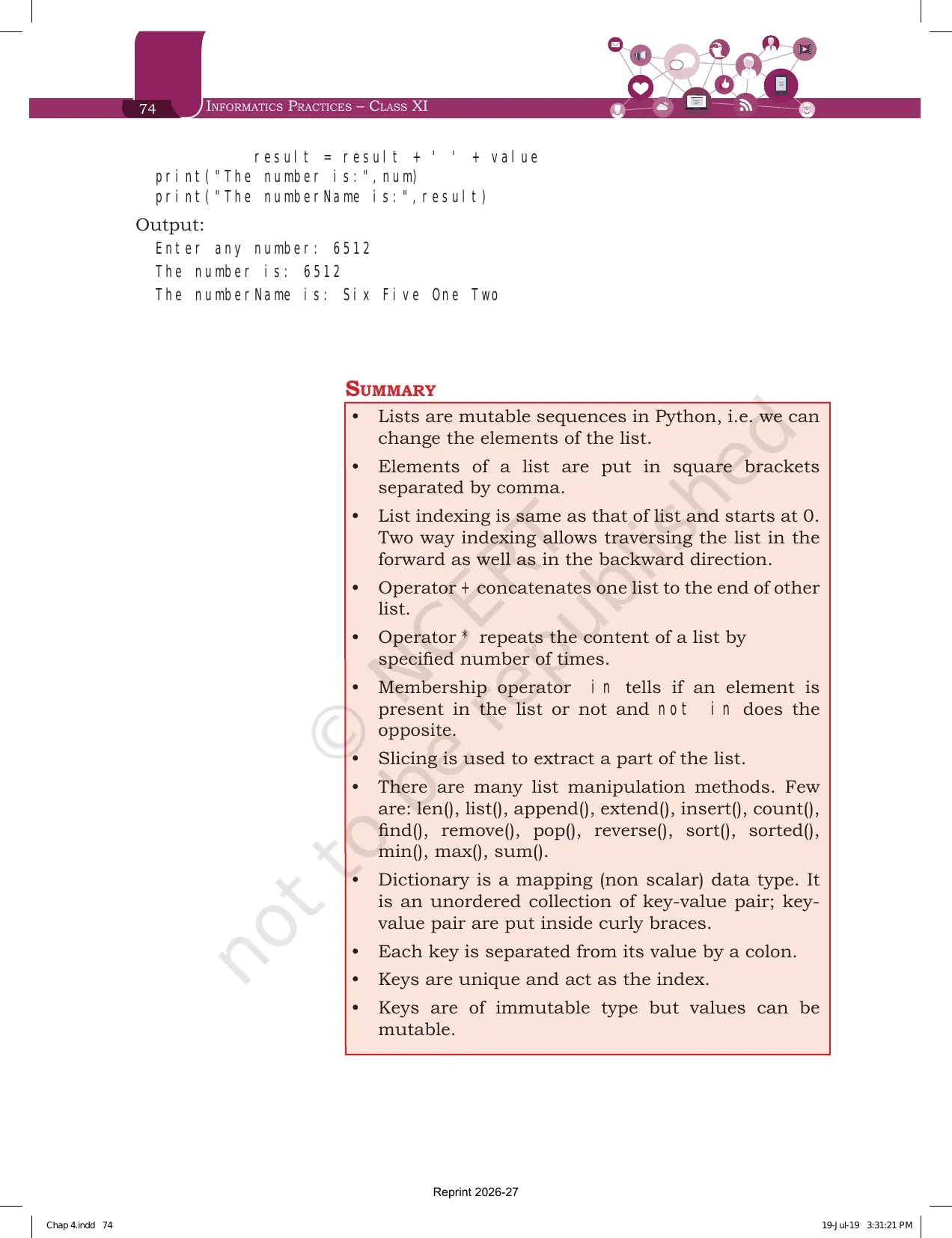
| Summary, page 74 | Twelve bullet points that compress lists and dictionaries together | The single best page for last minute revision |
| Exercise, pages 75 to 78 | 8 theory questions, 10 programming problems, a case study based question and three case study projects | School tests repeat these almost word for word |
Tip: the two margin boxes, one on concatenation and one on what len() and range() return, are only three lines each. Both have produced a one mark question in school tests, so read them along with the main text.
Introduction to List, Indexing and Why Lists Are Mutable
Section 4.1 gives the definition the marker looks for. The data type list is an ordered sequence which is mutable and made up of one or more elements. Unlike a string, which holds only characters, a list can hold integer, float, string, tuple or even another list. Elements sit inside square brackets and are separated by commas.
Example 4.1 prints four lists that are worth copying once by hand, because the exercise questions reuse their shapes.
- list1 is six even numbers, [2, 4, 6, 8, 10, 12].
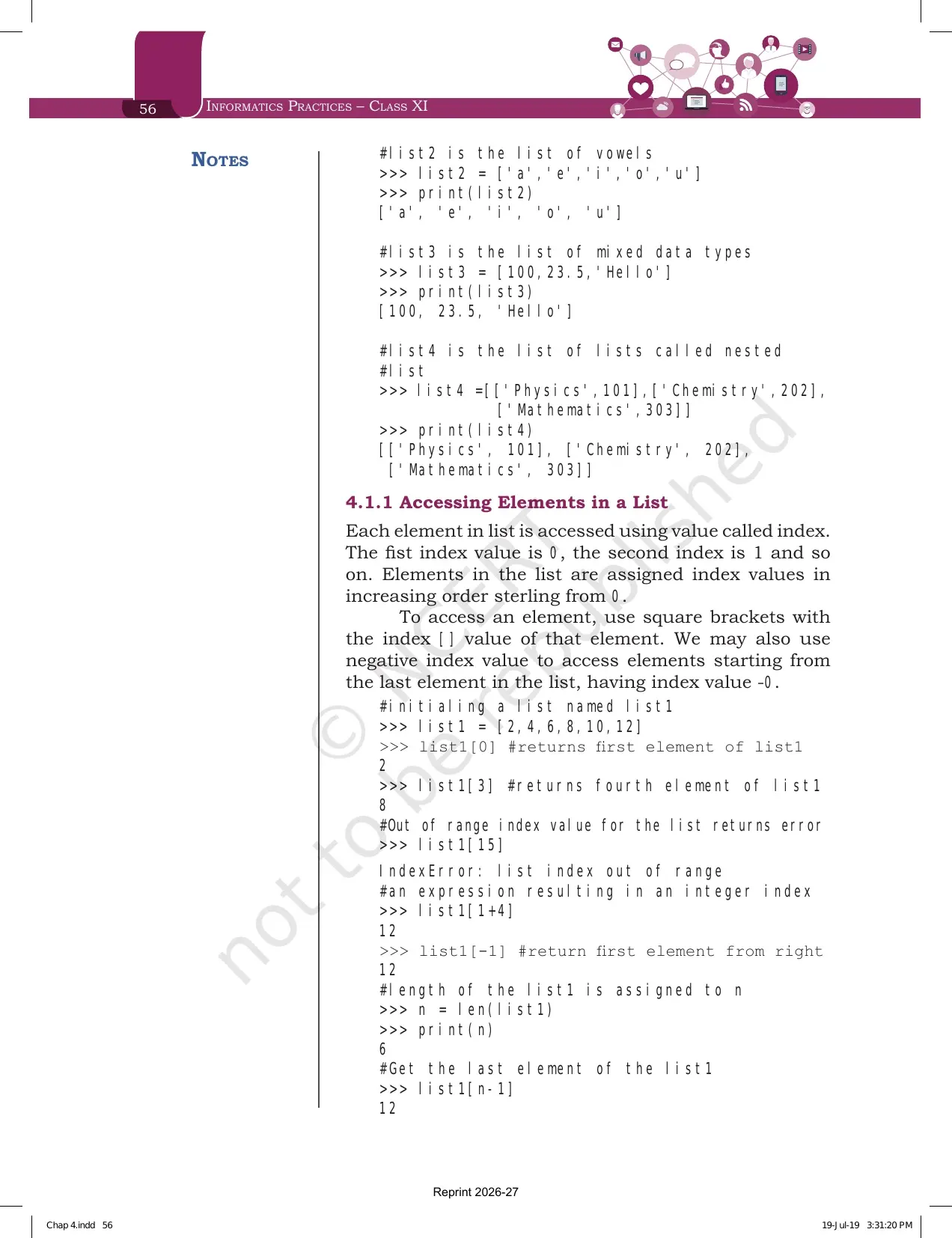
- list2 is the five vowels written as strings.
- list3 is [100, 23.5, 'Hello'], which mixes an integer, a float and a string in one list.
- list4 is a nested list, [['Physics',101],['Chemistry',202],['Mathematics',303]], where each element is itself a list.
Section 4.1.1 covers access. Each element is reached through a value called an index, and the first index is 0. Square brackets hold the index, so list1[0] gives 2 and list1[3] gives 8. An index that runs past the end raises IndexError: list index out of range.
| Statement | Output | Rule it demonstrates |
|---|---|---|
| list1[0] | 2 | Counting starts at 0, not 1 |
| list1[15] | IndexError | An out of range index stops the program |
| list1[1+4] | 12 | Any expression that gives an integer can be an index |
| list1[-1] | 12 | A negative index counts from the right |
| n = len(list1) then list1[n-1] | 12 | len() gives 6, so the last index is 5 |
| list1[-n] | 2 | The most negative index reaches the first element |
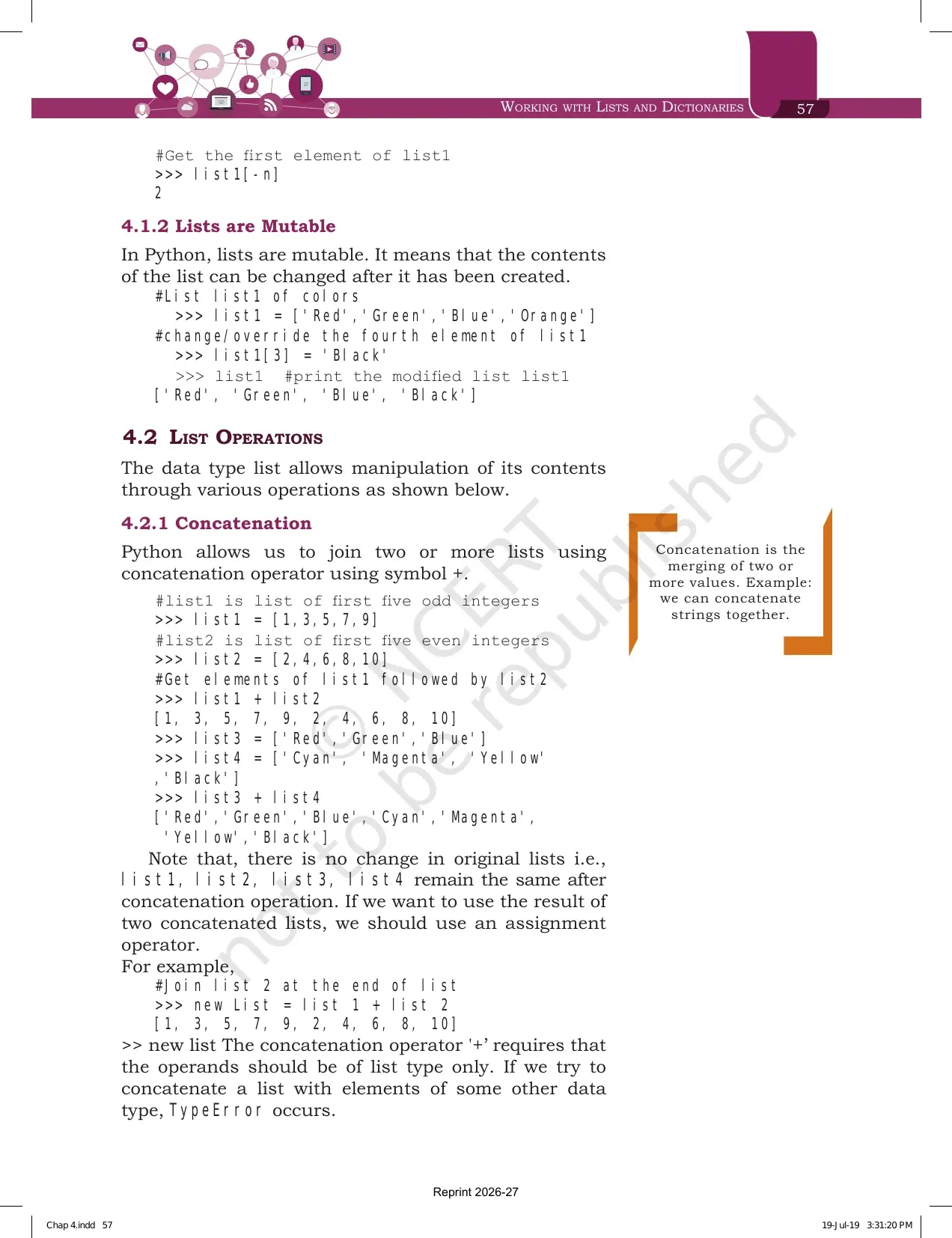
Section 4.1.2 is one line of theory and one example, but it is the line that separates a list from a tuple. Lists are mutable, so the contents of a list can be changed after it has been created. NCERT takes list1 = ['Red','Green','Blue','Orange'], writes list1[3] = 'Black', and the list becomes ['Red','Green','Blue','Black'] with no new list created.
Working with Lists and Dictionaries Chapter 4 Explained in Video
Source: Magnet Brains on YouTube
List Operations: Concatenation, Repetition, Membership and Slicing
Section 4.2 has four sub sections and every one of them shows up in the output questions. The first three are short. Slicing is the long one, and it carries the most marks.
| Operation | Symbol | Example from the chapter | Result |
|---|---|---|---|
| Concatenation (4.2.1) | + | [1,3,5,7,9] + [2,4,6,8,10] | [1, 3, 5, 7, 9, 2, 4, 6, 8, 10] |
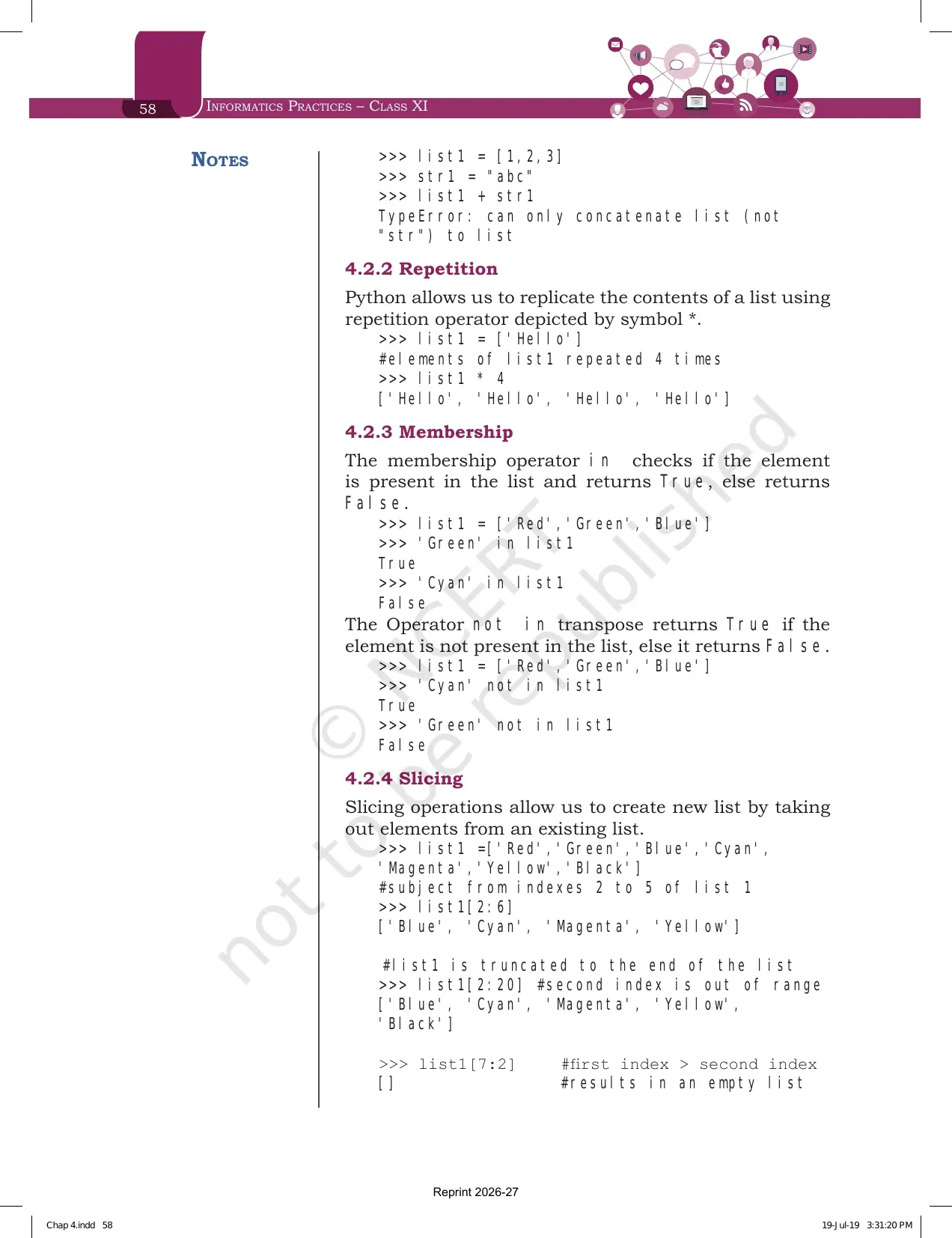
| Repetition (4.2.2) | * | ['Hello'] * 4 | ['Hello', 'Hello', 'Hello', 'Hello'] |
| Membership (4.2.3) | in | 'Green' in ['Red','Green','Blue'] | True |
| Membership (4.2.3) | not in | 'Cyan' not in ['Red','Green','Blue'] | True |
Two warnings sit around the concatenation example. First, the original lists do not change after a concatenation, so you must store the result in a new list with an assignment operator if you want to keep it. Second, both operands have to be lists. Trying [1,2,3] + "abc" raises TypeError: can only concatenate list (not "str") to list.
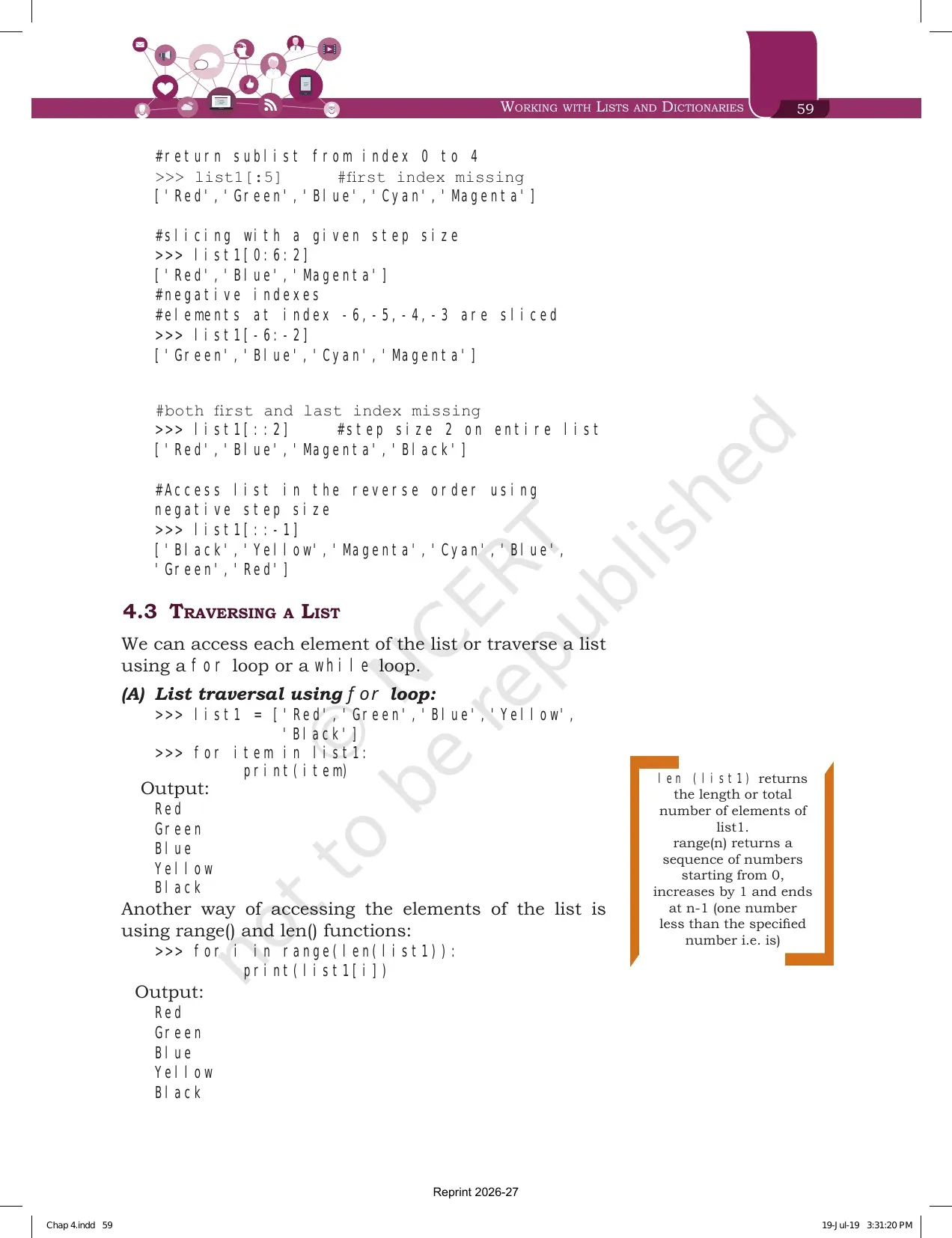
Section 4.2.4 defines slicing as creating a new list by taking elements out of an existing one. Every example uses the same seven colour list: ['Red','Green','Blue','Cyan','Magenta','Yellow','Black'].
| Slice | Output | What it proves |
|---|---|---|
| list1[2:6] | ['Blue', 'Cyan', 'Magenta', 'Yellow'] | The second index is excluded |
| list1[2:20] | ['Blue', 'Cyan', 'Magenta', 'Yellow', 'Black'] | An out of range second index is truncated, it does not raise an error |
| list1[7:2] | [] | A first index larger than the second gives an empty list |
| list1[:5] | ['Red','Green','Blue','Cyan','Magenta'] | A missing first index means start from 0 |
| list1[0:6:2] | ['Red','Blue','Magenta'] | The third value is the step size |
| list1[-6:-2] | ['Green','Blue','Cyan','Magenta'] | Negative indexes can be used on both sides |
| list1[::2] | ['Red','Blue','Magenta','Black'] | Both indexes missing means the whole list, stepped |
| list1[::-1] | ['Black','Yellow','Magenta','Cyan','Blue','Green','Red'] | A negative step reads the list backwards |
The last row is the one to memorise. list1[::-1] is the standard one line way to reverse a list without changing the original, and it appears again in exercise question 1(c).
Traversing a List Using a for Loop and the range() with len() Method
Section 4.3 is short and gives two ways to walk through a list. Both print the same output, and the exam accepts either unless the question names one.
- Direct traversal. Write for item in list1 followed by a colon, then print(item) on the indented line. The loop variable holds the element itself.
- Index traversal. Write for i in range(len(list1)) followed by a colon, then print(list1[i]). Here the loop variable holds the index, so you can also change elements while looping.
The margin box on this page explains the two functions the second form needs. len(list1) returns the length, that is the total number of elements of list1. range(n) returns a sequence of numbers starting from 0, increasing by 1, and ending at n-1, which is one number less than the value you supplied.
That off by one behaviour is the reason range(len(list1)) covers every index exactly once. Exercise question 3 uses this shape with an if i%2 == 0 test inside, so it prints the elements sitting at index 0, 2, 4, 6 and 8.
List Methods and Built-in Functions Printed in Table 4.1
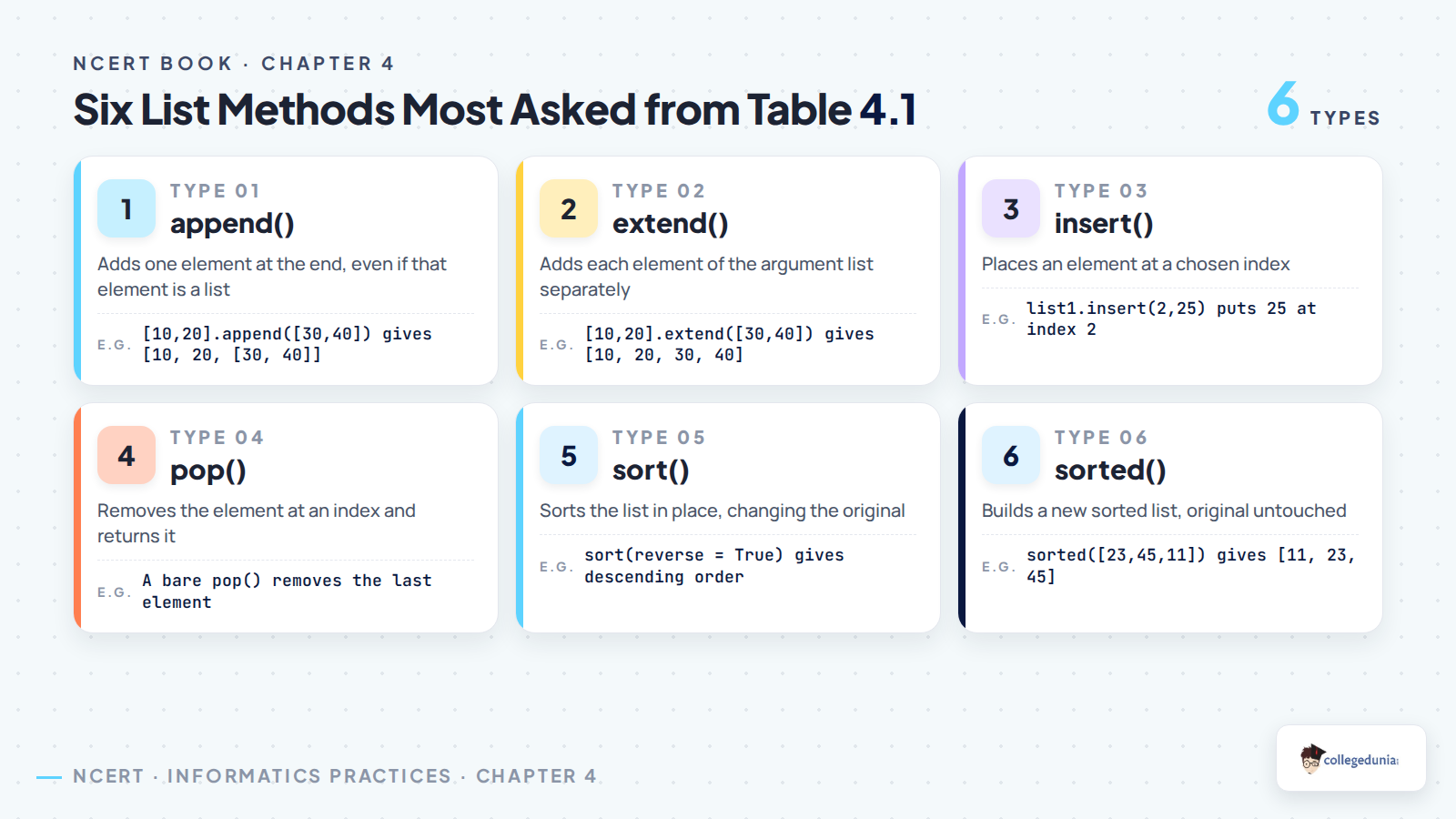
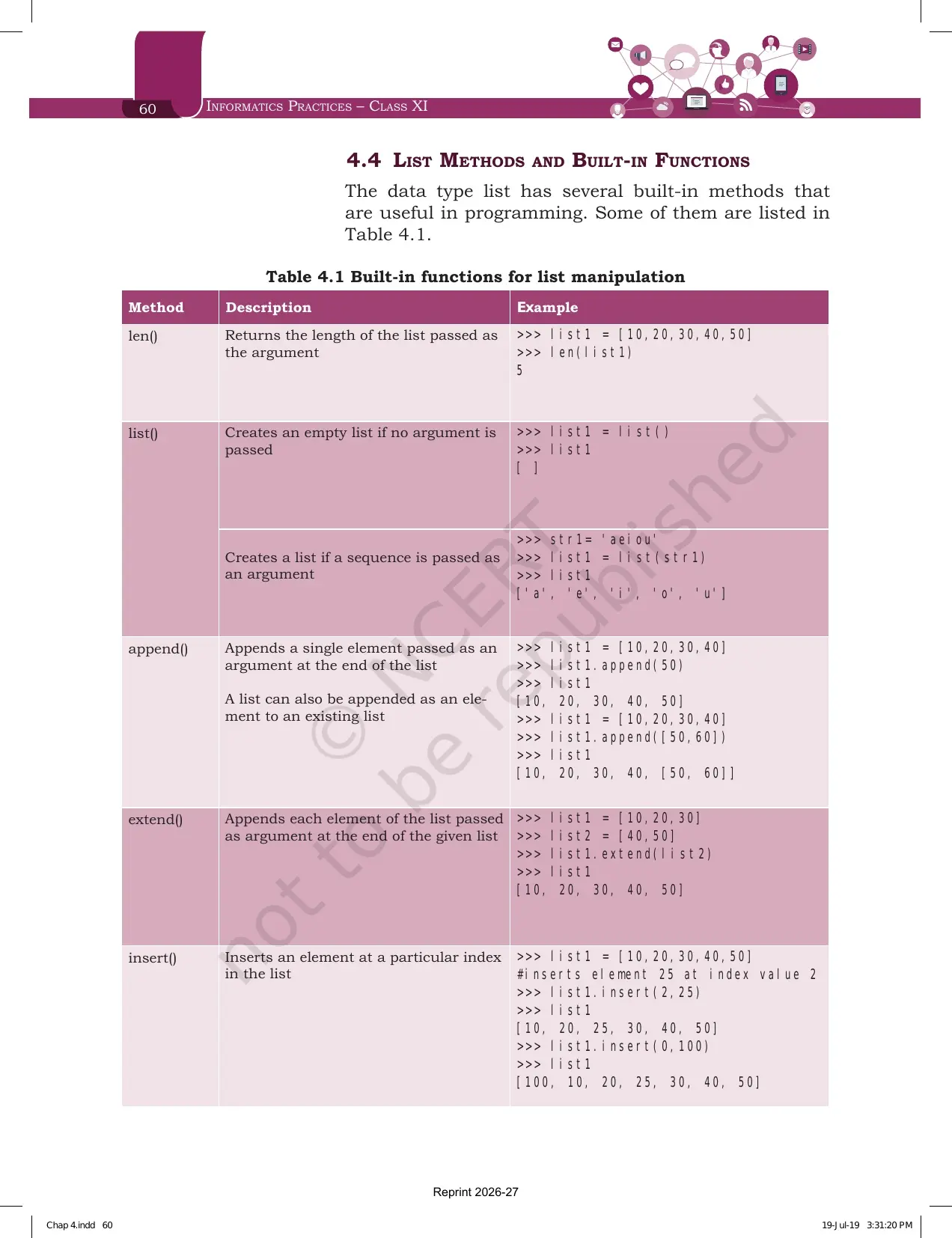
Section 4.4 is the reference table of the chapter. Fourteen methods are listed, each with a worked example. Learn them in pairs, because the exam almost always asks you to separate two that look similar.
| Method | What it does | Example and result from Table 4.1 |
|---|---|---|
| len() | Returns the length of the list passed as the argument | len([10,20,30,40,50]) gives 5 |
| list() | Creates an empty list with no argument, or a list from a sequence | list('aeiou') gives ['a', 'e', 'i', 'o', 'u'] |
| append() | Adds a single element at the end of the list | [10,20,30,40].append(50) gives [10, 20, 30, 40, 50] |
| append() with a list | Adds the whole list as one nested element | [10,20,30,40].append([50,60]) gives [10, 20, 30, 40, [50, 60]] |
| extend() | Adds each element of the argument list at the end of the given list | [10,20,30].extend([40,50]) gives [10, 20, 30, 40, 50] |
| insert() | Inserts an element at a particular index | [10,20,30,40,50].insert(2,25) gives [10, 20, 25, 30, 40, 50] |
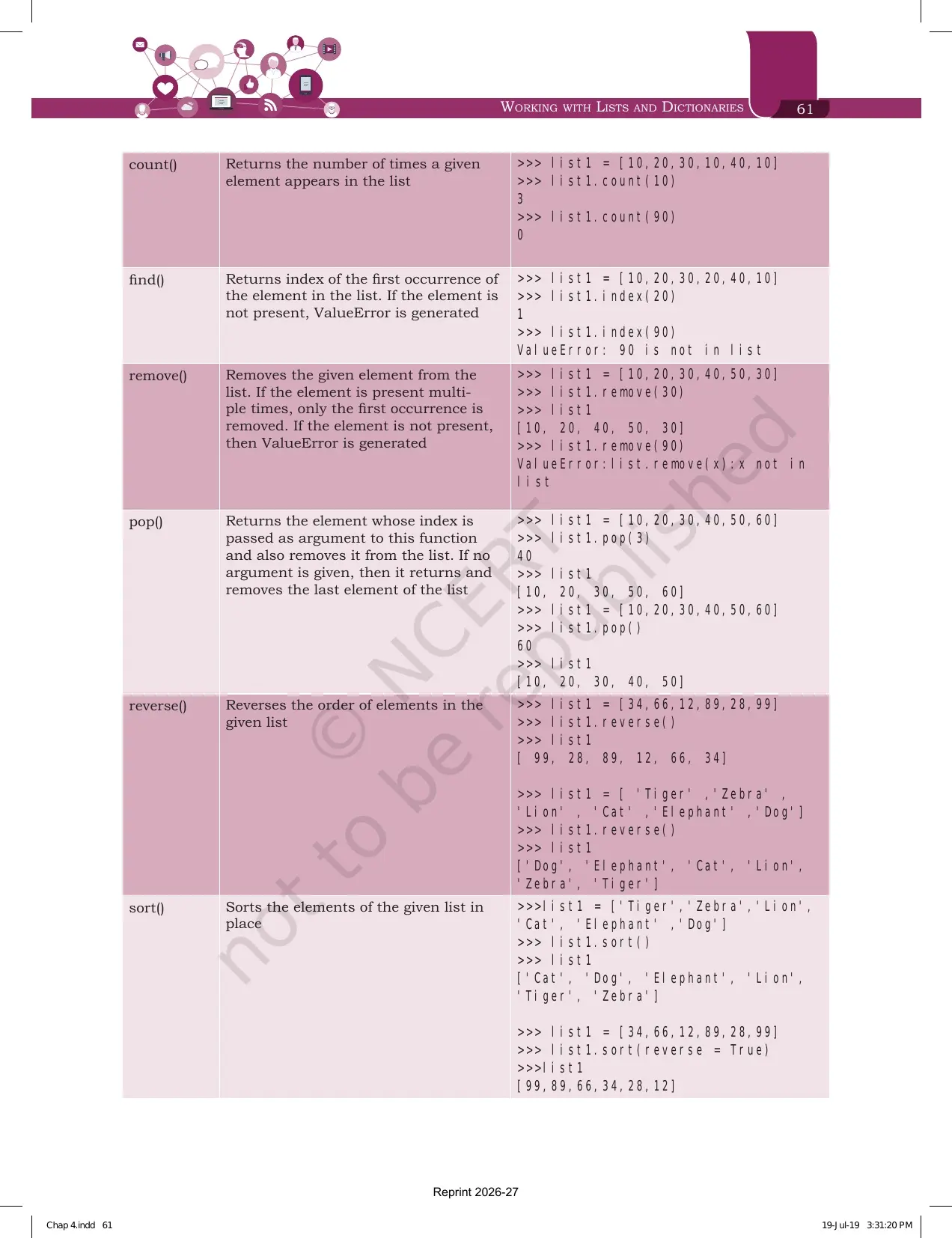
| count() | Returns how many times a given element appears | [10,20,30,10,40,10].count(10) gives 3, and count(90) gives 0 |
| index() | Returns the index of the first occurrence, otherwise ValueError | [10,20,30,20,40,10].index(20) gives 1, and index(90) raises ValueError |
| remove() | Removes the first occurrence of the given element, otherwise ValueError | [10,20,30,40,50,30].remove(30) gives [10, 20, 40, 50, 30] |
| pop() | Returns the element at the index passed and removes it, or the last element if no argument is given | pop(3) returns 40, and a bare pop() returns 60 |
| reverse() | Reverses the order of elements in the given list | [34,66,12,89,28,99].reverse() gives [99, 28, 89, 12, 66, 34] |
| sort() | Sorts the elements of the given list in place | sort() gives ascending order, and sort(reverse = True) gives descending order |
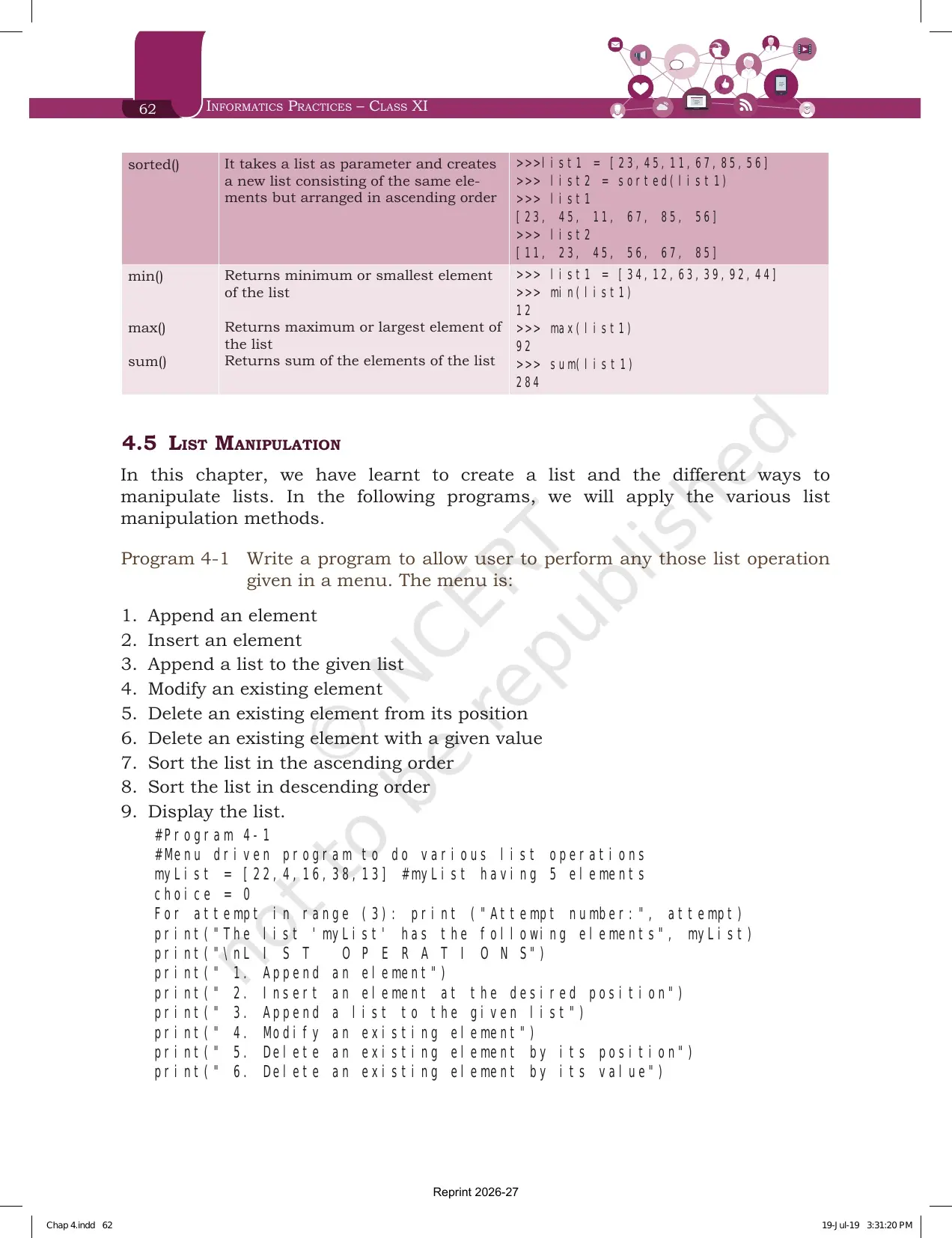
| sorted() | Takes a list and creates a new sorted list, leaving the original untouched | sorted([23,45,11,67,85,56]) gives [11, 23, 45, 56, 67, 85] |
| min(), max(), sum() | Return the smallest element, the largest element and the total | On [34,12,63,39,92,44] they give 12, 92 and 284 |
The three pairs that decide your marks are append() against extend(), sort() against sorted(), and remove() against pop(). append() adds one element even when that element is a list, while extend() unpacks the argument and adds each element separately. sort() changes the original list and returns nothing, while sorted() leaves the original alone and hands back a new list. remove() takes the value you want gone, while pop() takes the index and also returns what it removed.
One printing detail is worth knowing before the exam. The row for finding an index is labelled find() in Table 4.1, but every example in that row uses list1.index(). Write index() in your answer, because that is the method Python actually provides for a list.
List Manipulation Through Programs 4-1, 4-2 and 4-3
Section 4.5 stops explaining and starts applying. Three programs are printed with their full output, and they are the ones your practical file is expected to carry.
| Program | What it does | Methods it uses |
|---|---|---|
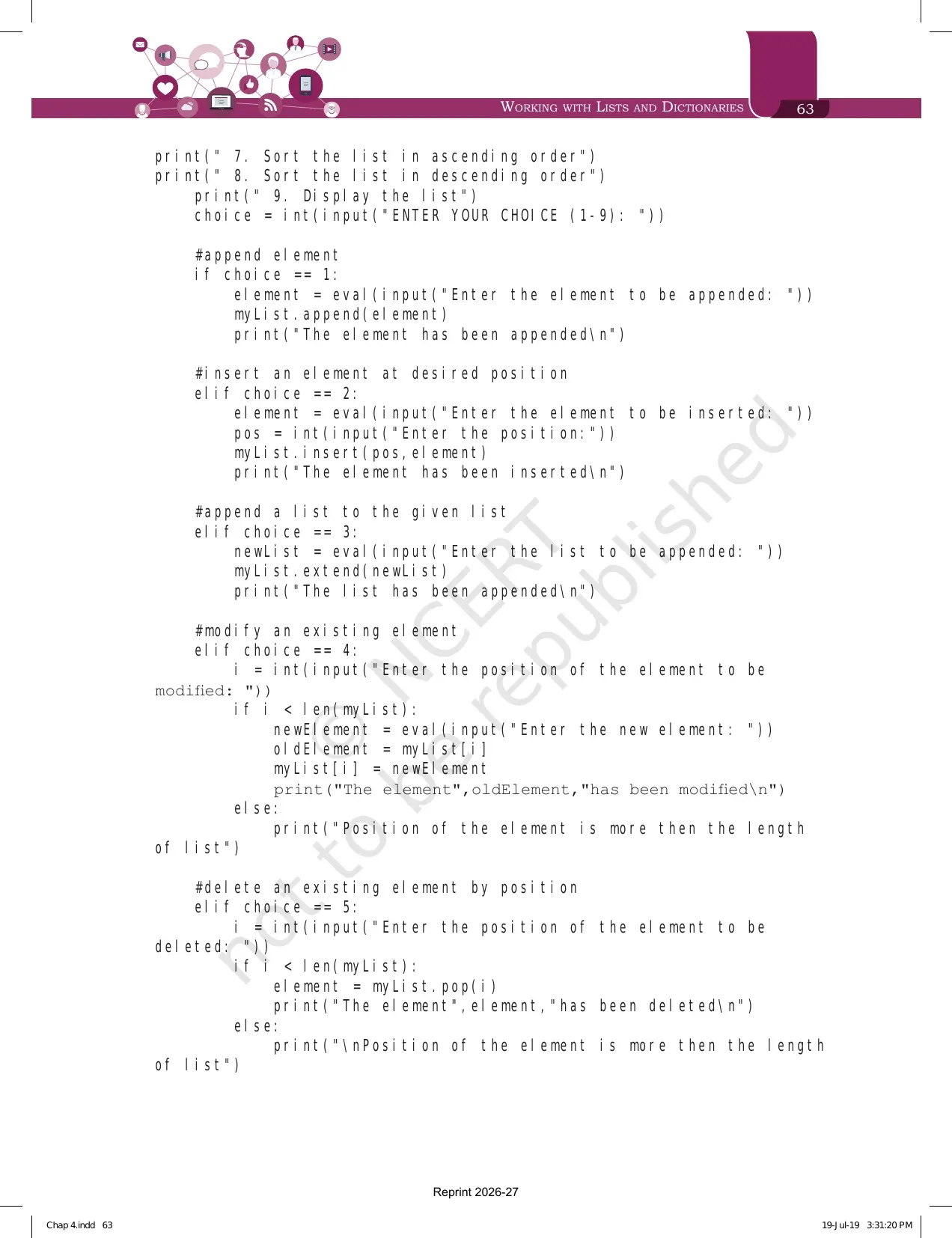
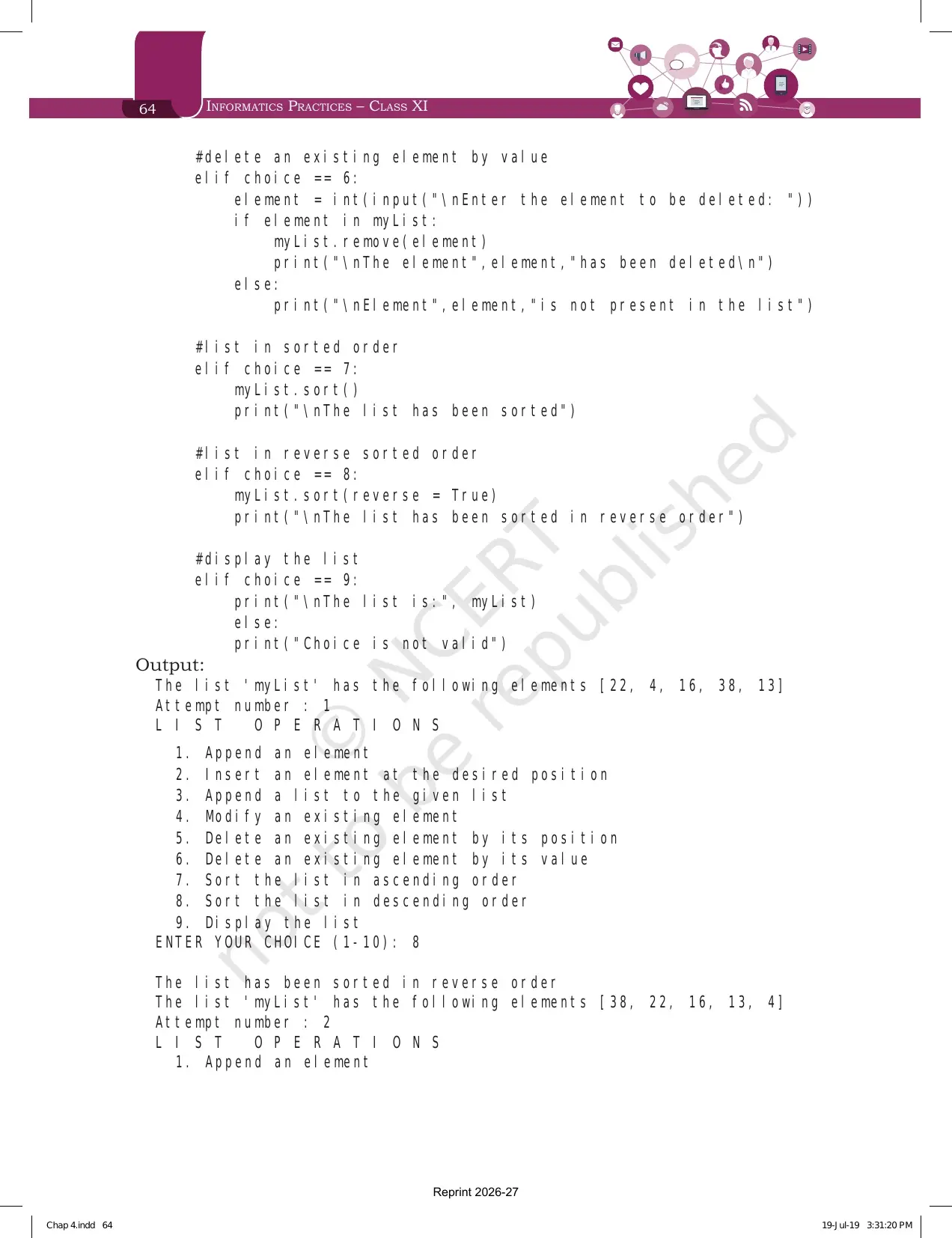
| Program 4-1 | A menu driven program with nine choices, run three times on myList = [22,4,16,38,13] | append(), insert(), extend(), pop(), remove(), sort() and sort(reverse = True) |
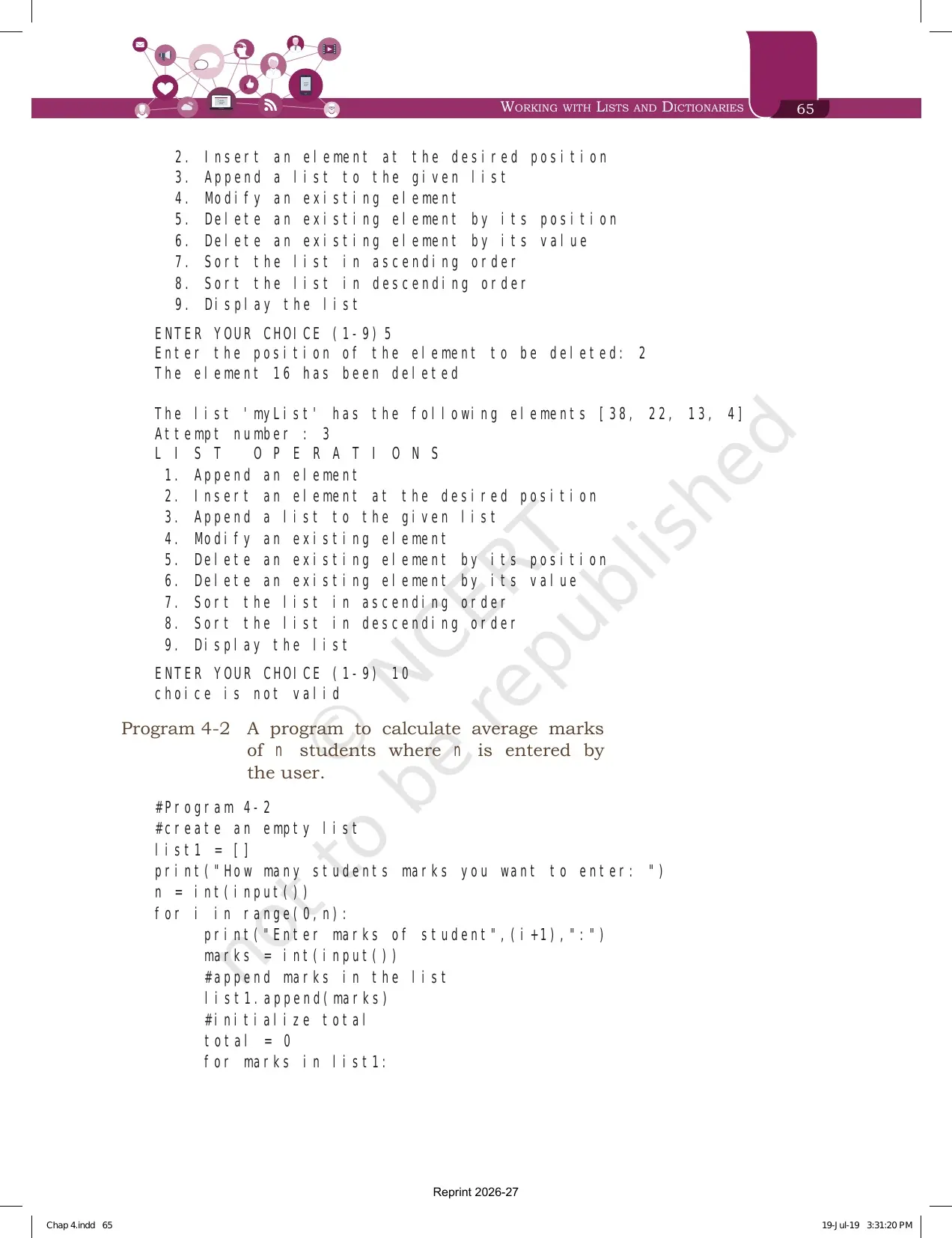
| Program 4-2 | Reads the marks of n students and prints the average | An empty list, append() inside a for loop, and a running total |
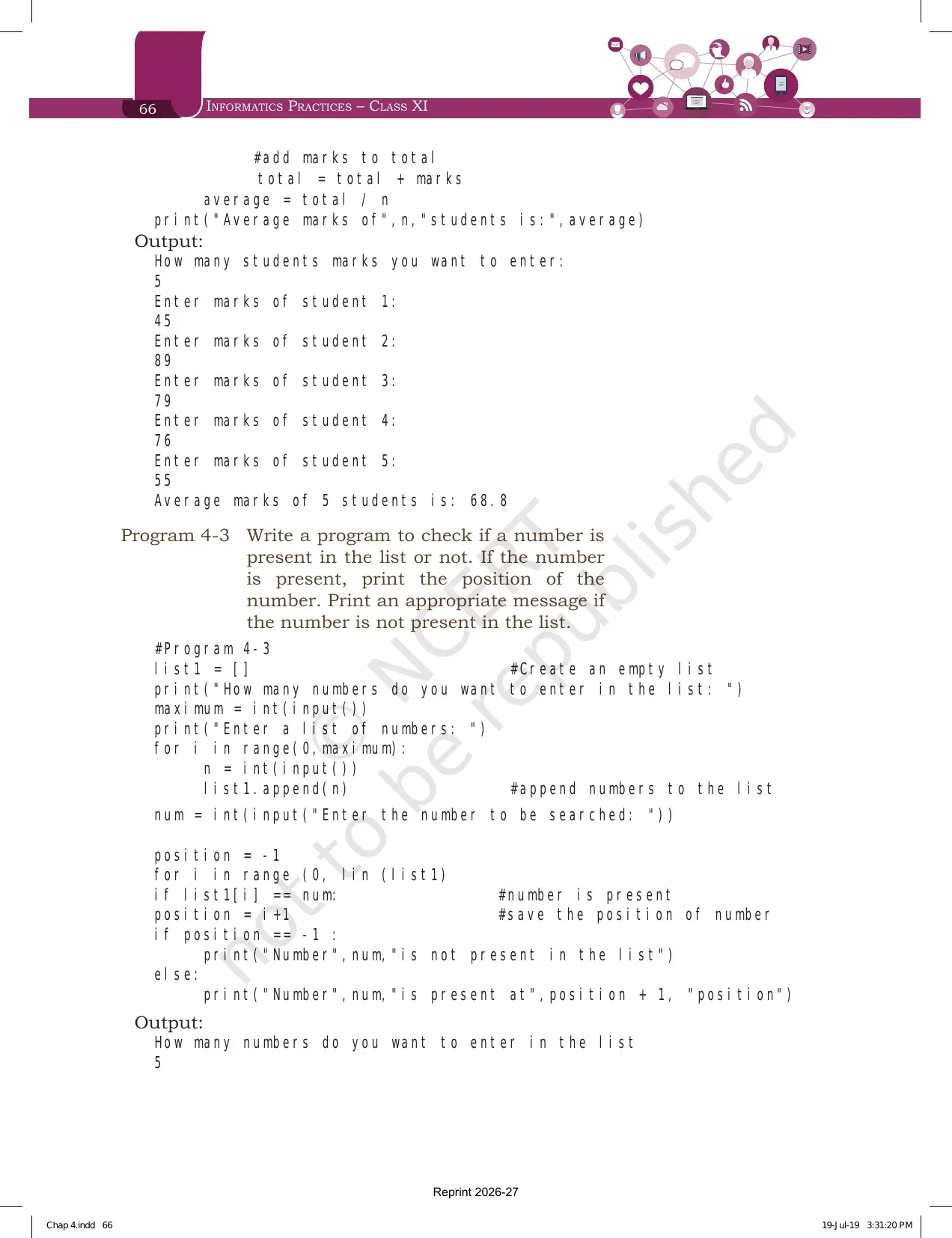
| Program 4-3 | Checks whether a number is present in a list and prints its position | append(), len(), range() and a position flag set to -1 |
Program 4-1 is the longest listing in the chapter, but it is only the nine methods you already know wrapped in an if and elif ladder. Choice 5 uses pop() because the question gives a position, and choice 6 uses remove() because the question gives a value. That single line explains the whole difference between the two methods.
Program 4-2 prints an average of 68.8 for the sample marks 45, 89, 79, 76 and 55. Program 4-3 searches the list 23, 567, 12, 89, 324 for the number 12 and reports it at the third position. Both programs start with an empty list written as list1 = [] and fill it with append() inside a loop, which is the pattern almost every programming problem in the exercise expects.
Introduction to Dictionaries: Keys, Values and Why Keys Must Be Immutable
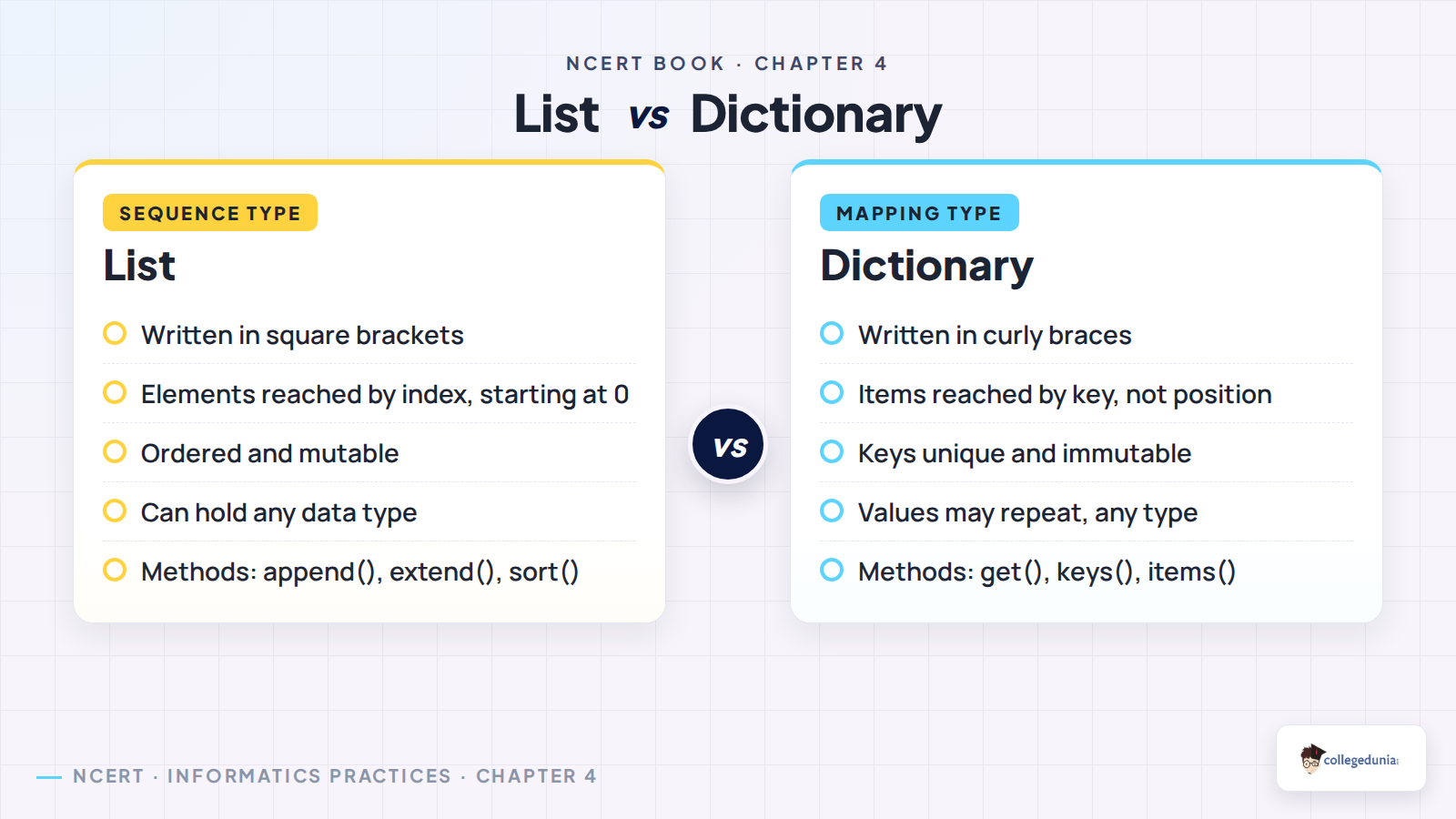
Section 4.6 switches from sequences to mapping. A dictionary is a mapping between a set of keys and a set of values, and one key value pair is called an item. A key is separated from its value by a colon, and consecutive items are separated by commas. Items in dictionaries are ordered, so the data comes back in the order you entered it.
Section 4.6.1 gives the creation rules, and this is the paragraph most short answer questions are lifted from.
- Items are enclosed in curly braces, and each item is a key value pair separated by a colon.
- The keys must be unique and must be of an immutable data type, which means a number, a string or a tuple.
- The values can be repeated and can be of any data type at all.
- dict1 = {} creates an empty dictionary, and the chapter example dict3 maps four student names to their percentage marks.
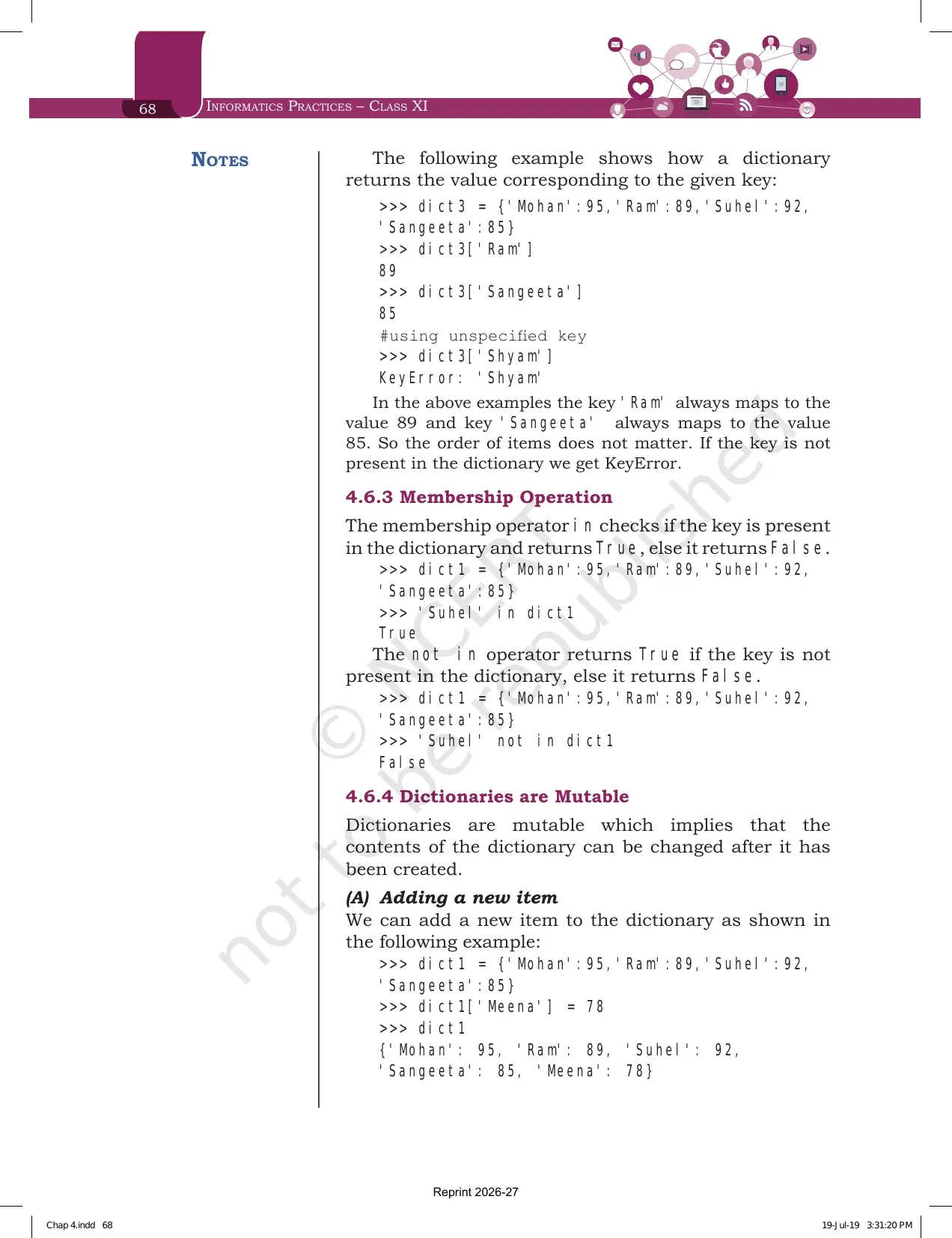
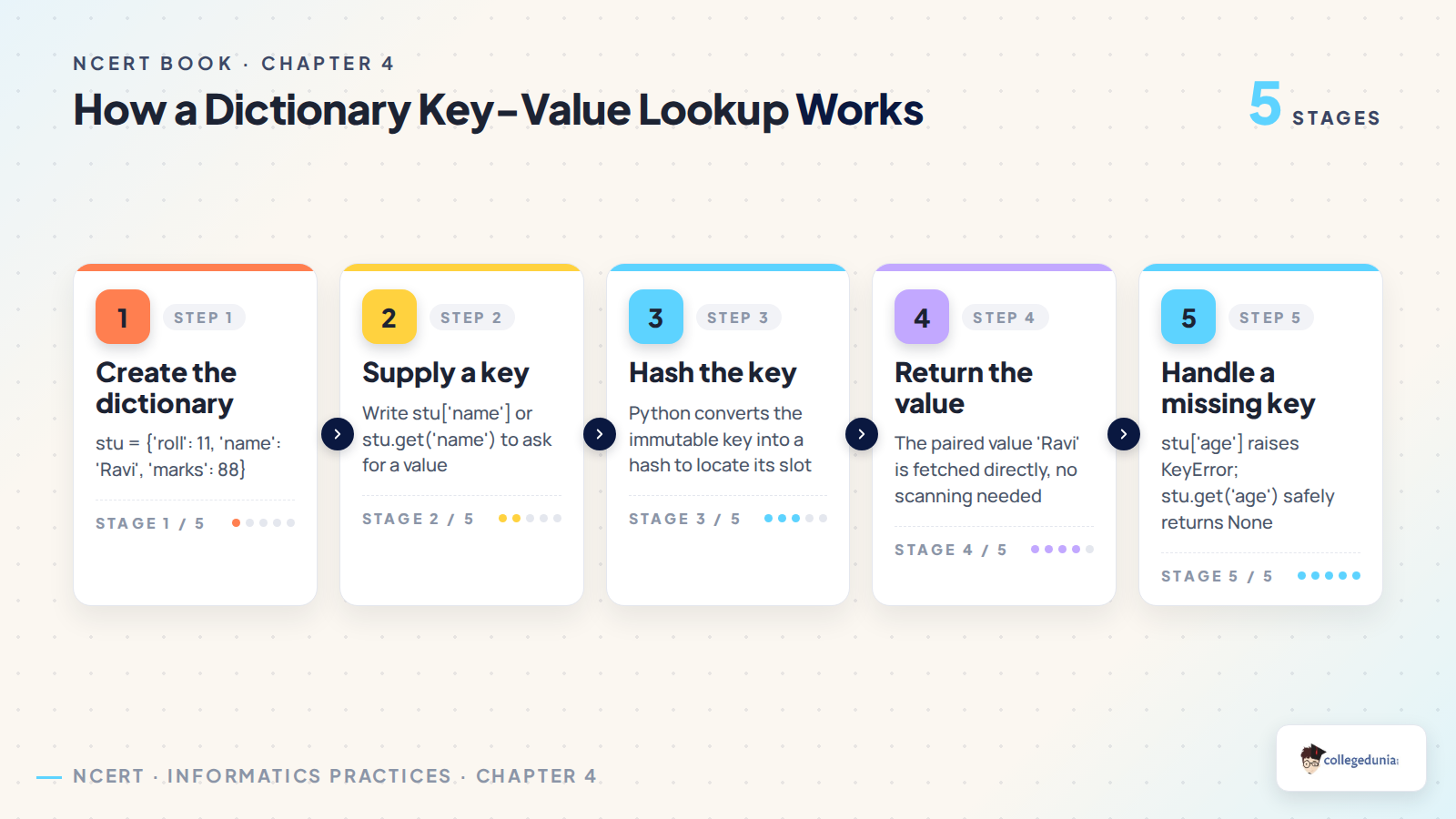
Section 4.6.2 covers access. The items of a string, a list or a tuple are reached by indexing, but the items of a dictionary are reached through the keys rather than through their positions. Each key serves as the index and maps to a value, so dict3['Ram'] returns 89. A key that does not exist raises KeyError, which is the dictionary version of IndexError.
Section 4.6.3 reuses the membership operators, with one change worth underlining. For a dictionary, in and not in test the keys, never the values. Section 4.6.4 then shows that dictionaries are mutable in two ways: writing dict1['Meena'] = 78 adds a brand new item, while writing dict1['Suhel'] = 93.5 overwrites an existing one. Python decides which of the two happens by checking whether the key is already present.
Traversing a Dictionary with the Two Methods NCERT Prints
Section 4.7 gives two for loop forms and prints identical output for both. The question usually asks for one of them by name, so keep the difference clear.
- Method 1. Write for key in dict1 followed by a colon, then print(key, ':', dict1[key]). The loop variable picks up the key, and you look the value up yourself.
- Method 2. Write for key, value in dict1.items() followed by a colon, then print(key, ':', value). Here items() hands you both parts at once, so no lookup is needed.
Both loops print Mohan: 95, Ram: 89, Suhel: 92 and Sangeeta: 85 in that order. Method 2 is the safer answer when a question asks you to print keys and values together, because it reads both in a single pass.
Dictionary Methods and Built-in Functions Printed in Table 4.2
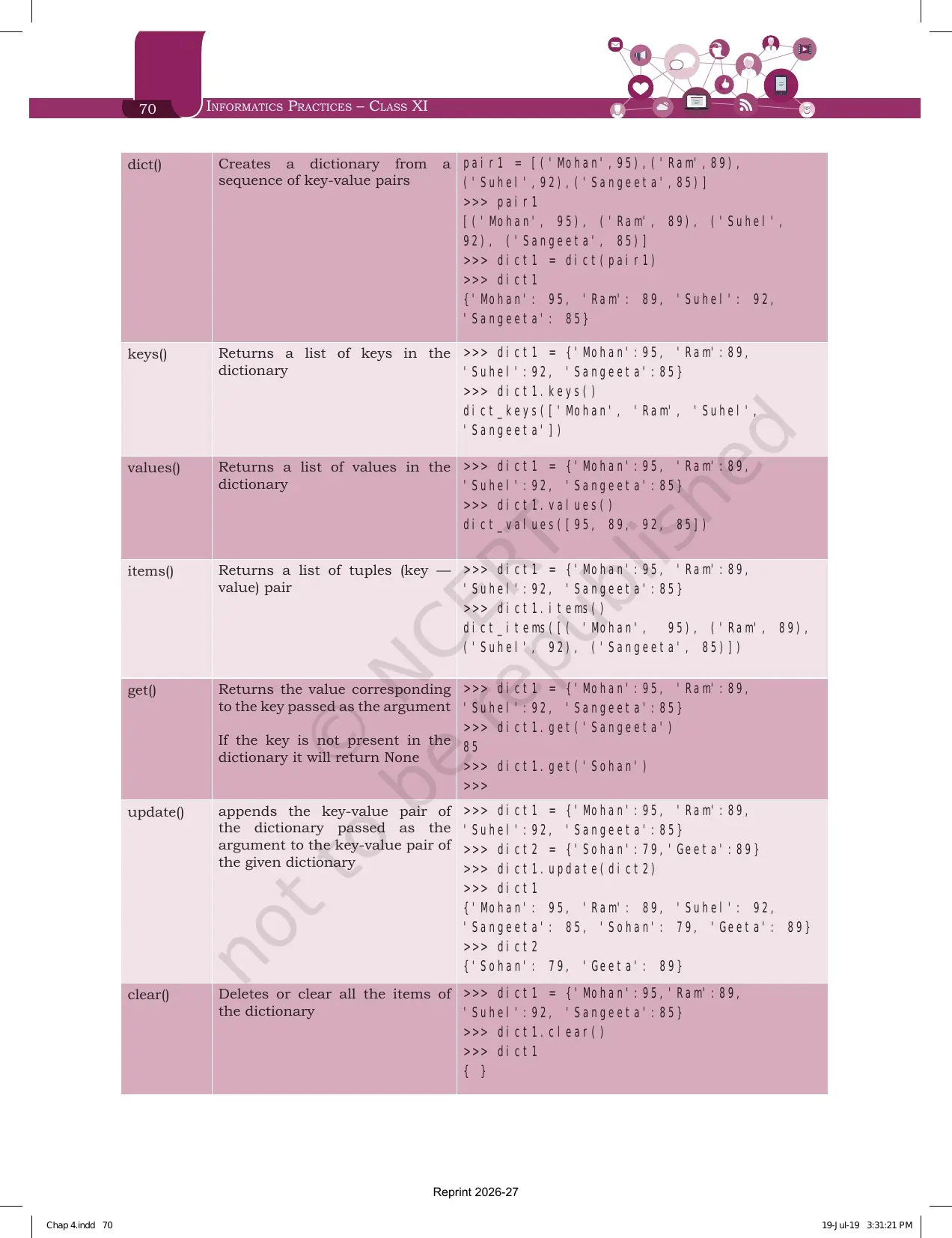
Section 4.8 is the dictionary twin of Table 4.1. Every example uses the same dictionary, dict1 = {'Mohan':95, 'Ram':89, 'Suhel':92, 'Sangeeta':85}, so you can trace all nine rows on one line of rough work.
| Method | What it does | Result printed in Table 4.2 |
|---|---|---|
| len() | Returns the number of key value pairs | len(dict1) gives 4 |
| dict() | Creates a dictionary from a sequence of key value pairs | dict(pair1) turns a list of four tuples into the same dictionary |
| keys() | Returns a list of the keys | dict_keys(['Mohan', 'Ram', 'Suhel', 'Sangeeta']) |
| values() | Returns a list of the values | dict_values([95, 89, 92, 85]) |
| items() | Returns a list of key and value tuples | dict_items([('Mohan', 95), ('Ram', 89), ('Suhel', 92), ('Sangeeta', 85)]) |
| get() | Returns the value for the key passed, and returns None if the key is absent | get('Sangeeta') gives 85, while get('Sohan') returns nothing |
| update() | Appends the key value pairs of the argument dictionary to the given one | dict1 grows to six items, and dict2 stays unchanged |
| clear() | Deletes all the items of the dictionary | dict1 becomes an empty pair of braces |
| del | Deletes one item by key, or the whole dictionary from memory | del dict1['Ram'] drops one item, while del dict1 makes the name raise NameError |
Two rows are asked more often than the rest. get() is the safe alternative to square brackets, because a missing key returns None instead of raising KeyError. And del has two forms that look almost the same: del dict1['Ram'] removes a single item, while del dict1 without the square brackets removes the entire dictionary, after which even printing its name gives NameError: name 'dict1' is not defined.
Manipulating Dictionaries and the Three Programs at the End of the Chapter
Section 4.9 works one dictionary through nine steps, then prints three programs. The worked dictionary is ODD = {1:'One', 3:'Three', 5:'Five', 7:'Seven', 9:'Nine'}, where the key is the digit and the value is that digit in words.
| Step | Statement | Output |
|---|---|---|
| (b) | ODD.keys() | dict_keys([1, 3, 5, 7, 9]) |
| (c) | ODD.values() | dict_values(['One', 'Three', 'Five', 'Seven', 'Nine']) |
| (d) | ODD.items() | dict_items with all five key and value tuples |
| (e) | len(ODD) | 5 |
| (f) and (g) | 7 in ODD, then 2 in ODD | True, then False |
| (h) | ODD.get(9) | 'Nine' |
| (i) | del ODD[9] | {1: 'One', 3: 'Three', 5: 'Five', 7: 'Seven'} |
The three programs that follow are the ones most likely to appear in a practical exam.
- Program 4-4 stores employee names as keys and salaries as values, then prints the whole dictionary as a two column table.
- Program 4-5 counts how many times each character appears in a string. For the input HelloWorld it prints l as 3 and o as 2, and the trick is the line dic[ch] += 1 when the character is already a key.
- Program 4-6 converts a number into words using a dictionary of digits, so the input 6512 prints Six Five One Two.
Program 4-5 is the single most reused idea in the chapter. The if ch in dic test followed by dic[ch] += 1 for an old key and dic[ch] = 1 for a new one is the standard frequency count, and programming problems 1 and 9 both want the same logic.
Exercise Questions and Programming Problems Printed at the End of the Chapter
The chapter closes on pages 75 to 78 with 8 theory questions, then 10 programming problems, then the case study work. Output tracing takes the largest share of the theory set, so keep a shell open and run the code rather than reading the answers.
| Question | What it asks | Which section answers it |
|---|---|---|
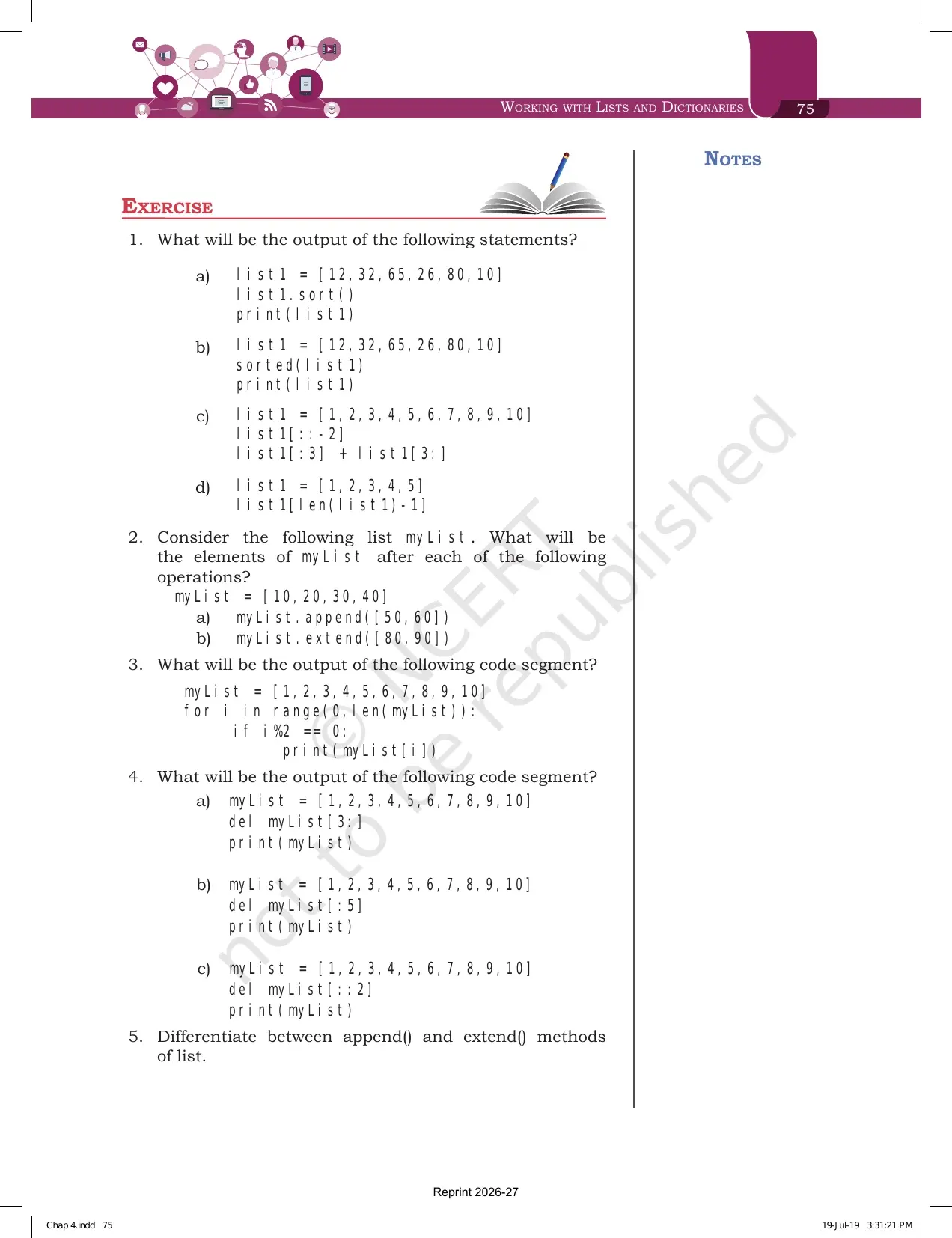
| 1 | Four output items on sort(), sorted(), a negative step slice and list1[len(list1)-1] | 4.2.4 and 4.4 |
| 2 | The elements of myList after append([50,60]) and after extend([80,90]) | 4.4 |
| 3 | Output of a range(len(myList)) loop that prints only even index positions | 4.3 |
| 4 | Output after del myList[3:], del myList[:5] and del myList[::2] | 4.2.4 and 4.8 |
| 5 | Differentiate between the append() and extend() methods of a list | 4.4 |
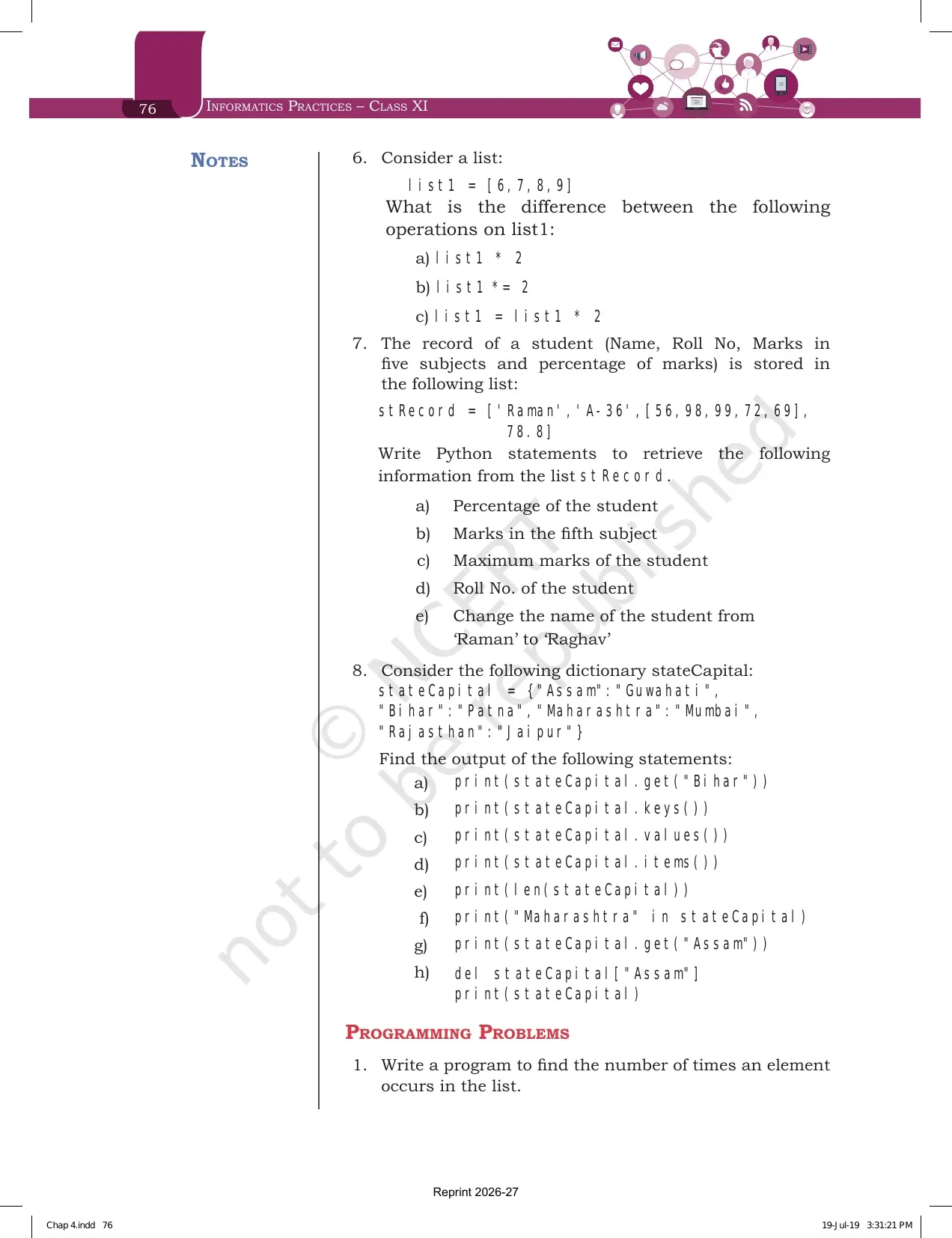
| 6 | The difference between list1 * 2, list1 *= 2 and list1 = list1 * 2 | 4.2.2 |
| 7 | Five statements to read from a nested student record list called stRecord | 4.1.1 and 4.4 |
| 8 | Eight outputs on the stateCapital dictionary, from get() to del | 4.6, 4.7 and 4.8 |
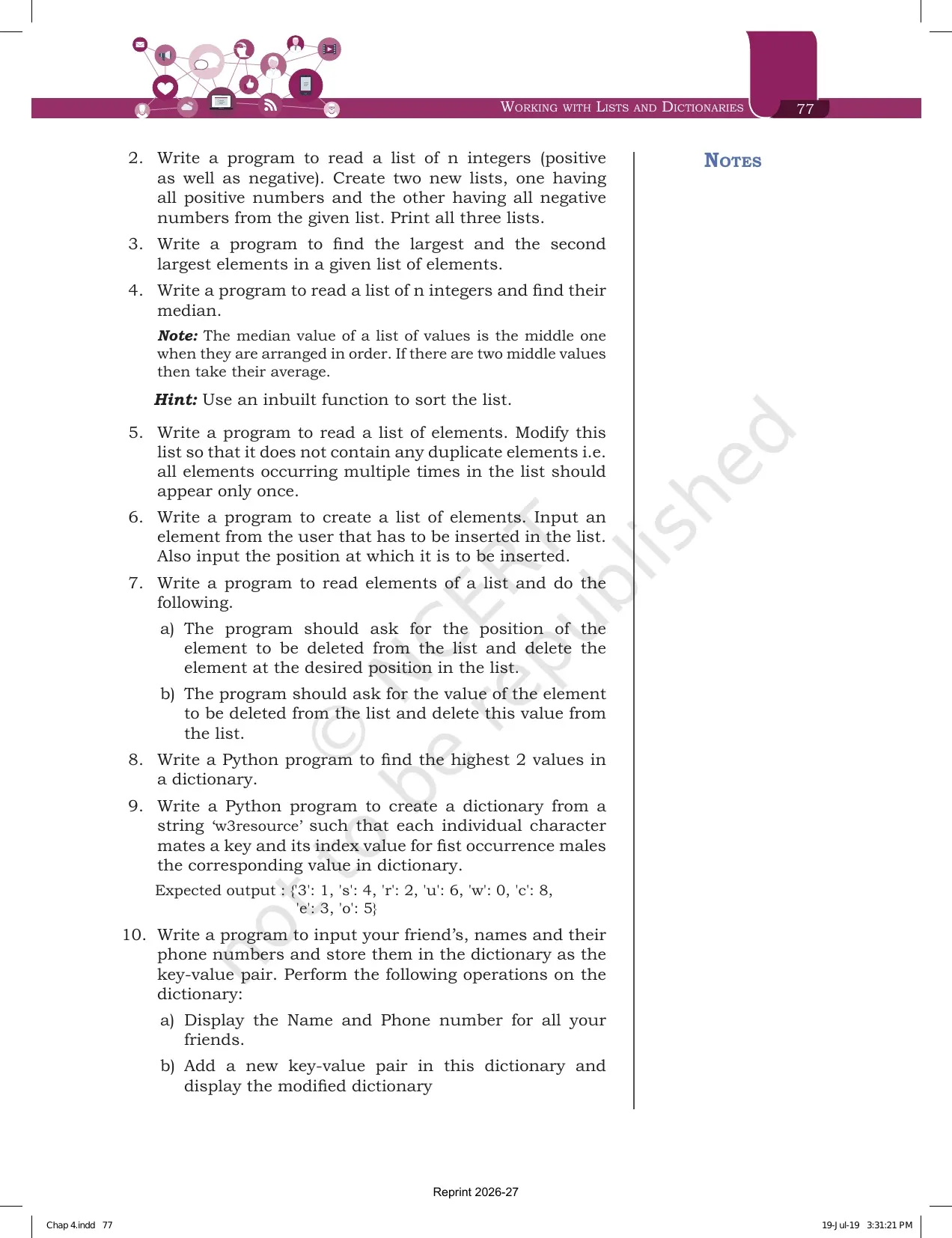
| Programming problems 1 to 7 | Frequency count, splitting positives and negatives, largest and second largest, median, removing duplicates, insertion at a position and two kinds of deletion | 4.4 and 4.5 |
| Programming problems 8 to 10 | Highest two values in a dictionary, a character index dictionary from the string w3resource, and a friends and phone numbers dictionary with six operations | 4.8 and 4.9 |
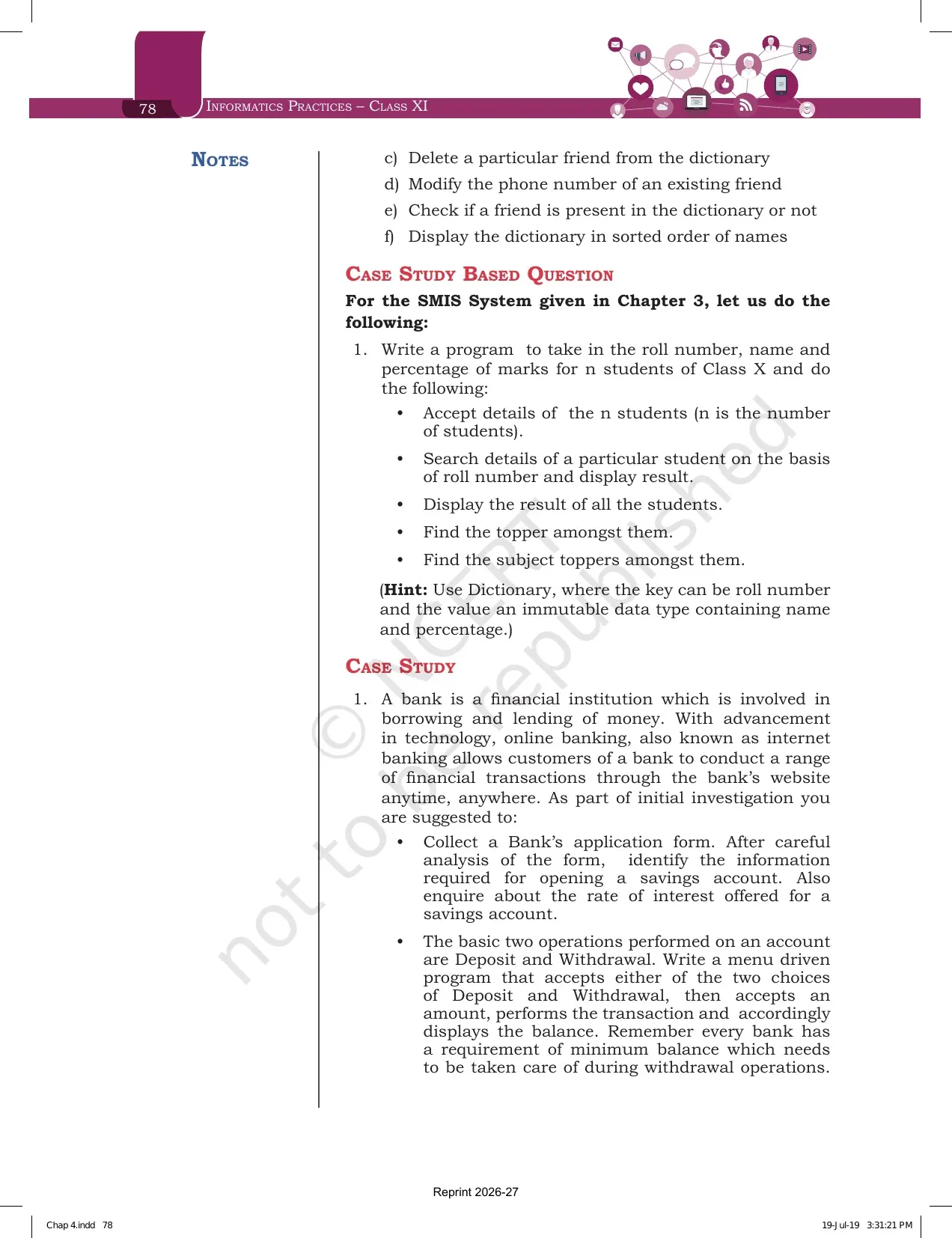
| Case study based question | Extends the Student Management Information System from the previous chapter using a dictionary keyed on roll number | 4.6 and 4.9 |
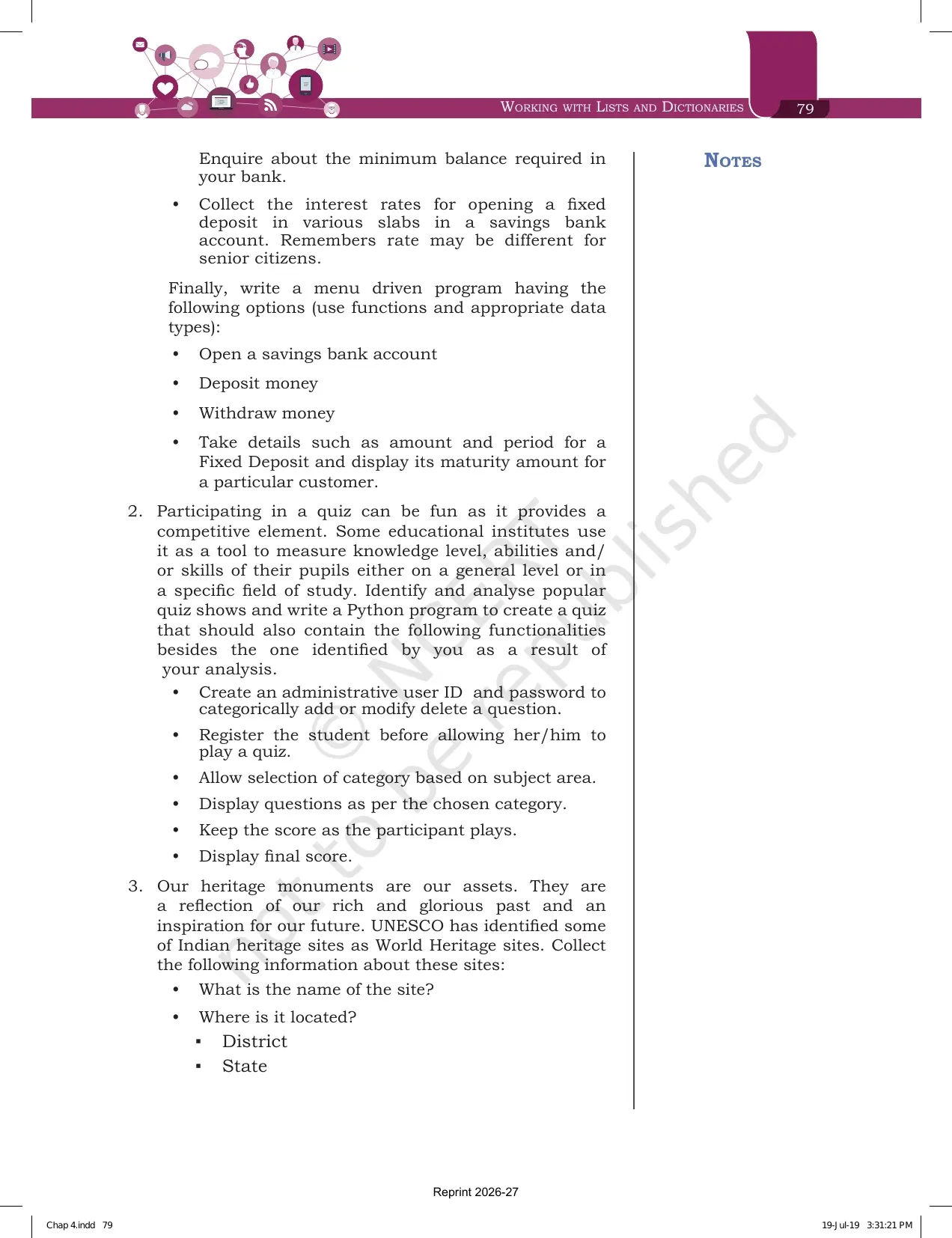
| Case study projects | Three longer projects: an online banking menu, a quiz application, and a program on the UNESCO World Heritage sites in India | The whole chapter |
Question 7 is worth the most practice time. stRecord holds a name, a roll number, a list of five subject marks and a percentage, so the marks list is reached with stRecord[2] and the fifth subject with stRecord[2][4]. Double indexing on a nested list is the one idea that question tests, and it appears again in the case study projects.
Working with Lists and Dictionaries Weightage in the Class 11 Informatics Practices Paper
The Class 11 Informatics Practices theory paper carries 70 marks with 30 marks of practical work. This chapter sits in Unit 2, the second heaviest unit in the course, and it also supplies the data structures every later program depends on.
| Unit | Approximate theory marks | Where Working with Lists and Dictionaries appears |
|---|---|---|
| Unit 1, Introduction to Computer System | Around 10 | Not applicable |
| Unit 2, Introduction to Python | Around 25 | List indexing, slicing, list methods, dictionary methods, traversal and menu driven programs |
| Unit 3, Database concepts and SQL | Around 30 | Not applicable |
| Unit 4, Introduction to Emerging Trends | Around 5 | Not applicable |
- Most common shape: a one mark output question on a slice or on a list method.
- Second most common: a two mark difference question, usually append() against extend() or sort() against sorted().
- Heaviest single item: a four or five mark program that builds a list or a dictionary from user input and then searches, counts or sorts it.
- The same list and dictionary work is tested again in the Computer Science and Informatics Practices domain paper of CUET (UG).
Common Mistakes Students Make in the Working with Lists and Dictionaries Chapter
Avoid these six in the answer sheet:
- Writing that append() and extend() do the same thing. append([50,60]) adds one nested element, while extend([50,60]) adds two separate elements.
- Printing a value after sorted() and expecting the original list to change. sorted() builds a new list, while sort() changes the original.
- Including the second index in a slice. list1[2:6] stops at index 5, so it returns four elements, not five.
- Saying that list1[7:2] raises an error. It quietly returns an empty list, and only a single index out of range raises IndexError.
- Using a list as a dictionary key. Keys must be immutable, so only a number, a string or a tuple is allowed.
- Confusing del dict1['Ram'] with del dict1. The first drops one item, the second destroys the whole dictionary.
A quick fix for the slice slip: read a colon as up to but not including. Then list1[2:6] reads as index 2 up to but not including index 6, and the count works itself out.
Student Feedback on the Working with Lists and Dictionaries Chapter
What Class 11 Students Said About This Chapter
What 13,260 Class 11 Informatics Practices students told us in a Collegedunia poll run during the 2026-27 session:
- 74% of Class 11 students surveyed said slicing was the sub topic they practised most before the paper.
- 7 out of 10 students rated the append() against extend() difference as the easiest two mark question in Unit 2.
- 44% lost marks by treating sorted() as though it changed the original list.
Source: 2026-27 Class 11 Informatics Practices student poll. Sample of 13,260 students from CBSE schools across 16 states.
How to Use the Working with Lists and Dictionaries PDF in a Three Block Revision Plan
This chapter is code from the first page, so reading it alone does not work. Keep the Python shell open on one side and the PDF on the other, and give the chapter about two hours split into three blocks.
- Block 1, 40 minutes. Read sections 4.1 to 4.3. Type every slice from the colour list yourself and check each output against the book. Finish with exercise questions 1, 3 and 6.
- Block 2, 40 minutes. Read sections 4.4 and 4.5. Run all 14 rows of Table 4.1 in interactive mode, then write Programs 4-2 and 4-3 from memory. Finish with exercise questions 2, 5 and 7.
- Block 3, 40 minutes. Read sections 4.6 to 4.9. Build the ODD dictionary and work its nine steps, then write Program 4-5. Finish with exercise questions 4 and 8, and read the Summary on page 74.
Repeat block 2 the night before the paper, because Table 4.1 feeds more questions than any other page. Students who typed every row of the two method tables once reported the fewest output mistakes in this unit.
How the Working with Lists and Dictionaries Chapter PDF Works with Notes, Solutions and Handwritten Notes
The book PDF gives you the original text, the two method tables and the exercise list. It does not give you written answers or a condensed summary. Those sit on the other Collegedunia pages for the same chapter, and using them together is faster than reading any one of them alone.
| Resource | What it adds beyond the book PDF | Link |
|---|---|---|
| NCERT Solutions | Written answers to all 8 exercise questions, including the four output items in question 1 and the eight dictionary outputs in question 8 | Working with Lists and Dictionaries Class 11 NCERT Solutions |
| Revision Notes | The slicing rules, Table 4.1 and Table 4.2 condensed into one revision file | Working with Lists and Dictionaries Class 11 Notes |
| Handwritten Notes | A topper's handwritten revision pages with the index number line drawn by hand and colour coded method tables | Working with Lists and Dictionaries Class 11 Handwritten Notes |
Also Check: the Brief Overview of Python chapter PDF, which introduces the list and dictionary data types that this chapter then builds into a full set of operations.
All Chapters of Class 11 Informatics Practices in NCERT Book PDF Format
The Class 11 Informatics Practices textbook has five chapters. The first two cover computing and technology, and the last three move into Python and data handling. Every link below opens the same official NCERT file for the 2026-27 session.
| Chapter | Pages | NCERT Book PDF |
|---|---|---|
| Chapter 1 | 14 | Computer System Class 11 NCERT Book PDF |
| Chapter 2 | 16 | Emerging Trends Class 11 NCERT Book PDF |
| Chapter 3 | 24 | Brief Overview of Python Class 11 NCERT Book PDF |
| Chapter 4 | 26 | Working with Lists and Dictionaries Class 11 NCERT Book PDF (you are here) |
| Chapter 5 | 14 | Understanding Data Class 11 NCERT Book PDF |
Working with Lists and Dictionaries Class 11 Informatics Practices Chapter 4 NCERT Book PDF FAQs
Questions Class 11 Students Ask Most About the Working with Lists and Dictionaries Chapter PDF
Ques. Where can I download the NCERT Class 11 Informatics Practices Chapter 4 Working with Lists and Dictionaries PDF?
Ans. You can download it free from the card at the top of this page. It is the official NCERT chapter file for the 2026-27 session and carries all 26 pages, including Table 4.1 with the list methods, Table 4.2 with the dictionary methods, the Summary on page 74 and the full exercise set.
Ques. What topics are covered in Chapter 4 Working with Lists and Dictionaries?
Ans. Nine heads are listed on the chapter opener: Introduction to List, List Operations, Traversing a List, List Methods and Built-in Functions, List Manipulation, Introduction to Dictionaries, Traversing a Dictionary, Dictionary Methods and Built-in Functions, and Manipulating Dictionaries. Inside those it also covers indexing, mutability, slicing and six worked programs.
Ques. What is a list in Python according to the NCERT Class 11 textbook?
Ans. A list is an ordered sequence which is mutable and made up of one or more elements. Unlike a string, which holds only characters, a list can hold elements of different data types such as integer, float, string, tuple or even another list. The elements are written inside square brackets and separated by commas.
Ques. What is the difference between the append() and extend() methods of a list?
Ans. append() adds a single element at the end of the list, and if that element is itself a list it is added as one nested element, so [10,20,30,40].append([50,60]) gives [10, 20, 30, 40, [50, 60]]. extend() unpacks the list passed to it and adds each of its elements separately, so [10,20,30].extend([40,50]) gives [10, 20, 30, 40, 50]. This is exercise question 5.
Ques. What is the difference between sort() and sorted() in Class 11 Informatics Practices?
Ans. sort() sorts the elements of the given list in place, so the original list is changed and nothing new is created. sorted() takes a list as a parameter and creates a new list with the same elements arranged in ascending order, leaving the original list untouched. sort(reverse = True) gives descending order.
Ques. How does list slicing work in the NCERT Class 11 chapter?
Ans. Slicing creates a new list by taking elements out of an existing one, and the second index is always excluded. A missing first index means start from 0, a third value sets the step size, and negative indexes count from the right. An out of range second index is simply truncated to the end of the list, while a first index larger than the second gives an empty list.
Ques. What is a dictionary in Python and how is it different from a list?
Ans. A dictionary is a mapping between a set of keys and a set of values, and each key value pair is called an item. Items sit inside curly braces with a colon between the key and the value. A list is a sequence whose elements are reached by their position, while a dictionary is reached through its keys, which act as the index.
Ques. Why must dictionary keys be of an immutable data type?
Ans. The keys of a dictionary act as the index, so they have to stay fixed once the item is created. NCERT states that keys must be unique and of any immutable data type, which means a number, a string or a tuple. Values carry no such restriction, so they can be repeated and can be of any data type.
Ques. What is the difference between get() and using square brackets on a dictionary?
Ans. Both return the value that matches the key you pass. The difference shows up when the key is missing. Square brackets raise KeyError and stop the program, while get() simply returns None and lets the program continue. That makes get() the safer choice when the key may not be present.
Ques. How do you traverse a dictionary in Class 11 Informatics Practices?
Ans. The chapter prints two methods, both using a for loop. In Method 1 you write for key in dict1 and then print the key along with dict1[key]. In Method 2 you write for key, value in dict1.items(), which hands you the key and the value together so no separate lookup is needed. Both print the same output.
Ques. How many exercise questions are there at the end of the Working with Lists and Dictionaries chapter?
Ans. There are 8 theory questions on pages 75 and 76, followed by 10 programming problems, one case study based question on a Student Management Information System, and three longer case study projects on online banking, a quiz application and the UNESCO World Heritage sites in India.
Ques. What does del do in a Python dictionary?
Ans. del has two forms. Writing del dict1['Ram'] deletes only the item whose key is Ram and leaves the rest of the dictionary intact. Writing del dict1 with no square brackets deletes the whole dictionary from memory, and any later use of that name raises NameError. Exercise question 8(h) tests the first form.
Ques. What is the difference between remove() and pop() for a list?
Ans. remove() takes the value of the element you want deleted, removes only its first occurrence, and raises ValueError when the value is not in the list. pop() takes the index instead, removes the element at that index and also returns it, and with no argument at all it removes and returns the last element of the list.
Ques. Is Working with Lists and Dictionaries part of the 2026-27 Class 11 Informatics Practices syllabus?
Ans. Yes. Working with Lists and Dictionaries is Chapter 4 of the NCERT Informatics Practices textbook for Class 11 and is the second chapter of Unit 2, Introduction to Python. The PDF on this page is the current 2026-27 reprint that CBSE schools follow, and the same content is tested again in the CUET (UG) domain paper.



Comments