




Candidates who have applied for SAAT 2026 Round 2 can expect their result to be out at admission.soa.ac.in around last week of June 2026. In case if your SAAT 2026 result login not working then you need to recover your application number and reset your password through your registered Email Id.
- Candidates will be able to see their SAAT 2026 result on the official portal of SOA in the last week of June 2026.
- Students might face login issue while checking SAAT 2026 result because of various reasons such as heavy traffic or unstable network connection.
- You are advised to follow the recovery steps for your SAAT 2026 application number and ways to reset your password described below if SAAT 2026 result login not working properly on your device.
Related Articles:
- SAAT 2026 Round 2 Exam: Check Date, Eligibility, Pattern and Cutoff
- SAAT 2026 Round 2 Result: How to Check on admission.soa.ac.in

Key Summary
- Candidates will be able to check their SAAT 2026 Round 2 Result by entering their application number and password as soon as the result link gets active on the portal.
- In order to revover your password you need to click on the “Forgotten Password” link and your application number will be sent to you after giving your registered contact details.
- By following all the steps as described below, if SAAT 2026 result login not working, you need to conatct the official SOA helpdesk details present on the official website.
How to Access SAAT 2026 Result on SOA Portal
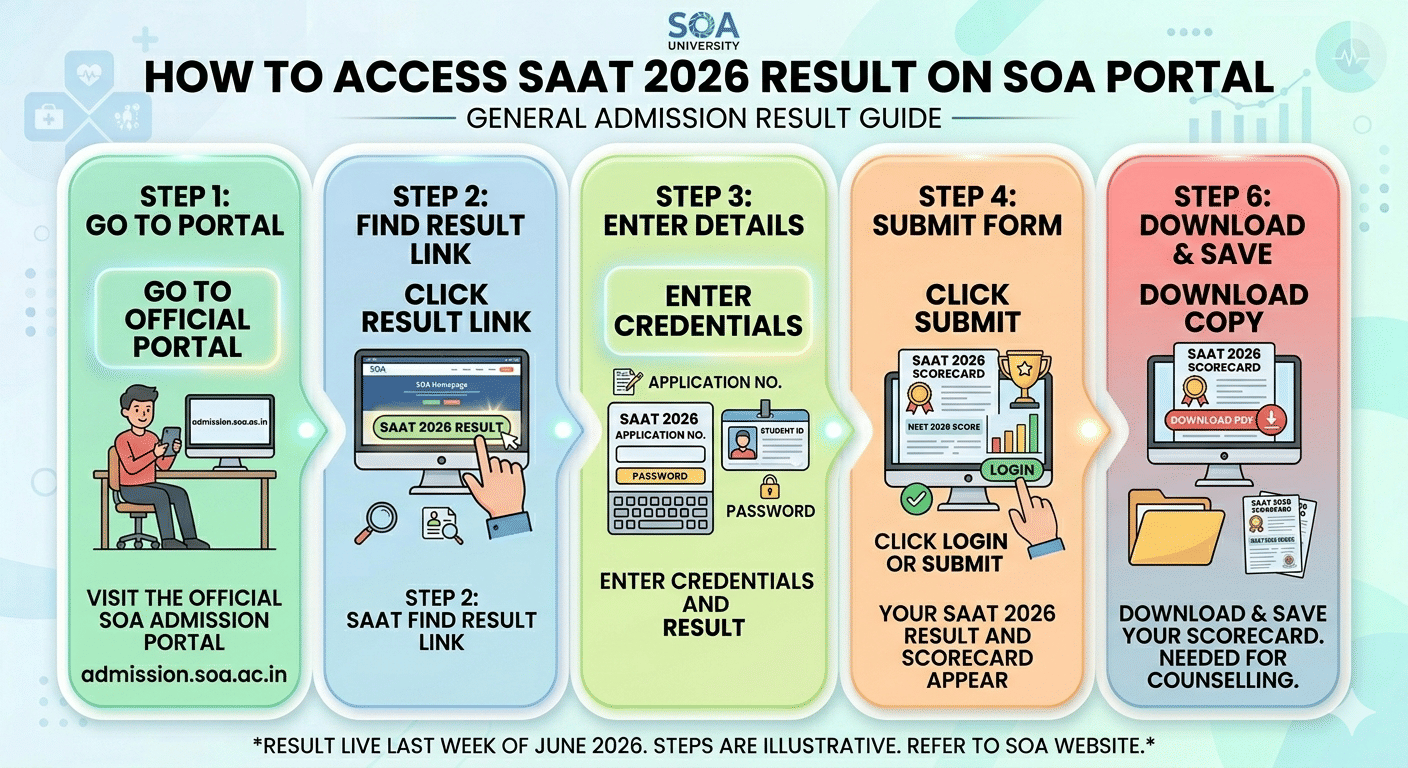
Once the SAAT 2026 result is live in the last week of June 26, 2026 at admission.soa.ac.in you need to follow these steps to check your SAAT 2026 Result:
- Step- 1 Go to the official SOA admission portal
- Step- 2 Click the SAAT 2026 Result link on the homepage
- Step- 3 Enter your SAAT 2026 application number and password in the fields provided
- Step- 4 Click Login or Submit
- Step- 5 Your SAAT 2026 result and scorecard will appear on the screen
- Step- 6 Download and save a copy of your scorecard as you will need it for counselling and admission rounds
Related Article: SAAT 2026 Round 2 Rankcard: Check Direct Link and Downloading Steps
Ques. What credentials do I need to check my SAAT 2026 result?
Ans. You need your SAAT 2026 application number and the password you set during registration. Enter both on the login page at admission.soa.ac.in to access your result and scorecard.
SAAT 2026 Result Login Not Working: Check Issues and Ways to Fixe
You can follow the ways to fix the SAAT 2026 Result Login not working The table below shows the most frequently problems on the SOA portal on result day and the quickest fix for each:
| Login Problem | Likely Cause | How to Fix |
|---|---|---|
| Portal not loading or showing a server error | High traffic on result day | Wait a few minutes and refresh; try early morning or switch from Wi-Fi to mobile data |
| "Invalid credentials" message | Wrong application number or password entered | Re-check your SAAT registration confirmation email for the exact credentials |
| Password not accepted | Forgotten password or typographical error | Use the "Forgot Password" link on the login page to reset via OTP |
| Application number not recognised | Incorrect format or number forgotten | Check your SAAT registration email or SMS; use the portal’s retrieval option |
| OTP not received | Poor network signal or wrong registered number | Confirm your registered mobile is active; try the email OTP option instead |
| Blank or frozen page | Browser cache or cookie conflict | Clear cache and cookies; switch to incognito mode or try Chrome or Firefox |
Quick tip: If the SOA portal is very slow, switching from a desktop browser to your mobile browser on a different network often loads the page faster during peak traffic.
Related Article: SAAT 2026 Round 2 Counselling : Check How to Register and Fill Choices
Ques. Why is the SOA admission portal not loading on SAAT 2026 result day?
Ans. High student traffic is the most common reason the portal slows down on result day. Try refreshing after a few minutes, clearing your browser cache, switching to mobile data, or using incognito mode in Chrome or Firefox.
SAAT 2026 Result Login Not Working: Check How to Recover Your SAAT 2026 Application Number
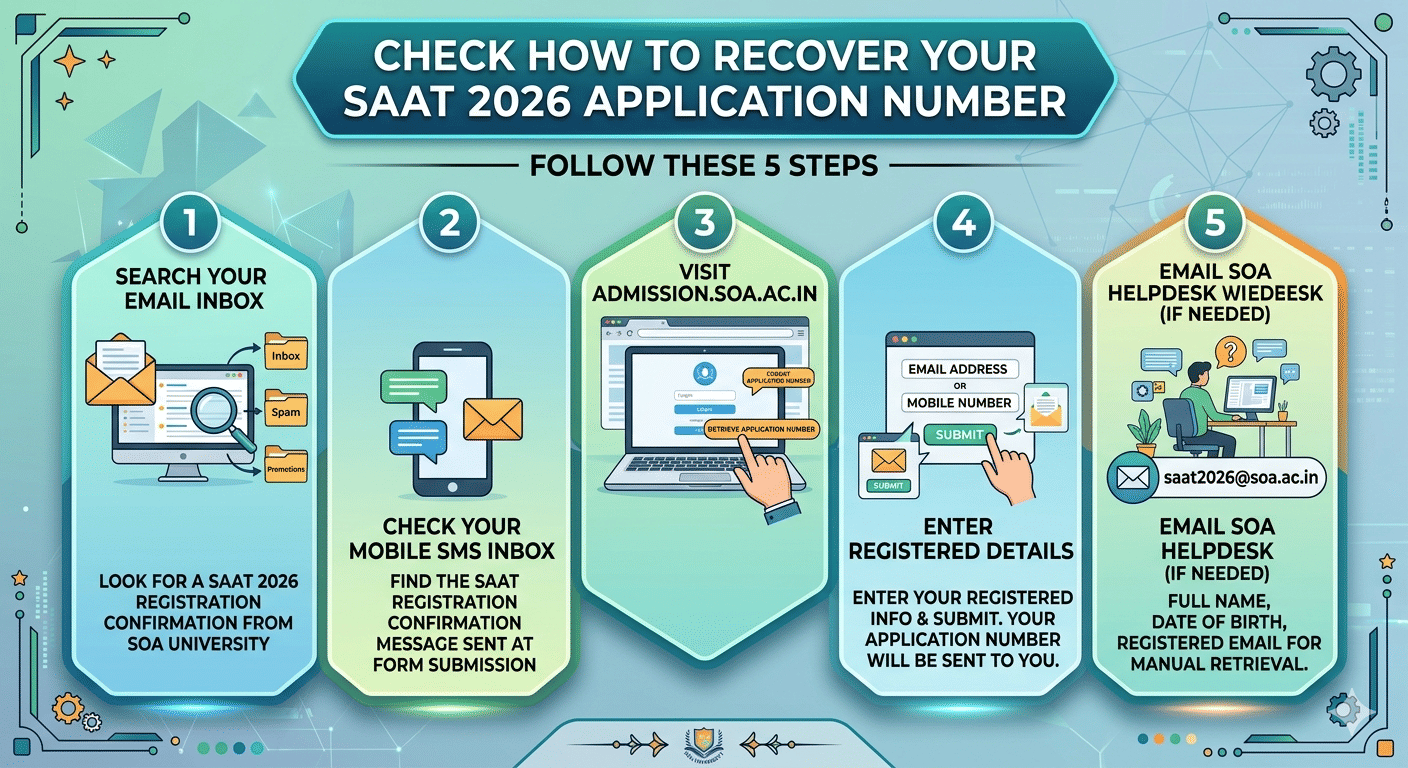
Your SAAT 2026 application number was sent to your registered email address and mobile number at the time of form submission. Try these steps in order to retrieve it:
- Step- 1 Search your email inbox for a SAAT 2026 registration confirmation email from SOA University (check Spam or Promotions folders too)
- Step- 2 Check your mobile SMS inbox for the SAAT registration confirmation message sent at the time of form submission
- Step- 3 Visit admission.soa.ac.in and look for a "Forgot Application Number" or "Retrieve Application Number" link on the login page
- Step- 4 Enter your registered email address or mobile number and submit your application number will be sent to you
- Step-5 If none of the above works, email the SOA helpdesk at saat2026@soa.ac.in with your full name, date of birth, and registered email for manual retrieval
Note: Keep your SAAT admit card handy as well as your application number is printed on it and can serve as a quick reference.
Related Article: SAAT 2026 Result: Is 70 marks safe for CSE Admission at SOA University
Ques. How do I reset my SAAT 2026 login password on the SOA portal?
Ans. Click "Forgot Password" on the login page at admission.soa.ac.in, enter your application number and registered email or mobile number, receive an OTP, and create a new password. The entire process takes under five minutes if your registered mobile is active.
SAAT 2026 Result Login Not Working: Check How to Reset Your SAAT 2026 Password on SOA Portal
If you have forgotten your SAAT 2026 login password, you can reset it in under five minutes. Make sure your registered mobile number is active and has network coverage before you begin:
- Step-1 Go to admission.soa.ac.in and open the SAAT 2026 login page
- Step-2 Click "Forgot Password" below the login form
- Step- 3 Enter your SAAT 2026 application number and your registered email address or mobile number
- Step- 4 Click Submit and an OTP or password reset link will be sent to your registered contact
- Step- 5 Enter the OTP on the portal to verify your identity
- Step- 6 Create a new password, confirm it, and click Update
- Step- 7 Return to the login page and use your new password to access your SAAT 2026 result
Note: The email address and mobile number you enter during the reset must match your SAAT 2026 registration details exactly. Any mismatch will block OTP delivery. If the issue persists, contact the SOA helpdesk directly.
Related Article: Check SAAT Round 2 Allotment 2026 BTech Branches for Rank Under 5000
According to a Reddit post, a user wanted to know whether SOA conducts physical interview after the counselling process. As per the discussion, a user said that after the result, counselling will be held and a date will be given to candidates for campus visit. The personal interview is conducted only in case a student is found suspicious and a separate date will be given.
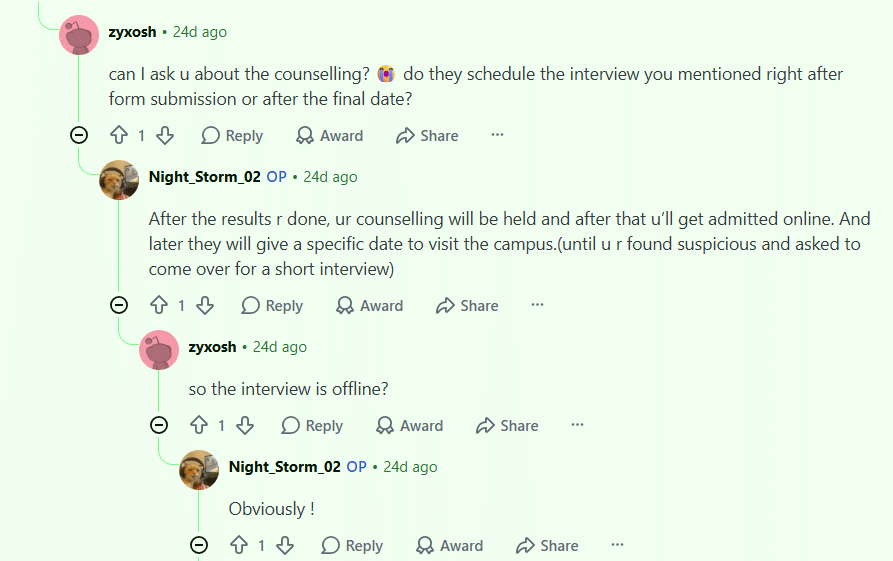
Source: Reddit
SAAT 2026 Result Login Not Working: Check SOA Helpdesk Contact Details
If you are unable to recover your credentials through the portal, reach out to the SOA University admission helpdesk for direct support:
| Contact Mode | Details |
|---|---|
| Official Portal | admission.soa.ac.in |
| Helpdesk Email | saat2026@soa.ac.in |
| University Address | Siksha O Anusandhan (Deemed to be University), J-15 Khandagiri, Bhubaneswar, Odisha – 751030 |
| Helpline Number | Check admission.soa.ac.in/admission-helpline for the current number |
Note: When you contact the helpdesk, keep your full name, date of birth, registered email ID, and registered mobile number ready. This information helps the SOA team verify your identity and retrieve your account details quickly.
Related Articles:
- SAAT 2026: Check How Many Students Qualified vs Registered
- SAAT 2026 Round 2 Seat Allotment: Check Fee Payments, Document Required and Reporting Steps
SAAT 2026 Result Login FAQs
Ques. How do I find my SAAT 2026 application number if I have lost it?
Ans. Check your registered email inbox or mobile SMS for the SAAT 2026 registration confirmation. Your application number is also printed on your SAAT admit card. If you still cannot find it, use the "Forgot Application Number" option on the portal or email saat2026@soa.ac.in with your name and date of birth.
Ques. I am not receiving the OTP for SAAT 2026 password reset. What should I do?
Ans. Ensure your registered mobile number has an active SIM with network coverage. Try the email OTP option if the SMS does not arrive within two minutes. If both options fail, email saat2026@soa.ac.in or visit the SOA University admission office in Bhubaneswar for in-person assistance.
Ques. When will the SAAT 2026 result be released?
Ans. The SAAT 2026 result is expected on June 26, 2026 on the official SOA admission portal at admission.soa.ac.in. Bookmark the portal and check it on that date to download your scorecard.



Comments