

![Central Institute for Subtropical Horticulture - [CISH]](https://img.collegedunia.com/public/college_data/images/logos/col6534.jpg?h=71.7&w=71.7&mode=stretch)
.png?h=18&w=18&mode=stretch)
IGNOU Result June 2026 is being released in phases for students who appeared in the June Term-End Examination (TEE) 2026. Students can check their result online through the official IGNOU result portal termendresult.ignou.ac.in using their Enrolment Number and selecting the June 2026 TEE option.
Update as of September 16, 2026: IGNOU is still updating the June 2026 TEE results. The official result portal states that “Results are incomplete. More results yet to follow.” Therefore, students whose course or Enrolment Number is not showing a result should check again later, as the result may not have been uploaded yet.
IGNOU June TEE Result 2026: Direct Link
| Particulars | Result link |
|---|---|
| IGNOU June TEE Result 2026 | Check Result |
Note: IGNOU conducts Term-End Examinations twice a year, in June and December. The June TEE result is normally declared in August, while the December TEE result is generally announced in February. Results may be released in batches.
IGNOU Result June 2026 Highlights
| Update | Current Status |
|---|---|
| June 2026 TEE | Conducted June 1–July 21, 2026 |
| June 2026 TEE Result | Released in phases |
| Result Mode | Online |
| Details Required | Enrolment Number |
| Revaluation/Answer Script | Online portal available for June 2026 TEE |
| December 2026 Exam Form | Open |
Also Read: IGNOU Admission 2026: Apply Online, Last Date, Eligibility, Courses, Fees & Latest Updates
How to Check IGNOU Result 2026 from the Official Website?
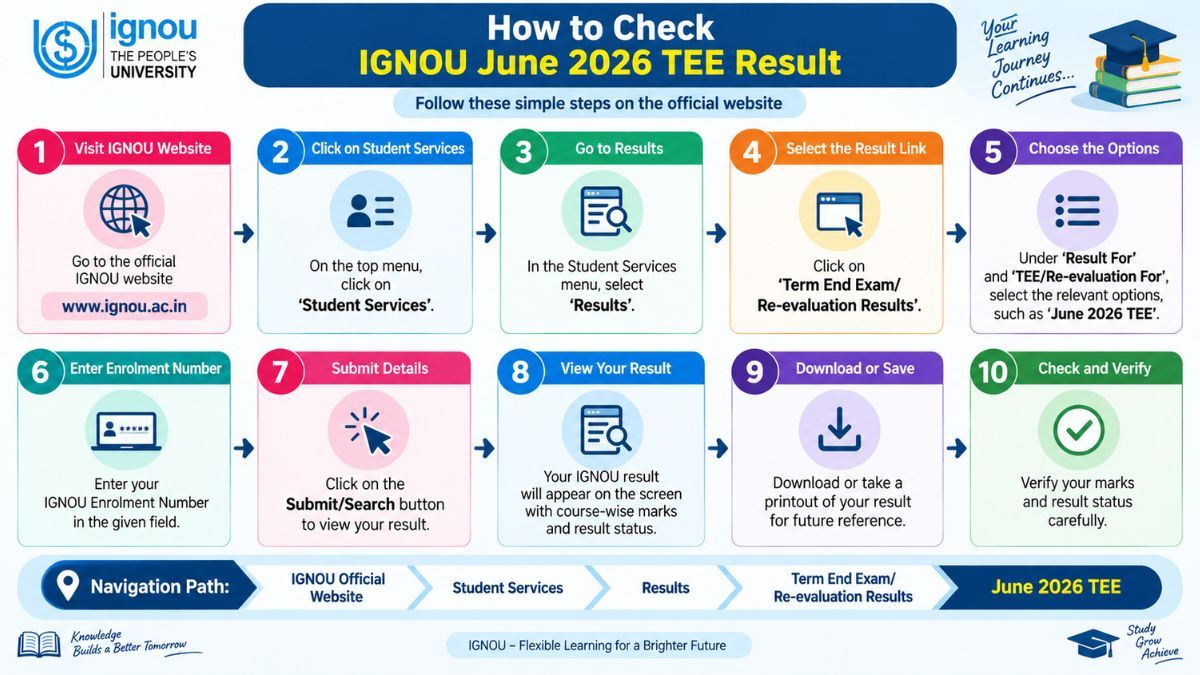
Students can check their IGNOU June TEE 2026 Result through the official website by following these steps:
- Visit the official IGNOU website.
- Click on Student Services.
- Select Results.
- Click on Term End Exam/Re-evaluation Results.
- The IGNOU Term-End Exam/Re-evaluation Result portal will open.
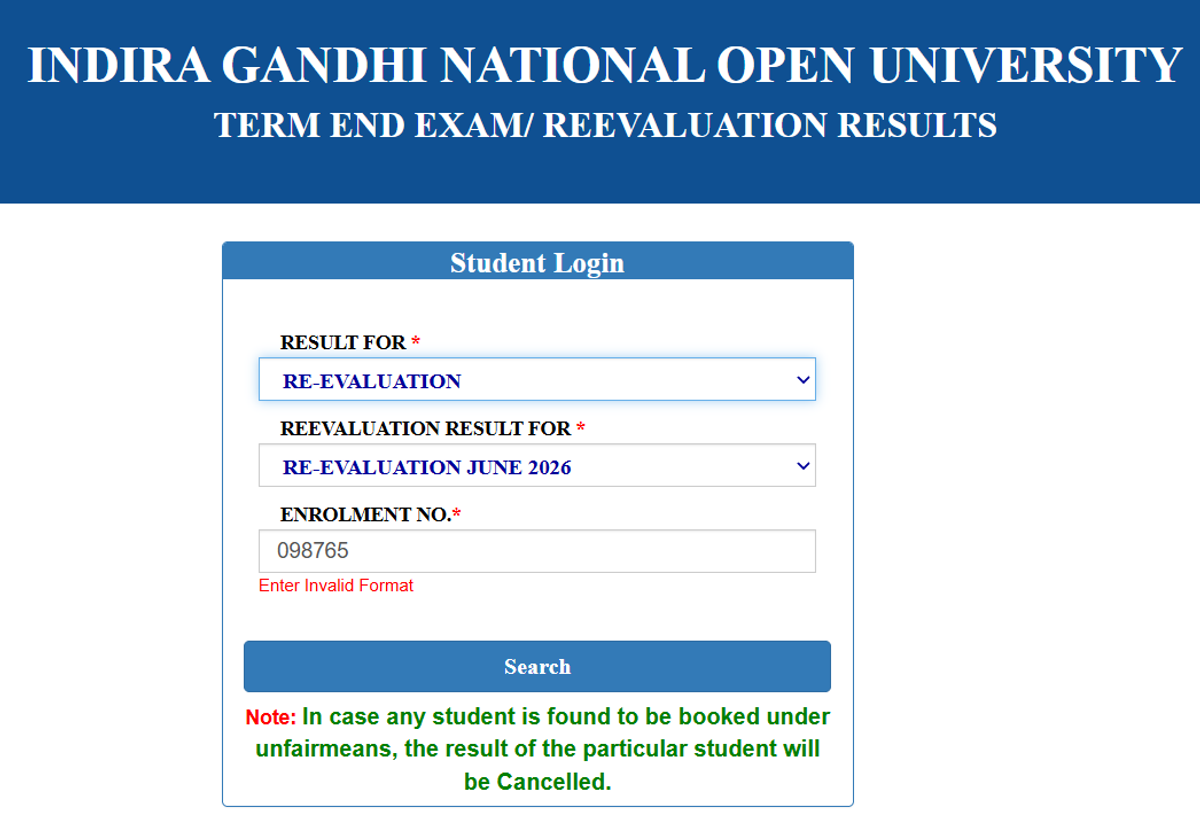
- Under “Result For,” select the appropriate result option.
- Under “TEE/Re-evaluation For,” select June 2026 TEE.
- Enter your Enrolment Number.
- Submit the details to view your result.
- Check your marks and result status, and download or save the result for future reference.
The steps to check the IGNOU June 2026 TEE Result are shown below in a pictorial representation:
IGNOU Result 2026: Details Mentioned
After downloading the result, students should verify the course and marks shown on the page. The IGNOU TEE result may include the following details:
- Enrollment number
- Maximum marks
- Marks obtained
- Grades
- Programme name
- Month and year
- Course code
- Remarks
IGNOU Re-evaluation of Answer Scripts 2026
Students who are not satisfied with their IGNOU TEE marks or grades can apply for re-evaluation within 40 days from the date of result declaration. The prescribed fee and application process are available on the IGNOU website.
The higher of the original and re-evaluated marks is considered for the student's record, wherever applicable. However, re-evaluation is not available for projects, practicals, assignments, seminars and similar components.
Also Check: IGNOU Grade Card 2026: Check Status, Download Grade Card, Marksheet & Updates
Steps to Apply for IGNOU Re-evaluation 2026
- Visit the IGNOU Official Website.
- Click on Student Services.
- Select “Re-evaluation & Copy of Answer Scripts”.
- Open the Online Re-evaluation Portal.
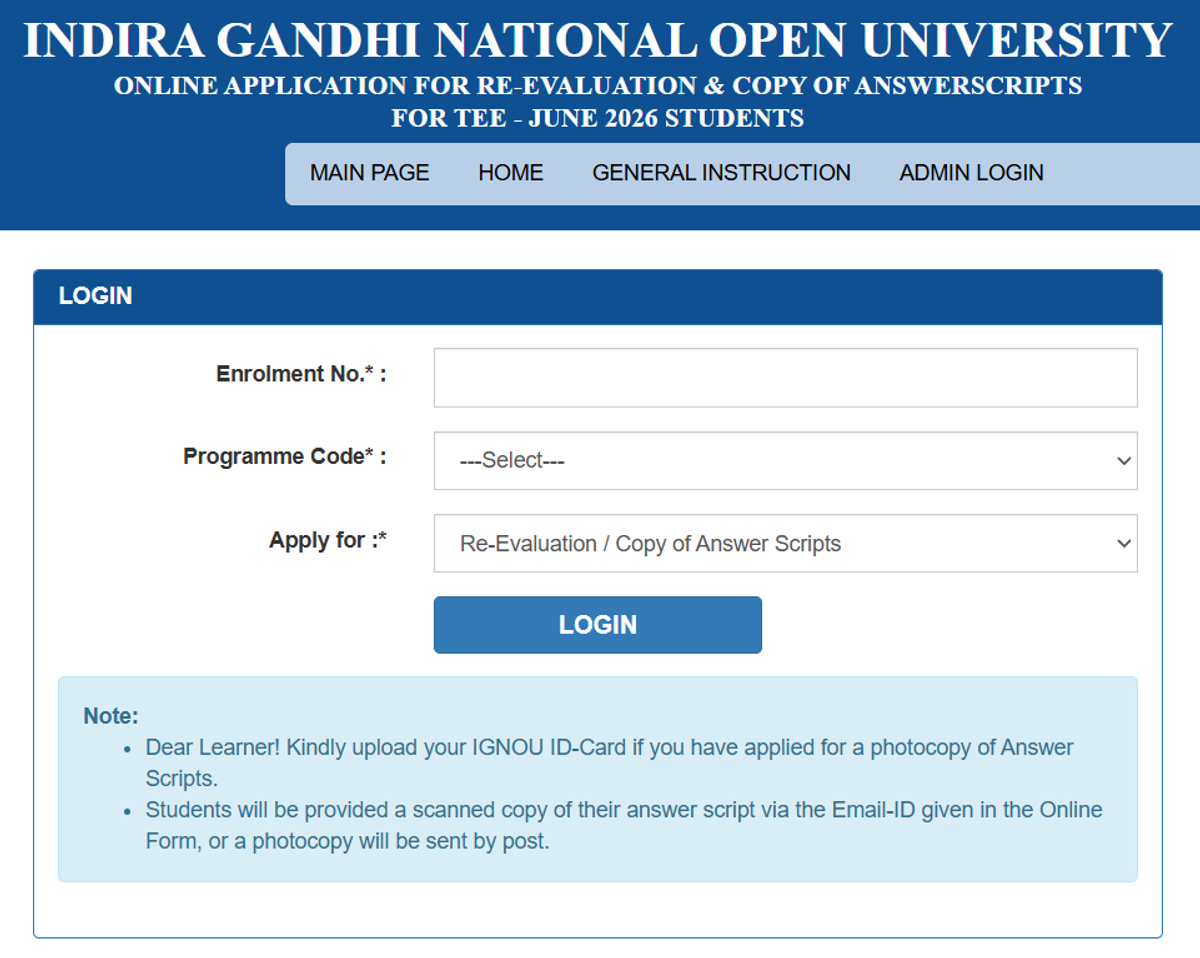
- Enter Your Enrolment Number.
- Select Your Programme Code.
- Choose “Re-evaluation” under “Apply for”
- Enter the Required Course Details
- Save the Application and Pay the Prescribed Fee
- Submit the Application and Save the Confirmation
Read: IGNOU Revaluation 2026 Begins
IGNOU Photocopy of Evaluated Answer Script
Students can also request a photocopy of their evaluated TEE answer script. The request must be submitted through the prescribed online portal, along with the applicable fee. Students should check the current June 2026 revaluation portal/instructions for the applicable application deadline before submitting the form.
Read More: IGNOU Study Centre List 2026: Check State-wise centre codes and Address
IGNOU Official Transcript
Students who need their academic records for higher studies or other official purposes can apply for an Official Transcript. The transcript is issued on request after submission of the prescribed application form and fee.
Check: IGNOU Assignment 2026: Submission Last Date, Front Page PDF, Status Check
IGNOU Result 2026: What is Early Result Declaration?
IGNOU provides an Early Declaration of Result facility for eligible students who need their TEE result urgently for higher studies or employment. Students must submit the prescribed application and supporting documents before the respective Term-End Examination begins.
The prescribed fee is INR 1,000 per course, subject to the applicable IGNOU rules.
Read More: IGNOU Grade Card 2026
How to Download IGNOU Grade Card 2026?
The IGNOU Grade Card 2026 can be checked online through the official IGNOU Grade Card portal. Students need to select their programme code and enter their enrolment number to access the grade card. It includes details such as assignment marks, Term-End Theory marks, practical marks and course status (Completed/Not Completed). The online grade card is updated as IGNOU adds the marks and other required components.
Check: IGNOU Courses & Fees 2026
IGNOU Result vs Grade Card 2026: What is the Difference?
| IGNOU Result | IGNOU Grade Card |
|---|---|
| Shows your Term-End Examination (TEE) result | Shows your overall academic performance record |
| Mainly shows TEE marks/grades and result status | Can include TEE theory, assignments, practicals and other applicable components |
| Used to check whether you passed the TEE | Used to track completion of courses and overall academic progress |
| Released/updated as TEE results are processed | Updated separately as different components are added |
IGNOU Result 2026 Important Links
The Term End Result portal is separate from the grade card. Students should use the result portal to check the June 2026 TEE result and the grade card portal to track assignments, theory marks, practical marks and course status.
| Particulars | Official Link |
|---|---|
| IGNOU Term End Result | Click Here |
| IGNOU Revaluation portal | Click Here |
| IGNOU Grade Card | Click Here |
| IGNOU Main Website | Click Here |
Frequently Asked Questions
Ques. Will my marks increase after IGNOU re-evaluation?
Ans. Not necessarily. IGNOU compares the original marks with the re-evaluated marks and considers the better score, wherever applicable. Therefore, if the re-evaluated marks are lower, the higher original marks are retained.
Ques. How many days do I have to apply for IGNOU re-evaluation?
Ans. Students can apply for re-evaluation within 40 days from the date of result declaration, that is, from the date the result is made available on the IGNOU website.
Ques. Is a second re-evaluation allowed in IGNOU?
Ans. No. IGNOU's programme guidelines state that there is no provision for a second re-evaluation of the same answer script.
Ques. Can I get a photocopy of my IGNOU answer script?
Ans. Yes. Students can request a photocopy of their evaluated Term-End Examination answer script by using the prescribed IGNOU online process and paying the applicable fee.
Ques. Where can I apply for IGNOU re-evaluation and answer-script photocopy?
Ans. Students can use the official IGNOU online services portal for these facilities. IGNOU also lists the re-evaluation and photocopy forms among its official student forms.
Ques. What is an IGNOU Official Transcript?
Ans. An Official Transcript is an academic record that students can request when they need to submit their academic details to Indian or overseas universities/institutions. It is issued on request after following the prescribed application process and paying the required fee.
Ques. How can I apply for an IGNOU Official Transcript?
Ans. Students need to submit the prescribed transcript application and pay the applicable fee. IGNOU provides the transcript form and related instructions through its official website.
Ques. Does IGNOU re-evaluation apply to every course?
Ans. Re-evaluation is available for eligible TEE theory answer scripts, subject to the university's rules. It is not available for components such as projects, practicals, assignments and seminars.
Ques. What happens if the re-evaluation changes my IGNOU marks?
Ans. If the re-evaluation results in a different score, the applicable revised marks/grades are incorporated into the student's records, with the better of the original and re-evaluated scores considered.
Ques. Can IGNOU change its re-evaluation rules?
Ans. Yes. IGNOU can revise its rules from time to time. Students should therefore follow the latest notification and instructions issued by the university when applying for re-evaluation, photocopy or other result-related services.



.png?h=132&w=263&mode=stretch)





Comments