



| Updated On - Jul 3, 2026
NIFT has opened Round 2 choice filling for Counselling 2026 at nift.admissions.nic.in. Candidates can modify choices until July 5 at 11:59 PM. The Round 2 seat allotment result will be declared on July 7.

The National Institute of Fashion Technology (NIFT) has opened Round 2 choice filling for NIFT Counselling 2026. The window is live on the official portal at nift.admissions.nic.in. It covers the Undergraduate (UG), UG Lateral Entry, and Postgraduate (PG) programmes.
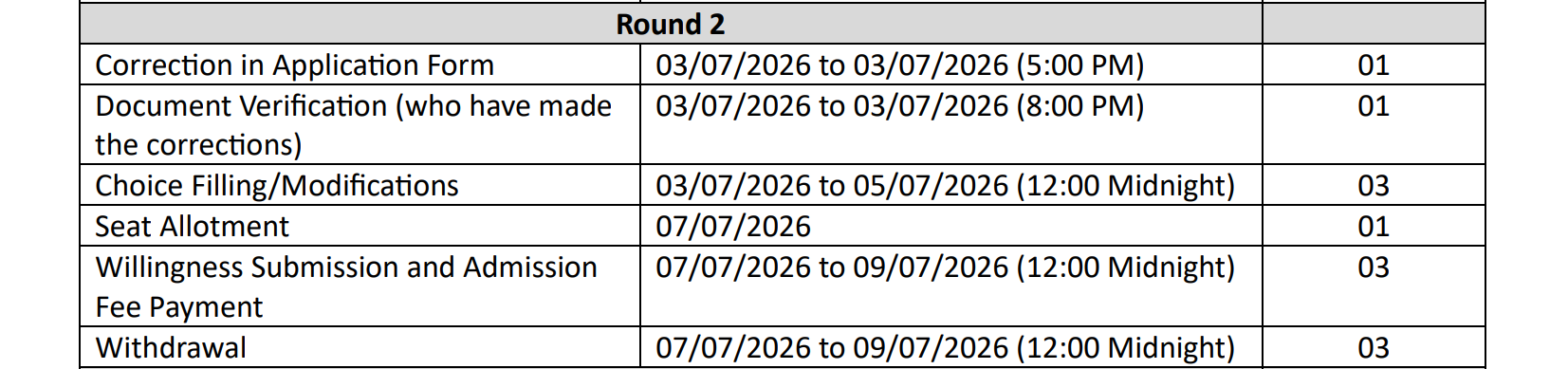
The Round 2 choice filling and modification window opened on July 3, 2026. Candidates can add, reorder, or remove course-and-campus preferences till July 5, 2026, 11:59 PM. The Round 2 seat allotment result will be released on July 7, 2026.
Three separate choice-filling portals are running for the three streams. Candidates must log in with their NIFT 2026 counselling credentials. The NIC portal also hosts the Pravesh Mitra mobile app for Android users.
| Direct Link: NIFT Counselling 2026 Round 2 Choice Filling Portal |
NIFT Counselling 2026 Round 2 Important Dates
| Event | Date and Time |
| Round 2 choice filling and modification opens | July 3, 2026 |
| Last date to modify and lock choices | July 5, 2026, 11:59 PM |
| Round 2 seat allotment result | July 7, 2026 |
| Round 1 seat acceptance fee window extended | Closed on July 2, 2026, 4:00 PM |
Who Can Participate in Round 2?
Round 2 is open to eligible candidates who did not secure a seat in Round 1. It also includes those who accepted a Round 1 seat but opted for upward movement. Candidates who withdrew from Round 1 as per the rules can also participate.
Candidates who fail to fill any choice will not be considered for seat allocation. The seat allotment engine considers only saved and locked preferences.
Also Check: MET 2026 Round 3 Cutoff Released at counseling.manipal.edu
How to Fill Choices for NIFT Counselling 2026 Round 2?
Follow these steps to complete the Round 2 choice filling on the NIC portal.
- Visit the official portal at nift.admissions.nic.in.
- Open the correct link for UG, UG Lateral, or PG counselling.
- Log in using the application number and password.
- Select preferred course and campus combinations in order of priority.
- Save the choices at every step to avoid data loss.
- Review the final order carefully and click on the lock button.
- Download the confirmation page for future reference.
Any last saved choice will be auto-locked by the system after the deadline. Candidates are advised to lock choices manually before July 5, 2026, 11:59 PM.
Also Check: JoSAA 2026 Counselling Registration and Choice Filling Begins at josaa.nic.in
What Happens After Choice Locking?
The NIC engine will process locked choices based on merit and category. The Round 2 seat allotment result will be published on July 7, 2026. Allotted candidates must pay the seat acceptance fee within the notified window.
Candidates can also use the upward movement or withdrawal options as per the guidelines. All updates are delivered through the portal and the Sandes app.
Round 2 is the last regular choice-modification window before spot rounds. A well-ordered preference list here decides your final campus and course. Choices locked now cannot be changed at a later stage.
Action Plan for Candidates
- Log in to nift.admissions.nic.in before July 5, 11:59 PM.
- Shortlist the campuses and programmes you can realistically join.
- Order preferences from most wanted to least wanted campus.
- Save the list after every edit to avoid losing progress.
- Lock the final choices and download the confirmation receipt.
- Arrange the seat acceptance fee amount in advance for July 7.
The Round 2 seat allotment result on July 7, 2026 and the follow-up seat acceptance fee payment window on nift.admissions.nic.in.
Read More


.jpeg?h=40&w=40&mode=stretch)



Comments