




The JEE Main 2026 application number is your user ID for JAC Delhi 2026. In case you have forgot it you can easily retrieve it from your JEE Main 2026 admit card, NTA scorecard, or registration confirmation email.
- You need to fix the JAC 2026 login issues as described below before the commencement of JAC Delhi 2026 Second Round Counselling around June 26, 2026.
- The common cause for JAC Delhi 2026 login not working will be because of an incorrect application number, forget the password set during registration, or face temporary server overload during peak counselling dates.
- You can try logging in to JAC Delhi 2026 during off-peak hours such as early morning or late night to check the registration or counselling updates.
- Candidates are advised to check below the steps for how to recover JAC Delhi 2026 application number and reset your password in case if you are unable to login to the official portal.
Related Articles:
- JAC Delhi 2026: Round 1 Seat Allotment Out, Counselling Dates, Cutoff and College Predictor
- JAC Delhi 2026 Round 1 Cutoff Out; Check Last Date for Seat Acceptance
- JAC Delhi 2026 Round 2 and Spot Round Options for Low JEE Main Rank
Key Summary
- The JAC Delhi 2026 Second Round counselling will begin on June 26, 2026 and the results will declared on July 1, 2026 at the official portal at jacdelhi.admissions.nic.in.
- As per the official notification candidate’s admission will be cancelled if he/she does not report to the allotted college for document verification or failed to pay the seat acceptance fee within timeframe.
- If you have tried all the steps of recovery and still JAC Delhi 2026 login not working, then you are advised to contact at the official heldesk mentioned in the website.
JAC Delhi 2026 Login Not Working: Check Common Errors and Quick Fixes
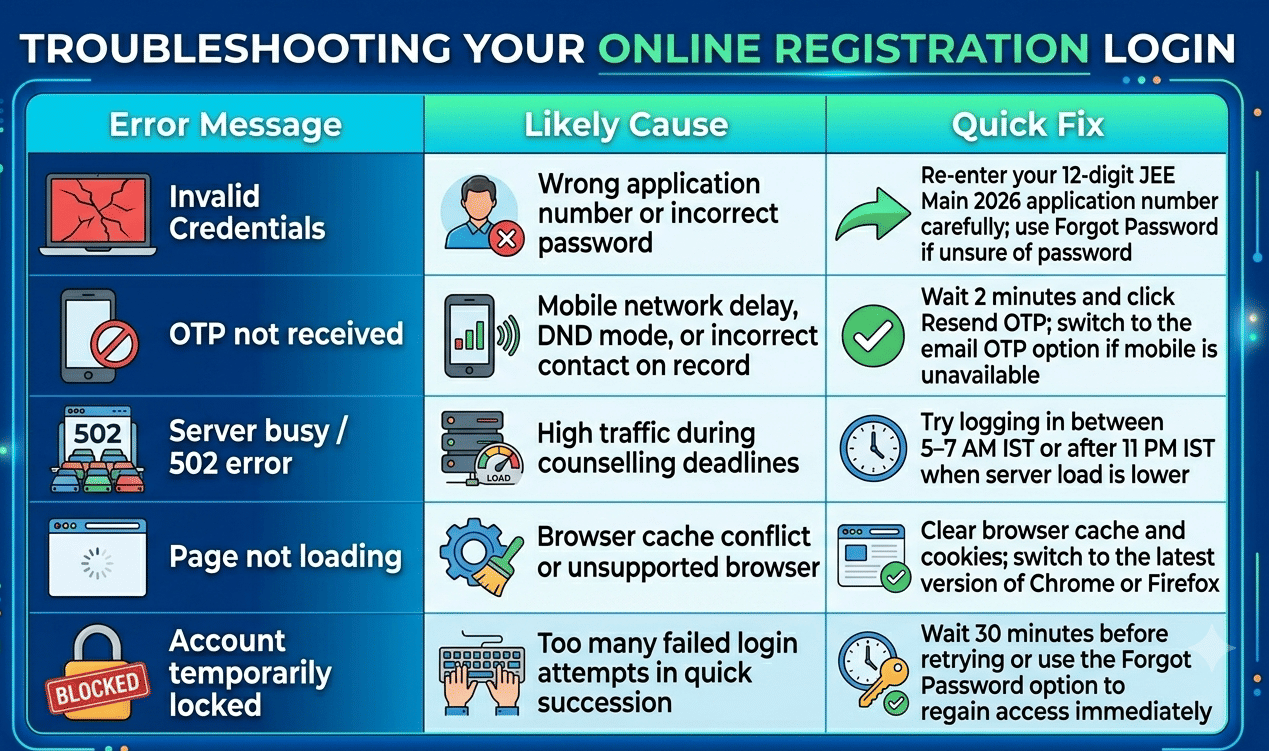
Before attempting a password reset, identify which error you are facing. Most JAC Delhi 2026 login not working on jacdelhi.admissions.nic.in fall into one of five categories. The table below shows common error to its likely cause and fix.
| Error Message | Likely Cause | Quick Fix |
|---|---|---|
| Invalid credentials | Wrong application number or incorrect password | Re-enter your 12-digit JEE Main 2026 application number carefully; use Forgot Password if unsure of password |
| OTP not received | Mobile network delay, DND mode, or incorrect contact on record | Wait 2 minutes and click Resend OTP; switch to the email OTP option if mobile is unavailable |
| Server busy / 502 error | High traffic during counselling deadlines | Try logging in between 5–7 AM IST or after 11 PM IST when server load is lower |
| Page not loading | Browser cache conflict or unsupported browser | Clear browser cache and cookies; switch to the latest version of Chrome or Firefox |
| Account temporarily locked | Too many failed login attempts in quick succession | Wait 30 minutes before retrying or use the Forgot Password option to regain access immediately |
Related Articles:
- JAC Delhi 2026 NSIT ECE Round 2 Cutoff: Expected Closing Rank
- JAC Delhi 2026 Documents Required for Seat Acceptance Checklist
- JAC Delhi 2026 Round 2 Seat Matrix: Remaining Seats After Round 1
Ques. What is the user ID for JAC Delhi 2026 login?
Ans. Your JAC Delhi 2026 user ID is your JEE Main 2026 Application Number is a 12-digit number assigned by NTA. Do not use your JEE Main roll number or your JAC Delhi registration ID, as these will not work on the login page.
JAC Delhi 2026 Login Not Working: How to Recover Your JAC Delhi 2026 Application Number
Your JAC Delhi 2026 login ID is your JEE Main 2026 application number assigned by NTA. It is not your JEE Main roll number or your JAC Delhi registration ID. If you have misplaced it, check these sources in order.
- JEE Main 2026 Admit Card- Your application number is printed on the top section of your admit card. Download a fresh copy from the NTA JEE Main portal if you no longer have one saved.
- JEE Main 2026 Scorecard- Log in to the NTA portal and open your result or scorecard page. The application number is displayed prominently in the candidate details.
- NTA Registration Email- Search your inbox for an email from NTA with a subject like "JEE Main 2026 Application Confirmation". Your 12-digit application number appears in that email.
- NTA JEE Main Portal- If you remember your NTA login credentials, log in at the JEE Main official website and check your application dashboard for the number.
- JAC Delhi Helpdesk- If none of the above sources are accessible, contact the JAC Delhi helpdesk. Provide your full name, date of birth, and JEE Main roll number for identity verification. The helpdesk will confirm the application number registered against your profile.
Note: Once you have the correct 12-digit number, use it as your user ID and follow the password reset steps below if you have also forgotten your password.
Related Articles:
- JAC Delhi 2026 DTU CSE Round 2 Cutoff: Category-Wise Closing Ranks
- JAC Delhi 2026 IIIT Delhi CSE Round 2 Cutoff: Expected Closing Rank Category-Wise
Ques. I forgot my JAC Delhi 2026 password. What should I do?
Ans. Click the Forgot Password link on the JAC Delhi 2026 login page at jacdelhi.admissions.nic.in. Enter your JEE Main application number and date of birth, then receive a one-time password on your registered mobile or email to set a new password.
JAC Delhi 2026 Login Not Working: How to Reset Your JAC Delhi 2026 Password
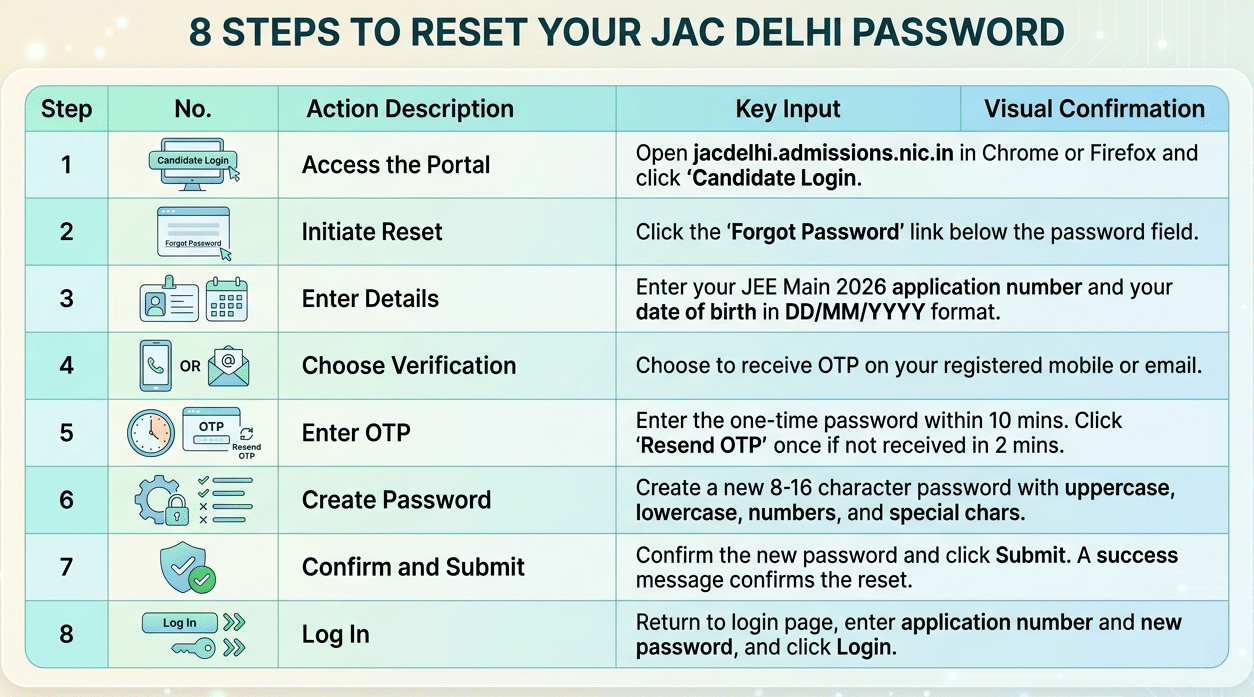
Follow these steps to reset your JAC Delhi 2026 password through the Forgot Password option on jacdelhi.admissions.nic.in if your JAC Delhi 2026 login not working.
- Step 1: Open jacdelhi.admissions.nic.in in Chrome or Firefox and click Candidate Login.
- Step 2: On the login page, click the Forgot Password link below the password field.
- Step 3: Enter your JEE Main 2026 application number and your date of birth in DD/MM/YYYY format.
- Step 4: Choose whether to receive the OTP on your registered mobile number or your registered email ID.
- Step 5: Enter the one-time password (OTP) within 10 minutes of receiving it. Click Resend OTP once if it does not arrive after 2 minutes.
- Step 6: Create a new password combining uppercase letters, lowercase letters, numbers, and a special character (8–16 characters).
- Step 7: Confirm the new password and click Submit. A success message confirms the reset.
- Step 8: Return to the login page, enter your application number and new password, and click Login.
Note: If OTP is not reaching your registered mobile, for example because you have changed your SIM then select the email OTP option instead. If neither your mobile number nor your email is accessible, email the JAC Delhi helpdesk from any address with a scanned copy of your JEE Main 2026 admit card for identity verification and manual password assistance.
Related Articles:
- JAC Delhi Round 2 OBC Cutoff 2026: Expected Closing Ranks
- JAC Delhi Round 2 2026 SC and ST Expected Cutoff: College-Wise
According to a reddit post, a user wanted to know the branch he/she would be getting in NSUT or DTU with 1 lakh 78 thousand rank with OBC quota as well as home state quota. As per discussion, he/she will get ICE and ME at NSUT or DTU.
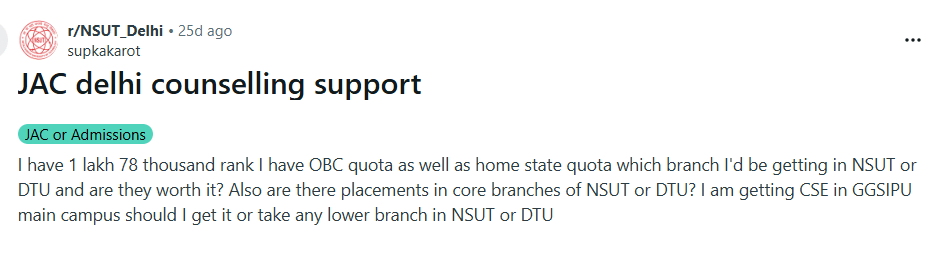
Source: Reddit
Ques. I am not receiving the OTP on my registered mobile for JAC Delhi 2026. What can I do?
Ans. Wait 2 minutes and click Resend OTP. Make sure your phone is not in DND or flight mode. If your registered mobile number is no longer active, select the email OTP option on the Forgot Password page. If neither option works, contact the JAC Delhi helpdesk with your JEE Main admit card for identity verification.
Step-by-Step JAC Delhi 2026 Login Process
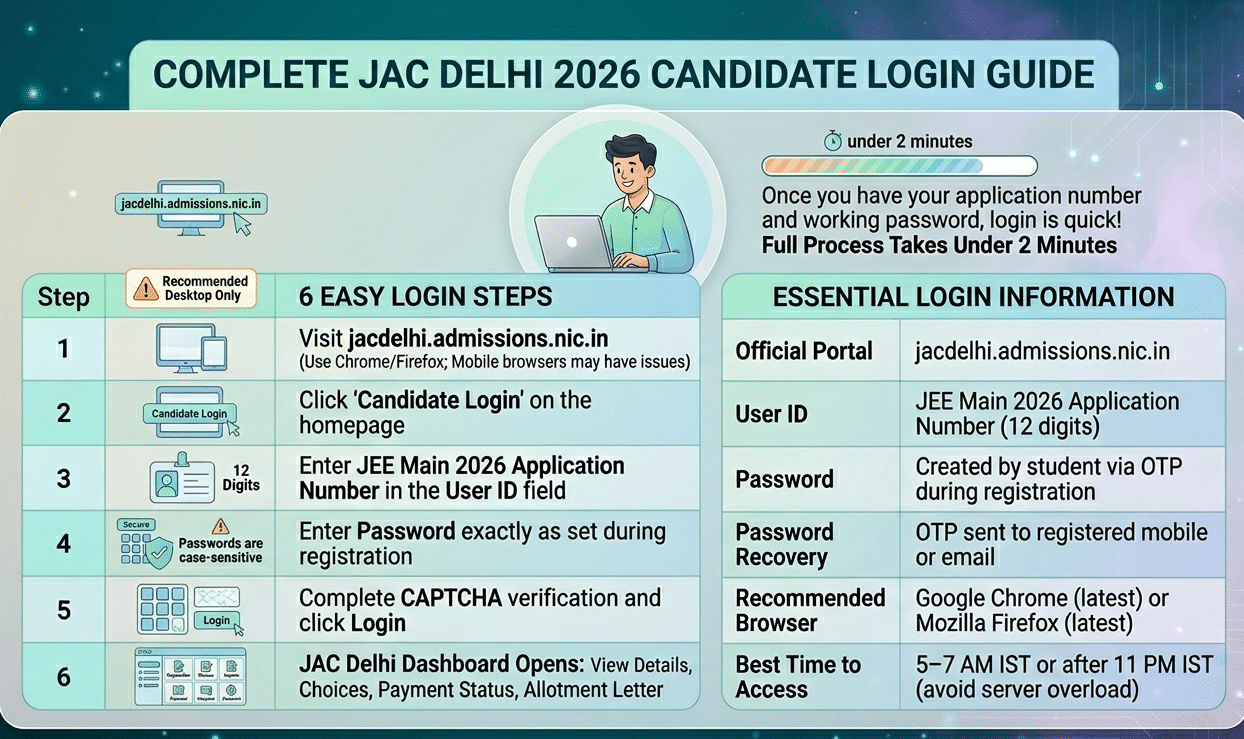
Once you have your application number and a working password, the full login process takes under two minutes.
- Step 1: Visit jacdelhi.admissions.nic.in on a desktop or laptop browser (mobile browsers may have display issues).
- Step 2: Click Candidate Login on the homepage.
- Step 3: Enter your JEE Main 2026 Application Number in the User ID field.
- Step 4: Enter your password exactly as set during JAC Delhi 2026 registration (passwords are case-sensitive).
- Step 5: Complete the CAPTCHA verification and click Login.
- Step 6: Your JAC Delhi 2026 dashboard opens, showing your registration details, choice filling link, payment status, and allotment letter (once released).
| Login Detail | Information |
|---|---|
| Official Portal | jacdelhi.admissions.nic.in |
| User ID | JEE Main 2026 Application Number (12 digits) |
| Password | Created by student during JAC Delhi 2026 registration via OTP |
| Password Recovery | OTP sent to registered mobile number or email ID |
| Recommended Browser | Google Chrome (latest) or Mozilla Firefox (latest) |
| Best Time to Access | 5–7 AM IST or after 11 PM IST to avoid server overload |
Related Articles:
- JAC Delhi Round 2 2026: Colleges for JEE Main Rank Under 50000
- JAC Delhi Round 2 2026 Documents Required for Seat Acceptance and College Reporting
JAC Delhi 2026 Login FAQs
Ques. Where can I find my JEE Main 2026 Application Number to log in to JAC Delhi?
Ans. Your JEE Main 2026 Application Number appears on your JEE Main admit card, your NTA result scorecard, and in the application confirmation email sent by NTA at the time of registration. You can also log in to the NTA JEE Main portal to retrieve it from your application dashboard.
Ques. The JAC Delhi 2026 portal is showing a server error. How do I access it?
Ans. Server errors on jacdelhi.admissions.nic.in are common when many students access the portal simultaneously around counselling deadlines. Try logging in during early morning hours between 5 AM and 7 AM IST or after 11 PM IST. Also clear your browser cache, try incognito mode, or switch to a different browser.
Ques. Can I update my registered mobile number or email ID for JAC Delhi 2026?
Ans. The JAC Delhi portal does not allow students to change registered mobile numbers or email IDs independently after registration. If your contact details are no longer accessible, write to the JAC Delhi helpdesk at the official email provided on jacdelhi.admissions.nic.in with a scanned copy of your JEE Main 2026 admit card for manual verification and credential update assistance.



Comments