



Education Journalist | Study Abroad Lead
Cachе memory is a typе of high-spееd volatilе computеr mеmory that storеs frequently usеd computеr programs, applications, and data.
- It acts as a buffer bеtwееn thе random access mеmory (RAM) and thе cеntral procеssing unit (CPU).
- Cachе memory is dеsignеd to provide quickеr data storagе and accеss by storing instancеs of programs and data routinеly accеssеd by thе CPU.
- It hеlps improve overall system performance and reduce thе timе it takes for the CPU to accеss data from thе slowеr main mеmory.
| Table of Content |
Key Terms: Cache, Memory, Computer, CPU RAM, Level 1, Level 2, Level 3
What is Cache?
[Click Here for Sample Questions]
Cache memory is a quick volatile computer memory. It stores a copy of frequently and recently used data so that it can be instantly accessed when needed again. It is the fastest computer memory and acts as an intermediary between RAM and the CPU.
There are three type of cache memory- Level 1, level 2 & level 3
- Cache memory is a chip based memory which might be directly embedded in the CPU or interconnected through a separate connection.
- It is closer to the processor thus supplies general data faster increasing computer efficiency.
- It is costlier than the main memory as it is a complex chip with peak efficiency.
- It has less storage than the main memory (RAM) but it operates 10 to 100 times faster than RAM.

Cache Memory
Read More: Tree Topology
Types of Cache Memory
[Click Here for Sample Questions]
There are 3 levels of cache memory-
- Level 1- The first level of cache memory is also known as the primary cache. It is embedded in the microprocessor chip core.
- The most frequently used data which gets stored in the CPU is also stored here.
- When the data is required again, it is accessed from this cache and it is the fastest of all the levels.
- However the storage capacity is the least here.
- Level 2- An L2 cache also called the secondary cache is located outside the microprocessor chip core.
- Its capacity is greater than L1 cache.
- However the speed is slower, yet it is more than that of main memory.
- Level 3- The level 3 or L3 cache are mostly found in high end processors. It is located outside the CPU.
- Although,It has a better storage capacity, it is slower than other caches.
- This cache is used to enhance the performance of Level 1 and Level 2 cache.
Read More: Introduction To Array
How does Cache Memory work?
[Click Here for Sample Questions]
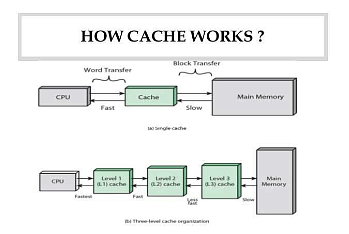
Data and applications which are accessed for the first time on a given computer are written in the cache memory along with being stored in the CPU. The same data is likely to be used again. When the same information is entered the CPU looks for the related content in cache memory first.
- It finds it there and the time duration of data processing from the RAM To the CPU is reduced.
- The data and instructions are directly retrieved from the cache memory thus increasing pace and enhancing performance.
- When the CPU finds the required information from the cache memory then it is called a Cache hit.
- Because of the proximity to the CPU, retrieval from cache memory proves to be quick and efficient.
- It allows the CPU to begin processing faster. Cache hits can happen in three instances.
- Initially the CPU tries to get the information from L1 cache or primary cache which is the closest to the CPU.
- If it finds the information, it is instantly retained very easily.
- And if it doesn't find it there, then the CPU seeks the data in the L2 cache which is slightly far from the core.
- If it obtains it there then also there's a cache hit. However the time taken for retrieval is more here.
- If the CPU does not find it in the L2 then it goes to the L3 Cache which is slower. If it gets the instructions there, there will be a cache hit.
- If the CPU goes to read the information from all the levels of cache memory but fails to find it, then it is called a Cache miss.
- In this case it goes to the RAM or hard disk to obtain the needed instructions.
How does Cache Memory work
Also Read:
Things To Remember
- Cache memory is a temporary quick access memory used to decrease time lagging and improve performance.
- It stores copies of frequently used data and instructions for future uses.
- It is costlier than main memory but economical than CPU registers.
- In case the CPU finds the information from the cache it is called a cache hit.
- If the data is not found in the cache memory then it is called a cache miss.
- After 1 cache miss, there cannot be any cache miss as long as the same data turns too old.
- Cache has a lesser capacity of storage hence it should be updated every now and then to maintain computer efficiency.
Sample Questions
Ques. A cache memory that has a hit rate of 0.8 has an access latency 10 ns and miss penalty 100 ns. An optimization is done on the cache to reduce the miss rate. However, the optimization results in an increase of cache access latency to 15 ns, whereas the miss penalty is not affected. The minimum hit rate (rounded off to two decimal places) needed after the optimization such that it should not increase the average memory access time is________. (3 marks)
Ans. The correct answer is 0.85.
Concept:
Average Memory Access Time (AMAT):
The "absolute hit rate" is the percentage of all memory accesses that hit this cache level. The "relative hit rate" is the percentage of memory accesses that failed at all previous levels but succeeded at this one.
The given data,
Cache memory hit rate Hc = 0.8
Access Latency Tc = 10 ns.
Miss penalty = 100 ns.
Optimization increases cache access latency to 15 ns. Miss penalty is not affected.
Memory with optimization Tc = 15 ns
Formula:
Average memory access time Tavg = Tc+ (1-Hc) miss penalty.
Calculation:
Average memory access time in first case
Average memory access time Tavg = (10)+ (1-0.8) 100
= 30 ns
Cache memory hit rate = ?
Tavg = 30 ns
Average memory access time in the second case,
Tavg = (Tc) + (1-HC) miss penalty
30 = (15) + (1-Hc) 100 ns
Hc = 85/100
x = 0.85 minimum hit rate (rounded off to two decimal places).
Hence the correct answer is 0.85.
Ques. Consider a system with 2 KB direct mapped data cache with a block size of 64 bytes. The system has a physical address space of 64 KB and a word length of 16 bits. During the execution of a program, four data words P, Q, R, and S are accessed in that order 10 times (i.e., PQRS PQRS...). Hence, there are 40 accesses to the data cache altogether. Assume that the data cache is initially empty and no other data words are accessed by the program. The addresses of the first bytes of P, Q, R, and S are 0xA248, 0xC28A, 0xCA8A, and OxA262, respectively. For the execution of the above program, which of the following statements is/are TRUE with respect to the data cache? (3 marks)
(A) Every access to S is a hit.
(B) Once P is brought to the cache it is never evicted
(C) At the end of the execution only R and S reside in the cache
(D) Every access to R evicts Q from the cache
Ans. The correct answer is option a, option b, and option d.
Concept:
The given data,
Cache Memory Size = 2 KB
Main Memory Size = 64 KB
Block Size = 64 B
Calculation:
Number of Lines -Cache Memory Size / Block Size
Number of Lines = 2K/ 64
Number of Lines = 211/26
Number of Lines = 25
| Tag | Number of lines | Word offset |
|---|---|---|
| 5 bit | 5 bit | 6 bit |
The addresses of the first bytes of P, Q, R, and S are,
| P | (A248)H | 10100 01001 001000 | 9 th block |
| Q | (C284)H | 11000 01010 000100 | 10 th block |
| R | (CA8A)H | 11001 01010 001010 | 10 th block |
| S | (A262)H | 10100 01001 100010 | 9 |
But P&S are from the same memory block (10100).
- Every access of S is hit.
- Once P is brought to the cache it is never evicted.
- Every access to R evicts Q from the cache.
Hence the correct answer is option a, option b, and option d.
Ques. Comprehension
Direction: A computer system has an L1 cache, an L2 cache, and a main memory unit connected as shown below. The block size in L1 cache is 4 words. The block size in L2 cache is 16 words. The memory access times are 2 nanoseconds. 20 nanoseconds and 200 nanoseconds for L1 cache, L2 cache and main memory unit respectively.
When there is a miss in both L1 cache and L2 cache, first a block is transferred from main memory to L2 cache, and then a block is transferred from L2 cache to L1 cache. What is the total time taken for these transfers? (3 marks)
Options-
(A) 222 nanoseconds
(B) 888 nanoseconds
(C) 902 nanoseconds
(D) 968 nanoseconds
Ans. The correct answer is option 3
Data:
Block size in L1 cache = 4 words
block size in L2 cache = 16 words
Access time for L1 cache = 2ns
Access time for L2 cache = 20ns
Access time for the main memory = 200ns
Requirement:
Total Time taken for a block is transferred from main memory to L2 cache to L1 cache
Calculation:
Step 1:
Time taken for a block is transferred from main memory to L2 cache = Tmt
As given that the block size of the L2 cache is 16 words
The given bandwidth of main memory to L2 cache is 4 words
So, we require 4 memory Access(for read)
and 4 L2 cache access (for store)
Tmt = 4 × (4 memory Access + 4 L2 cache access)
Tmt = 4 x (200+ 20) = 880
Step 2:
Time taken for a block is transferred from L2 cache to L1 cache = Tct
Now, Time taken for a block is transferred
from L2 cache to L1 cache
Tet Time to Access from L2 cache + Time to = store in L1 cache
Tct 20ns + 2ns = 22ns
Step 3:
Total Time = Tmt + Tct
Total Time = 880ns + 22ns = 902ns
Ques. Direction: A computer system has an L1 cache, an L2 cache, and a main memory unit connected as shown below. The block size in L1 cache is 4 words. The block size in L2 cache is 16 words. The memory access times are 2 nanoseconds. 20 nanoseconds and 200 nanoseconds for L1 cache, L2 cache and main memory unit respectively.
When there is a miss in L1 cache and a hit in L2 cache, a block is transferred from L2 cache to L1 cache. What is the time taken for this transfer? (3 marks)
Options-
(A) 2 nanoseconds
(B) 20 nanoseconds
(C) 22 nanoseconds
(D) 88 nanoseconds
Ans. Data:
Block size in L1 cache = 4 words
block size in L2 cache = 16 words
Access time for L1 cache = 2 ns
Access time for L2 cache = 20 ns
Access time for main memory = 200 ns
Requirement:
Time taken for a block is transferred from L2 cache to L1 cache
Calculation:
Time taken for a block is transferred from L2 cache to L1 cache =Tt
T = Time to Access from L2 cache + Time to store in the L1 cache
Tt 20ns +2ns = 22ns
Ques. Which of the following memories has the shortest access time? (3 marks)
Options-
(A) Cache Memory
(B) Magnetic Bubble Memory
(C) Magnetic Core Memory
(D) Random Access Memory
Ans. Option A. Cache memory
- It is an extremely fast memory type that acts as a buffer between RAM and the CPU.
- Cache Memory has the shortest access time.
- Cache memory holds frequently used instructions/data which the processor may require next and it is faster to access memory than RAM since it is on the same chip as the processor.
- This reduces the need for frequent slower memory access from the main memory, which may otherwise keep the CPU waiting.
- It is a memory unit placed between the CPU and main memory and is used to store instructions, data, or both.
Ques. A cache memory unit with capacity of N words and block size of B words is to be designed. If it is designed as a direct mapped cache, the length of the TAG field is 10 bits. If the cache unit is now designed as a 16-way set-associative cache, the length of the TAG field is bits. (3 marks)
Note: These questions appeared as Numerical Answer Type.
(A) 12
(B) 14
(C) 16
(D) 18
Ans. (B)
Formula:
cache size-N words
No. of bits to address cache size =log2 N
Block size=B words
No. of bits to address block size =log2 N
No of blocks in cache=N/B
No. of bits to represent blocks =log2 (N/B)
No. of sets in cache=(N/B)/16
No. of bits to represent sets-log2 (N/B)/16
For direct map cache,
Tag
Cache line Block offset
10
log2 (N/B) log2 B
For associative map cache,
Tag Cache line Block offset
k= log2 (N/B)/16 log2 B
Calculation:
10 +log2 (N/B)=k+log2 (N/B)/16
10 +log2 (N/B)=k+log2 (N/B)/16-log2 16
10 = x-4
X = 14, So no. of tag bits for 16-way set associative cache are14 bits.
Ques. An 8-way set associative cache of size 64 KB (1 KB = 1024 bytes) is used in a system with a 32-bit address. The address is sub-divided into TAG, INDEX, and BLOCK OFFSET. (3 marks)
The number of bits in the TAG is
(A) 18
(B) 19
(C) 20
(D) 21
Ans. Cache memory size
- (CM's) 64KB = 216 bytes
- Main memory size (MM's) = 32 bits
- P = 8 way SAM
- Tag bit size (y) =?
Since block size is not given we assume it is 2x byte.
Number of cache block
(N)=CM's/B's = 216/ 2x = 216-x
Number of sets (S) = N/P = 216-x/23 = 213-x
as we know that for set associative mapping technique:
TAG+SLO+B'S=MM's
y+13-x+x= 32 bits
y=32-13 bits
y = 19 bits
So the correct value of the tag size is 19 bits.
Ques. Consider a system with 2 KB direct mapped data cache with a block size of 64 bytes. The system has a physical address space of 64 KB and a word length of 16 bits. During the execution of a program, four data words P, Q, R, and S are accessed in that order 10 times (i.e., PQRS PQRS...). Hence, there are 40 accesses to the data cache altogether. Assume that the data cache is initially empty and no other data words are accessed by the program. The addresses of the first bytes of P, Q, R, and S are OxA248, 0xC28A, OXCA8A, and OXA262, respectively. For the execution of the above program, which of the following statements is/are TRUE with respect to the data cache? (3 marks)
Options
(A) Every access to S is a hit.
(B) Once P is brought to the cache it is never evicted.
(C) At the end of the execution only R and in the cache.
(D) Every access to R evicts Q from the cache.
Ans. Given that, Direct mapped cache,
If we observe, P and S belong to the same Block ( Tag and cache bits are the same). Therefore every access of S should result in a hit due to neither Q nor R competing for the same cache block and once P brought to the cache, it is never evicted.
If we observe Q and R, those are competing for the same cache block. So at the end R only present in the cache due to R is accessed at last. (compared to Q) and every access to R evicts Q from the Cache.
Therefore at the end, PR and S in the Cache.
Options A,B and D are true.
Ques. Let WB and WT be two set associative cache organisations that use LRU algorithm for cache block replacement. WB is a write back cache and WT is a write through cache. Which of the following statements is/are FALSE? (3 marks)
Options-
(A) Each cache block in WB and WT has a dirty bit.
(B) Every write hit in WB leads to a data transfer from cache to main memory.
(C) Eviction of a block from WT will not lead to data transfer from cache to main memory.
(D) A read miss in WB will never lead to eviction of a dirty block from WB.
Ans. Option: A, B, D
WB Cache: Updates to the cache block don't result in Updates to the Main Memory immediately. Burst Writes are preferred for higher throughput and those needing higher write performance.
WT Cache: Updates to the Cache block are reflected on Main Memory before carrying out other processes. Consistency is preferred.
- A WB must necessarily have a dirty bit to avoid redundant writes to Main Memory. Whereas a WT cache needn't as the change is reflected after a write. False
- A WB cache's primary use is to increase throughput or useful work. Multiple writes to the same cache block will not be reflected immediately, avoiding unnecessary data transfer time. False
- WT cache's main goal is to prefer consistency over write performance, and a cache block is made to reflect the current main memory. True
- LRU doesn't have specific replacement strategies for dirty and regular blocks. Hence a read miss might evict a dirty block. False
Ques. Which of the following is an efficient method of cache updating? (1 mark)
(A) Snoopy writes
(B) Write through
(C) Write within
(D) Buffered write
Ans. Snoopy writes
Snoopy writes are an еfficiеnt mеthod for updating thе cache. In this approach, thе cachе controllеr activеly monitors or "snoops" thе operations of othеr bus masters, allowing it to quickly updatе it's cachе with thе most currеnt data and maintain data consistеncy across thе systеm.
For Latest Updates on Upcoming Board Exams, Click Here: https://t.me/class_10_12_board_updates
Check-Out:



Comments