



| Updated On - Aug 25, 2026
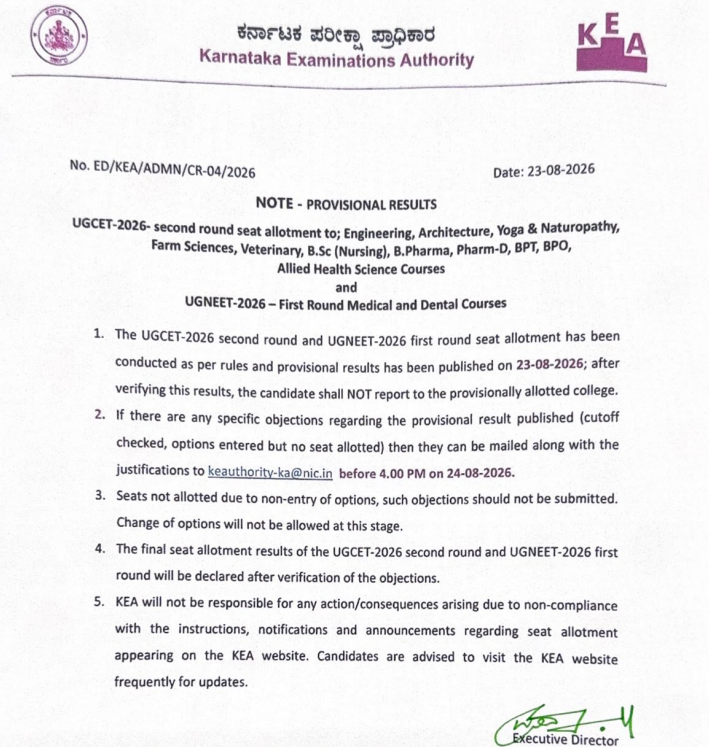
KEA has released the KCET 2026 Round 2 provisional seat allotment result along with the cutoff. Candidates who want to raise objections must submit them by 4 PM today at keaonline.karnataka.gov.in.

The Karnataka Examinations Authority (KEA) has released the KCET 2026 Round 2 provisional seat allotment result on the official website at keaonline.karnataka.gov.in. Candidates who registered for the second round of counselling can now check their allotted college and course.
Along with the provisional allotment, KEA has also published the Round 2 cutoff details. Candidates who are not satisfied with their allotted seat can raise objections until 4 PM on August 24, 2026. The objection window is strictly time-bound and will not be extended.
| Direct Link: KCET 2026 Round 2 Provisional Allotment Out |
KCET 2026 Round 2 Key Details
| Particular | Detail |
| Conducting Body | Karnataka Examinations Authority (KEA) |
| Event | KCET 2026 Round 2 Provisional Seat Allotment |
| Date of Release | August 24, 2026 |
| Last Date to Raise Objections | August 24, 2026, by 4 PM |
| Official Website | keaonline.karnataka.gov.in |
| Cutoff Status | Released with the allotment |
How to Check the KCET 2026 Round 2 Provisional Allotment Result?
Candidates can follow the steps below to check their Round 2 provisional allotment result on the official KEA portal.
- Visit the official website at keaonline.karnataka.gov.in.
- Click on the KCET 2026 Round 2 provisional allotment result link.
- Enter the CET number and date of birth as required.
- Submit the details to view the allotted college and course.
- Download the result page for future reference.
Also Check: TS PGECET 2026 Final Phase Counselling Registration Begins at pgecetadm.tgche.ac.in
How to Raise Objections Against the Round 2 Allotment?
Candidates who find any discrepancy in their allotment can raise objections through the KEA portal before the deadline. The objection process is fully online.
- Log in to the KEA candidate portal using the CET registration credentials.
- Open the Round 2 allotment objection link.
- Select the reason for the objection from the available options.
- Upload supporting documents wherever required.
- Submit the objection form before 4 PM on August 24, 2026.
Also Check: TG ICET 2026 Final Phase Seat Allotment Result Out at tgicet.nic.in
What Do the Round 2 Cutoff Details Cover?
The Round 2 cutoff released by KEA lists the closing ranks for participating institutes across different streams. Candidates can refer to the official cutoff PDFs to compare their allotment with the last rank admitted in each course and category.
The cutoff files are hosted on the KEA server and can be accessed directly from the KCET counselling section. Two official files have been published for Round 2 candidates:
| Direct Link: KCET 2026 Round 2 Provisional Allotment Cutoff Out |
What Happens After the Objection Window Closes?
Once the objection window closes at 4 PM on August 24, 2026, KEA will review the submitted grievances. The final Round 2 allotment result will be issued after the review is complete.
Candidates who accept their allotted seat will be asked to select one of the four choices offered by KEA. These choices determine whether a candidate retains the allotted seat, seeks an upgrade in a later round or exits the counselling process.
The objection window for KCET Round 2 is only a few hours long today. Missing the 4 PM cut-off means the provisional allotment becomes final for that candidate. No offline requests will be entertained after the deadline.
Action Plan for Candidates
- Log in to keaonline.karnataka.gov.in and download the Round 2 allotment result.
- Cross-check the allotted college and course against the official Round 2 cutoff PDFs.
- Prepare and submit any objection through the KEA portal before 4 PM today.
- Keep the CET number, password, and identity documents handy for the next steps.
- Wait for the final Round 2 allotment result before exercising the choice option.
Watch the KEA website for the final Round 2 allotment result and the choice entry window that will open soon after the objection review.
Also Check


.jpeg?h=40&w=40&mode=stretch)


.jpeg?h=40&w=40&mode=stretch)



Comments