



| Updated On - Aug 6, 2026
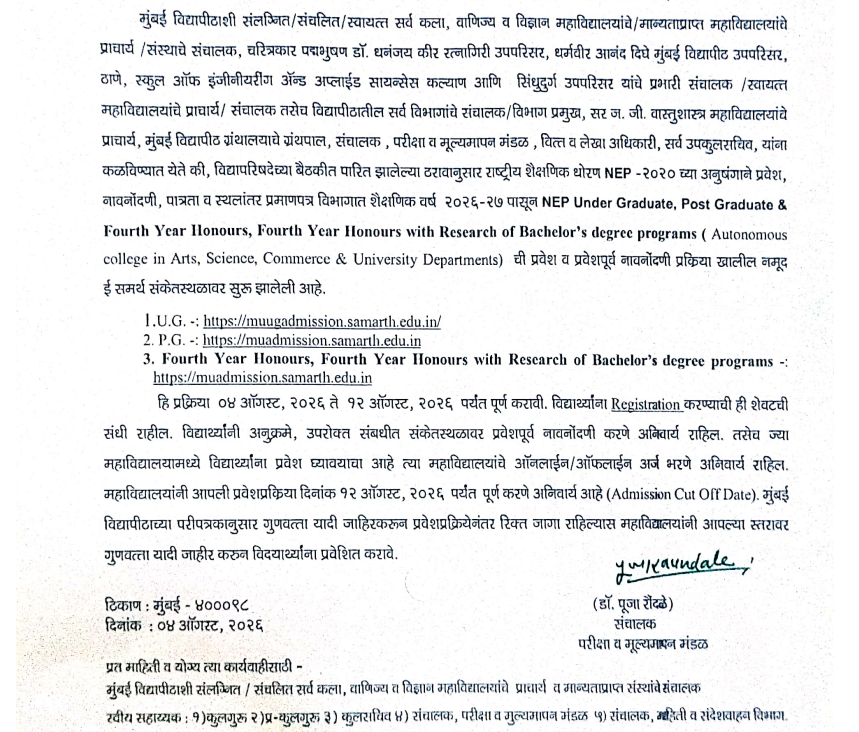
Mumbai University has extended the UG and PG Pre-Admission 2026 registration deadline to August 12, 2026. Candidates can now apply on the official Samarth portals at muugadmission.samarth.edu.in and muadmission.samarth.edu.in.

The University of Mumbai (MU) has extended its Pre-Admission 2026 registration deadline. The last date is now August 12, 2026. Candidates can register through the official Samarth portal at muugadmission.samarth.edu.in.
The extension covers UG, PG, Part-time, and Distance Education admissions for the 2026-27 academic session. The earlier pre-registration window had closed on July 15, 2026.
Mumbai University Pre-Admission 2026 Key Details
The Samarth portal handles the first-stage pre-admission registration. Each programme type has a separate official portal. The table below lists all four Samarth links.
| Programme Type | Official Portal | Revised Last Date |
| Undergraduate (UG) | muugadmission.samarth.edu.in | August 12, 2026 |
| Postgraduate (PG) | muadmission.samarth.edu.in | August 12, 2026 |
| Part-time Certificate | mucertificateadm.samarth.edu.in | August 12, 2026 |
| Distance Education | mucdoeadm.samarth.edu.in | August 12, 2026 |
Who Can Apply for MU Pre-Admission 2026?
Students who have passed Class 12 from a recognised board can register for undergraduate programmes. Candidates awaiting their Class 12 results can also complete the form using provisional academic details.
PG applicants must hold a valid Bachelor's degree in a relevant discipline. Candidates applying for Distance Education and Part-time Certificate programmes should check the eligibility criteria on the respective admission portal.
Also Check: MAH MPharm CET CAP 2026 Registration Deadline Extended to August 6
How to Register for Mumbai University Pre-Admission 2026?
The MU pre-admission process requires candidates to complete a single online registration on the Samarth portal. The registration must be completed before applying to any Mumbai University-affiliated college.
- Visit the relevant Samarth portal listed in the table above.
- Click on the New Registration tab on the homepage.
- Enter your full name, mobile number, and active email ID.
- Verify the account using the OTP sent to your registered mobile number.
- Log in and enter your personal, academic, and category details.
- Upload scanned copies of the required documents.
- Review the application form and submit it before August 12, 2026.
Also Check: MAH MCA CET 2026 CAP Round 1 Seat Allotment Out at mca2026.mahacet.org.in
Documents Required for Registration
Candidates should keep the following documents ready:
- Class 10 and Class 12 marksheets
- School leaving certificate
- Passport-size photograph and scanned signature
- Aadhaar card or another valid photo ID
- Category certificate, if applicable
- Domicile certificate, wherever required
Also Check: MAH BCA CET CAP 2026 Final Merit List Released; Check Steps to View Rank
Registration Fee and College Application
The Samarth pre-admission registration is a one-time online process. However, candidates may need to pay course-wise or college-wise application fees separately while applying to their preferred MU-affiliated colleges.
Applicants should keep net banking, UPI, or debit/credit card details ready for online payment. The admission fee varies depending on the programme and college selected.
Mumbai University runs one of India's largest affiliated college networks. The extension gives late applicants a fresh chance to enter the process. Students who missed the July 15 window can now register.
Action Plan for Candidates
- Open the correct Samarth portal for your programme type.
- Register using an email and phone number you actively use.
- Keep scanned marksheets and ID documents ready before starting.
- Fill each field carefully; small errors delay merit-list generation.
- Submit and download the confirmation slip before August 12, 2026.
Watch the MU portal for the next merit list dates. Track college-level admission rounds after registration closes on August 12.
Also Check






Comments