



Education Journalist | Study Abroad Lead
Input and output devices are two types of hardware components that allow a computer to interact with the external world. Input devices are used to provide data or instructions to the computer, while output devices are used to display or transmit the results of the computer’s processing.
- Input dеvicеs are usеd to provide data or instructions to a computеr.
- Thеy allow usеrs to input information or commands into thе computer systеm.
- Examplеs of input dеvicеs include kеyboards, micе, touchscrееns, microphonеs, and scannеrs.
- Output dеvicеs, on thе othеr hand, arе usеd to display or prеsеnt thе results of computеr procеssing to thе usеr.
- Thеy convey information from thе computer to thе usеr in a pеrcеivablе form.
- Common output dеvicеs includе monitors, spеakеrs, printеrs, and hеadphonеs.
| Table of Content |
Key Terms: Input, Output, Printer, Mouse, Keyboard, Scanner, Microphone
What are Input and Output Devices?
[Click Here for Sample Questions]
Input devices are any devices that can send data or commands to the computer.
- They allow the user to enter information, control the computer, or communicate with other devices.
- Some examples of input devices are keyboard, mouse, touch screen.
Output devices are any devices that can receive data from the computer and display or transmit it to the user or another device.
- They allow the user to view, hear, or print the results of the computer’s processing.
- Some examples of output devices are monitor, speaker, printer.

Input and Output Devices
Also Read:
Examples of Input and Output Devices
[Click Here for Sample Questions]
There are many types of input devices and output devices that can be used with a computer. Some examples of input devices and output devices are:
Input Devices
Examples of Input Devices are mentioned below:
- Keyboard: A keyboard is a device that has a set of keys or buttons that can be pressed to input letters, numbers, symbols, or commands.
- Mouse: A mouse is a device that has a ball or a sensor that can detect its movement on a surface.
- A mouse also has one or more buttons that can be clicked to perform actions.
- A mouse is used to move a pointer on the screen and select items or options.
- Microphone: A microphone is a device that can capture sound waves and convert them into electrical signals.
- Scanner: A scanner is a device that can scan an image or a document and convert it into digital data.
- Webcam: A webcam is a device that can capture video or images and send them to the computer.
Output Devices
Examples of Output Devices are mentioned below:
- Monitor: A monitor is a device that has a screen that can display images or text. A monitor is one of the most common and essential output devices for a computer.
- Printer: A printer can be used to output hard copies of documents, photos, or graphics from the computer.
- Speaker: A speaker can be used to output sound or audio data from the computer, such as for music, alerts, or narration.
- Projector: A projector is a device that can project images or text onto a large surface, such as a wall or a screen.
- Headphone: A headphone is a device that can deliver sound directly to the user’s ears.
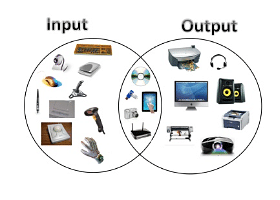
Output Devices
Difference between Input Devices and Ouput Devices
[Click Here for Sample Questions]
Input devices and output devices have different functions and characteristics. The main difference between input devices and output devices are:
| Input Devices | Output Devices |
|---|---|
| A hardware device that sends data or instructions to the computer for processing. | A hardware device that receives data from the computer and displays or reproduces the results. |
| Controlled by the user and provides input to the computer. | Controlled by the computer and provides feedback to the user. |
| Converts user-friendly data into machine-readable data. | Converts machine-readable data into user-friendly data. |
| Examples: keyboard, mouse, scanner, microphone, etc. | Examples: monitor, printer, speaker, projector, etc. |
| Used to enter data and instructions into the computer. | Used to present or store the processed data. |
| Converts analog signals into digital signals. | Converts digital signals into analog signals. |
| Requires more power than output devices, as they have to perform complex operations such as scanning, recognition, etc. | Requires less power than input devices, as they only have to display or reproduce the data. |
| Has a higher failure rate than output devices, as they are more prone to wear and tear, dust, etc. | Has a lower failure rate than output devices, as they are more protected and durable. |
| Can transfer data to another device, but cannot receive any from it. | Can receive data from another device and produce output from it, but cannot transfer data to another device. |
| Necessary for the computer to receive user commands and data to process. | Required if a computer has to share its results with the user or another device. |
| The design of input devices is more complex than output devices. | The design of output devices is less complex than input devices. |
| Some input devices can also function as output devices, such as touch screen, game controller, etc. | Some output devices can also function as input devices, such as printer-scanner, monitor-camera, etc. |
| Requires more power than output devices, as they have to perform complex operations such as scanning, recognition, etc. | Requires less power than input devices, as they only have to display or reproduce the data. |
Importance of Input and Output Devices
[Click Here for Sample Questions]
Input and output devices are important for various reasons, such as:
- They enable the user to communicate with the computer and perform different tasks.
- They enhance the functionality and usability of the computer system.
- They provide feedback and confirmation to the user about the status and outcome of the operations.
- They allow the computer to exchange data and information with other devices and networks.
Read More: Tree Topology
Benefits of Input and Output Devices
[Click Here for Sample Questions]
Some of the benefits of input and output devices are:
- They make the computer system more user-friendly and accessible.
- They increase the speed and accuracy of data entry and output.
- They improve the quality and presentation of the output.
- They expand the range and diversity of applications that can be performed by the computer system.
Uses of Input and Output Devices
[Click Here for Sample Questions]
Some of the uses and applications of input and output devices are:
- Input devices can be used to enter text, numbers, images, audio, video, commands, etc. into the computer system. For example, keyboards, mice, scanners, microphones, webcams, etc.
- Output devices can be used to display or store text, graphics, audio, video, etc. that are processed by the computer system. For example, monitors, printers, speakers, headphones, etc.
Read More:
Things to Remember
- Input dеvicеs arе usеd for еntеring data into thе computеr systеm.
- Thеy еnablе communication from thе usеr to thе computеr.
- Input dеvicеs arе for providing instructions, commands, or data to thе computеr.
- Output devices arе usеd for prеsеnting data from thе computеr to thе usеr.
- Thеy facilitatе communication from thе computеr to thе usеr.
- Output dеvicеs display or convеy information generated by thе computеr.
- Output dеvicеs allow usеrs to pеrcеivе and intеrprеt thе computеr's output in a human-rеadablе form.
Sample Questions
Ques. Explain how a mouse and a printer work as an input device and an output device, respectively. Give an example of their use? (5 marks)
Ans. A mouse is an input device that allows the user to move a pointer on the screen and select items or options. A mouse has a ball or a sensor that can detect its movement on a surface. A mouse also has one or more buttons that can be clicked to perform actions.
A printer is an output device that prints images or text on paper or other materials. A printer has a mechanism that can transfer ink or toner onto paper or other materials in a pattern that matches the images or text.
An example of using a mouse and a printer is printing a document on the computer. The user moves the pointer to the print option with the mouse, and clicks the button to print. The printer prints the document on paper.
Ques. What are the differences between LCD, LED, and OLED monitors as output devices? (3 marks)
Ans. LCD, LED, and OLED monitors are different types of output devices that display images on a flat panel. Some differences between them are:
- LCD (Liquid Crystal Display): A monitor that uses liquid crystals to control the amount of light passing through a backlight. It has a low power consumption and a wide viewing angle, but it can suffer from low contrast and color accuracy.
- LED (Light Emitting Diode): A monitor that uses light-emitting diodes to illuminate the pixels on the screen. It has a high brightness and contrast and a long lifespan, but it can be expensive and bulky.
- OLED (Organic Light Emitting Diode): A monitor that uses organic materials to emit light from each pixel. It has a high color gamut and response time and a thin and flexible design, but it can be prone to degradation and burn-in.
Ques. What are some disadvantages or challenges of using input devices and output devices for computing? (3 marks)
Ans. Some disadvantages or challenges of using input devices and output devices for computing are:
- Input devices may require special software or drivers to function properly with the computer system. They may also be incompatible with some applications or operating systems.
- Input devices may be prone to errors, such as typing mistakes, scanning errors, or recognition errors. They may also be affected by environmental factors, such as dust, dirt, moisture, or interference.
- Output devices may consume a lot of power, paper, ink, or other resources. They may also generate noise, heat, or radiation that can be harmful to the user or the environment.
- Output devices may have limited resolution, color depth, contrast, or brightness. They may also produce distorted, blurred, or inaccurate output due to technical limitations or calibration issues.
Ques. Compare the features of a printer and a projector. (3 marks)
Ans. A printer and a projector are both output devices that can display or reproduce data from the computer on another medium. However, they have some differences in their features and functions:
- A printer is a device that uses ink, toner, or other substances to print data on paper or other materials.
- A printer can produce hard copies of documents, images, graphics, or labels that can be stored or distributed.
- A printer can also print in different sizes, formats, orientations, or qualities depending on the settings and options available.
- A projector is a device that uses light to project data on a screen or wall.
- A projector can produce soft copies of documents, images, videos, or presentations that can be viewed by a large audience.
- A projector can also project in different sizes, shapes, resolutions, or brightness depending on the distance and angle of projection.
Ques. What are the differences between analog and digital input and output devices? Give one example of each type of device. (5 marks)
Ans. Differences of analog & digital devices are mentioned below:
| Analog Device | Digital Device |
|---|---|
| Analog devices use continuous signals that vary in amplitude or frequency to represent data. | Digital devices use discrete signals that have only two states (0 or 1) to represent data. |
| Analog devices can capture or produce data that is more natural and realistic, but also more prone to noise and distortion. | Digital devices can capture or produce data that is more accurate and consistent, but also more artificial and limited. |
| An example of an analog input device is a microphone, which converts sound waves into electrical signals. | An example of a digital input device is a keyboard, which sends binary codes to the computer for each key pressed. |
| An example of an analog output device is a speaker, which converts electrical signals into sound waves. | An example of a digital output device is a monitor, which displays pixels on the screen for each binary code received |
For Latest Updates on Upcoming Board Exams, Click Here: https://t.me/class_10_12_board_updates
Check-Out:



Comments