



| Updated On - Aug 1, 2026
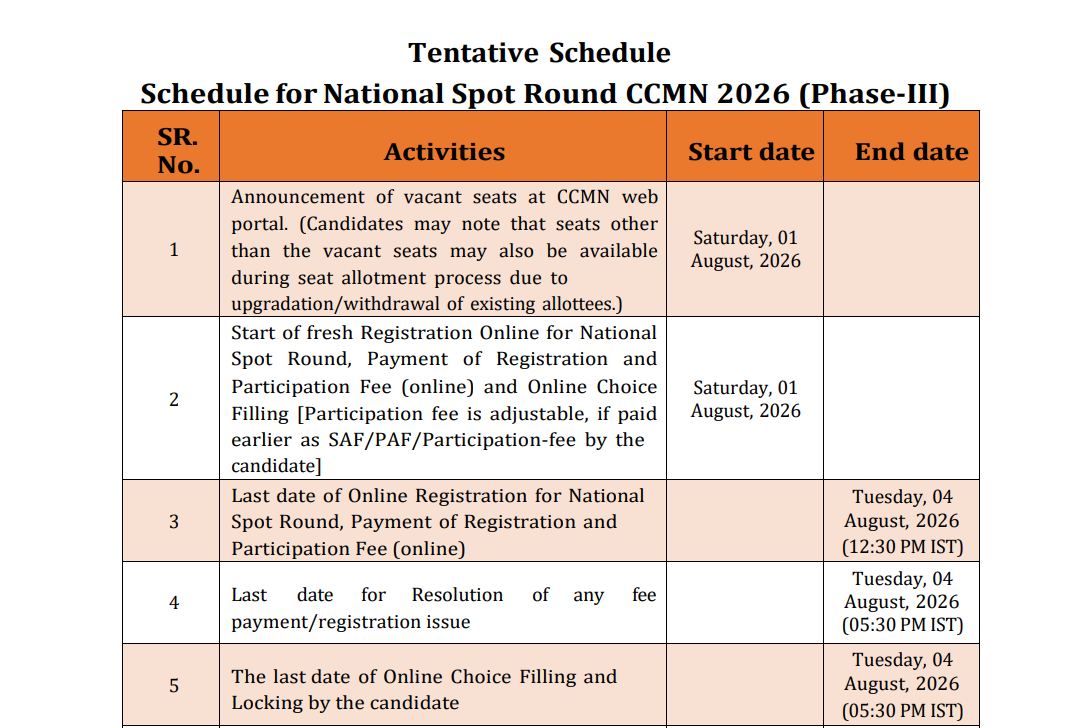
CCMN 2026 National Spot Round registration and online choice filling opened on August 1 at ccmn.admissions.nic.in. Candidates with a valid JAM 2026 score can apply till August 4. Seat allotment will be declared on August 5, 2026.

Centralized Counselling for M.Sc. Admissions (CCMN) has opened the National Spot Round 2026 registration. The registration and online choice filling are live at ccmn.admissions.nic.in. Candidates with a valid JAM 2026 scorecard are eligible to apply.
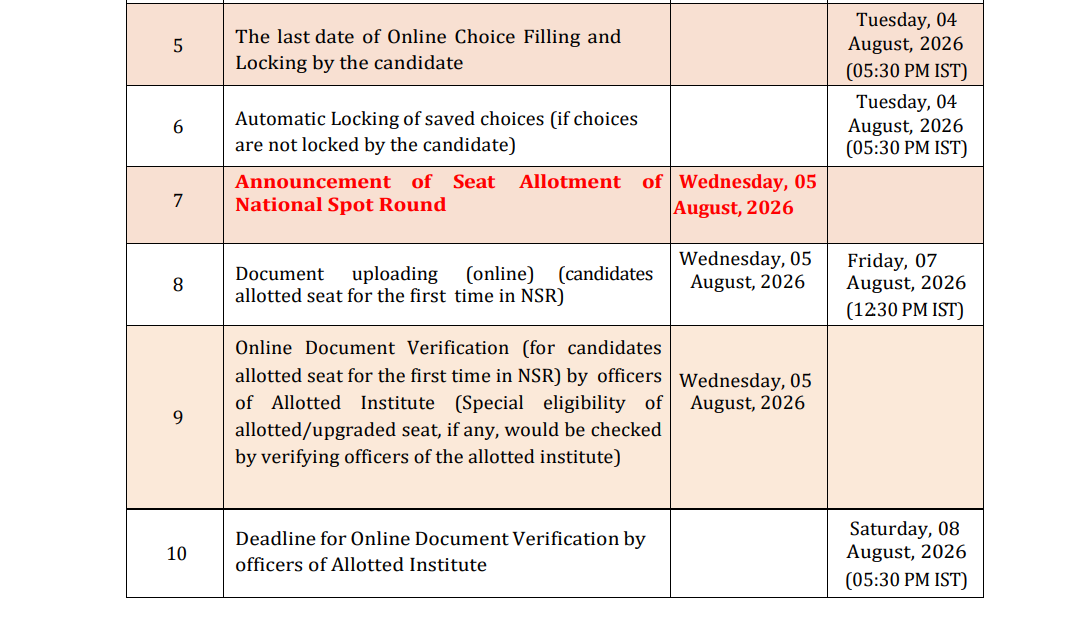
The last date to register is August 4, 2026, by 12:30 PM. Choice filling closes on the same day at 5:30 PM. The National Spot Round seat allotment result will be declared on August 5, 2026.
CCMN manages admission to M.Sc. programmes at NITs, IIEST Shibpur, and select CFTIs. The National Spot Round is the final phase of the CCMN 2026 counselling cycle.
| Direct Link: CCMN 2026 National Spot Round Registration Portal |
CCMN 2026 National Spot Round Key Dates
| Event | Date and Time |
|---|---|
| Registration and Fee Payment Opens | August 1, 2026 |
| Last Date for Registration and Fee Payment | August 4, 2026 (12:30 PM) |
| Last Date for Online Choice Filling and Locking | August 4, 2026 (5:30 PM) |
| National Spot Round Seat Allotment Result | August 5, 2026 |
CCMN 2026 Registration and Participation Fee
| Category | Fee Amount |
| OC / EWS / OBC | Rs 10,000 |
| SC / ST | Rs 7,500 |
Payment options include net banking, debit card, credit card, and UPI. The fee must be paid before the registration deadline to confirm participation.
Who Is Eligible to Apply?
A valid IIT JAM 2026 scorecard is the primary eligibility requirement. After login, the portal shows only the programmes for which a candidate is eligible.
NRI candidates with a foreign degree are also eligible to apply. They must hold a valid GATE 2026 or JAM 2026 score.
Also Check:
- GATE 2027 Drops International Exam Centres
- GATE 2027 Introduces New Robotics and Automation Paper; Check Exam Dates
- GATE 2027 Schedule Released by IIT Madras; Check Registration Start Date
How to Register for the CCMN 2026 National Spot Round?
Follow the steps below to complete the registration and choice-filling process on the official portal:
- Visit the official CCMN portal at ccmn.admissions.nic.in.
- Click on the candidate login link on the homepage.
- Sign in using your JAM 2026 registration credentials.
- Review the tentative seat vacancy list before proceeding.
- Fill out the National Spot Round registration form with personal and academic details.
- Pay the participation fee through the available online payment modes.
- Access the choice-filling module and select your preferred programmes.
- Lock the filled choices before the deadline to confirm submission.
Also Check: IIT JAM 2026 Round 5 Cutoff Released at jam2026.iitb.ac.in
What Happens After the Seat Allotment?
Allotted candidates must accept the allotted seat within the timeline provided on the CCMN portal. Payment of the admission fee is required to confirm the allotment.
Candidates must then report to the allotted institute and complete the document verification process. Detailed reporting instructions will be released along with the National Spot Round allotment result on August 5, 2026.
The National Spot Round is the final chance in CCMN 2026. It fills seats that stayed vacant after the regular and special rounds. Candidates who missed earlier rounds get one final opportunity here.
Action Plan for Candidates
- Visit ccmn.admissions.nic.in and log in with your JAM 2026 credentials.
- Check the tentative seat vacancy list for the National Spot Round.
- Complete registration and pay the fee before August 4, 12:30 PM.
- Fill and lock your programme choices before August 4, 5:30 PM.
- Check the seat allotment result on the portal on August 5, 2026.
Watch ccmn.admissions.nic.in for the National Spot Round seat allotment on August 5. Reporting and document verification instructions will follow soon after.
Read More


.jpeg?h=40&w=40&mode=stretch)



Comments