




Tuples and Dictionaries is the chapter where Class 11 Computer Science leaves the list behind for a sequence that cannot be edited and a collection that has no index at all. The class 11 computer science chapter 10 ncert book pdf on this page is the official NCERT chapter for 2026-27. Download it for Table 10.1, Table 10.2, all eight programs and the complete exercise set.
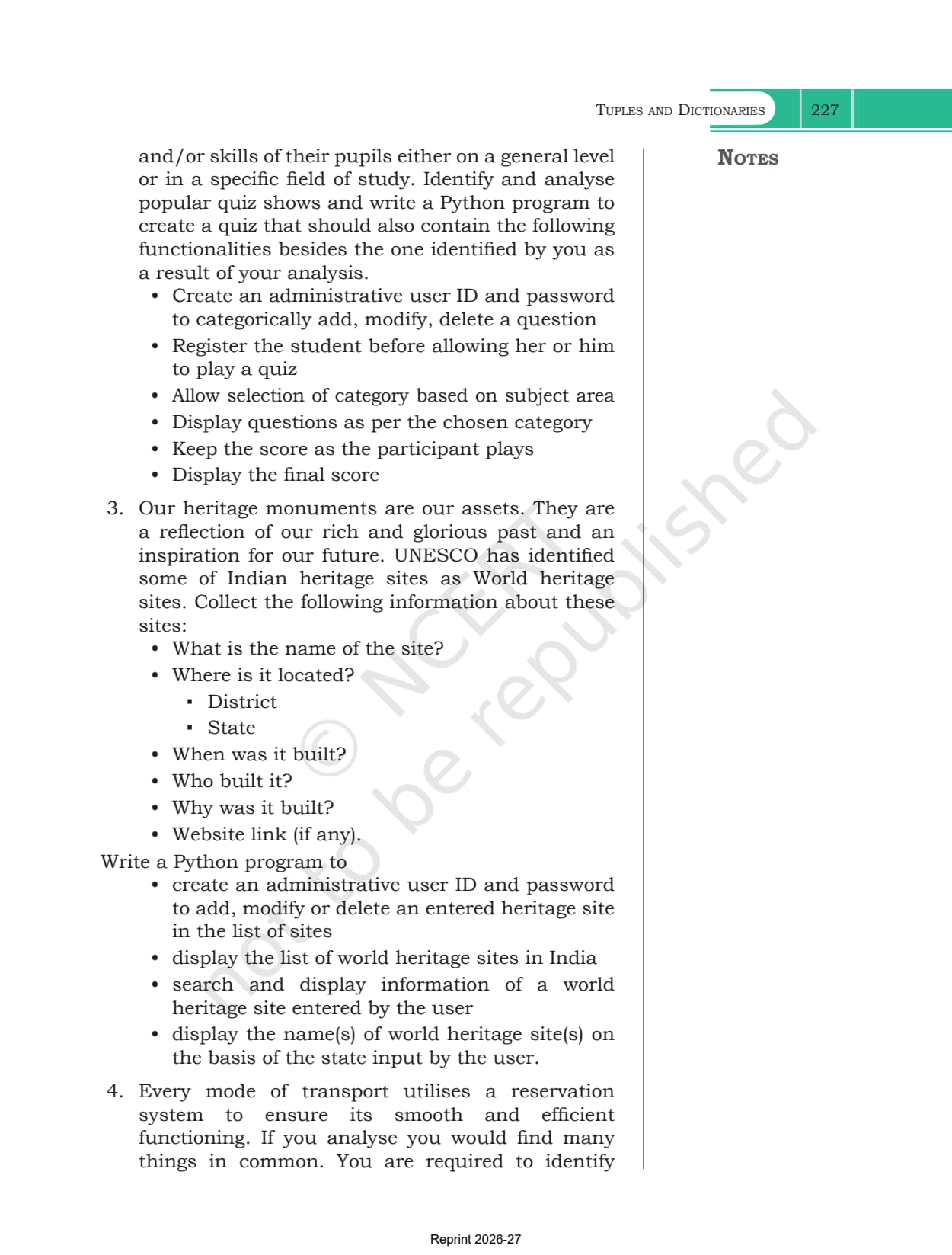
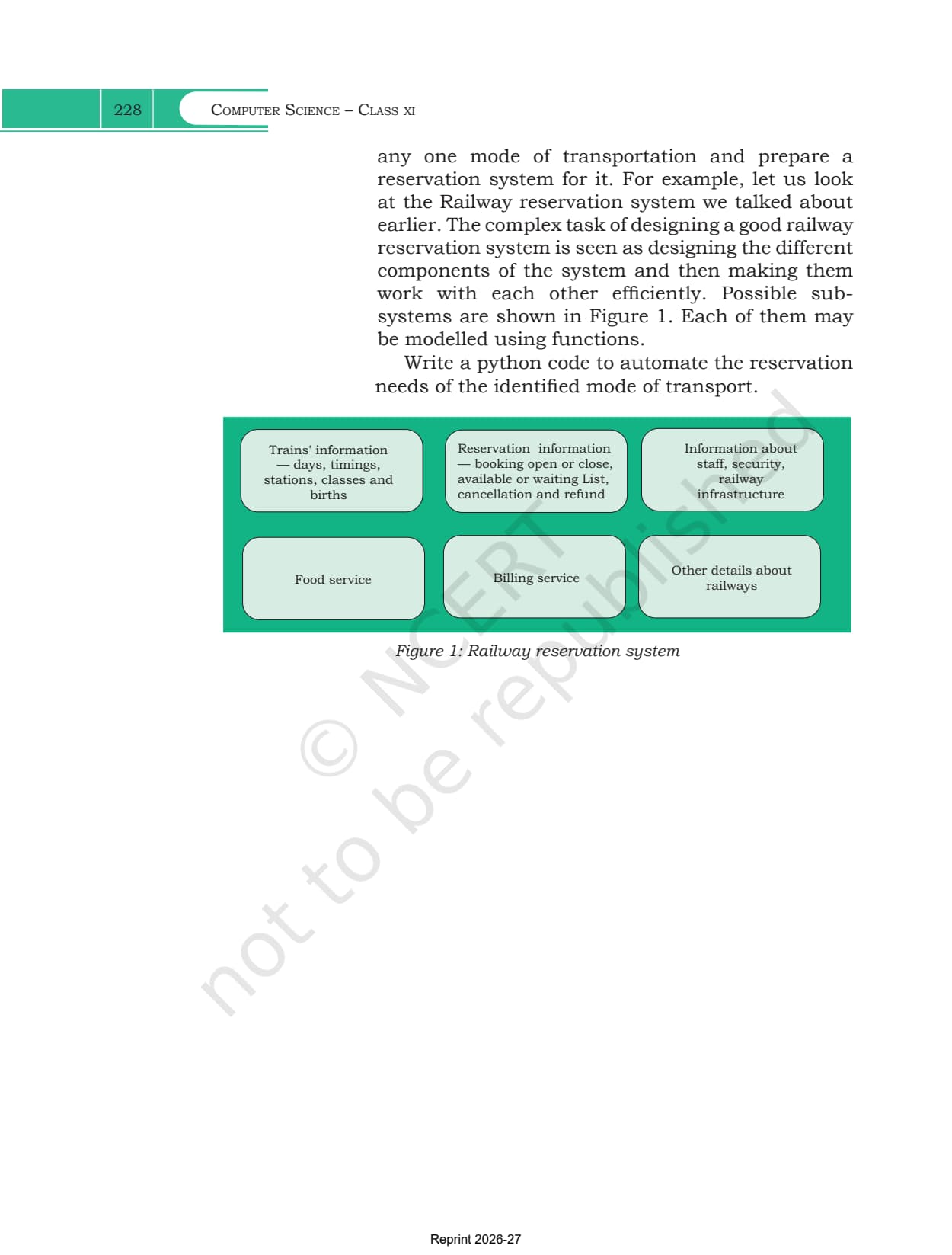
- Chapter: Chapter 10, Tuples and Dictionaries
- Book: Computer Science, the Class 11 NCERT textbook for 2026-27, 11 chapters
- File: 22 pages, printed pages 207 to 228, the complete official chapter
You can page through both reference tables, all eight worked programs and the full exercise set in the viewer above before downloading the file.
This is the official NCERT chapter file for the 2026-27 session, hosted by Collegedunia with no pages removed.
How the Tuples and Dictionaries Chapter Is Laid Out
The chapter opens with a line from Alan Kay comparing software to a musical score, then runs through twelve numbered sections. The first six build the tuple, the last six build the dictionary, and the two halves never mix until the case study at the end asks you to use both together.
| Section | What it covers |
|---|---|
| 10.1 Introduction to Tuples | round brackets, mixed data types, Example 10.1 with four sample tuples |
| 10.1.1 Accessing Elements in a Tuple | index from 0, negative indices, index expressions and IndexError |
| 10.1.2 Tuple is Immutable | TypeError on item assignment, and the list inside a tuple that can still be changed |
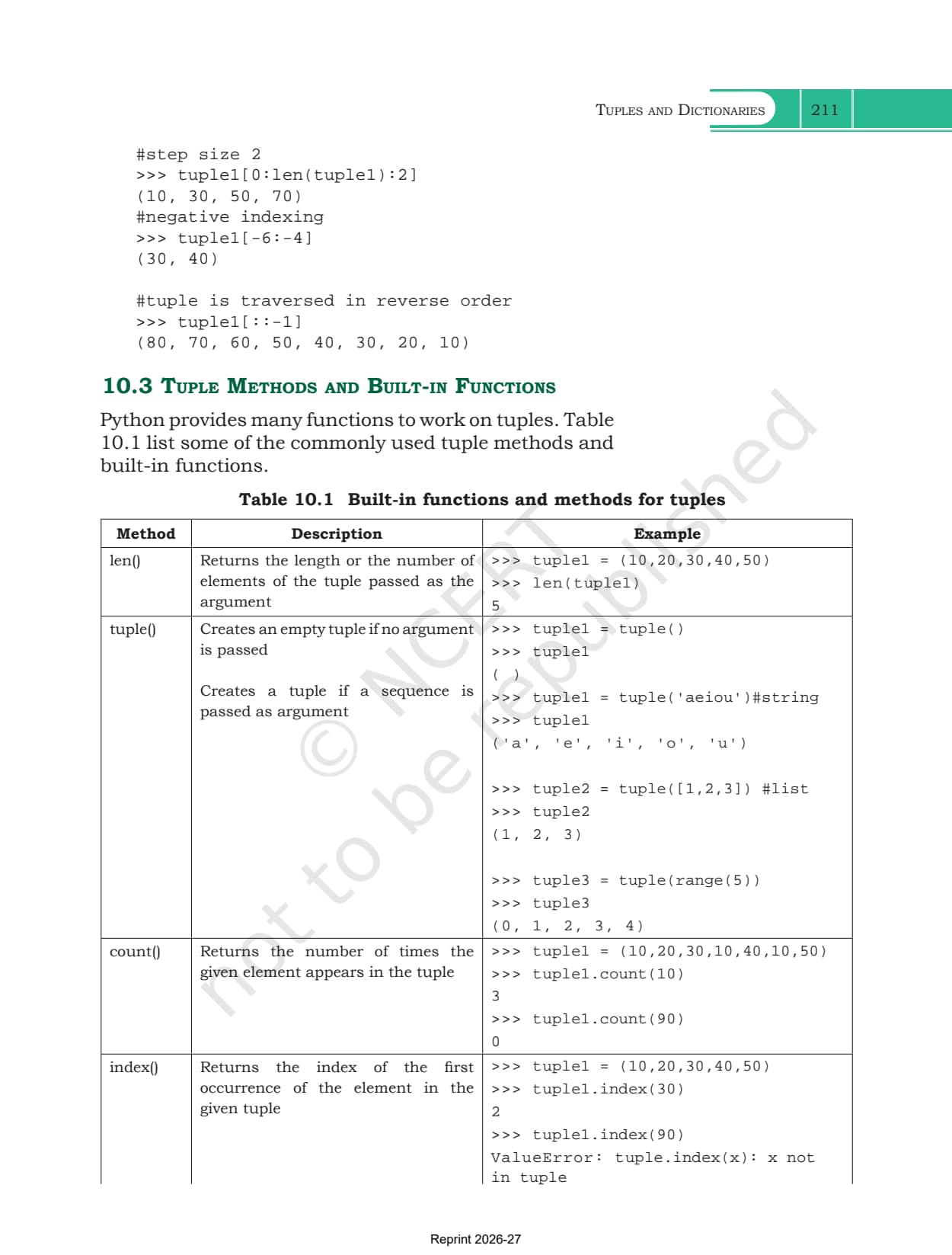
| 10.2 Tuple Operations | concatenation, repetition, membership and slicing, sub sections 10.2.1 to 10.2.4 |
| 10.3 Tuple Methods and Built-in Functions | Table 10.1, from len() and tuple() through to min(), max() and sum() |
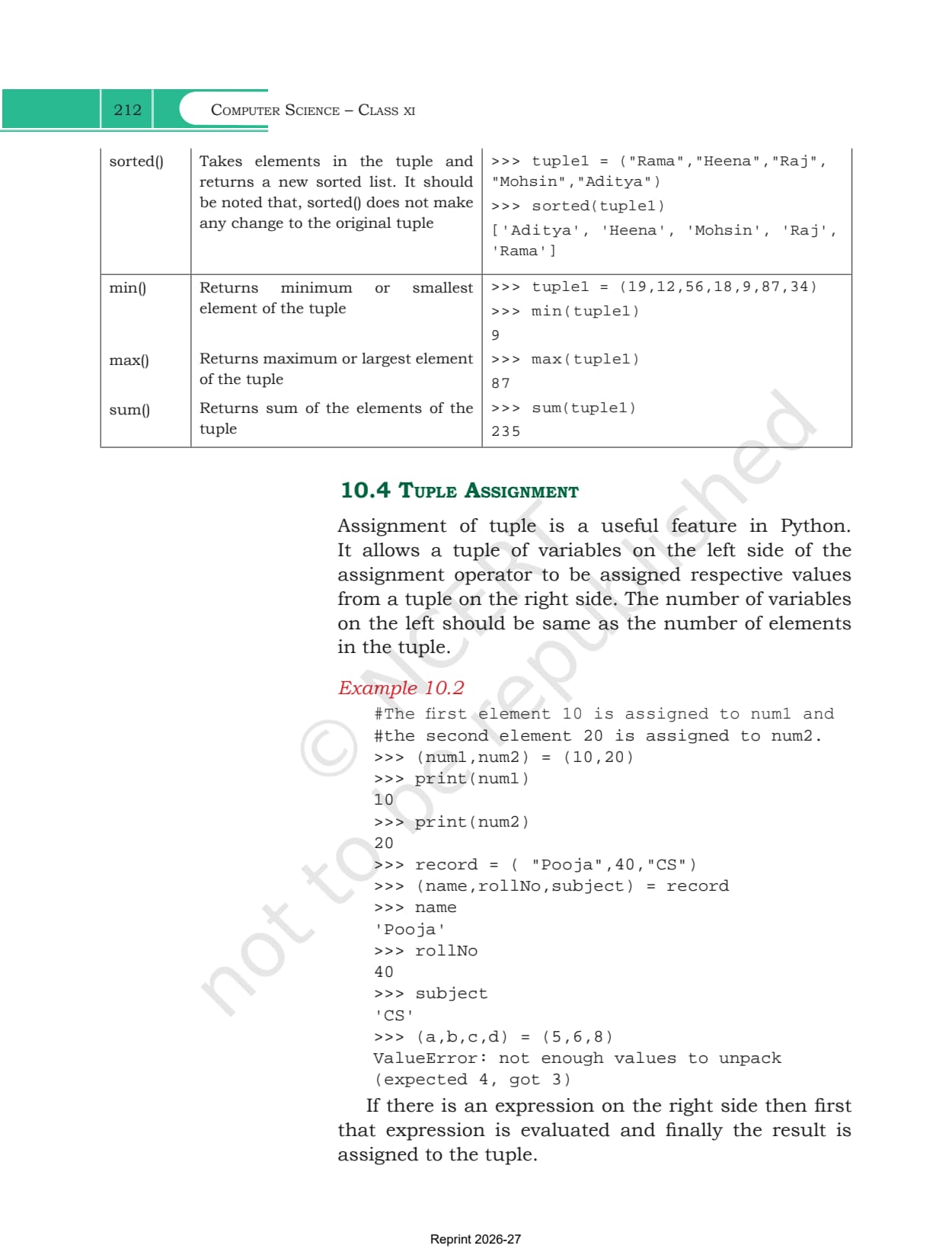
| 10.4 Tuple Assignment | Examples 10.2 and 10.3, unpacking a record into named variables |
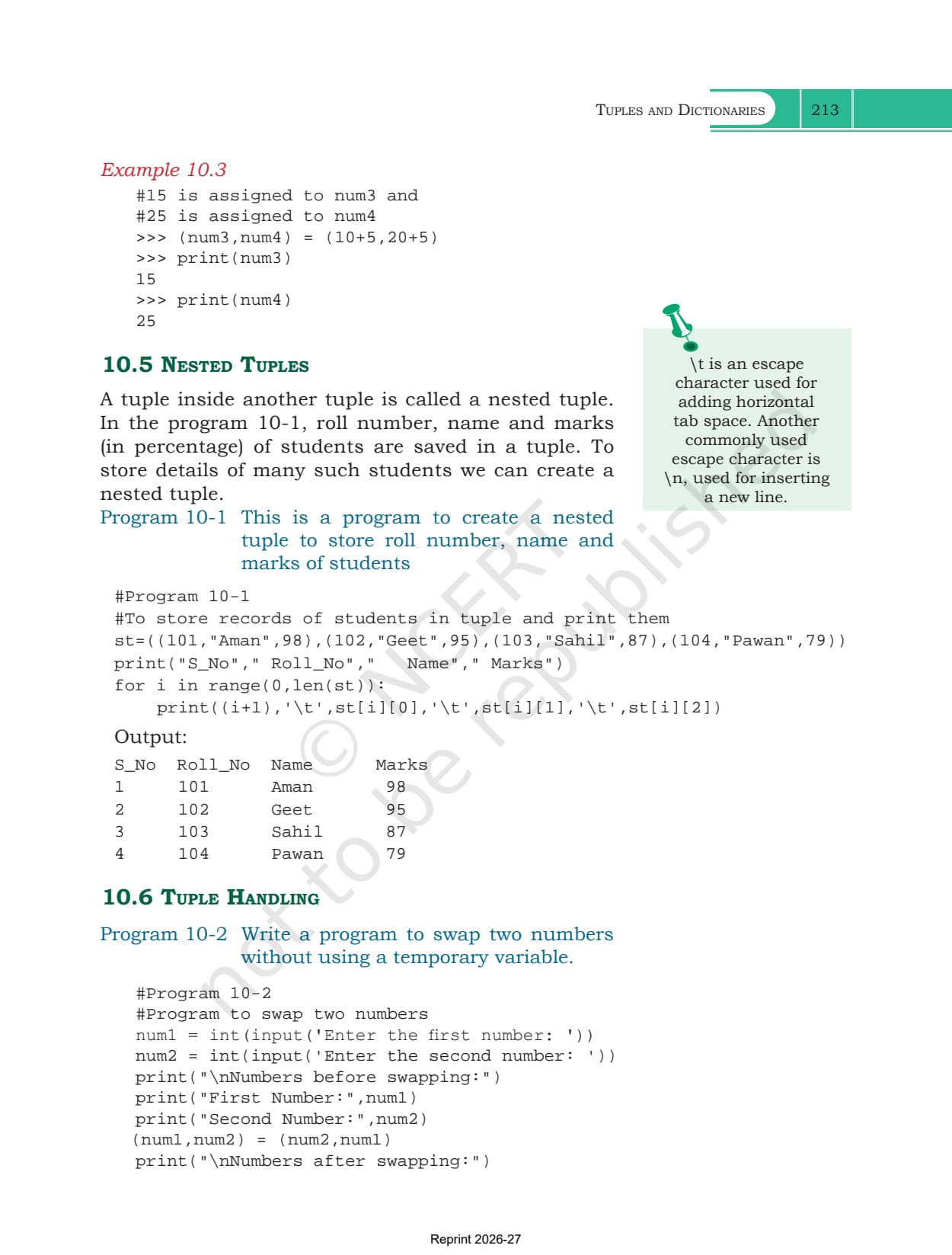
| 10.5 Nested Tuples | a tuple inside a tuple, with Program 10-1 printing a student marks table |
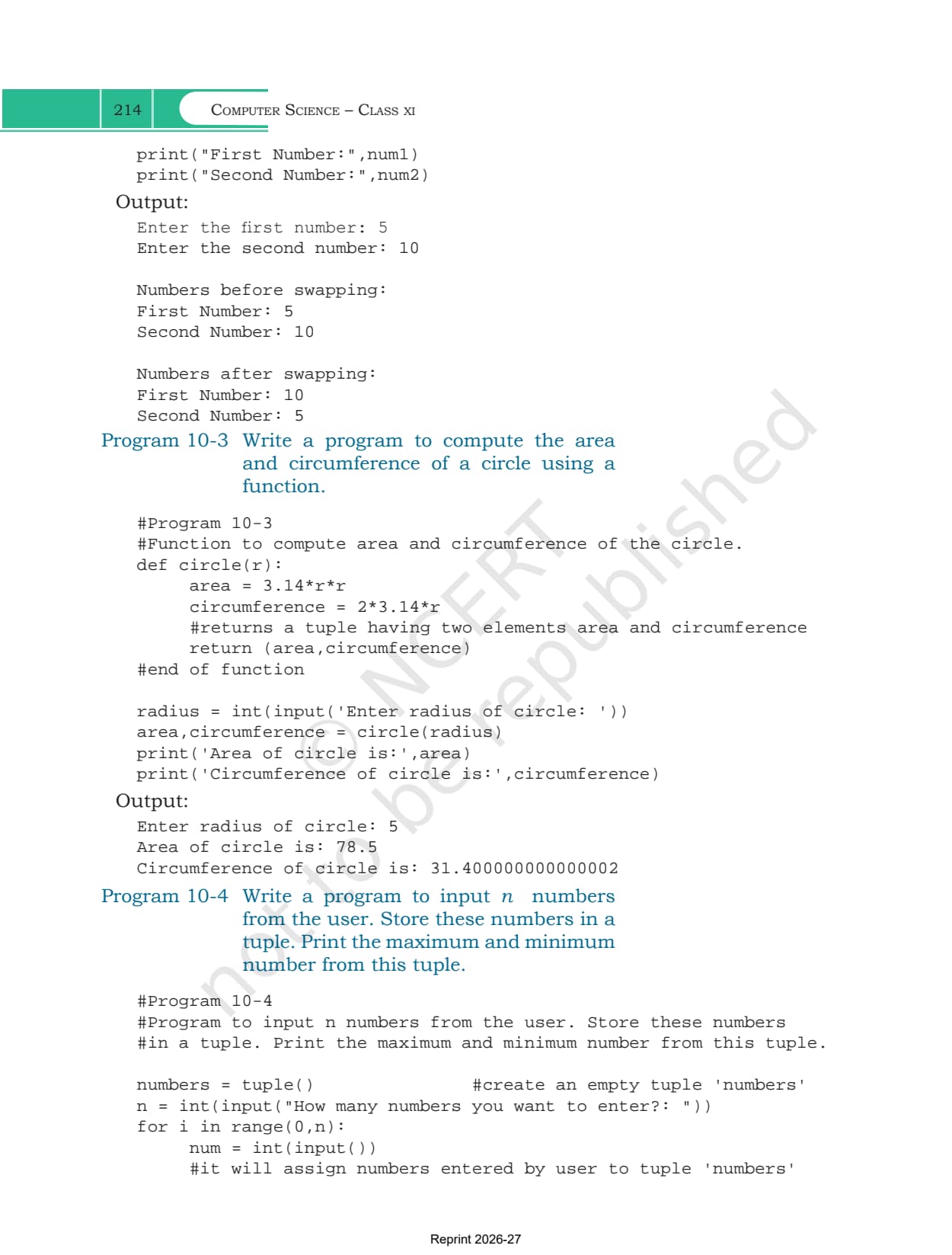
| 10.6 Tuple Handling | Programs 10-2, 10-3 and 10-4, including swapping without a temporary variable |
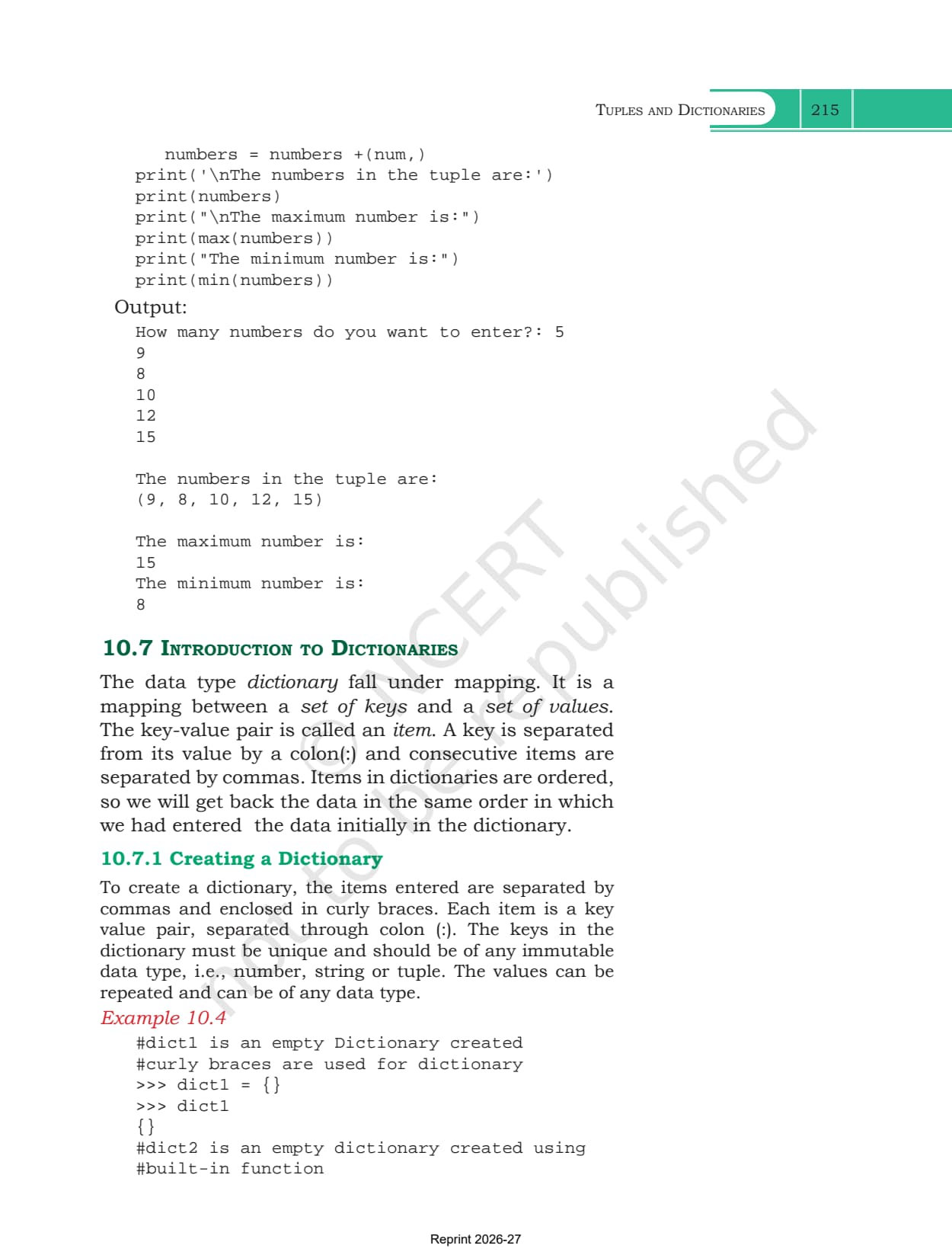
| 10.7 Introduction to Dictionaries | curly braces, key value pairs, Example 10.4 and the KeyError |
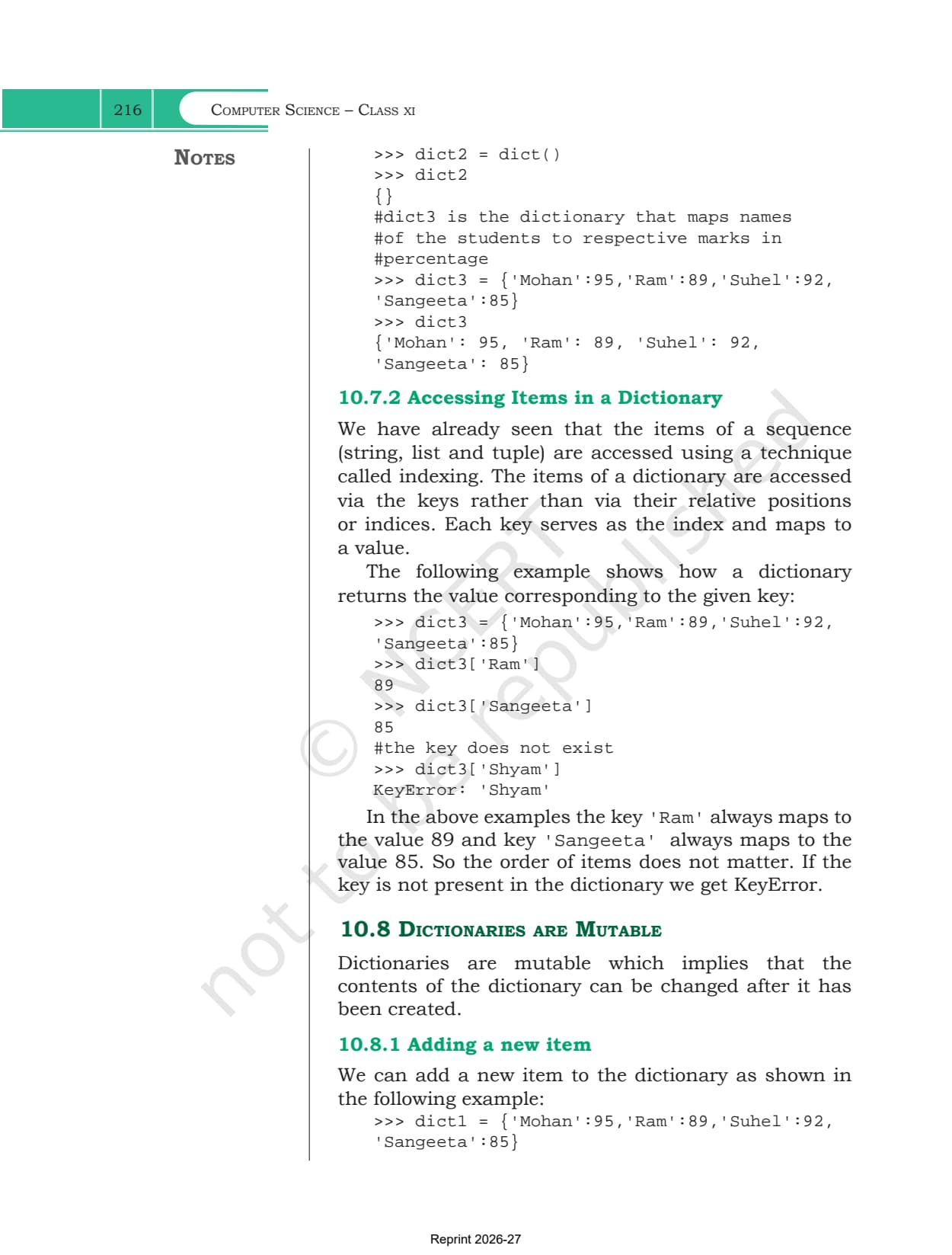
| 10.8 Dictionaries are Mutable | adding a new item and overwriting an existing one |
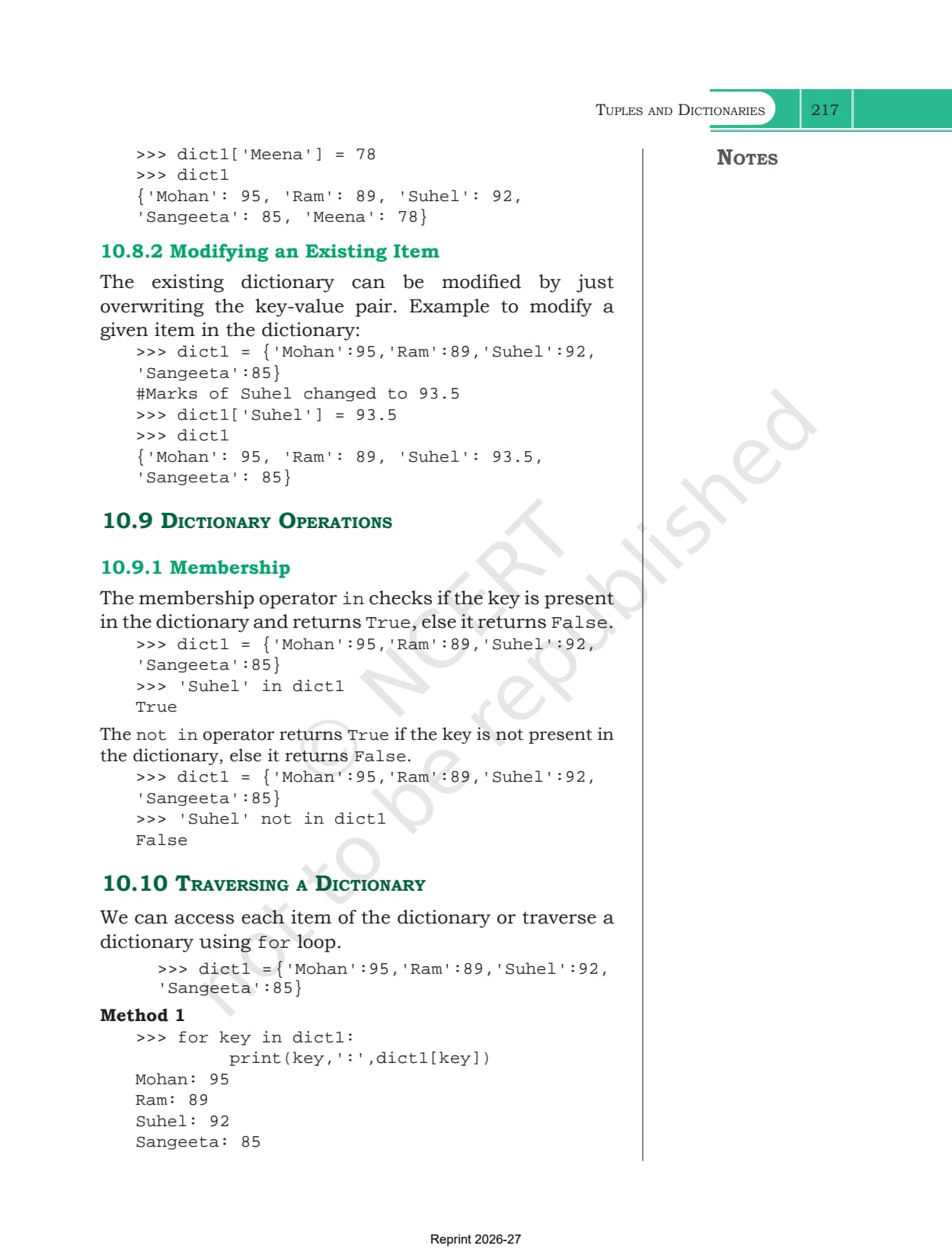
| 10.9 Dictionary Operations | membership testing with in and not in, which is the only operation given |
| 10.10 Traversing a Dictionary | two for loop methods, one over the keys and one over items() |
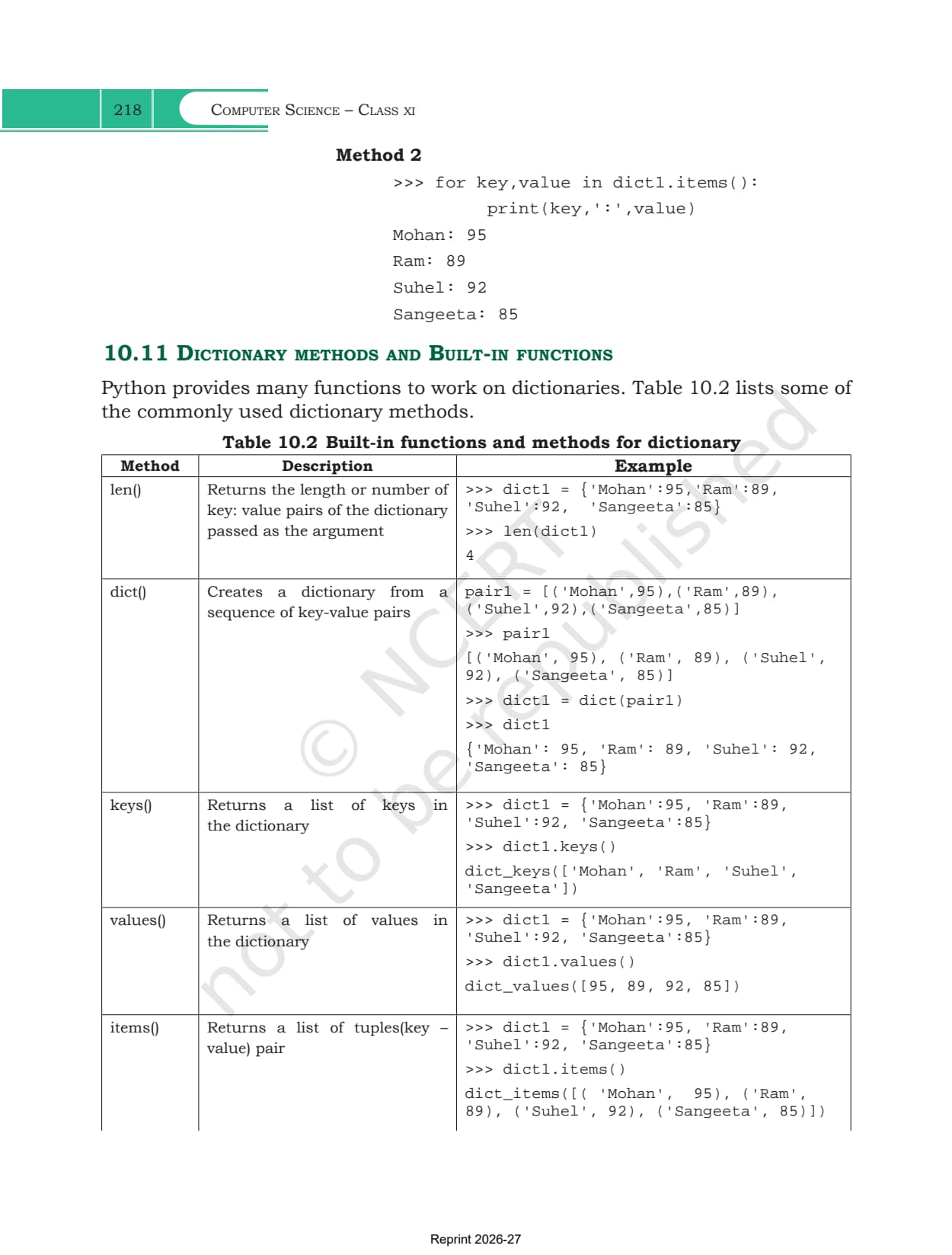
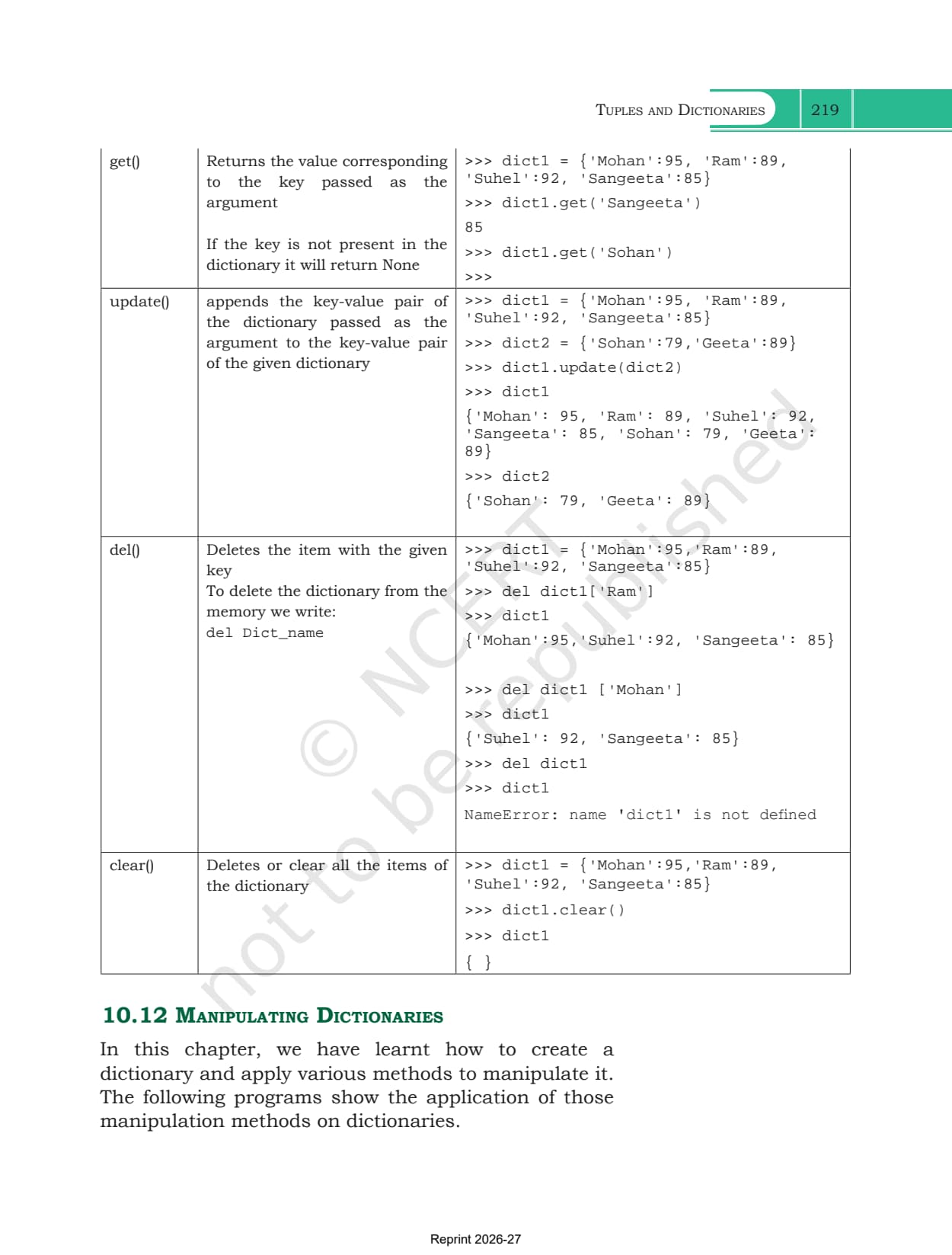
| 10.11 Dictionary Methods and Built-in Functions | Table 10.2, len(), dict(), keys(), values(), items(), get(), update(), del and clear() |
| 10.12 Manipulating Dictionaries | Programs 10-5 to 10-8, the character counter included |
| Summary and Exercise | a fourteen point recap, 8 exercise questions, 5 programming problems and four case study questions |
What the Tuples and Dictionaries Chapter PDF Contains
The PDF holds the whole chapter exactly as NCERT printed it, with nothing trimmed from either end.
- All twelve sections, from the definition of a tuple to the four dictionary manipulation programs
- Table 10.1 for tuples and Table 10.2 for dictionaries, each entry paired with a runnable shell transcript
- Examples 10.1 to 10.4, covering the four sample tuples, tuple assignment and the three ways to start a dictionary
- Programs 10-1 to 10-8 with their printed output, including the swap program, the circle function that returns two values and the character frequency counter
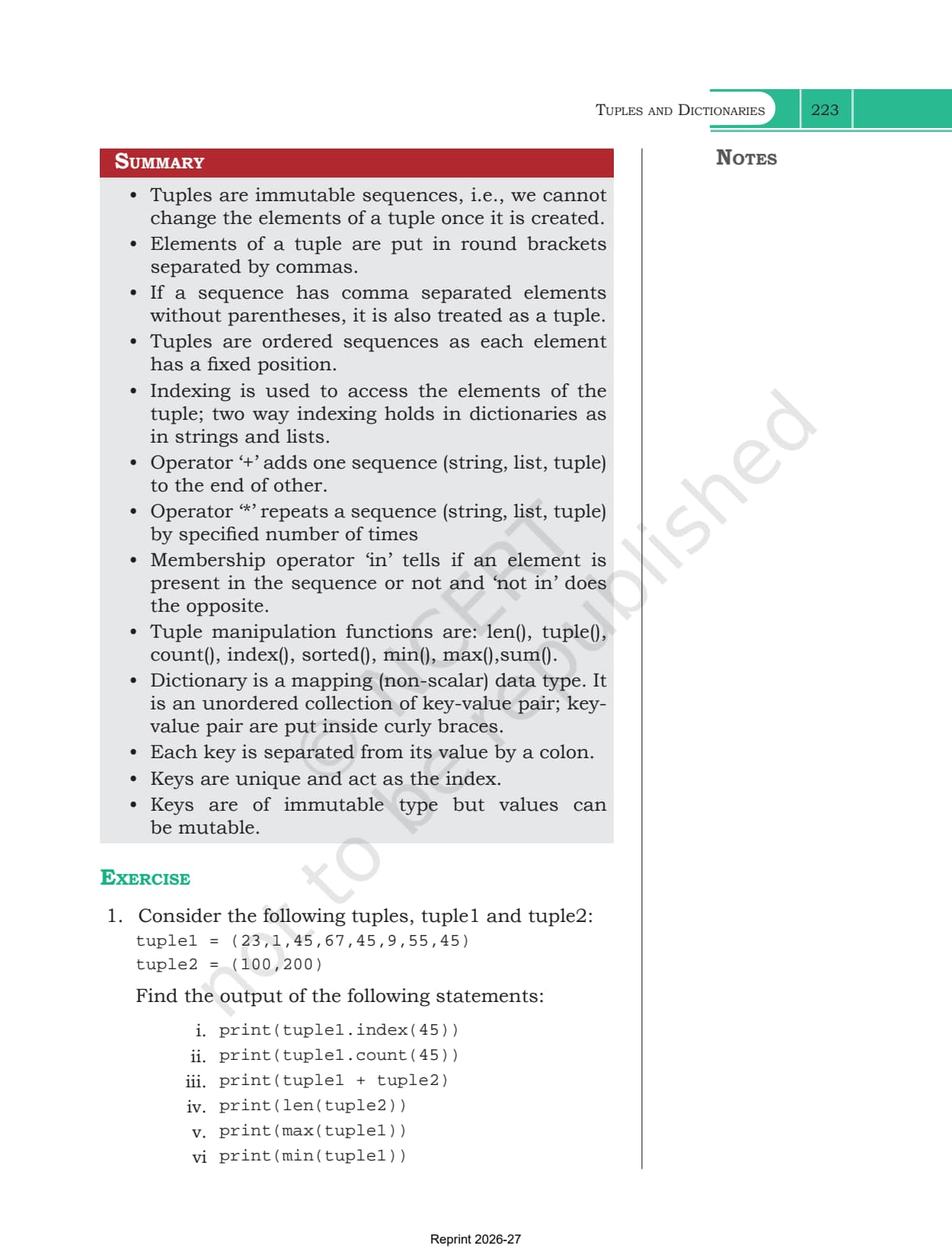
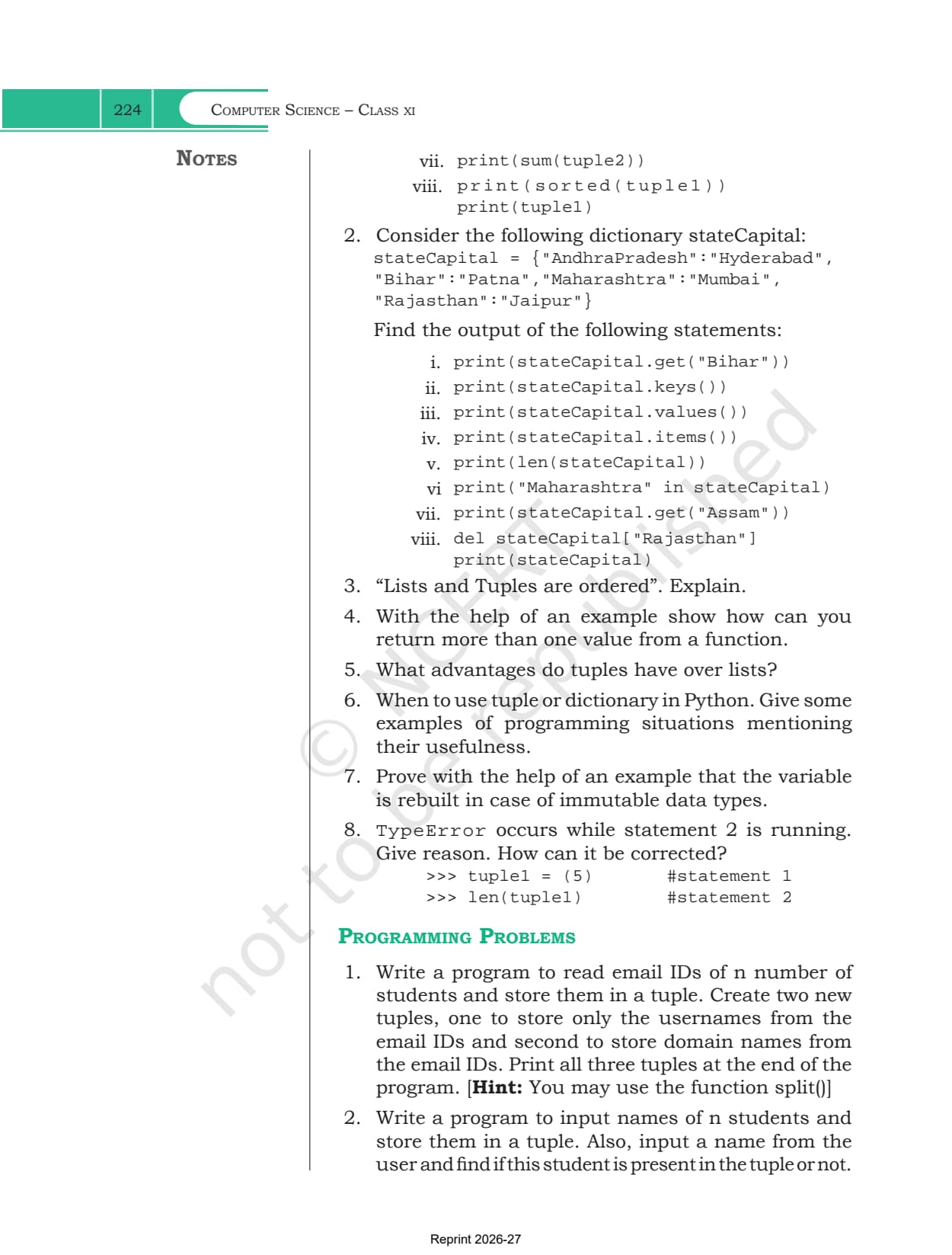
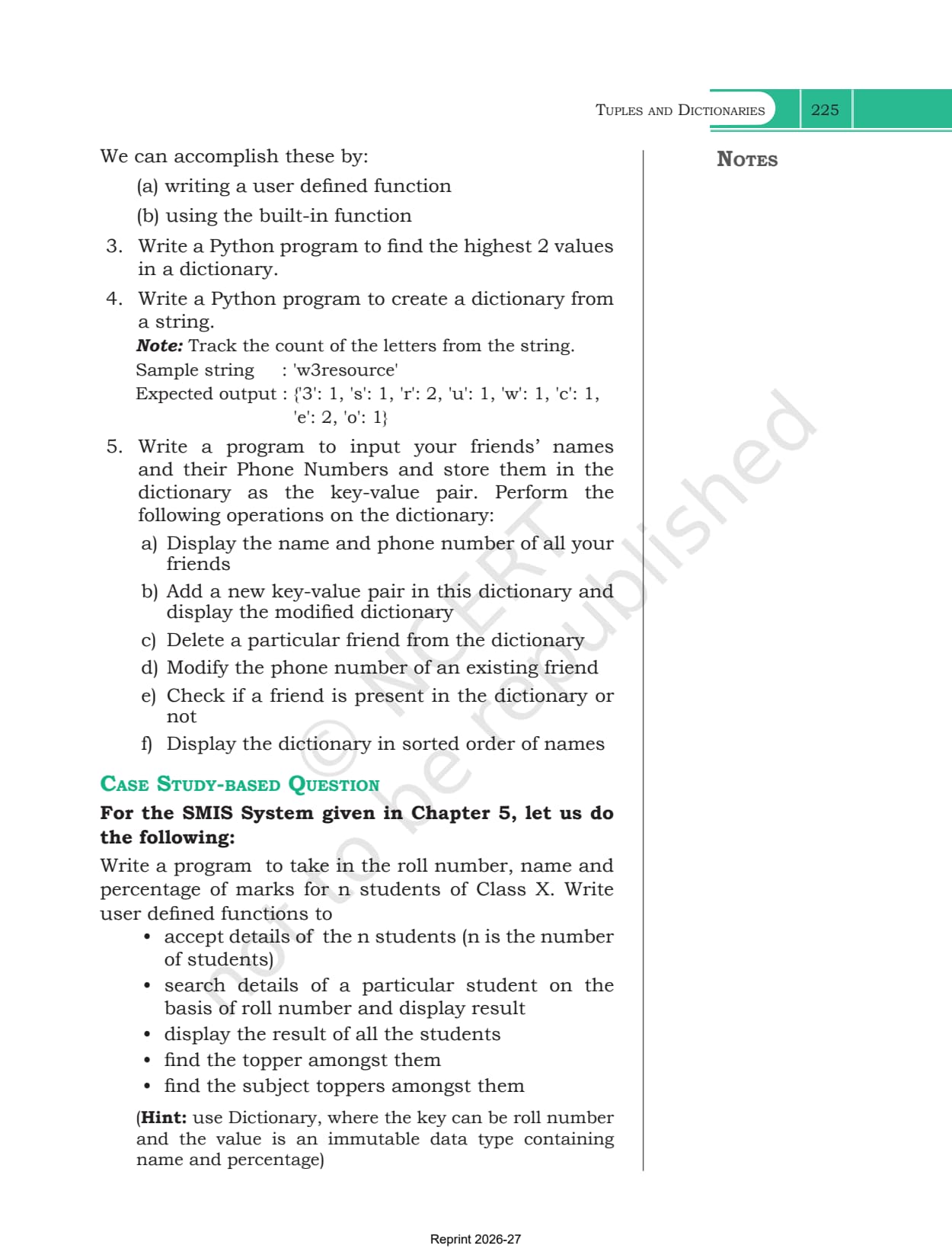
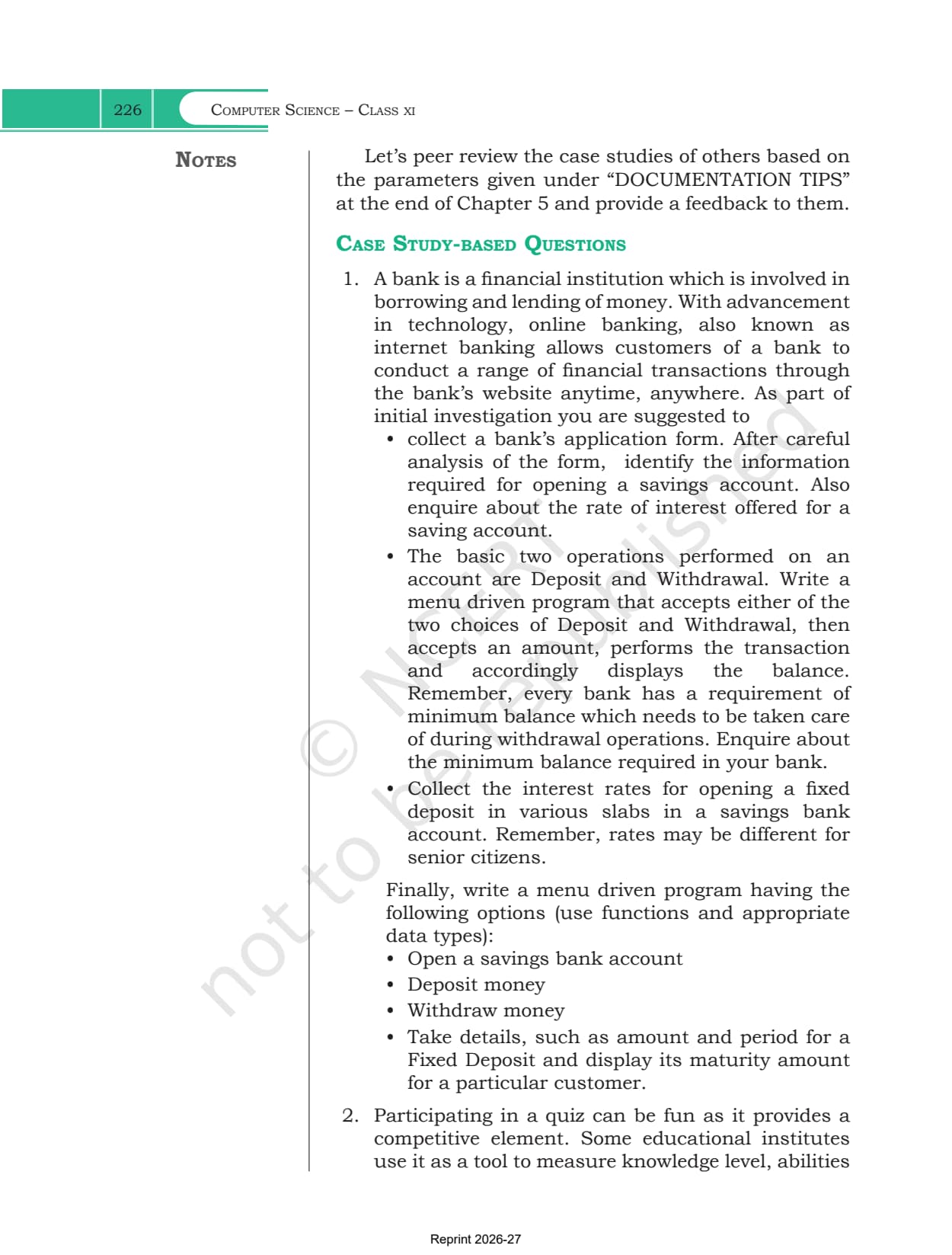
- The Summary page, all 8 exercise questions, the 5 programming problems and the case study questions that close the chapter
Tuples and Dictionaries Class 11 Chapter Overview
Source: Nitin Paliwal on YouTube
Creating a Tuple and the Single Element Comma Rule
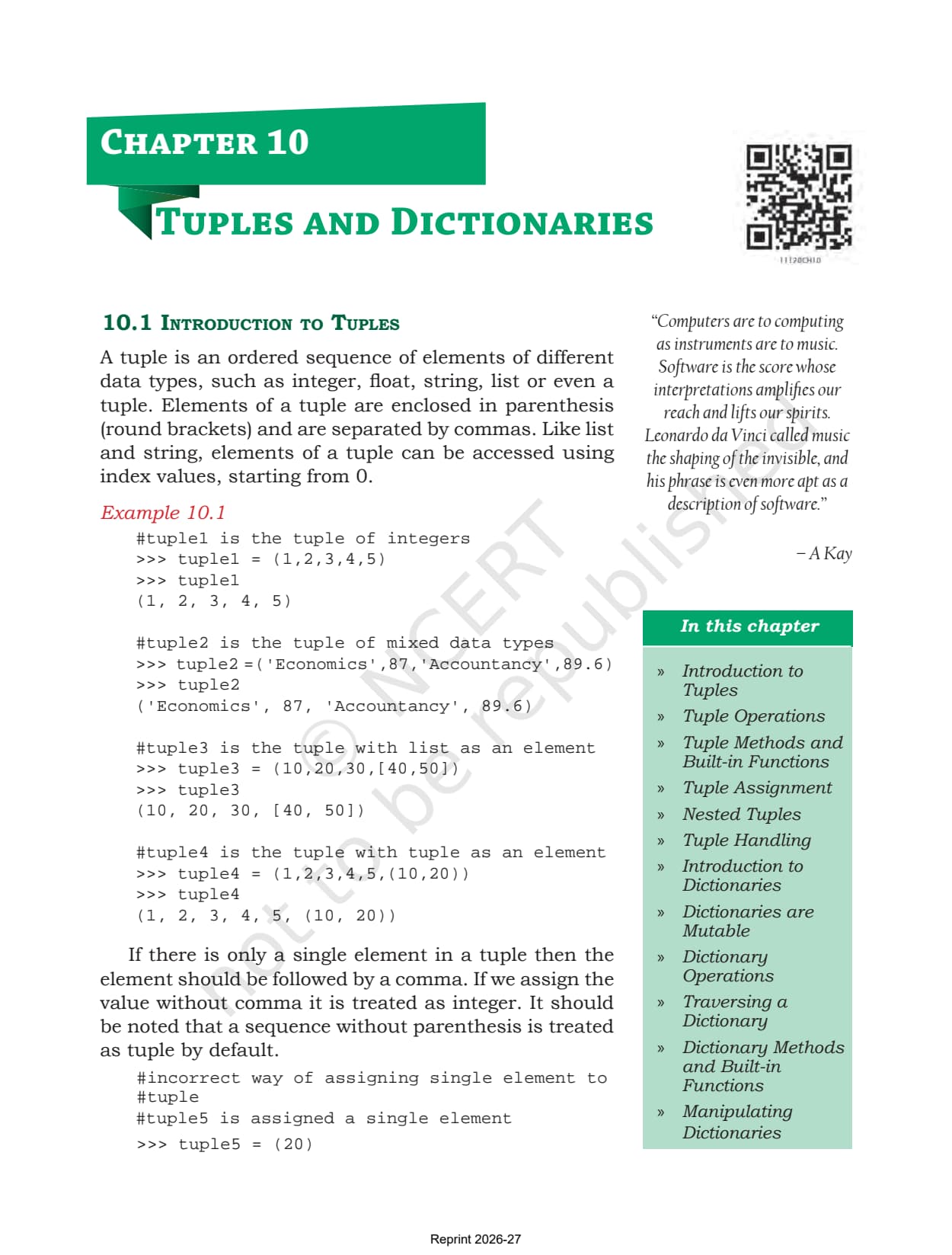
Section 10.1 defines a tuple as an ordered sequence of elements of different data types, written inside parentheses and separated by commas. Example 10.1 shows four of them side by side: a tuple of integers, a tuple mixing subject names with marks, a tuple that holds a list as one element, and a tuple that holds another tuple. The margin note in the chapter draws the working distinction, that a list normally stores elements of the same type while a tuple stores elements of different types.
Then comes the trap that the chapter spends a full page on, and that exercise question 8 asks about directly.
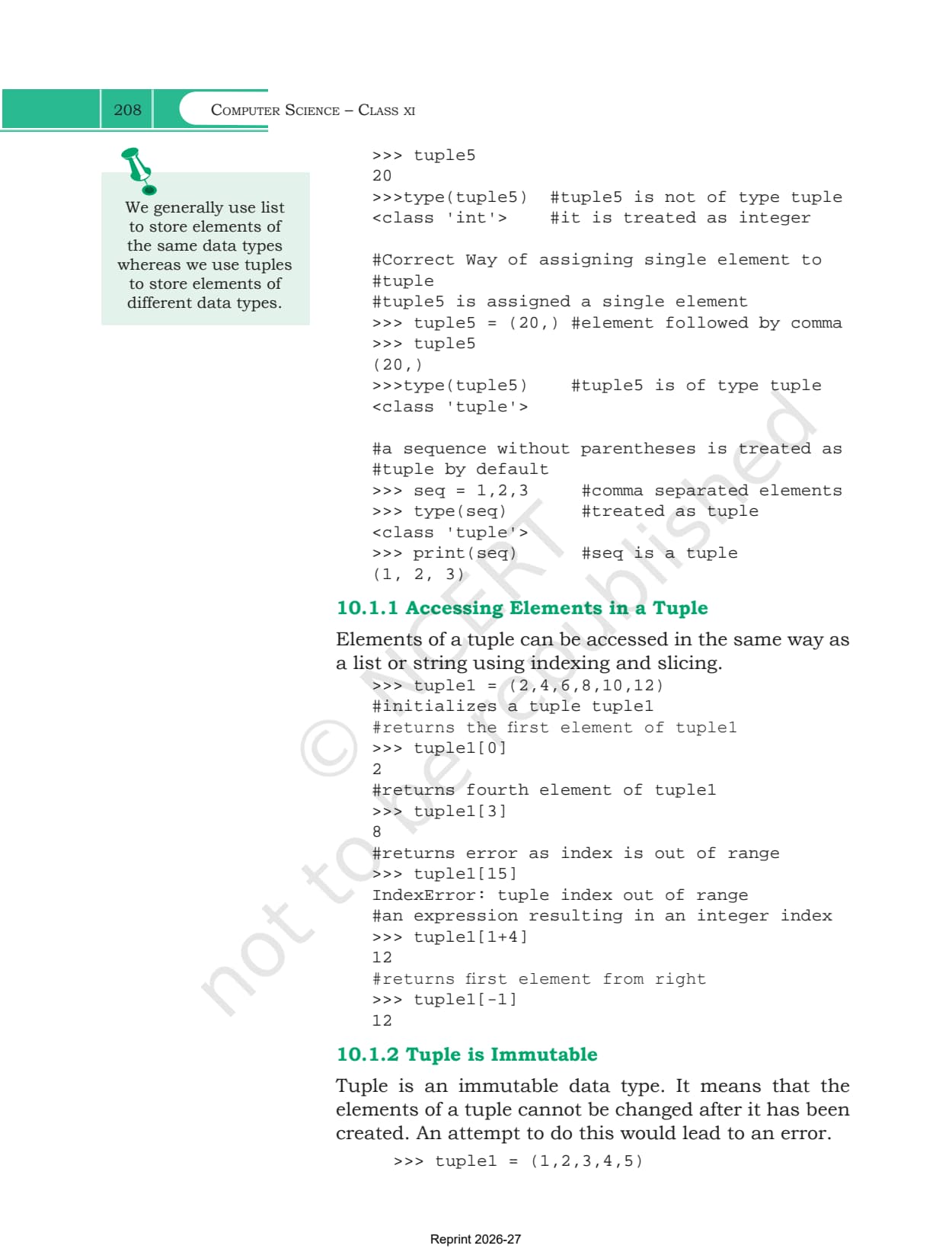
- One element without a comma: writing tuple5 = (20) stores a plain integer. Calling type() on it returns <class 'int'>, and len() on it raises TypeError
- One element with a comma: writing tuple5 = (20,) stores a real tuple, and type() confirms <class 'tuple'>
- No parentheses at all: seq = 1,2,3 is still a tuple by default, because the commas are what make it one
- Indexing: tuple1[0] is the first element, tuple1[-1] the last, tuple1[1+4] is legal because the expression evaluates to an integer
- Out of range: tuple1[15] on a six element tuple raises IndexError: tuple index out of range
Why a Tuple Is Immutable When a List Is Not
Section 10.1.2 is the pivot of the first half. A tuple is immutable, so once it is built its elements cannot be replaced. Assigning tuple1[4] = 10 raises TypeError: 'tuple' object does not support item assignment, and no amount of retyping changes that.
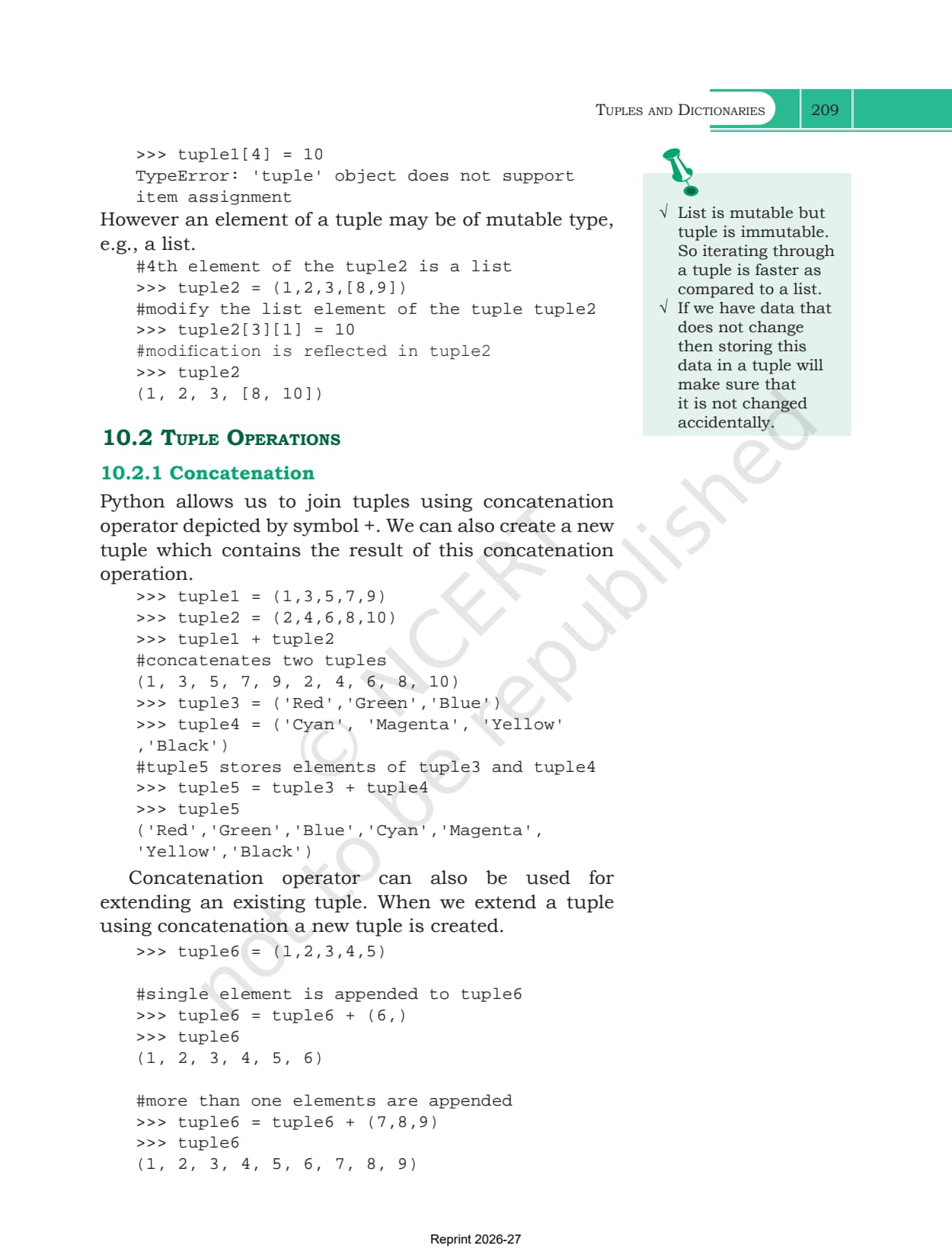
The chapter then adds the qualification most students miss. An element of a tuple may itself be of a mutable type. Given tuple2 = (1,2,3,[8,9]), the statement tuple2[3][1] = 10 works perfectly well and the tuple now prints as (1, 2, 3, [8, 10]). The tuple has not changed, because it still points at the same list object. What changed is the contents of that list.
The margin notes give the two practical reasons the chapter wants you to remember: iterating through a tuple is faster than iterating through a list, and data that should never change is safer stored in a tuple because it cannot be edited by accident. Exercise question 5 asks for exactly this comparison.
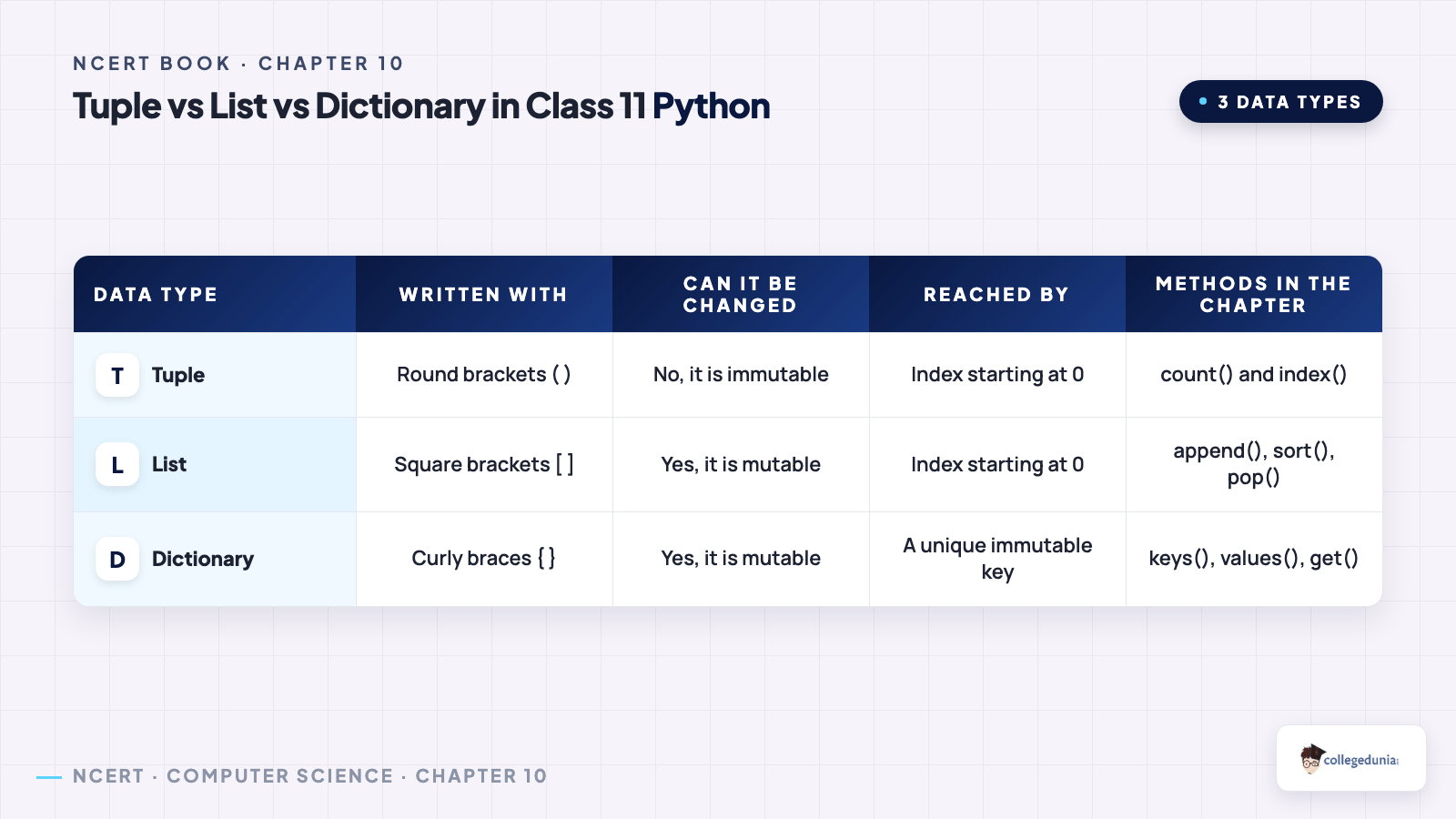
| Point of difference | Tuple | List |
|---|---|---|
| Written with | round brackets, or bare commas | square brackets |
| Change one position | no, the assignment raises TypeError | yes, list1[3] = 'Black' works |
| Typical use | elements of different data types | elements of the same data type |
| Speed of iteration | faster, because it is immutable | slower |
| Methods in the chapter | count() and index() only | append, insert, remove, pop, sort, reverse |
| Indexing and slicing | identical rules | identical rules |
Tuple Operations from Concatenation to Slicing
Section 10.2 gives four operations, and every one of them is read only. Because a tuple cannot be edited in place, each operation builds a fresh tuple, which is why the chapter keeps reassigning the result back to the same name.
| Operation | Operator | What the chapter shows |
|---|---|---|
| Concatenation | + | tuple1 + tuple2 joins them end to end, and tuple6 = tuple6 + (6,) is how the chapter appends a single element |
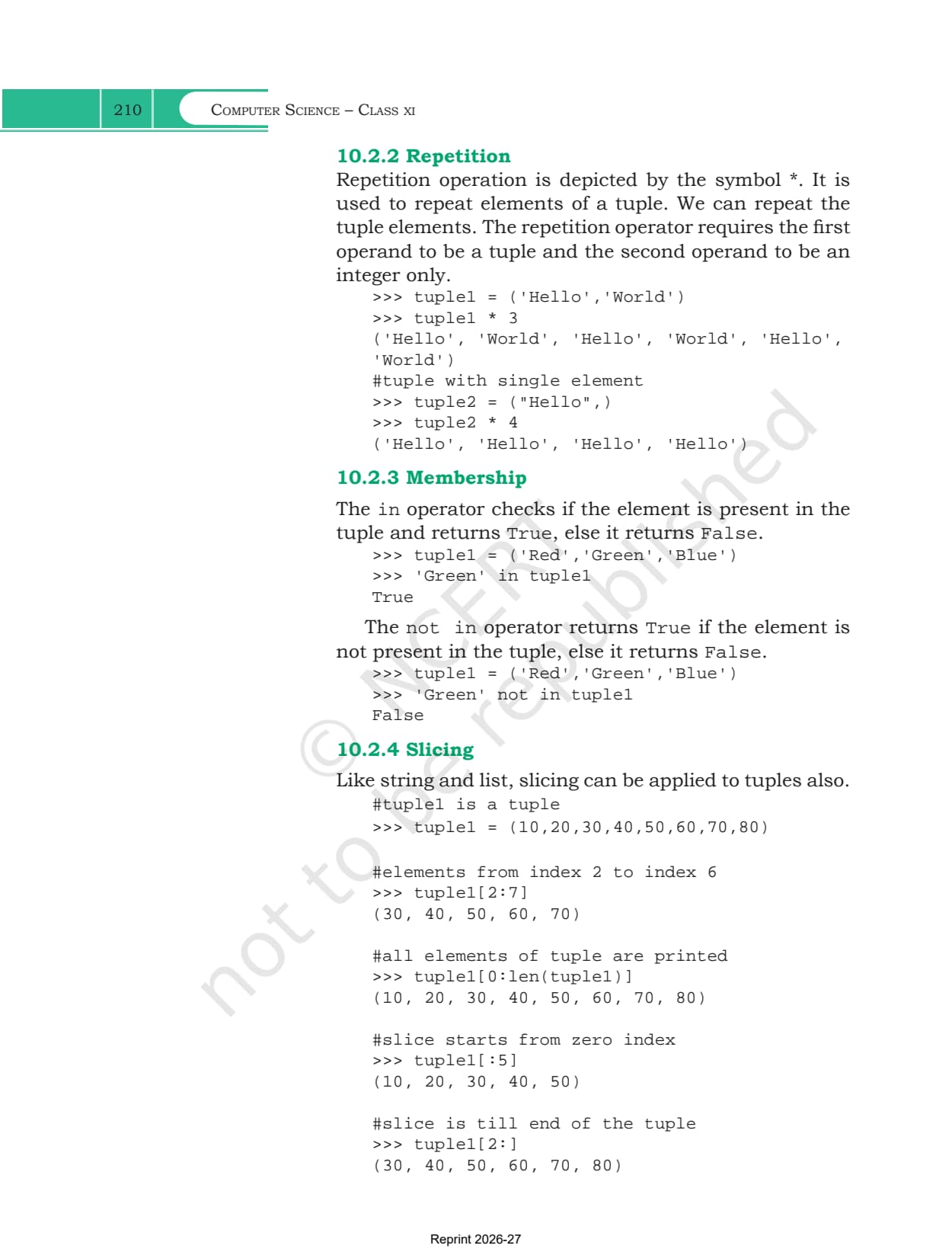
| Repetition | * | ('Hello','World') * 3 repeats the whole tuple. The first operand must be a tuple and the second an integer |
| Membership | in and not in | 'Green' in tuple1 returns True or False, exactly as it does for a list |
| Slicing | [start:stop:step] | tuple1[2:7] takes a subtuple, tuple1[:5] starts at the beginning, tuple1[0:len(tuple1):2] adds a step |
Two slicing lines are worth memorising. Negative indices work inside a slice, so tuple1[-6:-4] returns the two elements counted from the right. And tuple1[::-1], a step of minus one across the whole tuple, hands back the tuple in reverse order without touching the original, which is the same behaviour you saw on strings and lists.
Tuple Methods, Tuple Assignment and Nested Tuples
Section 10.3 is the reference part of the first half. Table 10.1 is short compared with the list table, and that shortness is itself the point: an immutable type simply cannot offer append, insert, remove or sort.
| Method | What it does |
|---|---|
| len() | returns the number of elements in the tuple |
| tuple() | creates an empty tuple, or converts a string, a list or a range into a tuple |
| count() | returns how many times a value appears, and 0 if it never does |
| index() | returns the index of the first occurrence, or raises ValueError |
| sorted() | returns a new sorted list and leaves the tuple exactly as it was |
| min(), max(), sum() | return the smallest element, the largest element and the total |
Note what sorted() gives back. It returns a list, not a tuple, which is exactly what exercise question 1 part viii is testing when it asks you to print sorted(tuple1) and then print tuple1 on the next line.
Section 10.4 covers tuple assignment, the feature that lets a tuple of variables on the left take its values from a tuple on the right. Writing (name,rollNo,subject) = record spreads a three element record across three named variables in one line. The counts must match, so (a,b,c,d) = (5,6,8) raises ValueError: not enough values to unpack. If the right side is an expression it is evaluated first, so (num3,num4) = (10+5,20+5) stores 15 and 25.
Section 10.5 then puts a tuple inside a tuple. Program 10-1 stores four student records as a nested tuple and reaches each field with two indices, st[i][0] for the roll number, st[i][1] for the name and st[i][2] for the marks. Section 10.6 closes the tuple half with three programs: swapping two numbers without a temporary variable, a circle() function that returns area and circumference together as one tuple, and a loop that grows an empty tuple one element at a time before printing max() and min().
Dictionaries, Their Keys and Why They Are Mutable
Section 10.7 changes the shape of the data completely. A dictionary is a mapping between a set of keys and a set of values. Each key value pair is called an item, a colon separates a key from its value, commas separate the items, and the whole thing sits inside curly braces. The items are reached through the keys instead of through numeric positions, so dict3['Ram'] returns 89 no matter where in the dictionary that pair happens to sit.
- Keys must be unique and must be of an immutable type, which the chapter lists as a number, a string or a tuple
- Values may repeat and may be of any data type at all
- Three ways to start: dict1 = {} for an empty dictionary, dict2 = dict() for the same thing through the built-in function, or a literal such as {'Mohan':95,'Ram':89}
- A missing key raises KeyError, so dict3['Shyam'] on a dictionary that has no Shyam stops the program
Section 10.8 shows that dictionaries are mutable in two ways that look identical on the page. Writing dict1['Meena'] = 78 when the key does not exist adds a new item at the end. Writing dict1['Suhel'] = 93.5 when the key already exists overwrites the value in place. Section 10.9 then gives the only dictionary operator in the chapter, in and not in, and both of them test the keys rather than the values. Section 10.10 gives the two traversal loops: for key in dict1 hands you the keys so you print dict1[key], while for key,value in dict1.items() hands you both at once.
Dictionary Methods in Table 10.2 and the Worked Programs
Section 10.11 collects the dictionary methods you are expected to reproduce in the examination, and exercise question 2 on the stateCapital dictionary walks straight through most of them.
| Method | What it does |
|---|---|
| len() | returns the number of key value pairs in the dictionary |
| dict() | builds a dictionary from a sequence of key value pairs, such as a list of tuples |
| keys() | returns the keys, printed in the dict_keys([...]) form |
| values() | returns the values, printed in the dict_values([...]) form |
| items() | returns each item as a tuple, printed in the dict_items([...]) form |
| get() | returns the value for a key, and returns None instead of raising KeyError when the key is absent |
| update() | appends the key value pairs of the dictionary passed as the argument, leaving that argument unchanged |
| del | del dict1['Ram'] removes one item, while del dict1 removes the whole dictionary from memory |
| clear() | empties the dictionary but leaves the name pointing at { } |
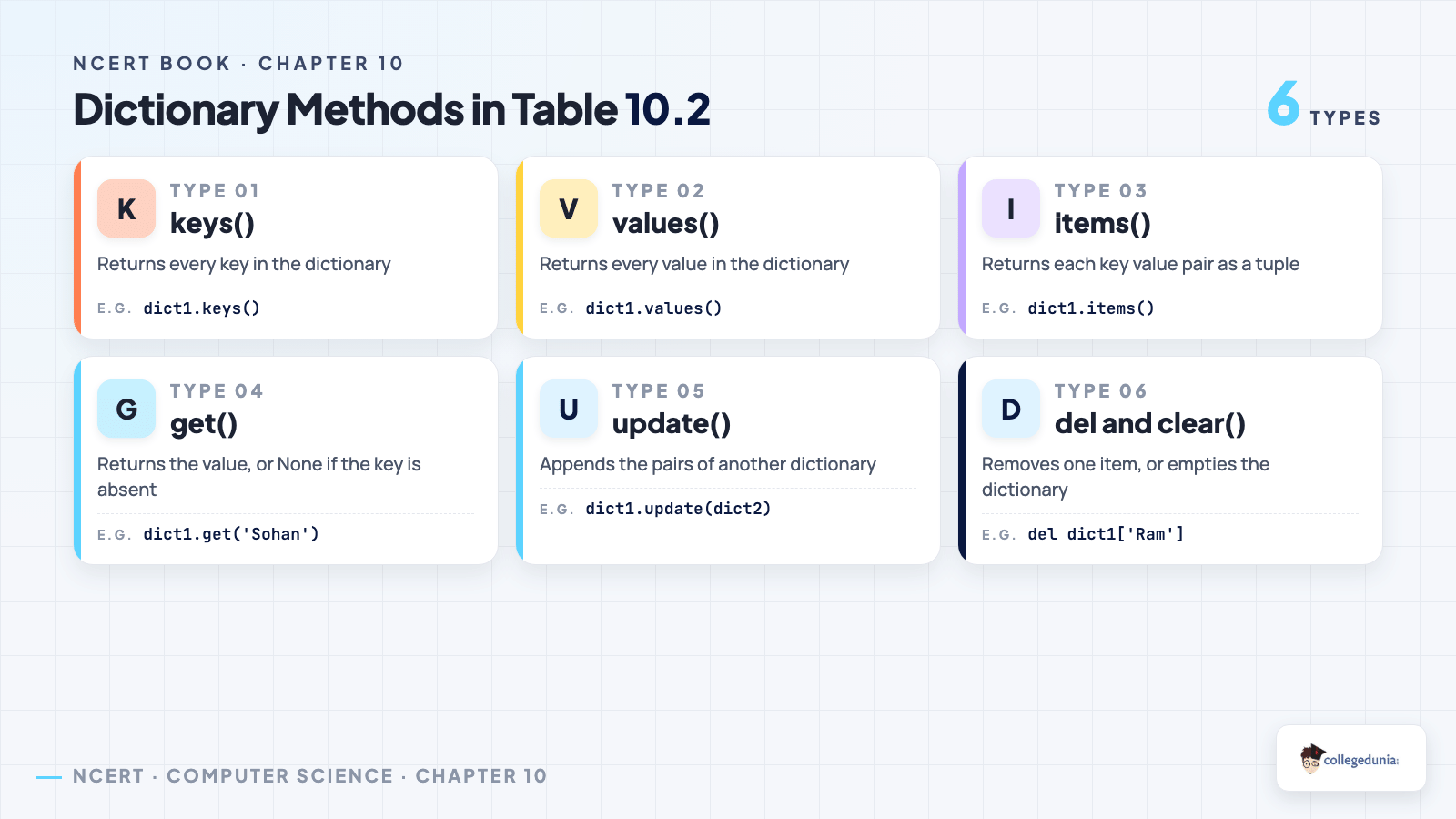
The difference between get() and square bracket access is the one that turns up most often in written papers. Square brackets raise KeyError on a missing key and stop the program, while get() returns None and lets the program continue. The gap between del dict1['Ram'] and del dict1 matters just as much, because the second form leaves the name undefined and any later use raises NameError.
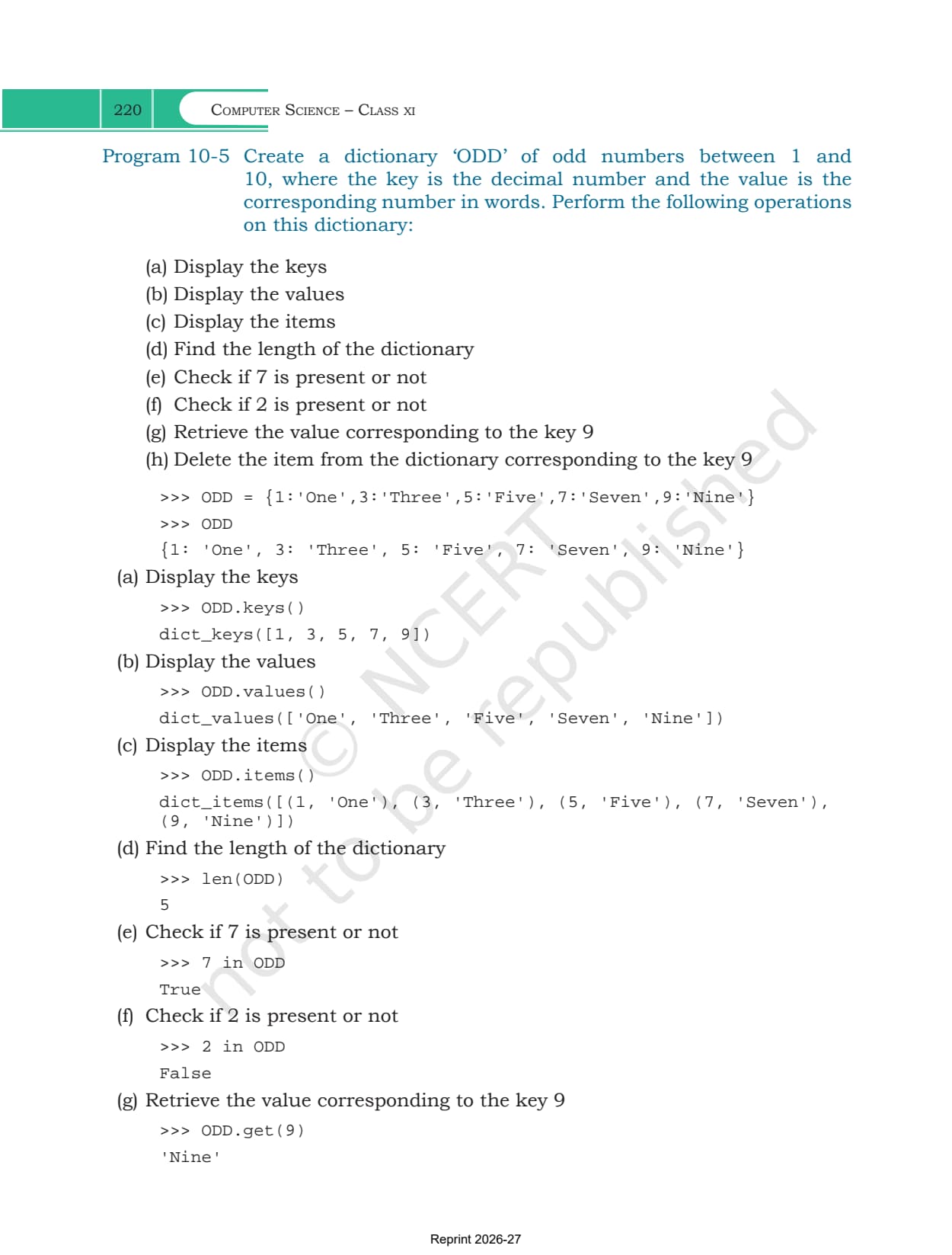
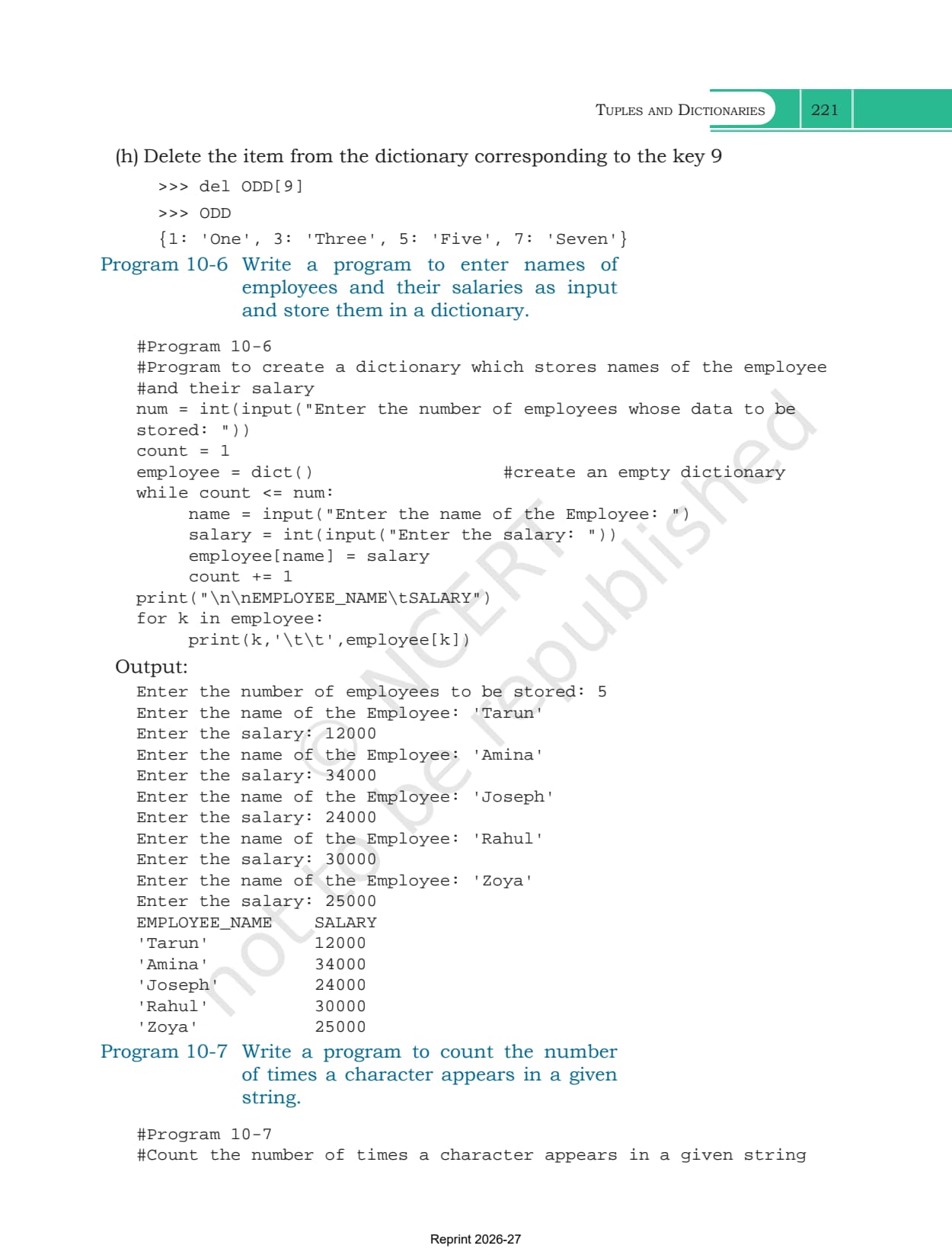
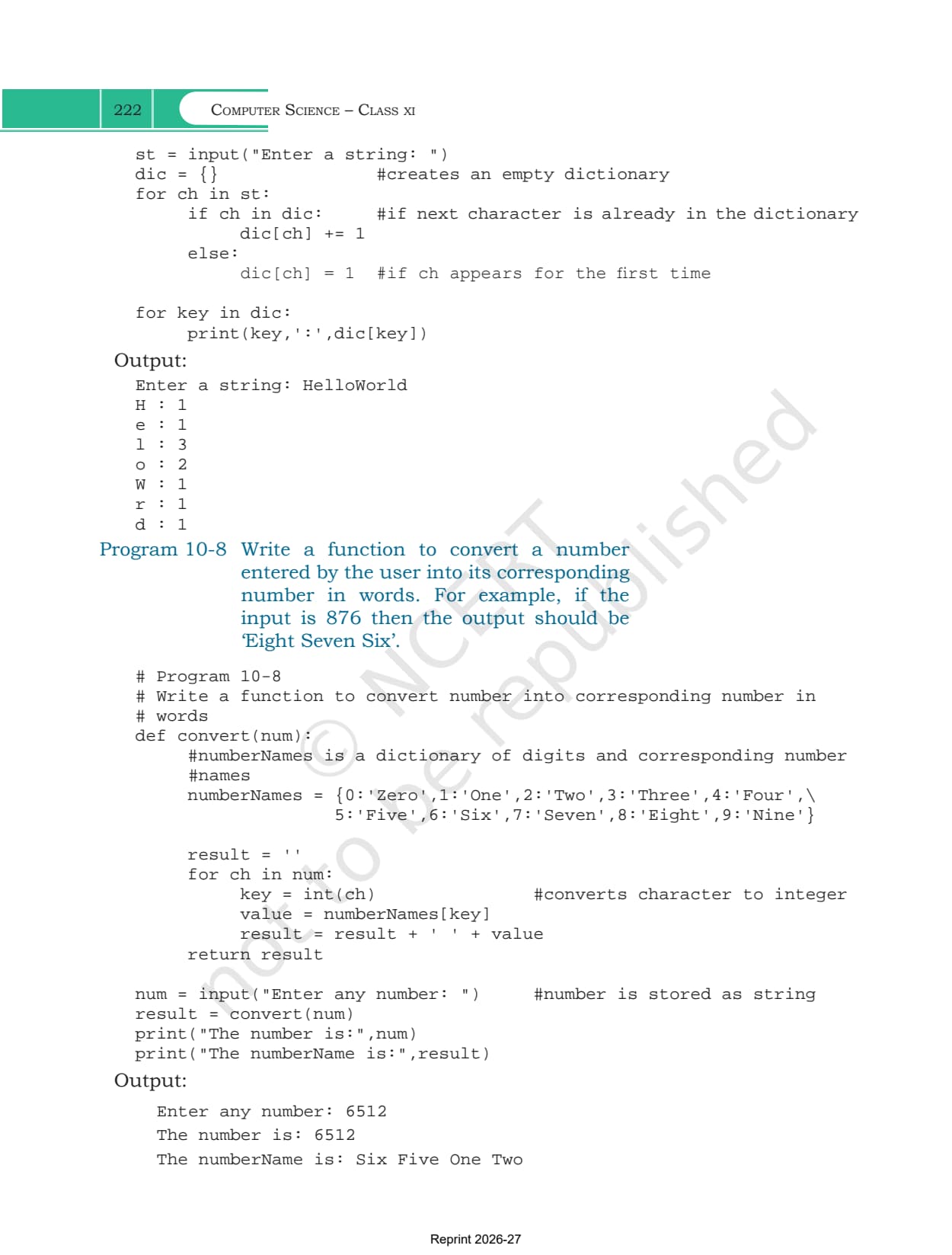
Section 10.12 then applies all of it in four programs. Program 10-5 builds an ODD dictionary of odd numbers to their names and runs eight operations on it in sequence, keys, values, items, len, two membership tests, a get and a del. Program 10-6 reads employee names and salaries into a dictionary through a while loop. Program 10-7 counts how often each character appears in a string, incrementing dic[ch] when the character is already a key and setting it to 1 when it is not. Program 10-8 reverses the idea, using a fixed dictionary of digits to words to turn the input 6512 into Six Five One Two.
What Collegedunia Adds to This Chapter PDF
Collegedunia gives students the file plus a way into it. The chapter PDF itself is the official NCERT file, untouched.
- Official file: the exact NCERT chapter PDF, no pages removed
- Read in the browser: page through all 22 pages before downloading
- Chapter list: jump to any other chapter of the book from one table
Also Check: the other Class 11 Computer Science resources for this chapter.
| Resource | Link |
|---|---|
| Handwritten notes | Tuples and Dictionaries Class 11 Handwritten Notes |
| Chapter notes | Tuples and Dictionaries Class 11 Notes (coming soon) |
| Chapter solutions | Tuples and Dictionaries Class 11 NCERT Solutions (coming soon) |
| Previous chapter book PDF | Lists NCERT Book PDF |
| Previous chapter handwritten notes | Lists Class 11 Handwritten Notes |
| Next chapter handwritten notes | Societal Impact Class 11 Handwritten Notes |
Class 11 Computer Science NCERT Book PDF: All Chapters
Every chapter of the book is on its own page. The 2026-27 Class 11 Computer Science textbook has 11 chapters, and chapters 5 to 10 form the Python programming block that this chapter completes.
| Chapter | Download |
|---|---|
| Chapter 1 | Computer System NCERT Book PDF |
| Chapter 2 | Encoding Schemes and Number System NCERT Book PDF |
| Chapter 3 | Emerging Trends NCERT Book PDF |
| Chapter 4 | Introduction to Problem Solving NCERT Book PDF |
| Chapter 5 | Getting Started with Python NCERT Book PDF |
| Chapter 6 | Flow of Control NCERT Book PDF |
| Chapter 7 | Functions NCERT Book PDF |
| Chapter 8 | Strings NCERT Book PDF |
| Chapter 9 | Lists NCERT Book PDF |
| Chapter 10 | Tuples and Dictionaries NCERT Book PDF |
| Chapter 11 | Societal Impact NCERT Book PDF (coming soon) |
Tuples and Dictionaries Class 11 NCERT Book PDF FAQs
Common Student Questions on the Tuples and Dictionaries Chapter File
Ques. Where can I download the Class 11 Computer Science Chapter 10 NCERT Book PDF?
Ans. The official 22-page chapter file is on this page, free to download.
Ques. How many pages is the Tuples and Dictionaries chapter?
Ans. 22 pages, printed pages 207 to 228 in the 2026-27 book, and this PDF is the complete chapter with both reference tables and all eight programs.
Ques. Why does a single element tuple need a comma?
Ans. Because the parentheses alone do not create a tuple, the comma does. Writing tuple5 = (20) stores the integer 20, so type() reports int and len() raises TypeError. Writing tuple5 = (20,) stores a real one element tuple. This is exercise question 8.
Ques. What advantage does a tuple have over a list?
Ans. A tuple is immutable, so iterating through it is faster than iterating through a list, and data that must not change cannot be edited by accident. That is the answer the chapter expects for exercise question 5.
Ques. Can anything inside a tuple be changed?
Ans. The tuple itself cannot, but an element of a mutable type can. On tuple2 = (1,2,3,[8,9]) the statement tuple2[3][1] = 10 succeeds and the tuple prints as (1, 2, 3, [8, 10]), because the list object inside it changed rather than the tuple.
Ques. What can be used as a dictionary key?
Ans. Any immutable type, which the chapter lists as a number, a string or a tuple. Keys must also be unique. Values carry no such restriction and may repeat or be of any type.
Ques. What is the difference between get() and square bracket access?
Ans. Both return the value for a key that exists. When the key is missing, dict1['Shyam'] raises KeyError and stops the program, while dict1.get('Sohan') simply returns None.
Ques. How do I traverse a dictionary?
Ans. The chapter gives two loops. Method 1 is for key in dict1 followed by print(key,':',dict1[key]). Method 2 is for key,value in dict1.items(), which hands you both parts at once.
Ques. Is this the official NCERT file?
Ans. Yes. It is the NCERT chapter PDF for 2026-27 hosted as published, with no pages removed or added.



Comments