




The Directorate of Technical Education (DoTE) Tamil Nadu has released TNEA 2026 Rank List on July 1 2026. The candidates will have to login to know their ranks, download their rank cards and participate in the TNEA 2026 counseling.
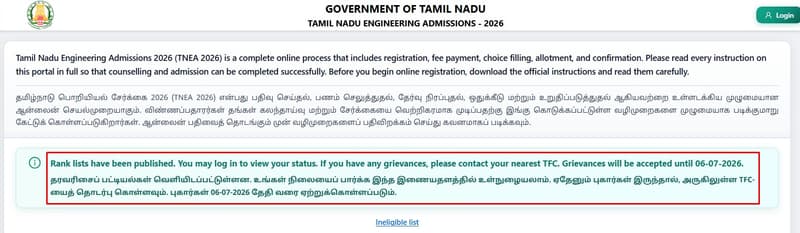
Source: tneaonline.org
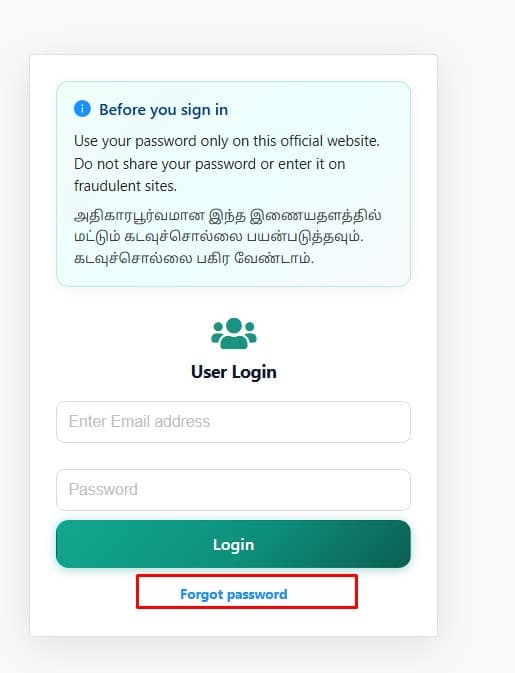
- Candidates who have forgotten their application number or password can use the "Forgot Application Number" or "Forgot Password" option available on the official portal.
- To recover your TNEA application number, the fastest method is to check your registered email or SMS inbox for previous TNEA correspondences.
- You can also check for a downloaded PDF of your application, or contact the TNEA helpdesk directly to recover your TNEA Application number.
- Login issues such as a forgotten application number, password or OTP are common around the TNEA 2026 Rank List release and can be resolved through the portal's recovery options.
Related Links:
- TNEA Result 2026: Rank List Released on July 1 at tneaonline.org, Counselling, Cutoff and Marks Vs Rank
- TNEA Counselling 2026: Rank List, Schedule, Allotment, Cutoff & Top Colleges
- TNEA Rank List 2026 Released Raise Objections by July 6

Key Summary
- Anna University through the Directorate of Technical Education (DoTE) releases the TNEA 2026 Rank List on the official TNEA portal.
- Candidates who forget their password should select the "Forgot Password" option and complete the verification through OTP or the email reset link.
- A successful login is required to download the rank card, complete counselling registration and participate in the seat allotment process.
How to Recover Your TNEA 2026 Application Number
TNEA 2026 application number is the primary credential for all login activities. If candidates have misplaced it then they should follow the steps given below:
- Step 1: Visit tneaonline.org and click the "Forgot Password" option on the login page.
- Step 2: Provide your registered email ID or registered mobile number.
- Step 4: Click "Submit" to continue the recovery process.
- Step 5: Your TNEA 2026 Application Number will be sent to your registered mobile number or email ID.
- Step 6: Check the Spam or Junk folder if the email is not available in your inbox after a few minutes.
- Step 7: Candidates should also check the TNEA registration confirmation email, as the application number is usually available in the email subject and message.
- If candidates no longer have access to the registered mobile number or email ID, they should contact the TNEA Helpdesk or visit the nearest TNEA Facilitation Centre (TFC).
- Candidates should keep their Class 12 Hall Ticket Number ready for identity verification, if required.
Also Check:
- 190 Marks in TNEA 2026: Expected Rank and College Chances
- TNEA 2026: 90 Marks Expected Rank and Government College Options
Ques. What should I do if I no longer have access to my registered mobile number or email ID for TNEA 2026 application number recovery?
Ans. If you cannot access your registered mobile number or email ID, you should contact the TNEA Helpdesk or visit the nearest TNEA Facilitation Centre (TFC) for assistance. Carry your Class 12 Hall Ticket Number and a valid photo ID, as these may be required to verify your identity before your application number can be retrieved.
Ques. How long does it take to receive the TNEA 2026 application number after submitting the recovery request?
Ans. In most cases, the TNEA 2026 application number is sent to the registered mobile number or email ID within a few minutes after successful verification. If you do not receive it, check your Spam/Junk folder and ensure that the registered contact details are entered correctly. If the application number is still not received after a reasonable wait, contact the TNEA Helpdesk for further assistance.
How to Reset Your TNEA 2026 Password
If candidates remember their application number but cannot recall the password then they should use the portal’s built-in reset tool:
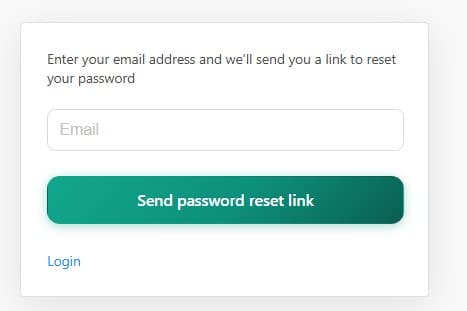
- Step 1: Visit tneaonline.org and click the "Forgot Password" option on the login page.
- Step 2: Enter your registered email ID used during the TNEA 2026 registration process.
- Step 3: Click "Send Password Reset Link" or "Submit" to continue.
- Step 4: Check your registered email inbox for the password reset link.
- Step 5: Check the Spam or Junk folder if the email is not available in your inbox.
- Step 6: Open the password reset link and create a new password using at least 8 characters, including letters, numbers, and a special character.
- Step 7: Confirm the new password and save the changes.
- Step 8: Return to the login page and sign in using your application number or registered email ID with the new password.
- If the reset email is not received, use the "Resend" option, if it is available on the portal.
- Candidates should ensure that the registered mobile number is not on DND (Do Not Disturb) mode, as OTP messages may not be delivered.
- If the password reset link is still not received or the registered email is no longer accessible, candidates should contact the TNEA Helpdesk or visit the nearest TNEA Facilitation Centre (TFC) with the required documents, including the Class 12 Hall Ticket.

Also Check:
- TNEA 2026 195 Marks: Expected Rank and Top Engineering Colleges
- 80 Marks in TNEA 2026: Expected Rank and Admission Chances
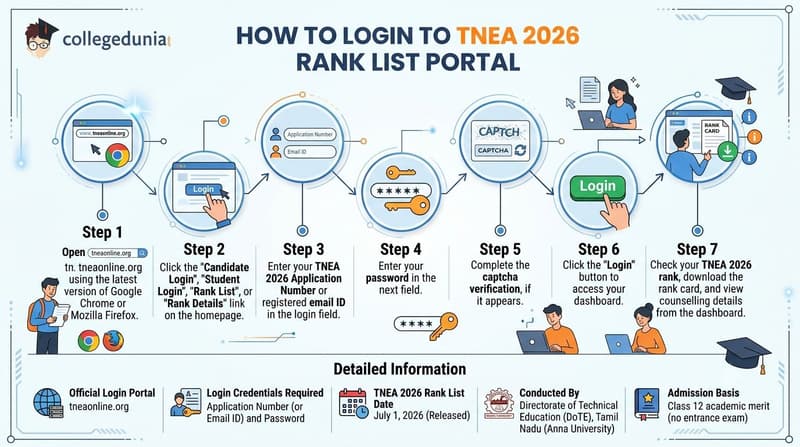
How to Login to TNEA 2026 Rank List Portal
Candidates need to follow these steps to log in and access your rank on tneaonline.org after the rank list is released:
- Step 1: Open tneaonline.org using the latest version of Google Chrome or Mozilla Firefox.
- Step 2: Click the "Candidate Login", "Student Login", "Rank List", or "Rank Details" link available on the homepage.
- Step 3: Enter your TNEA 2026 Application Number or registered email ID in the login field.
- Step 4: Enter your password in the next field.
- Step 5: Complete the captcha verification, if it appears on the screen.
- Step 6: Click the "Login" button to access your dashboard.
- Step 7: After logging in, candidates can check their TNEA 2026 rank, download the rank card, and view the counselling details from the dashboard.
| Detail | Information |
|---|---|
| Official Login Portal | tneaonline.org |
| Login Credentials Required |
Application Number (or Email ID) and Password |
| TNEA 2026 Rank List Date |
July 1, 2026 (Released) |
| Conducted By |
Directorate of Technical Education (DoTE), Tamil Nadu (Anna University) |
| Admission Basis |
Class 12 academic merit (no entrance exam) |
Also Check:
Ques. Can I log in to the TNEA 2026 rank list portal using my registered email ID instead of the application number?
Ans. Yes. The TNEA 2026 portal allows candidates to log in using either their registered email ID or application number, along with the password created during registration. After successful login, candidates can view their rank, download the rank card, and access counselling-related information from the dashboard.
Ques. What should I do after downloading the TNEA 2026 rank card?
Ans. After downloading the TNEA 2026 rank card, candidates should verify their name, community, normalized aggregate marks, and rank. If any discrepancy is found, they should report it through the official grievance process within the prescribed timeline. Candidates should also keep a printed and digital copy of the rank card ready, as it will be required during the counselling and choice-filling process.
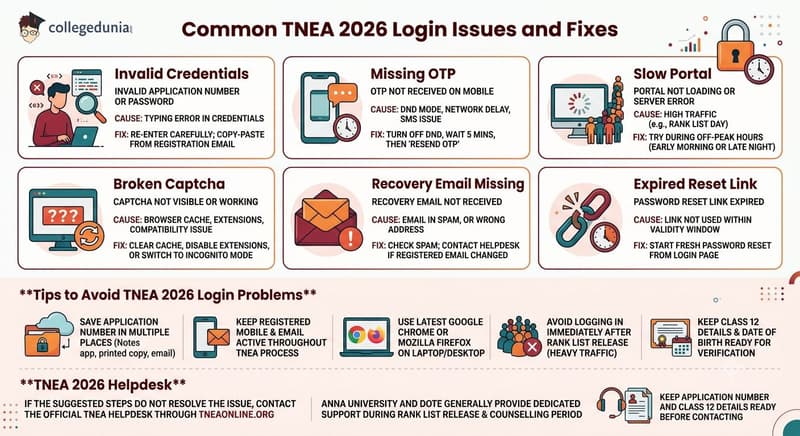
Common TNEA 2026 Login Issues and Fixes
The table below covers the most frequent TNEA portal login problems candidates face and the quickest way to resolve each one:
| Login Issue | Likely Cause | Fix |
|---|---|---|
| Invalid application number or password error | Typing error in credentials | Re-enter carefully; copy-paste the number from your registration email |
| OTP not received on mobile |
DND mode enabled, network delay, or SMS issue |
Turn off DND, wait 5 minutes, then click "Resend OTP" |
|
Account locked after multiple failed attempts |
Too many incorrect password entries |
Wait 30 minutes or use "Forgot Password" to reset |
| Portal not loading or server error | High traffic on rank list release day |
Try during off-peak hours (early morning or late night) |
| Captcha not visible or not working |
Browser cache, extensions, or compatibility issue |
Clear browser cache, disable extensions, or switch to Incognito mode |
| Recovery email not received | Email in spam or wrong address on file | Check spam folder; contact helpdesk if the registered email has changed |
| Password reset link expired | Link not used within its validity window | Start a fresh password reset from the login page |
Tips to Avoid TNEA 2026 Login Problems
- Candidates should save their TNEA 2026 Application Number in more than one place, such as a notes app, a printed copy, or a registered email.
- Candidates should keep their registered mobile number and email ID active throughout the TNEA 2026 rank list and counselling process.
- Candidates should use the latest version of Google Chrome or Mozilla Firefox on a laptop or desktop for a smoother login experience.
- Candidates should avoid logging in immediately after the TNEA 2026 Rank List is released, as heavy portal traffic may affect access.
- Candidates should keep their Class 12 details and date of birth ready for identity verification whenever required.
TNEA 2026 Helpdesk
- If the suggested steps do not resolve the login issue, candidates should contact the official TNEA Helpdesk through tneaonline.org.
- Anna University and the Directorate of Technical Education (DoTE) generally provide dedicated support during the TNEA Rank List release and counselling period.
- Candidates should keep their TNEA 2026 Application Number and Class 12 registration details ready before contacting the helpdesk.
Also Check:
- TNEA 2026 Kongu Engineering College: Expected Branch-Wise Cutoff
- 85 Marks in TNEA 2026: Expected Rank and Colleges You Can Get
Ques. Why is the TNEA 2026 captcha not loading or working during login?
Ans. The TNEA 2026 captcha may not appear because of browser cache issues, incompatible browser settings, or extensions such as ad blockers. Clear your browser cache, disable unnecessary extensions, refresh the page, or open the portal in Incognito/Private mode using the latest version of Google Chrome or Mozilla Firefox. If the issue continues, try logging in from another browser or device.
Ques. What information should I keep ready before contacting the TNEA 2026 Helpdesk for login issues?
Ans. Before contacting the TNEA 2026 Helpdesk, keep your Application Number, Class 12 registration or hall ticket details, date of birth, and registered mobile number or email ID ready. If your issue is related to login or password recovery, note down the exact error message or take a screenshot. This helps the support team verify your identity and resolve the issue more quickly.
TNEA 2026 Application Number Recovery: Reddit Discussion
A Reddit user reported being unable to log in to the TNEA portal despite using the same credentials that had worked the previous day. The user asked whether others were facing a similar issue.

Source: Reddit
Several users replied that the TNEA website appeared to be temporarily unavailable, possibly due to backend updates before the release of rank lists. Others also reported that the portal was not loading properly despite having a stable internet connection, suggesting that the issue was affecting multiple applicants rather than individual accounts.

Source: Reddit
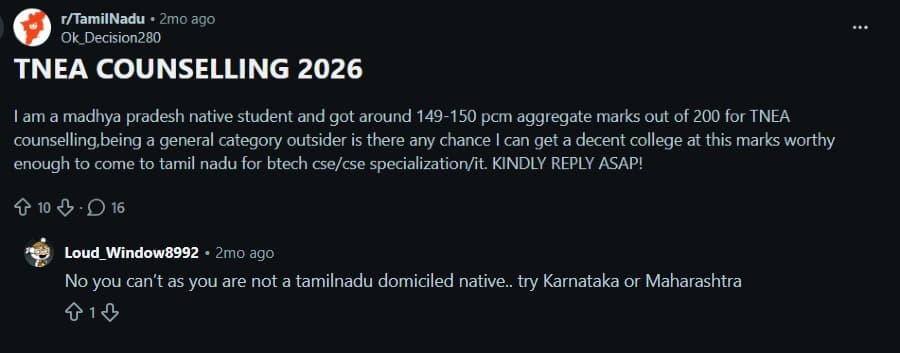
- The discussion focused on the admission chances for an outside-state General category candidate in TNEA Counselling 2026, with a PCM aggregate of 149–150 out of 200, seeking a CSE, CSE specialization, or IT seat in a reputed Tamil Nadu engineering college.
- Another user suggested that admission through TNEA may be difficult for a non-Tamil Nadu domicile candidate, advising the candidate to consider engineering admission opportunities in states such as Karnataka or Maharashtra instead.
TNEA 2026 Login FAQs
Ques. What credentials do I need to log in to the TNEA 2026 rank list portal?
Ans. You need your TNEA 2026 application number and the password you created during registration. Visit tneaonline.org, enter both credentials, and click "Login" to access your dashboard where your rank and rank card download link will be available.
Ques. How do I find my TNEA 2026 application number if I forgot it?
Ans. Click "Forgot Application Number" on the tneaonline.org login page. Enter your registered mobile number or email ID along with your date of birth. The portal will send your application number to the registered contact. Also check your original TNEA registration confirmation email.
Ques. I am not receiving the OTP for TNEA 2026 password reset. What should I do?
Ans. First, ensure your mobile is not in DND mode. Wait 5 minutes and click "Resend OTP". If the OTP still doesn’t arrive, check your registered email inbox and spam folder for a reset link. Contact the TNEA helpdesk if the issue persists.
Ques. My TNEA account is locked after wrong password attempts. How do I unlock it?
Ans. Wait 30 minutes and try again. Alternatively, use the "Forgot Password" option on tneaonline.org to reset your password and unlock the account. Contact the TNEA helpdesk for further assistance if needed.
Ques. The TNEA 2026 portal is very slow on rank list day. How can I access it?
Ans. Heavy traffic is common on rank list release day. Try during off-peak hours (early morning or late night). Clear browser cache, use Incognito mode, switch browsers, or try mobile data instead of Wi-Fi.
Ques. Can I update my registered mobile number or email on the TNEA portal?
Ans. Direct updates to registered contact details are generally not allowed after submission. You must contact the TNEA helpdesk or Anna University with supporting documents (e.g., ID proof) to request a change before counselling concludes.



Comments