




TS LAWCET 2026 Phase 1 Seat Allotment will be be released on August 5, 2026 at lawcetadm.tgche.ac.in. Log in with your Hall Ticket Number and Date of Birth to check your allotted college and course.
The Telangana State Council of Higher Education (TGCHE) conducts TS LAWCET counselling in multiple phases for admission to 3-Year LLB (for graduates) and 5-Year LLB (for 10+2 students) programmes across law colleges in Telangana.
- Students should download their allotment order, report to the allotted college and submit required documents within the stipulated time.
- The TS LAWCET Phase 1 Seat Allotment covers 3-Year LLB (graduate entry) and 5-Year LLB (10+2 entry) programmes.
- Students dissatisfied with TS LAWCET Phase 1 allotment may participate in Phase 2 for a better seat.
- You might face server down due to high traffic, so you should wait a few minutes and refresh the page.
Related Articles:
- TS LAWCET Counselling 2026: Registration, Web Options and Round-Wise Seat Allotment
- List of Top Colleges in India Accepting TS LAWCET
TS LAWCET 2026 Phase 1 Seat Allotment: Key Details
The table below lists all essential information about TS LAWCET 2026 Phase 1 seat allotment for quick reference.
| Detail | Information |
|---|---|
| Exam Name | Telangana State Law Common Entrance Test (TS LAWCET) 2026 |
| Conducted By | Telangana State Council of Higher Education (TGCHE) |
| Official Portal | lawcetadm.tgche.ac.in |
| Phase 1 Seat Allotment Date | August 5, 2026 |
| Courses Covered | 3-Year LLB (for graduates) and 5-Year LLB (for 10+2 students) |
| Allotment Mode | Online at the official portal |
| Login Credentials | Hall Ticket Number and Date of Birth |
| Post-Allotment Action | Download order, report to college, pay fee and submit documents |
Source: lawcetadm.tgche.ac.in
Related Article:
- TS LAWCET 2026 Rank Under 1000: Top Law Colleges in Phase 1 Seat Allotment
- TS LAWCET 2026 Choice Filling: How to Fill College Preferences for Best Seat
How to Check TS LAWCET 2026 Phase 1 Seat Allotment
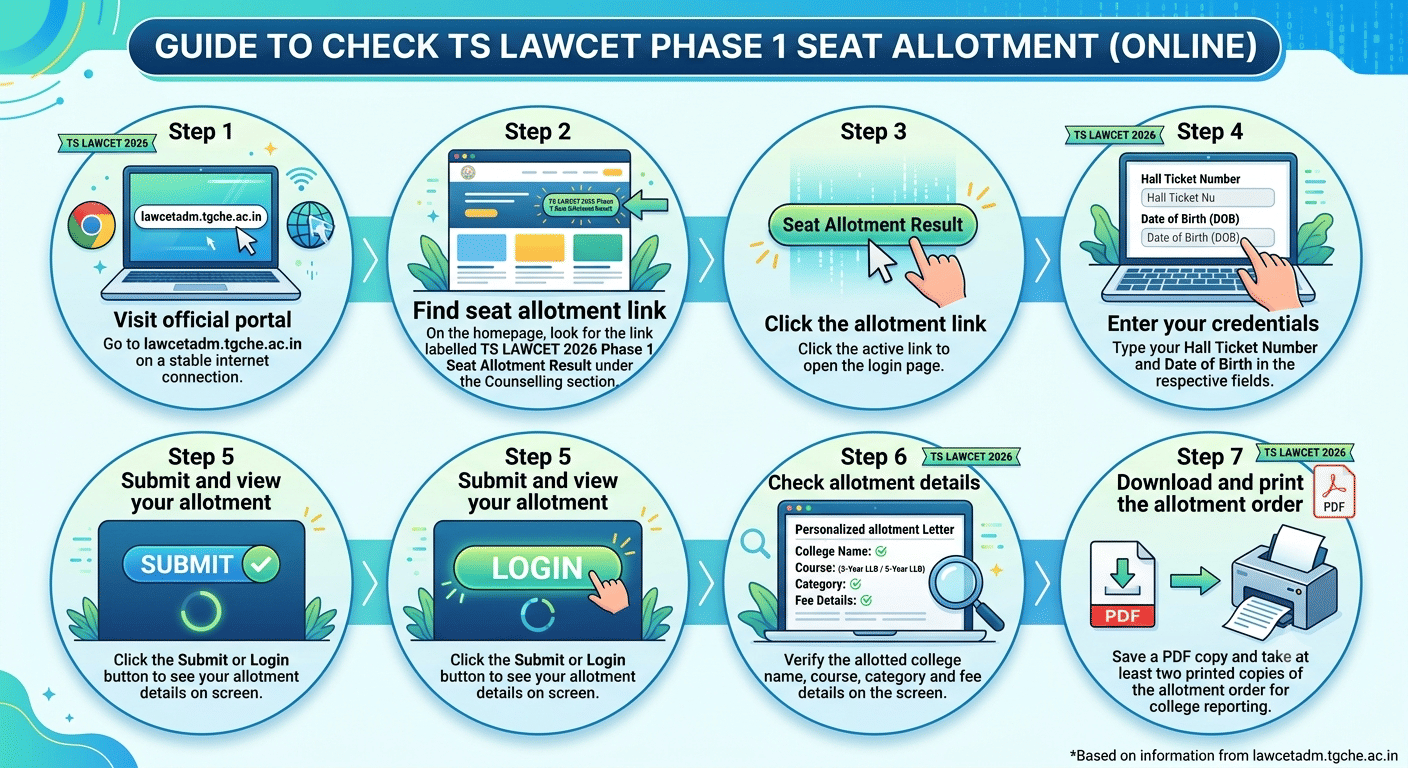
Students can check their TS LAWCET Phase 1 seat allotment online at lawcetadm.tgche.ac.in. Follow these seven steps to access the allotment result.
- Step 1: Visit the official portal: Go to lawcetadm.tgche.ac.in on a stable internet connection.
- Step 2: Find the seat allotment link: On the homepage, look for the link labelled TS LAWCET 2026 Phase 1 Seat Allotment Result under the Counselling section.
- Step 3: Click the allotment link: Click the active link to open the login page.
- Step 4: Enter your credentials: Type your Hall Ticket Number and Date of Birth in the respective fields.
- Step 5: Submit and view your allotment: Click the Submit or Login button to see your allotment details on screen.
- Step 6: Check allotment details: Verify the allotted college name, course (3-Year LLB or 5-Year LLB), category and fee details on the screen.
- Step 7: Download and print the allotment order: Save a PDF copy and take at least two printed copies of the allotment order for college reporting.
Keep multiple copies of your seat allotment order. You will need it during document verification and fee payment at the allotted college.
Related Article: TS LAWCET 2026 Category-Wise Seat Allotment: OC, BC, SC and ST Seats in Law Colleges
Ques. When will TS LAWCET 2026 Phase 1 Seat Allotment be released?
Ans. TS LAWCET 2026 Phase 1 Seat Allotment is expected to be released on August 5, 2026 at lawcetadm.tgche.ac.in. Students should keep checking the portal for any updates to this date from TGCHE.
Documents Required for Reporting to the Allotted College
Students who receive a seat in TS LAWCET Phase 1 seat allotment must carry original documents along with self-attested photocopies at the time of reporting. The table below lists all mandatory documents.
| Document | Remarks |
|---|---|
| TS LAWCET 2026 Seat Allotment Order | Downloaded from lawcetadm.tgche.ac.in; carry two printed copies |
| TS LAWCET 2026 Hall Ticket | Original and photocopy required for identity verification |
| TS LAWCET 2026 Rank Card | Shows rank and score; required for admission verification |
| Class 10 (SSC) Certificate and Marks Memo | For date of birth proof; original and attested copy required |
| Intermediate (10+2) Certificate and Marks Memo | Required for 5-Year LLB students; pass certificate and marks memo |
| Degree Certificate or Provisional Certificate | Required for 3-Year LLB students; graduation pass certificate |
| Transfer Certificate (TC) | Issued by the last institution attended; original required |
| Study or Residence Certificate | To establish local area candidature in Telangana |
| Caste Certificate | Required for SC, ST, BC and EWS students; issued by competent authority |
| Income Certificate | Required for fee reimbursement eligibility; issued by MRO or above |
| Recent Passport-Size Photographs | Minimum 4 to 6 copies with white background |
| Aadhaar Card | Original and photocopy for identity and address verification |
Related Article: TS LAWCET 2026 Phase 1 Documents Required for College Reporting
Ques. What should I do after getting Phase 1 seat allotment in TS LAWCET 2026?
Ans. After checking the allotment, download the allotment order, report to the allotted college within the given deadline, pay the tuition fee and submit required original documents. Students may also opt for Phase 2 to seek a better seat.
What to Do After Checking TS LAWCET 2026 Phase 1 Seat Allotment
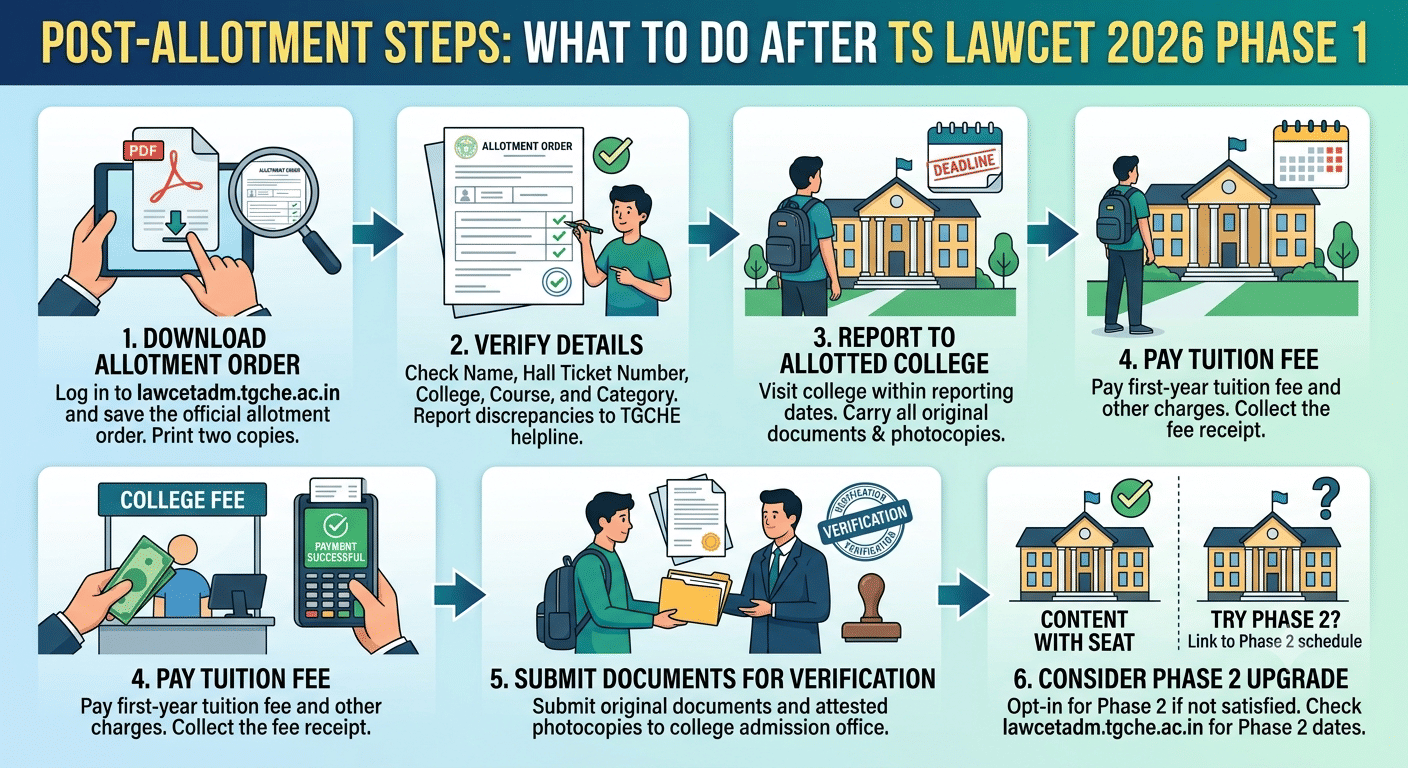
After the TS LAWCET Phase 1 seat allotment result is published, students must complete several steps within the reporting deadline. Missing any step may result in cancellation of the allotted seat.
- Step 1 Download the allotment order: Log in to lawcetadm.tgche.ac.in and save the official allotment order as a PDF. Print at least two copies.
- Step 2 Verify all details on the allotment order: Check that your name, Hall Ticket Number, allotted college, course and category are correct. Report discrepancies to the TGCHE helpline immediately.
- Step 3 Report to the allotted college: Visit the college within the reporting dates mentioned in the official counselling schedule. Carry all original documents and photocopies.
- Step 4 Pay the tuition fee: Pay the first-year tuition fee and any other prescribed fee at the college fee counter or through the designated online mode. Collect the fee receipt.
- Step 5 Submit documents for verification: Submit all required original documents and attested photocopies to the college admission office for verification and record.
- Step 6 Consider the Phase 2 upgrade option: If you are not satisfied with the Phase 1 allotted seat, you may opt in for Phase 2 counselling to try for a better college or course. Check the official schedule for Phase 2 dates on lawcetadm.tgche.ac.in.
Related Article: TS LAWCET 2026 Upgrade vs Freeze: Wait for Phase 2 Allotment
Ques. What is the official website to check TS LAWCET 2026 Phase 1 Seat Allotment?
Ans. The official website to check TS LAWCET 2026 Phase 1 Seat Allotment is lawcetadm.tgche.ac.in. This portal is managed by TGCHE and hosts all counselling-related information including allotment orders, reporting schedules and helpline details.
Troubleshooting Login Issues on lawcetadm.tgche.ac.in
Some students may face login or access issues when checking seat allotment on the official portal. The following tips help resolve common problems.
- Portal not loading: High traffic may slow down the site immediately after result publication. Wait a few minutes and refresh the page or try during off-peak hours such as early morning.
- Use a supported browser: Open the portal in Google Chrome or Mozilla Firefox. Avoid Internet Explorer and older browser versions that may not render the site correctly.
- Clear browser cache and cookies: Go to browser settings, clear cache and cookies and then reload the allotment link. This resolves most display and login errors.
- Hall Ticket Number format: Enter the Hall Ticket Number exactly as printed on your TS LAWCET 2026 admit card. Do not add spaces, slashes or extra characters.
- Date of Birth format: Enter your date of birth in the DD/MM/YYYY format unless the portal specifies otherwise. Entering it in any other order will cause a login failure.
- No allotment message displayed: If the portal shows no seat allotted, it means you were not assigned a seat in Phase 1. You may participate in Phase 2 counselling for a fresh chance at seat allotment.
- Contact the helpline: For unresolved issues, contact the TGCHE TS LAWCET counselling helpline. The helpline number is published on the official portal lawcetadm.tgche.ac.in under the Contact or Help section.
Related Article: TS LAWCET 2026 Seat Matrix: Category-Wise Seats in Law Colleges
TS LAWCET 2026 Phase 1 Seat Allotment FAQs
Ques. What credentials do I need to check TS LAWCET 2026 Phase 1 Seat Allotment?
Ans. Students need their TS LAWCET 2026 Hall Ticket Number and Date of Birth to log in and check their Phase 1 seat allotment on lawcetadm.tgche.ac.in. No other login details are required.
Ques. Can I get a better seat in Phase 2 if I am not satisfied with Phase 1 allotment?
Ans. Yes. Students who receive a seat in Phase 1 but prefer a different college or course may participate in Phase 2 counselling by exercising the upgrade option. TGCHE publishes the procedure and dates for Phase 2 on lawcetadm.tgche.ac.in.
Ques. What happens if I do not report to the college after Phase 1 seat allotment?
Ans. If a student does not report to the allotted college within the reporting deadline, the Phase 1 seat allotment is cancelled. The student may lose eligibility for that round and may not be considered for further phases.



Comments