




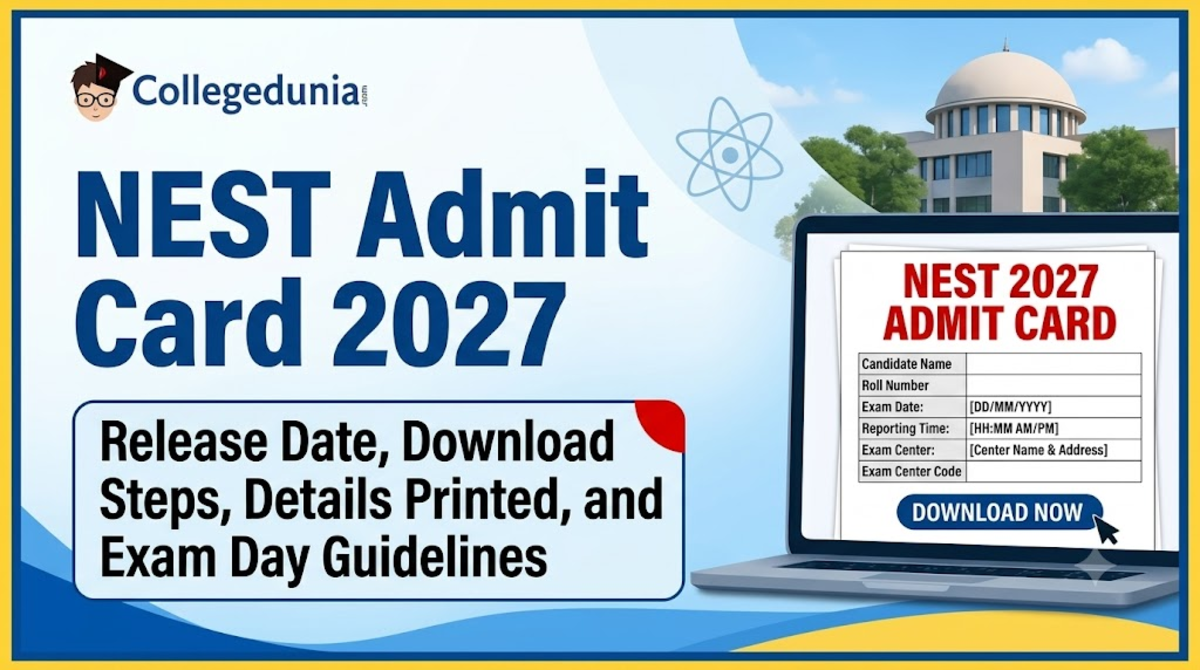
The NEST Admit Card 2027 is expected to be released online in the third week of May 2027, roughly 10 to 14 days before the exam. The NEST Admit Card 2027 is issued only through the official NEST portal.
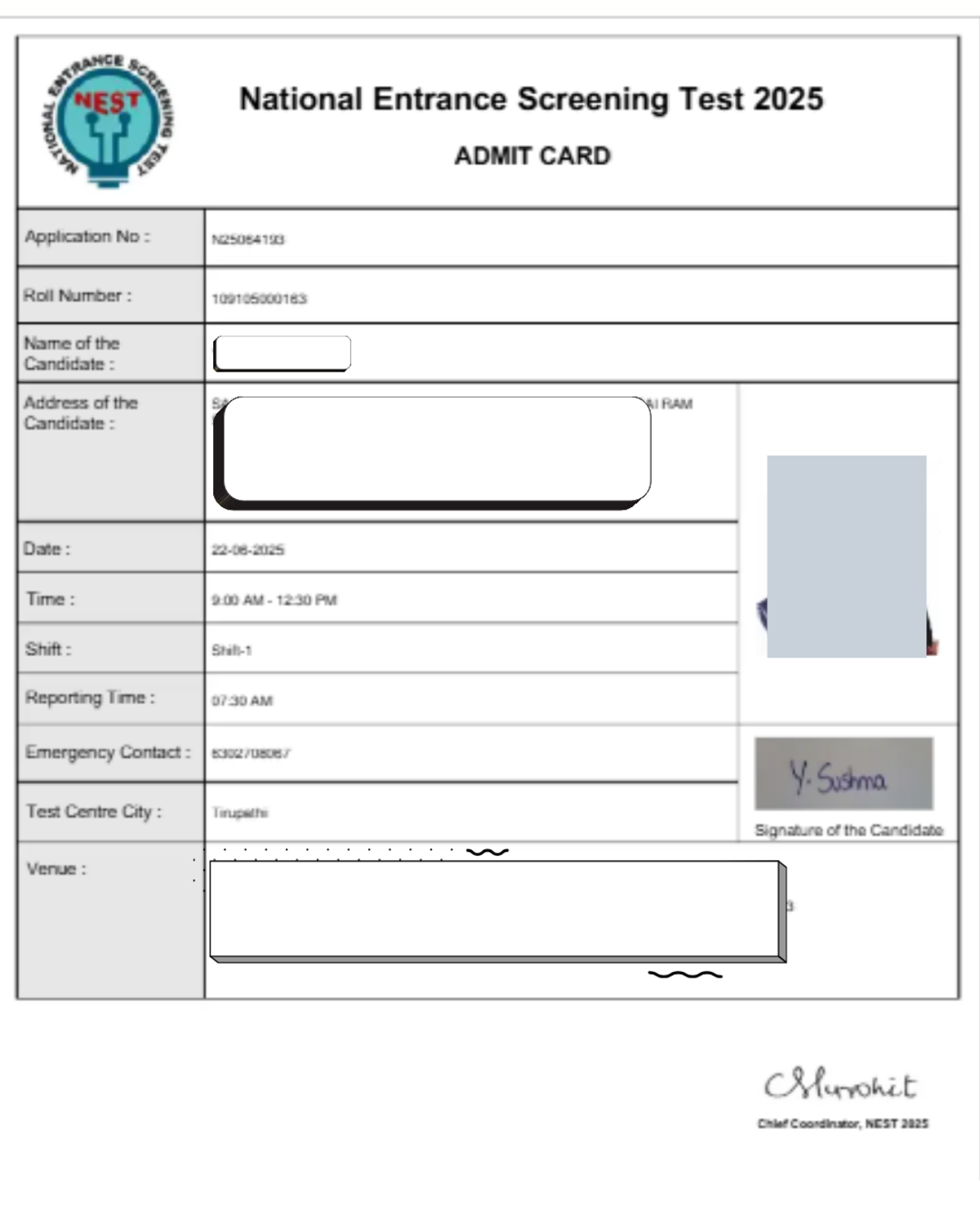
Candidates need their Application Number (User ID) and Password, along with a Captcha code, to download the admit card. The NEST Admit Card 2027 carries the candidate's name, roll number, photograph, signature, exam date, shift timings, allocated centre and gate closing time.
- Download the NEST 2027 hall ticket as soon as it is released and keep checking the portal for any revised version due to technical updates.
- Students should check the complete centre address of the NEST exam center and plan the route and travel time.
- Bring the printed NEST admit card along with one original valid photo ID for verification. Carry a transparent blue or black ballpoint pen as specified for exam day.
- Ensure the name on the original photo ID matches the name printed on the admit card.
- Report to the centre well before the printed gate closing time, as late entry is not permitted.
- Do not carry mobile phones, smartwatches, calculators, Bluetooth devices or written material to the centre.
- Revisit the portal around 48 hours before the exam to check whether an updated NEST admit card has been issued.
Related Links:
- NEST Application Process 2027: Expected Date, Registration Process, Application Form, Fees, and Eligibility
- NEST Eligibility Criteria 2027: Subject-wise Eligibility, Age Limit, Domicile Requirements, and Educational Qualification
- NEST 2027 Seat Reservation, Check Age Limit, Eligibility Criteria, Document Required
Key Summary
- NEST Admit Card 2027 release date is expected in the third week of May 2027, about 10–14 days before the exam.
- NEST 2027 admit card download requires the Application Number/User ID, Password, and a Captcha code entered on the official NEST portal.
- The admit card carries the candidate's name, photograph, signature, roll number, exam date, shift timings and exam centre address.
- Candidates must carry a printed admit card and an original valid photo ID; digital copies on phones are not accepted.
- Portals may face heavy traffic and re-issue revised admit cards, so candidates should recheck the portal 48 hours before the exam.
NEST Admit Card 2027: Overview
The NEST 2027 admit card contains essential candidate, exam, centre and exam-day information required for appearing in the entrance test.
- In the previous cycle, the admit card was first released on May 18 and later re-issued on May 24 due to technical updates, so candidates should watch for revised versions.
- No physical hall ticket is sent by post; the NEST Admit Card 2027 must be downloaded and printed by the candidate.
- Unlike many state entrance tests, NEST is conducted online as a Computer-Based Test (CBT).
| Particulars | Details |
|---|---|
| Exam Name | National Entrance Screening Test (NEST) |
| Admit Card Name | NEST Admit Card 2027 (Hall Ticket) |
| Conducting Authority | NISER Bhubaneswar and UM-DAE CEBS Mumbai |
| Admit Card Release (2026 cycle, for reference) | May 24, 2026 (initially released May 18, re-issued due to technical updates) |
| Mode of Release | Online only |
| Official Website | Official NEST Website |
| Credentials Required | Application Number/User ID and Password |
| Details Mentioned | Name, roll number, application number, photograph, signature, exam date, shift timings, allocated exam centre and guidelines |
| Mode of Examination | Online, Computer-Based Test (CBT) |
| Purpose | Admission to the 5-year Integrated M.Sc. Programme in Basic Sciences (Biology, Chemistry, Mathematics, Physics) |
| What to Carry | Printed admit card, original valid photo ID, transparent blue/black ballpoint pen |
| What Not to Carry | Electronic gadgets, digital logs, textual paper, bags, or metallic devices |
Ques. When will the NEST admit card 2027 be released?
Ans. The NEST Admit Card 2027 release date is expected in the third week of May 2027, based on the previous cycle's pattern. The official date will be confirmed only once NISER/CEBS release the notification.
Ques. Where to download the NEST 2027 admit card?
Ans. The NEST 2027 admit card can be downloaded only from the Official NEST Website, using the Application Number/User ID and Password.
Also Read:
NEST Admit Card 2027: Tentative Schedule
The full tentative timeline leading up to the exam, hosted by NISER Bhubaneswar and UM-DAE CEBS Mumbai, is structured below.
- In previous years, the gap between the NEST Admit Card 2027 download and the exam date is roughly 10 to 14 days.
- Due to heavy portal traffic and possible technical discrepancies, candidates should download the admit card early.
- Check the NEST portal again around 48 hours before the exam for any revised hall ticket.
| Exam Event / Milestone | Expected Date / Window (Tentative) |
|---|---|
| Official Notification and Registration Opens | First week of January 2027 |
| Closing of Online Registration | Second week of April 2027 |
| Application Correction Window | Third week of April 2027 |
| NEST Admit Card 2027 Release | Third week of May 2027 |
| NEST 2027 Exam Date | First week of June 2027 |
| Provisional Answer Key and Objections | Second to third week of June 2027 |
| Declaration of Results | Fourth week of June / July 2027 |
Ques. What is the NEST admit card 2027 release date?
Ans. It is expected in the third week of May 2027, roughly 10–14 days before the exam, based on the previous cycle. This is tentative until the official notification is released.
Also Read:
How to Download the NEST Admit Card 2027
The NEST Admit Card 2027 can be downloaded directly from the Official NEST Portal by logging in with the Application Number and Password once the link goes live in May 2027.
- Open the Portal: Go to the Official NEST Website.
- Locate the Link: Click the notification labelled "Download NEST 2027 Admit Card."
- Enter Credentials: Enter the Application Number (User ID) and Password or Date of Birth.
- Verification Code: Type the Captcha displayed on screen.
- Login: Click "Login" or "Submit" to access the dashboard.
- Download: View the hall ticket on screen and click the download icon to save the PDF.
- Print: Print two clear copies of the admit card for records and exam day.
Ques. How to download NEST admit card 2027?
Ans. Visit the Official NEST Website, click the admit card download link once it's live, log in with the Application Number, Password and Captcha, then download and print the hall ticket.
Ques. What is the NEST 2027 admit card download link?
Ans. There is no separate direct link outside the official portal. The NEST Admit Card 2027 download link appears on the Official NEST Website homepage only once it is activated in May 2027.
NEST Admit Card 2027: Login Credentials
To download the NEST Admit Card 2027, candidates need their registered Application Number (User ID) and the Password generated during registration.
- User ID / Application Number: Sent to the registered email/SMS after registration.
- Password: Created during the initial portal signup.
- Captcha Code: As shown on the active login page.
Ques. What are the NEST admit card 2027 login credentials?
Ans. The Application Number/User ID, the Password created during registration, and the Captcha code shown on the login page.
Also Read:
NEST Admit Card 2027: Forgot Password or Application Number
If credentials are lost, candidates should first search their personal email inbox for the automated welcome message sent during registration, using keywords like "NEST 2027 Registration" or "Application Confirmation."
To Recover the Application Number (User ID):
- Search Email and SMS: Look for messages from the official domain, including in Spam/Junk/Promotions folders.
- Check the Downloaded Application Form: The Application Number (formatted as N27xxxxxx) is printed at the top of the saved confirmation page.
- Contact the Helpdesk: Email nest@niser.ac.in with full name, date of birth, registered mobile number and registered email, or call +91-9513252088.
To Recover a Forgotten Password:
- Go to the NEST Login Page.
- Click "Forgot Password" at the bottom of the login window.
- Enter the User ID, complete the Captcha, and click "Get Password."
- Follow the reset link or OTP sent to the registered communication channel to create a new password.
Ques. NEST admit card 2027 forgot password, what should I do?
Ans. Click "Forgot Password" on the login page, enter the User ID, complete the Captcha, and use the reset link or OTP sent to the registered email or mobile number to create a new password.
Also Read: NEST 2026: Is 100 Marks a Safe Score for CBS Mumbai Admission
Details Mentioned on the NEST Admit Card 2027
Below are the details mentioned on the NEST Admit Card:
- Check your name, roll/application number, photograph, signature, exam date, timing and centre address carefully.
- Note the gate closing time and exam-day instructions, including prohibited items and required protocols.
| Detail | Description |
|---|---|
| Candidate's Name | Full name exactly as entered in the application form |
| Roll Number / Application Number | Unique identification numbers assigned for the exam |
| Photograph and Signature | Digital copies uploaded during registration |
| Exam Date and Timings | Exact exam date, assigned shift/session, and official reporting time |
| Exam Centre Address | Full name and complete physical address of the allocated venue |
| Gate Closing Time | Strict cut-off time after which entry is barred |
| Exam Day Instructions | Safety protocols, code of conduct and list of prohibited items |
Ques. What are the NEST 2027 admit card exam centre details?
Ans. The full name and complete physical address of the allocated test venue, along with the reporting time and gate closing time specific to that centre.
Also Read: NEST 2023 Question Paper with Answer Key PDF (June 24 - Session 2)
What to Do After Downloading the NEST Admit Card 2027
Candidates should complete a few basic checks after downloading the admit card to avoid last-minute issues:
- Print and Verify: Take at least two clear A4-size printouts and verify personal details, photograph, signature and category code.
- Prepare for Exam Day: Check the centre route and travel time, keep the admit card, original photo ID and required photographs ready, and avoid all prohibited items.
| Step | What to Do | Key Requirements |
|---|---|---|
| Print the Admit Card | Download and print on standard A4-size paper | Prefer a clear colour print; keep at least two copies |
| Verify Details | Check all printed details carefully | Verify name, date of birth, photograph, signature and category code |
| Check Exam Centre | Locate the assigned test centre using the printed address | Check the route and travel time in advance; consider a dry run if local |
| Arrange Documents | Keep all required documents together | Carry the printed admit card, original photo ID and 2 passport-size photographs matching the uploaded photo |
| Check Prohibited Items | Review the list of banned items | Avoid mobile phones, smartwatches, calculators, Bluetooth devices, written material, log tables, notebooks and heavy jewellery |
Ques. What to do after downloading the NEST admit card 2027?
Ans. Print at least two copies on A4 paper, verify every printed detail, locate the exam centre in advance, and keep the admit card, photo ID and matching photographs together for exam day.
Documents Required with the NEST Admit Card 2027
Invigilators cross-verify documents at the security gate before allowing entry, so candidates must carry the printed NEST Admit Card 2027 along with specific identification.
Mandatory Identification Documents (any one, original only):
- Aadhaar Card (physical card or clear e-Aadhaar printout)
- Voter ID Card
- PAN Card
- Passport
- Driving License
- School or College ID Card (currently valid, issued by a recognised institution)
Important ID Validation Rules:
- Original Copy Only: Photocopies, scanned images or digital versions on mobile phones are not accepted.
- Name Match: The name on the photo ID must exactly match the name printed on the admit card.
- Clear Photograph: The photo on the ID must be clear and easily identifiable.
Ques. What documents are required with the NEST admit card 2027?
Ans. The printed admit card along with one original government photo ID, such as Aadhaar, Voter ID, PAN, Passport, Driving License or a valid school/college ID.
Ques. What to carry with the NEST admit card 2027?
Ans. The printed admit card, an original valid photo ID, and a transparent blue or black ballpoint pen. Electronic gadgets, bags and metallic devices are not allowed.
NEST Admit Card 2027: Exam Day Guidelines
Violating any exam day protocol can lead to immediate disqualification, so candidates should review the guidelines carefully.
- Strict Gate Closing: Candidates must reach the centre before the printed gate closing time; no entry is allowed after gates lock.
- No Early Exit: Leaving the hall before the paper's full duration is not permitted.
- Biometric Verification: Fingerprint/iris scans or facial photography, and mandatory security frisking, should be expected at the entrance.
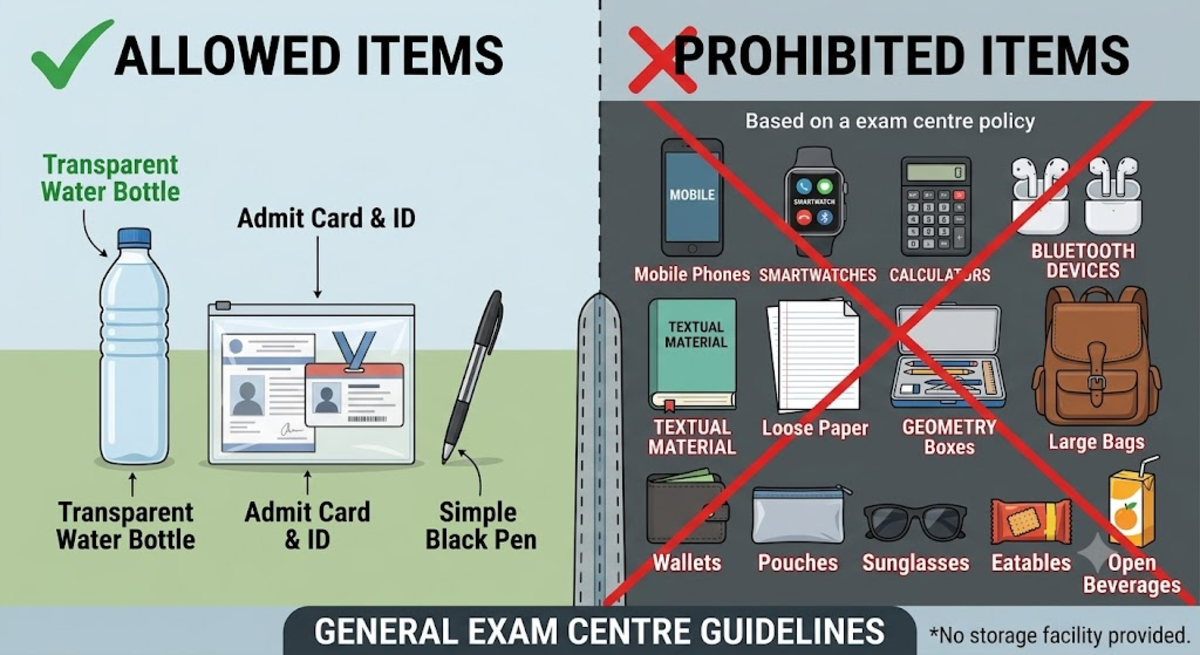
Prohibited items (centres usually provide no storage facility):
- Electronic Gadgets: Mobile phones, smartwatches, calculators, Bluetooth devices, earphones, health bands or pagers.
- Stationery: Textual material, log tables, notebooks, geometry boxes or loose paper.
- Personal Belongings: Large bags, wallets, pouches or sunglasses.
- Food and Drinks: Eatables or open beverages; only a transparent water bottle is usually permitted.
Ques. Is the NEST admit card mandatory for the exam?
Ans. Yes. The printed NEST Admit Card 2027 is the primary entry document, and candidates cannot be admitted to the exam centre without it, along with a valid original photo ID.
This YouTube video by “Vivek NISER | SciAstra” shares key guidelines for NEST candidates on admit card use, mandatory documents, dress code, prohibited items, entry procedures, and exam-day time limits.
Common Problems While Downloading the NEST Admit Card 2027
Candidates may face login, server, browser or admit card download issues while accessing the NEST portal.
- Resolve Access Issues: Re-enter login details carefully, use “Forgot Password” if required, and wait 15–30 minutes if the website is slow or the account is locked.
- Fix Technical Errors: Try an updated browser or Incognito mode, clear cache/cookies, and redownload the admit card if details appear missing or blurred.
| Problem | Possible Cause | Solution |
|---|---|---|
| Invalid Login / Mismatched Credentials | Incorrect User ID, password or Captcha |
|
| Website Crashing / Slow Loading | Heavy server traffic right after release |
|
| Blank Screen / Technical Errors | Browser compatibility issues, cache buildup, or slow internet |
|
| Missing / Blurry Admit Card Details | PDF rendering issues or incomplete download |
|
| Account Locked Out | Multiple unsuccessful login attempts |
|
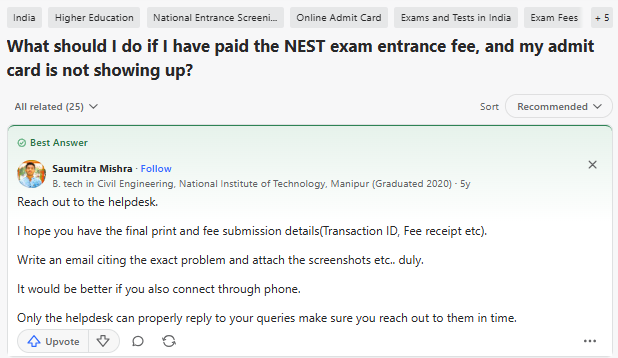
Students on Quora discuss the issues faced while downloading the NEST Admit Card:
- A candidate is asking what steps to take if they have paid the NEST exam entrance fee but their admit card is still not visible.
- Contact the NEST official helpdesk directly via email with detailed problem descriptions and relevant screenshots.
- Keep transaction details (Fee receipt, Transaction ID, and final application printout) ready, and follow up via phone call to ensure timely resolution.
Source: Quora
Ques. NEST admit card not downloading 2027, what should I do?
Ans. Wait for server traffic to reduce, clear the browser cache, try a different browser, or use an Incognito window. If the account gets locked after repeated attempts, wait 20–30 minutes before trying again.
Ques. NEST admit card login problem, how do I fix it?
Ans. Recheck the User ID, password and Captcha entered. Use "Forgot Password" if needed, and confirm the User ID from the registration confirmation email if login continues to fail.
NEST Admit Card 2027: Grievance Helpdesk and Correction
If the internet connection and credentials have been verified but the admit card is still inaccessible, candidates should contact the official NEST helpdesk immediately.
- Helpdesk Email: nest@niser.ac.in
- Helpline Number: +91-9513252088
| Grievance Resolution Method | What to Do | Key Details / Requirements |
|---|---|---|
| Online Grievance Portal |
|
|
| Official Helpline |
|
|
| Email Escalation |
|
|
Ques. What is the NEST admit card 2027 correction process?
Ans. Raise the issue through the online grievance portal first, since it is the fastest route. If unresolved, call the official helpline, or email nest-exam@niser.ac.in with the Application Number, the faulty admit card copy, and a valid government ID as proof.
NEST Admit Card 2027 FAQs
Ques. When will NEST admit card 2027 be released?
Ans. It is expected in the third week of May 2027, about 10–14 days before the exam, based on the previous cycle. The exact date depends on the official NISER/CEBS notification.
Ques. Is the NEST admit card 2027 available as a hard copy by post?
Ans. No. The NEST Admit Card 2027 is released online only, and candidates must download and print it themselves.
Ques. NEST admit card 2027 direct link — where can I find it?
Ans. There is no direct link outside the official portal. It must be accessed through the Official NEST Website once the download link is activated.
Ques. What is the NEST admit card 2027 official website?
Ans. The Official NEST Website is the only source for downloading the NEST Admit Card 2027, checking the schedule, and raising corrections through the grievance portal.



Comments