

![Indira Gandhi National Open University - [IGNOU]](https://img.collegedunia.com/public/college_data/images/logos/1491826680logo.png?h=71.7&w=71.7&mode=stretch)
.png?h=18&w=18&mode=stretch)
IGNOU Admission Status 2026 can be checked online for fresh admissions, re-registration, and re-admission through the official IGNOU Admission Status portal. Candidates can track their application status using their Enrollment Number, Control Number, or Registered Username. The status page shows whether the application has been approved, is under verification, or requires document correction.
| Direct Link: Check IGNOU Admission Status 2026 |
Important Points
- Check admission status online using the Enrollment Number, Control Number, or other required login details.
- Admission status is updated only after successful verification of the application and uploaded documents.
- Applications may remain under verification if document validation is still in progress.
- If any discrepancy is found in the submitted documents, IGNOU will notify the candidate to take the necessary action.
- Admission confirmation is generally updated within two months of submitting the application.
- Candidates are advised to check the admission status regularly until their admission is confirmed.
Note: If your admission status is not showing or is still under process, it does not necessarily mean that your application has been rejected. IGNOU updates the admission status after completing document verification and fee confirmation. During the July admission cycle, updates may take longer due to the high volume of applications.
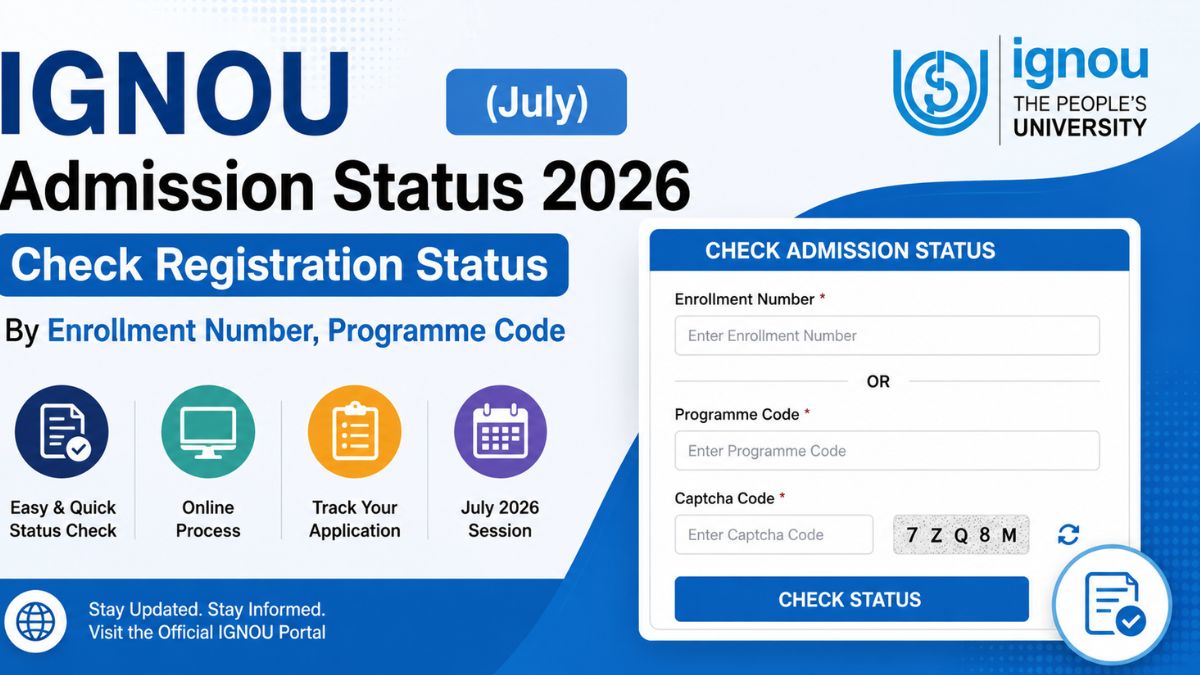
How to Check IGNOU Admission Status 2026?
Follow these simple steps to check your IGNOU admission status online:
- Visit the Official Portal: Go to the IGNOU Student Services - Know Your Admission Status portal.
- Click on ‘Check your registration status’.
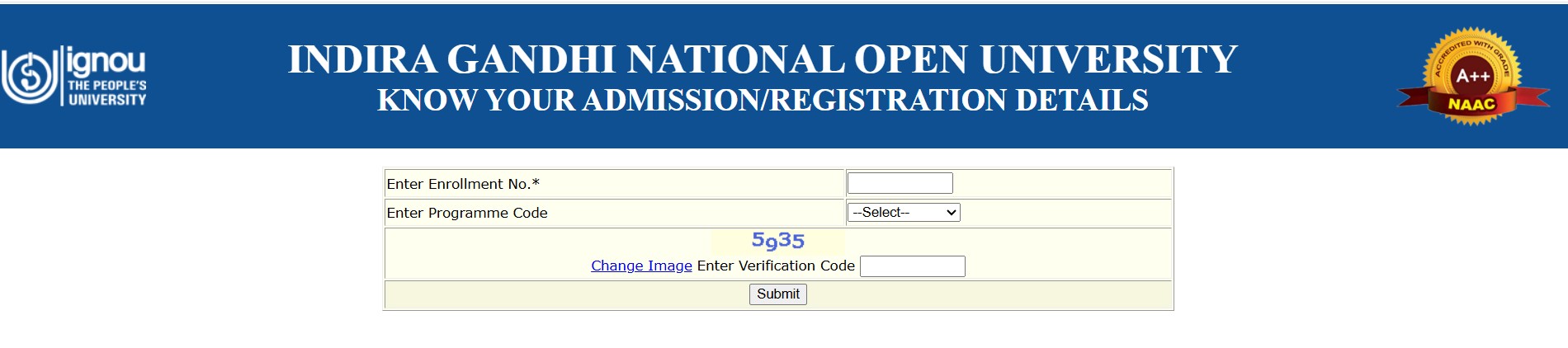
The following dialogue box will appear.
- Enter Your Enrolment Number: Type your 9 or 10-digit enrolment number in the designated field.
- Select Your Programme: Choose your programme code from the drop-down menu (e.g., BAG, BCOMG, MEG).
- Complete the Verification: Enter the captcha/security code displayed on the screen.
- Submit the Details: Click on the Submit button to view your admission status
Check More: IGNOU Courses & Fees
How to check IGNOU Admission Status by Name?
The IGNOU students get their login and their passwords when they register for the first time in the IGNOU official portal and generate a user ID by their names and numeric combination. That User name can be used further to know the IGNOU Admission status.
Many students are also experiencing difficulty knowing whether their IGNOU registration or re-admission status is confirmed or not. Many students get the enrollment number after they pay the application fee but some don’t because a large number of students are applying for the application.
How to check admission status in IGNOU by control number?
A control number is 10 digits number that is generated automatically once the student pays the application fee. The control number also acts as a unique identification number. The students can check their IGNOU admission status by using a 10 digit unique control number assigned by the university. The applicants are allotted the control number for their admission session having 10 digits, and an alphabet is present at the end of the control number. If the students have their control number, it reflects that their form is submitted and under process for verification.
How to Check IGNOU Admission Status by Student Login?
The students pursuing any of the programs at IGNOU have access to a student login. IGNOU login is a portal for the student. There are many facilities that are provided by the online admission system. Applicants can easily log into their IGNOU accounts using their enrollment number, username, and password.
A ten-digit enrollment number will be supplied to those who successfully register for the courses. With the use of a login, students can control their activity after logging in. For a variety of tasks, including admission, registration, submitting assignments, paying bills, and downloading certificates, aspirants can log in to the IGNOU student site. When logging into IGNOU, this control number can be used to trace applications, check on their status, and retrieve forgotten usernames. Please read the complete article for more details.
IGNOU Admission Status ‘Approved’/Confirmed
- This means the regional center has approved or validated the student’s application form.
- University will notify the applicant by email/SMS that their request has been approved.
- At the beginning of the academic year, all qualified candidates can begin their studies and assignments.
Check More: IGNOU Study Centre
IGNOU Admission Status 2026: Details Mentioned
This IGNOU Registration portal will display the following details:
- Personal details of the student.
- Admission Year / Session.
- Admission Validity (Maximum duration to complete the program).
- Study centre allocated.
- Regional Center.
- Course registered.
- Address of learner.
- New Address change request (if any request made).
- New/ Updated Address of Learner (if any request made).
- Email ID (Masked)
- Mobile Number (Masked)
Check More: IGNOU Study Material
IGNOU admission Status: How to Recover Password?
Candidates who have forgotten their IGNOU login credentials can regain them by following the university’s instructions. The following instructions will help you retrieve your IGNOU login credentials.
- Visit the IGNOU website at ignou.ac.in.
- On the login page, click ‘Forgotten password.’
- Username, mobile number, and email
- Clicking on ‘Submit.’
- To change your password, enter the email address.
When is IGNOU Admission Status Not Confirmed?
After submitting the IGNOU admission form, many applicants worry when their admission status continues to show "Not Confirmed" or does not appear on the portal. IGNOU verifies every application, uploaded document, eligibility criteria, and fee payment before confirming admission. The verification process generally takes 7–15 days, though it may take longer during peak admission periods due to the large number of applications.
Your IGNOU admission status may not be confirmed due to one or more of the following reasons:
- Document Verification is Pending: IGNOU is still verifying your uploaded certificates, photographs, signature, and other supporting documents. During this period, the admission status may remain "Not Confirmed."
- Incorrect or Unclear Documents: Blurred scans, incorrect file size or format, incomplete documents, or uploading the wrong certificates can delay or lead to rejection of the application.
- Eligibility Criteria Not Met: If you do not meet the minimum educational qualifications or programme-specific eligibility mentioned in the IGNOU admission prospectus, your application may not be approved.
- Unrecognized Educational Qualification: Certificates issued by institutions or boards that are not recognized by the appropriate education authorities are not accepted by IGNOU, resulting in rejection.
- Discrepancy in Application Details: Mismatched information such as your name, date of birth, marks, or category details compared with your supporting documents can also delay verification.
- Fee Payment or Technical Issues: If the admission fee payment has not been successfully recorded or there is a technical issue with the application submission, the confirmation may be delayed.
Note: If your admission status is not confirmed even after 15–20 days of successful application submission, you should contact your Regional Centre or the IGNOU Student Service Centre with your Control Number and payment details for assistance.
IGNOU Admission 2026 (July Session)
IGNOU is accepting applications for the July 2026 admission cycle. IGNOU University has extended the last date to 16 August 2026 for both fresh admissions and re-registration. The extension is applicable to all notified programmes offered through Open and Distance Learning (ODL) and Online modes, including UG, PG, Diploma, PG Diploma, and Certificate programmes.
Important: Candidates should keep their APAAR ID ready before starting the online application process.
Click here: IGNOU Student registration form

How to Apply for IGNOU July Admission 2026? Step-by-Step Registration Process
- Visit the official IGNOU Admission Portal at ignouadmission.samarth.edu.in.
- Click on the "Click Here for New Registration" option.
- Fill in the required details, such as your name, email ID, mobile number, and other basic information, and click "Register".
- Log in using the User ID and Password sent to your registered email address and mobile number.
- Select your programme, regional centre, study centre, and study material mode (printed or digital), wherever applicable.
- Complete the application form by entering your personal, academic, and contact details.
- Upload the required documents, including your photograph, signature, educational certificates, and other applicable documents.
- Pay the application fee online using the available payment options.
- Review all the details carefully and click "Submit" to complete the application.
- Download and save the confirmation page/application form for future reference.
Tip: Keep scanned copies of your photograph, signature, educational certificates, identity proof, and category certificate (if applicable) ready before starting the registration process.
IGNOU Re-registration Status 2026 (July Session)
IGNOU Re-registration for the July 2026 session is currently open for both Indian and International students enrolled in Open and Distance Learning (ODL) and Online programmes. Students can submit their re-registration form and pay the programme fee online through the official IGNOU Re-registration Portal.
Last Date for Re-registration: 16 August 2026
| Direct link: Apply for re-registration 2026 |
Important Instructions for IGNOU Re-registration 2026
- Register on the IGNOU Re-registration Portal using a valid mobile number and email ID. Existing users can log in using their registered username and password.
- If you face issues such as OTP not received, forgotten username/password, or incorrect contact details, contact your Regional Centre for assistance.
- Carefully select your courses/subjects as per your Programme Guide. Changes after submission may not be permitted.
- Complete the online fee payment using a secure payment method such as Debit Card, Credit Card, Net Banking, UPI, or BHIM.
- Do not share your OTP, card details, or banking credentials with anyone during the payment process.
- Avoid waiting until the last date to submit the re-registration form to prevent technical issues or payment delays.
- If your payment is deducted but the status is not updated, wait for 24 hours before attempting another transaction.
- In case of duplicate payment, IGNOU will process the refund for one of the transactions.
- Students using cyber cafés or third-party services should verify that the correct courses have been selected and obtain a copy of the submitted application form and payment receipt for future reference.
Note: Students should keep a copy of the submitted re-registration form and payment confirmation for future reference.
Follow the steps below to apply online for the IGNOU July 2026 admission session:
How to Fill the IGNOU Re-Registration Form Online?
Follow these simple steps to complete your IGNOU re-registration:
- Visit the official IGNOU Re-Registration Portal at https://onlinerr.ignou.ac.in/.
- Read all the instructions carefully on the homepage.
- Tick the checkbox to confirm that you have read and understood the instructions.
- Click the "Proceed for Re-Registration" button.
The following IGNOU Student Portal Login Page will open.
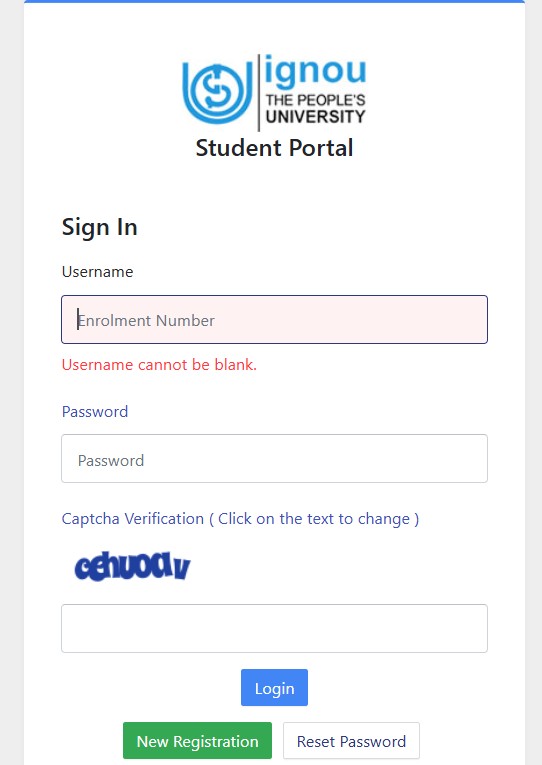
- Log in using your Username and Password. If you are registering for the first time, click "New Registration" and create your account.
- Select your programme, semester/year, and choose the courses you wish to register for.
- Review all the details carefully and click "Submit".
- Complete the fee payment using UPI, Debit Card, Credit Card, Net Banking, or any other available online payment option.
- Once the payment is successful, download and save the re-registration confirmation receipt for future reference.
Note: Last date for July 2026 re-registration is 16 August 2026.
Frequently Asked Questions
Ques. How long does IGNOU take to confirm admission?
Ans. IGNOU usually confirms admission within 7 to 30 days after the successful submission of the application form, fee payment, and document verification. However, during the January and July admission sessions, the university receives a large number of applications, so the verification process may take longer. If your admission status is still pending after a few weeks, regularly check the admission status portal or contact your Regional Centre for updates.
Ques. Why is my IGNOU Admission Status still showing "Pending"?
Ans. Your IGNOU Admission Status may continue to show "Pending" for several reasons. The university may still be verifying your uploaded documents, processing your application fee, or reviewing your eligibility. Incorrect or incomplete documents, mismatched details, or heavy application traffic during the admission cycle can also delay confirmation. If the status remains unchanged for an extended period, you should contact your assigned IGNOU Regional Centre for assistance.
Ques. What should I do if my IGNOU Admission Status is not updated?
Ans. If your IGNOU Admission Status 2026 has not been updated even after several weeks, first ensure that your application was submitted successfully and the admission fee was paid. You should then check the admission status portal regularly for updates. If there is still no change, contact your IGNOU Regional Centre or the Student Service Centre with your application number, programme details, and payment information to resolve the issue.
Ques. Can I check my IGNOU Admission Status without an Enrollment Number?
Ans. Yes. If your Enrollment Number has not yet been generated, you can still check your admission status using your Programme Code or other details available on the official admission status portal. Once your admission is confirmed, IGNOU will generate an Enrollment Number, which can be used to access the student portal and other university services.
Ques. What does "Admission Confirmed" mean in IGNOU Admission Status?
Ans. The "Admission Confirmed" status indicates that IGNOU has successfully verified your application form, supporting documents, and fee payment. It means your admission has been approved, and you are officially enrolled in your selected programme. After confirmation, you can access the IGNOU Student Portal using your Enrollment Number to download your ID card, submit assignments, and use other student services.
Ques. When will I receive my IGNOU Enrollment Number?
Ans. IGNOU generates the Enrollment Number only after your admission has been successfully confirmed. Once issued, the Enrollment Number is sent to the registered email ID or mobile number and is also reflected on the student portal. This unique number is required for logging into the IGNOU Student Portal, downloading the identity card, submitting assignments, filling examination forms, checking results, and accessing other academic services.
Ques. Can I log in to the IGNOU Student Portal before admission confirmation?
Ans. No. You can access the IGNOU Student Portal only after your admission has been confirmed and your Enrollment Number has been generated. If you are a newly admitted student, you must first complete the registration process and receive your Enrollment Number before creating your student portal account. Once activated, the portal allows you to manage your academic activities, including assignments, examinations, study materials, and admission-related services.









Comments