




The AP PGECET Admit Card 2027 is expected to be released around April 14–16, 2027, on its official website, cets.apsche.ap.gov.in. Candidates can download the hall ticket by logging in with their registration number and other required credentials. The AP PGECET Hall Ticket 2027 is expected to be released on the same date for candidates across all disciplines.
| Click here to download the AP PGECET Admit Card 2027 (Will be updated here) |
- The AP PGECET Admit Card will contain important details such as the candidate’s name, exam date and time, exam centre, and exam-day instructions.
- Candidates must carry a printed copy of the admit card along with a valid photo ID to the examination centre.
- Candidates will be able to download the AP PGECET Admit Card using their registration number and other required login credentials.
- On the day of the exam, candidates should carry a printed copy of the AP PGECET Hall Ticket 2027 along with a valid photo ID proof to the examination centre.
Related Links:
- AP PGECET 2027 Exam Dates: Answer Key on 6 June, Result on 14 June and Counselling Schedule
- AP PGECET Exam Pattern 2027: 120 Questions, 120 Marks, Marking Scheme and Subject-wise Weightage
AP PGECET Admit Card 2027: Key Highlights
The AP PGECET Admit Card 2027 will contain important details such as the candidate’s name, exam date, time, venue, roll number, and exam-day instructions.
- Candidates must download the AP PGECET hall ticket online and verify all details carefully before appearing for the examination.
| Particulars | Details |
|---|---|
| Exam Name | AP PGECET 2027 |
| Admit Card Name | AP PGECET Admit Card / Hall Ticket 2027 |
| Admit Card Release Date | April 14–16, 2027 (Expected) |
| Mode of Release | Online |
| Official Website | cets.apsche.ap.gov.in |
| Credentials Required | Registration Number and other required login credentials |
| Expected Exam Date | April 27–29, 2027 (Tentative) |
| Exam Mode | Computer-Based Test (CBT) |
| Details Mentioned | Candidate Name, Roll Number, Exam Date & Time, Exam Centre & Exam-Day Instructions |
| Documents to Carry | Printed AP PGECET Hall Ticket and Valid Photo ID Proof |
AP PGECET Admit Card 2027 Dates
The AP PGECET Admit Card is expected to be released around April 14–16, 2027, based on the previous year's schedule.
- In 2026, APSCHE released the AP PGECET hall tickets on April 15, 2026, around 2 weeks before the entrance exam.
| Events | Dates |
|---|---|
| AP PGECET Admit Card 2027 Release Date | April 14–16, 2027 (Expected) |
| AP PGECET 2027 Exam Dates | April 27–29, 2027 (Expected) |
Last 5 years’ Statistics for AP PGECET Admit Card 2027
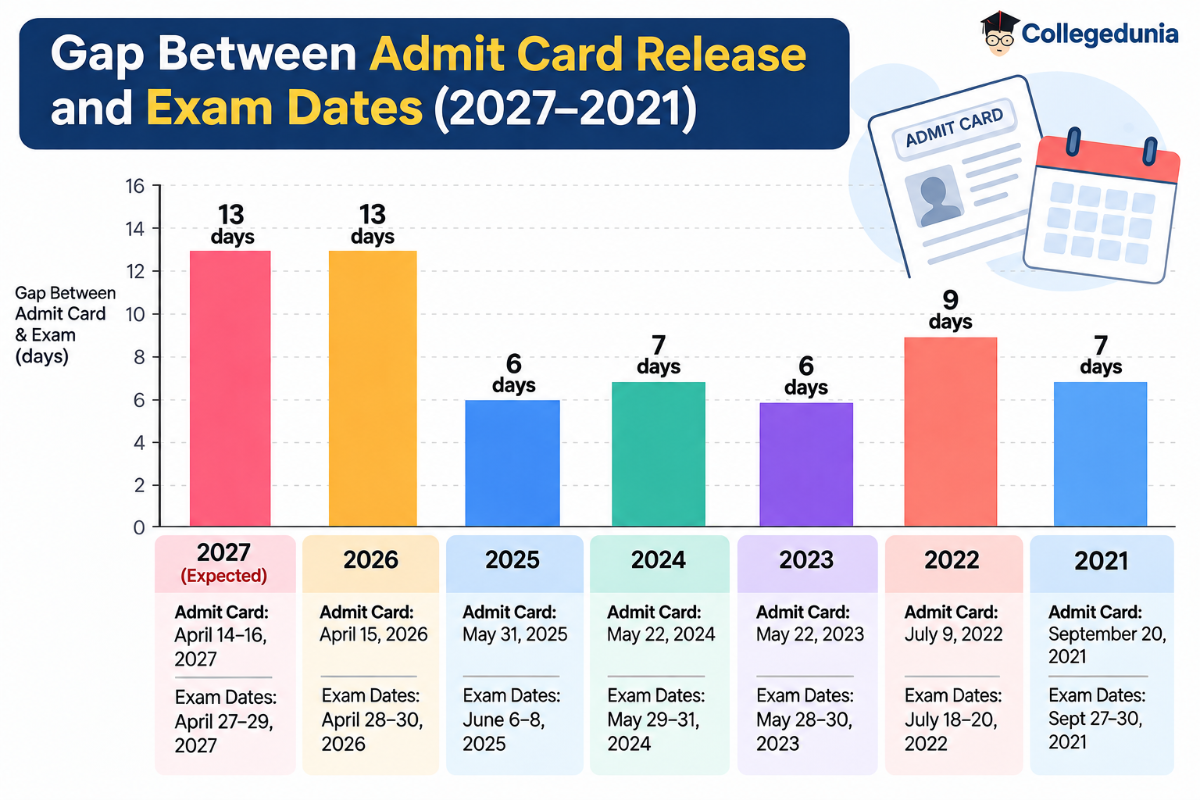
Over the last five years, the AP PGECET Hall Ticket 2027 was generally released 6–13 days before the exam, with the gap varying across years.
| Year | Admit Card Release Date | Exam Dates | Gap Between Admit Card & Exam |
|---|---|---|---|
| 2027 | April 14–16, 2027 (Expected) | April 27–29, 2027 | 13 days |
| 2026 | April 15, 2026 | April 28–30, 2026 | 13 days |
| 2025 | May 31, 2025 | June 6–8, 2025 | 6 days |
| 2024 | May 22, 2024 | May 29–31, 2024 | 7 days |
| 2023 | May 22, 2023 | May 28–30, 2023 | 6 days |
| 2022 | July 9, 2022 | July 18–20, 2022 | 9 days |
| 2021 | September 20, 2021 | Sept 27–30, 2021 | 7 days |
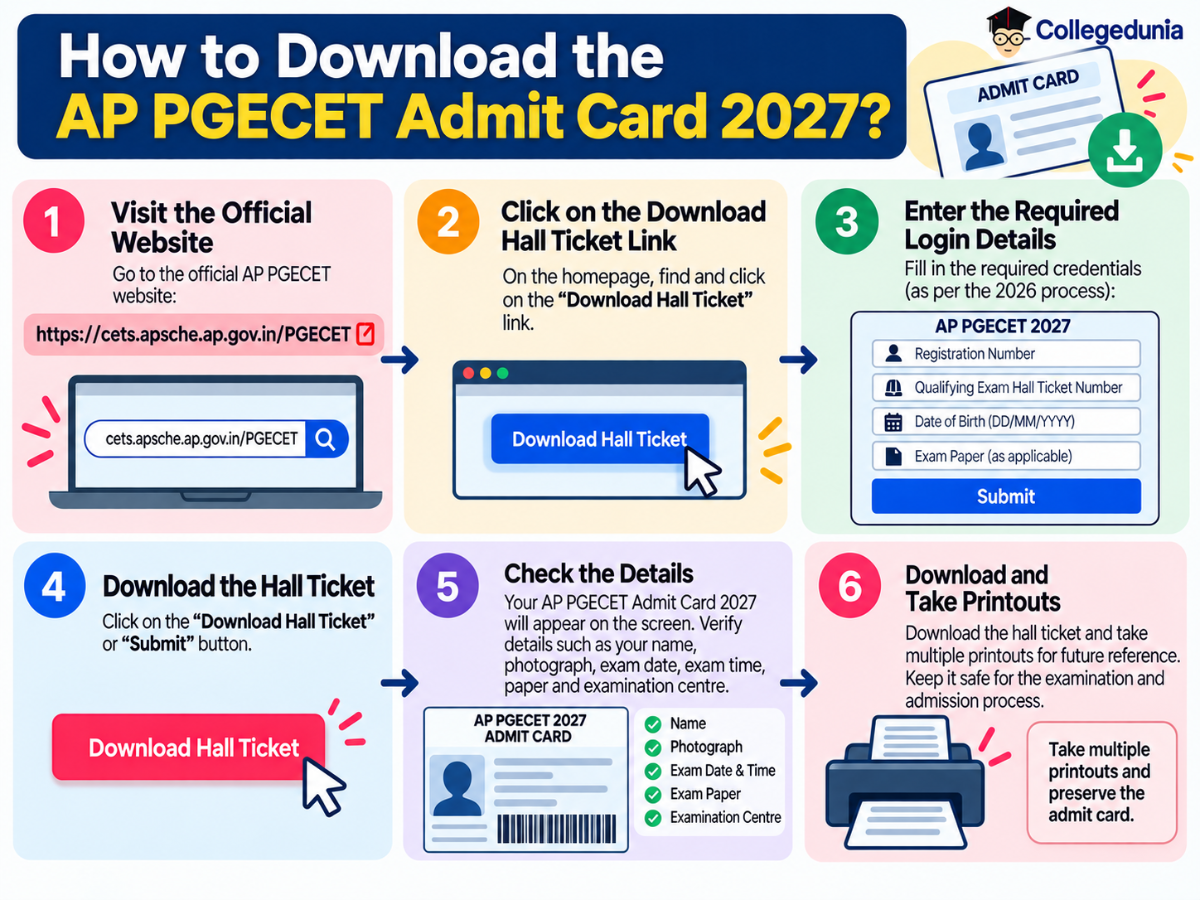
How to Download the AP PGECET Admit Card 2027?
The AP PGECET Admit Card 2027 is expected to be available online before the entrance exam, with candidates required to use their registration and qualifying exam details to access it.
- Step 1: Visit the official AP PGECET website: cets.apsche.ap.gov.in/PGECET
- Step 2: On the homepage, click on the “Download Hall Ticket” link.
- Step 3: Enter the required login details, such as Registration Number, Qualifying Examination Hall Ticket Number, Date of Birth, and Exam Paper, as applicable for AP PGECET 2027.
- Step 4: Click on the “Download Hall Ticket” / “Submit” button.
- Step 5: The AP PGECET Admit Card 2027 will appear on the screen. Check details such as your name, photograph, exam date, exam time, paper & examination centre.
- Step 6: Download the hall ticket and take multiple printouts for future reference. Candidates should preserve the admit card for the examination and admission process.
Details Mentioned on the AP PGECET Admit Card 2027
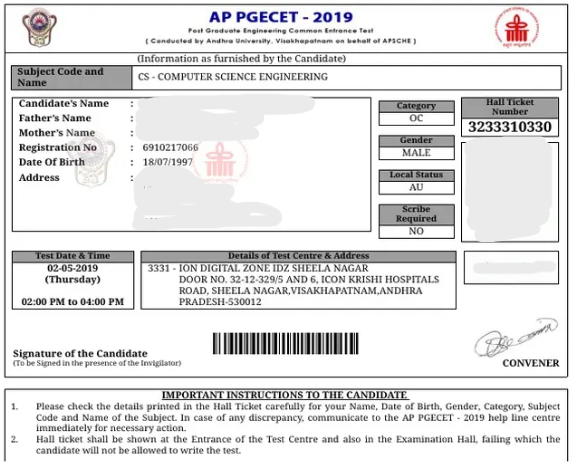
The AP PGECET Admit Card 2027 is expected to carry essential candidate and examination details, including the exam date, time, paper, and test-centre information.
| Details | Information Mentioned |
|---|---|
| Candidate’s Name | Name of the candidate as provided during registration |
| Registration Number | AP PGECET application/registration number |
| Hall Ticket Number | Candidate’s allotted hall ticket number |
| Photograph & Signature | Candidate’s photograph and signature |
| Date of Birth | Candidate’s date of birth |
| Exam Paper/Subject | Engineering or Pharmacy paper selected for the entrance test |
| Exam Date | Date on which the candidate has to appear for the exam |
| Exam Time/Session | Reporting time and examination session |
| Exam Centre | Name and address of the allotted test centre |
Sample Image of AP PGECET Admit Card
Can I download AP PGECET Admit Card 2027 without registration number?
No, candidates generally need their registration number and other login credentials to download the AP PGECET Hall Ticket 2027.
- If you have forgotten your registration number, check your application confirmation or registered email/mobile for the details.
- Candidates should avoid entering incorrect credentials repeatedly, as this may prevent successful login.
- If the issue persists, contact the AP PGECET/APSCHE helpdesk for assistance.
Check: AP PGECET Registration: Check How to Apply, Fees, Correction Window
What to do after downloading the AP PGECET Admit Card 2027?
After downloading the AP PGECET Admit Card 2027, candidates should:
- Verify all details mentioned on the hall ticket, including name, photograph, registration number, exam date, time, paper, and examination centre.
- Check the examination centre address and locate it on Google Maps to understand the route and estimated travel time.
- Take a clear printout of the admit card and keep an extra copy for future reference.
- Read all exam-day instructions printed on the hall ticket carefully, including reporting time and items allowed inside the examination centre.
- Plan your travel and logistics to reach the examination centre on time and avoid last-minute delays.
- Contact the AP PGECET authorities if you find any discrepancy in the details printed on the admit card. Do not make unauthorised changes to the hall ticket.
Documents to Carry Along with the AP PGECET Admit Card 2027

Source: Reddit
An aspirant has asked a question related to the admit card, which is “Guys, please can anyone provide me a list of documents needed for admission?”
The AP PGECET Admit Card 2027 is an essential document for entry into the examination centre. Candidates should also carry a valid photo ID such as Aadhaar Card, PAN Card, Voter ID, Passport, or Driving Licence for identity verification.
| Document | Notes |
|---|---|
| Printed Admit Card | Carry the downloaded AP PGECET 2027 Hall Ticket and preserve it carefully. |
| Aadhaar Card | Carry a valid Aadhaar card as photo identification. |
| PAN Card | Can be used as a valid photo ID, where accepted. |
| Voter ID | Carry the original photo identity card. |
| Passport | A valid passport can be used for identity verification. |
| Driving Licence | Carry a valid photo-bearing driving licence. |
| Other Valid Photo ID | Candidates may carry another government-issued photo ID if permitted by the exam authorities. |
AP PGECET Admit Card 2027: Exam Day Guidelines
Candidates appearing for AP PGECET 2027 should carefully follow the instructions mentioned on their admit card and reach the examination centre well before the reporting time.
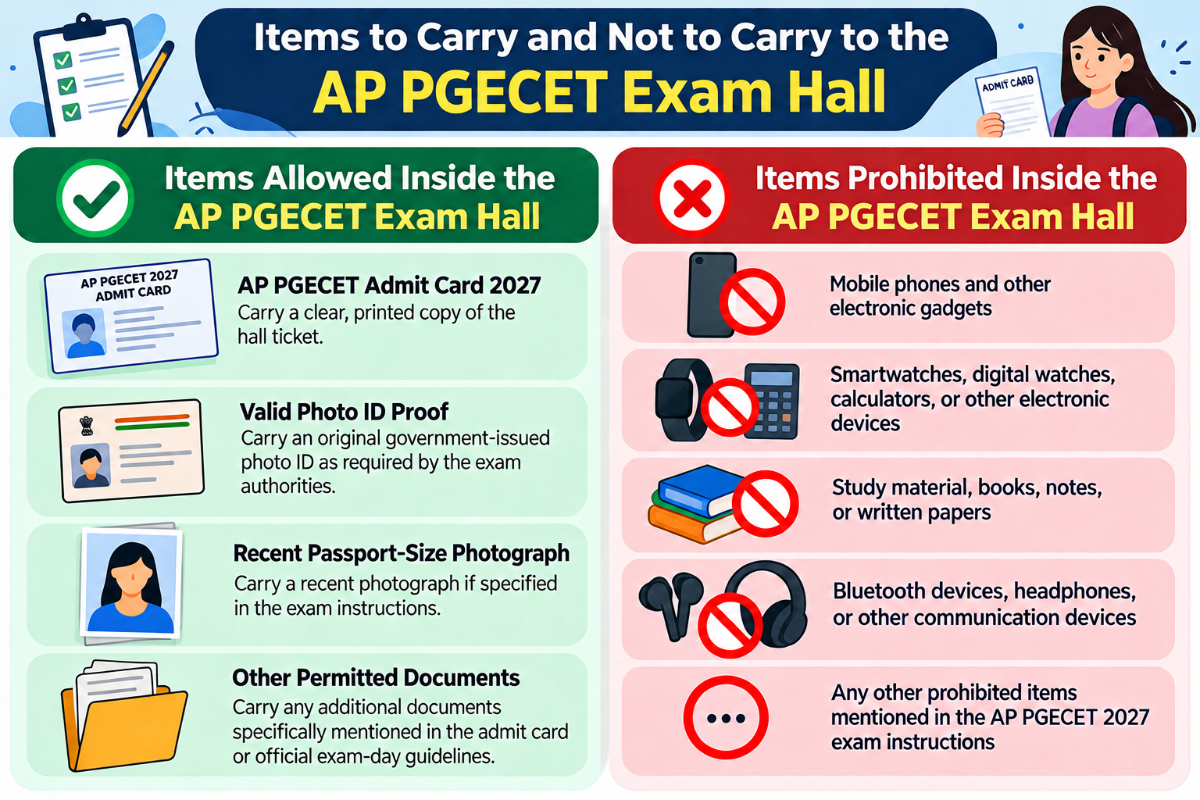
Items Allowed Inside the AP PGECET Exam Hall
- AP PGECET Admit Card 2027 – Carry a clear, printed copy of the hall ticket.
- Valid Photo ID Proof – Carry an original government-issued photo ID as required by the exam authorities.
- Recent Passport-Size Photograph – Carry a recent photograph if specified in the exam instructions.
- Other Permitted Documents – Carry any additional documents specifically mentioned in the admit card or official exam-day guidelines.
Items Prohibited Inside the AP PGECET Exam Hall
- Mobile phones and other electronic gadgets
- Smartwatches, digital watches, calculators, or other electronic devices
- Study material, books, notes, or written papers
- Bluetooth devices, headphones, or other communication devices
- Any other prohibited items mentioned in the AP PGECET 2027 exam instructions.
Problems faced while downloading the AP PGECET Admit Card 2027
Candidates may face technical or login-related issues while downloading the AP PGECET Admit Card 2027, especially during periods of heavy website traffic. It is advisable to check login details and retry after some time if the hall ticket does not load.
| Problem | Possible Reasons | What Candidates Can Do |
|---|---|---|
| Incomplete Registration |
| Complete all required application steps and ensure the fee payment and final submission are successful. |
| Error in Login Details |
|
|
| Technical Glitches |
|
|
| Missing or Incorrect Information |
|
|
AP PGECET Admit Card 2027: Grievance Helpdesk
If you find any error or discrepancy in your AP PGECET Admit Card 2027, contact the AP PGECET/APSCHE authorities immediately for assistance.
- Visit the official AP PGECET website for the latest updates, support, and contact details.
- If the admit card download link is not working, refresh the page, clear your browser cache, or try logging in again after some time.
- If you are unable to access your account, verify your registration number and login credentials before attempting to log in again.
- Report any incorrect personal details, photograph, signature, exam date, session, or test-centre information to the concerned authorities before the examination.
- Keep a copy of your AP PGECET application details and admit card when contacting the authorities to help resolve the issue quickly.

Source: cets.apsche.ap.gov.in
AP PGECET Admit Card 2027 FAQs
Ques. What should I do if there is an error in AP PGECET Admit Card 2027?
Ans. If you find any discrepancy in your AP PGECET Admit Card 2027, contact the AP PGECET/APSCHE authorities immediately and report the issue with the required details. For technical issues, try logging in again after clearing your browser cache or using a different browser, and keep your application details handy.
Ques. Can I show a digital copy of the AP PGECET Hall Ticket 2027?
Ans. Absolutely not. The candidates must carry only a physical copy of their admit card. A digital copy is prohibited. If you do not show a physical copy of the AP PGECET Hall Ticket, then you will not be allowed to sit for the exam.
Ques. Is there any time limit to download the AP PGECET hall ticket?
Ans. There is usually no fixed daily time limit for downloading the AP PGECET hall ticket once it is released. Candidates should download and print it within the period specified by APSCHE, preferably well before the examination date to avoid last-minute technical issues.
Ques. For how many days does the AP PGECET Admit Card remain live on the website?
Ans. AP PGECET does not specify a fixed number of days for which the hall ticket remains available for download. For 2026, hall-ticket downloading began on April 15, ahead of the April 28–30 exam dates, and candidates were advised to preserve the hall ticket after downloading it.
Ques. Whom should I approach if there’s any error in the admit card?
Ans. If candidates find any error in the AP PGECET Admit Card 2027, they should immediately contact the AP PGECET Convener/Helpdesk, Andhra University, Visakhapatnam. The latest official contact details are 8331865313 and helpdeskappgecet@apsche.org, with queries handled from 10 AM to 5 PM.



Comments