




KCET 2026 scorecard is now available to download on their official website cetonline.karnataka.gov.in/kea/. KCET 2026 result was announced on June 6th 2026.
- Students have to log in using their application ID and Date of birth to download their KCET scorecards.
- KCET 2026 scorecards contain the ranks for various courses such as Engineering, Nursing, Pharm-D and many more.
- Along with KCET 2026, it will also consist of your subject-wise scores in the KCET exam and also your Class 12 scores.
- The KCET 2026 scorecard is the most important document for your counselling and college admission process.
Also Read
- Check KCET 2026 Counselling Schedule and Seat Allotment Process
- Check KCET Course-wise and Category-wise Cutoff 2026
KCET 2026 Scorecard — Overview
KEA releases the KCET scorecard and rank card on the official portal after results are announced. The scorecard is the primary document required for KCET 2026 counselling registration. The table below captures the key details at a glance.
| Detail | Information |
|---|---|
| Conducting Body | Karnataka Examinations Authority (KEA) |
| Exam Full Name | Karnataka Common Entrance Test (KCET) 2026 |
| Official Portal | cetonline.karnataka.gov.in/kea/ |
| Scorecard Release | After KCET 2026 result declaration |
| Login Credentials Required | Application Number and Date of Birth |
| Total Marks | 180 (60 each for Physics, Chemistry, Mathematics/Biology) |
| Scorecard Mode |
Online only — no physical copy dispatched |
Also Read
- Is 40000 a Good Rank in KCET?
- Low Cutoff Engineering Branches in KCET 2026: 1st Round of Counselling Closing Ranks
Ques. Is the KCET 2026 scorecard the same as the rank card?
Ans. Yes, the scorecard and rank card are the same document in KCET. The scorecard shows your subject-wise marks and Ranks for various courses including engineering, nursing, Pharm-D, and many more.
How to Download KCET 2026 Scorecard
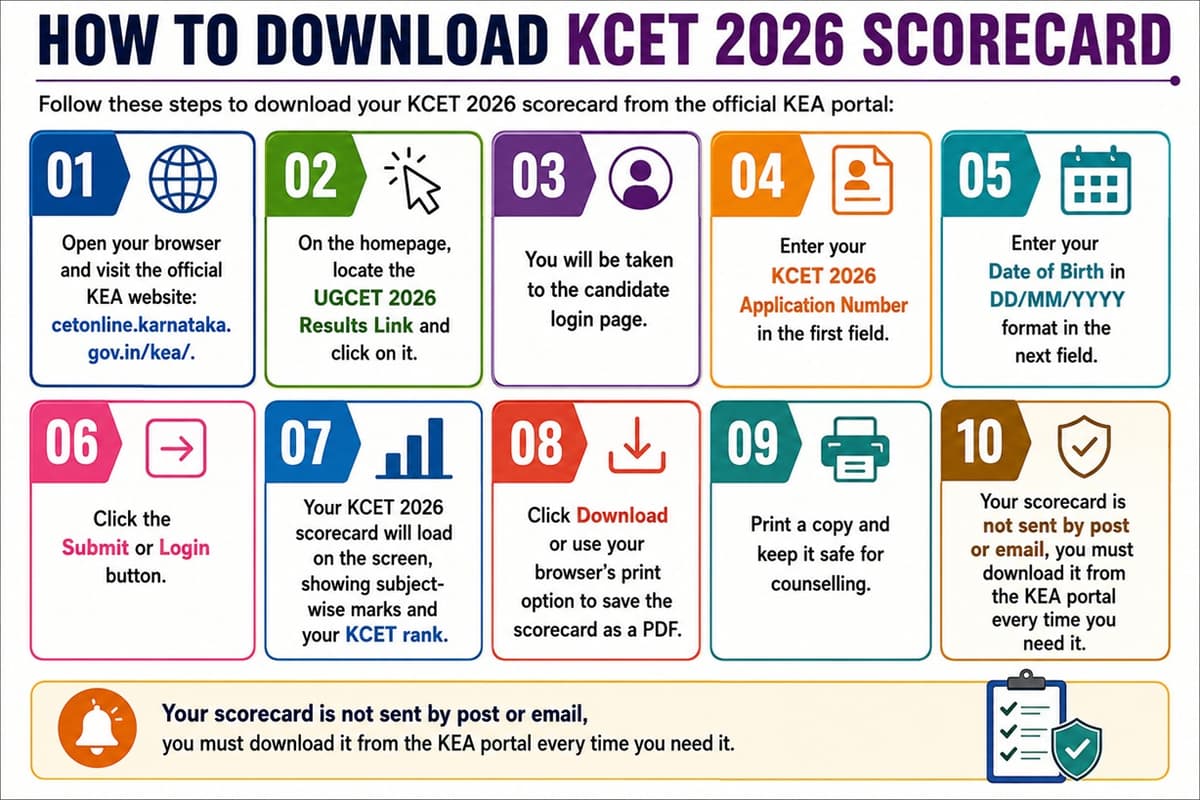
Follow these steps to download your KCET 2026 scorecard from the official KEA portal:
- Open your browser and visit the official KEA website: cetonline.karnataka.gov.in/kea/.
- On the homepage, locate the UGCET 2026 Results Link and click on it.
- You will be taken to the candidate login page.
- Enter your KCET 2026 Application Number in the first field.
- Enter your Date of Birth in DD/MM/YYYY format in the next field.
- Click the Submit or Login button.
- Your KCET 2026 scorecard will load on the screen, showing subject-wise marks and your KCET rank.
- Click Download or use your browser’s print option to save the scorecard as a PDF.
- Print a copy and keep it safe for counselling.
Your scorecard is not sent by post or email, you must download it from the KEA portal every time you need it.
Also Read
- KCET 2026 Option Entry: Dates, How to Fill Choices & Expert Tips
- KCET 2026 Seat Matrix: Institute-wise Seat Availability by Branch
Ques. What credentials do I need to download the KCET 2026 scorecard?
Ans. You need your KCET 2026 application number and your date of birth in DD/MM/YYYY format to log in to the KEA portal and access your scorecard.
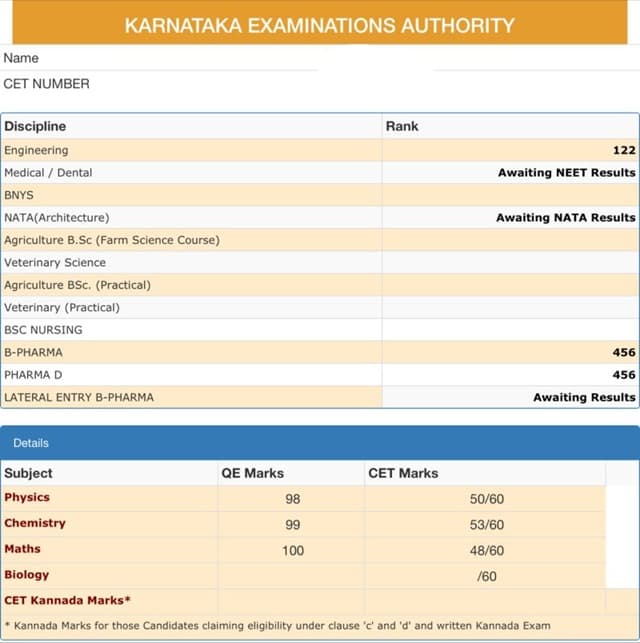
Details Mentioned on KCET 2026 Scorecard and Rank Card
Check all details on your scorecard carefully after downloading. Report any discrepancy to KEA immediately through the official portal. The table below lists what appears on the KCET 2026 scorecard.
| Detail on Scorecard | Description |
|---|---|
| Candidate’s Name | As registered in the KCET 2026 application form |
| Application Number | Unique ID allotted at the time of registration |
| CET Number | Roll number assigned for KCET 2026 |
| Date of Birth | As submitted in the application |
| Category | General / OBC / SC / ST / other applicable category |
| Physics Marks | Marks obtained out of 60 |
| Chemistry Marks | Marks obtained out of 60 |
| Mathematics / Biology Marks | Marks obtained out of 60 |
| Total Marks | Aggregate out of 180 |
| KCET Rank | Overall merit rank in KCET 2026 |
| Category Rank | Rank within the reserved category, if applicable |
Also Read
- KCET 2026 Safe Score for CSE: Marks for Top Bangalore Colleges
- College Chances with 160 Marks in KCET 2026
Common Login Issues and Fixes
Some students face trouble while trying to download their scorecard. Here are the most common login issues and how to resolve them quickly.
| Issue | Likely Cause | Fix |
|---|---|---|
| Invalid credentials error | Wrong application number or incorrect date of birth format | Re-enter the application number exactly as shown on your admit card; use DD/MM/YYYY for date of birth |
| Page not loading | Server overload due to high traffic after result declaration | Try during non-peak hours such as early morning or late at night, or switch to a different browser |
| Scorecard not displaying after login | Browser compatibility or cache issue | Clear browser cache and cookies, then retry using Google Chrome or Mozilla Firefox |
| Forgot application number | Registration details not saved | Check your KCET 2026 registration confirmation email or use the forgot application number option on the KEA portal |
| PDF not downloading | Pop-ups blocked by the browser | Allow pop-ups for cetonline.karnataka.gov.in in your browser settings and try again |
If problems persist, contact the KEA helpdesk directly through the official portal at cetonline.karnataka.gov.in/kea/ for further assistance.
Ques. What should I do if there is an error on my KCET 2026 scorecard?
Ans. If you notice any discrepancy in your name, category, or marks on the KCET 2026 scorecard, contact the KEA helpdesk immediately through the official portal. Keep a copy of your admit card and registration documents ready when raising your query.
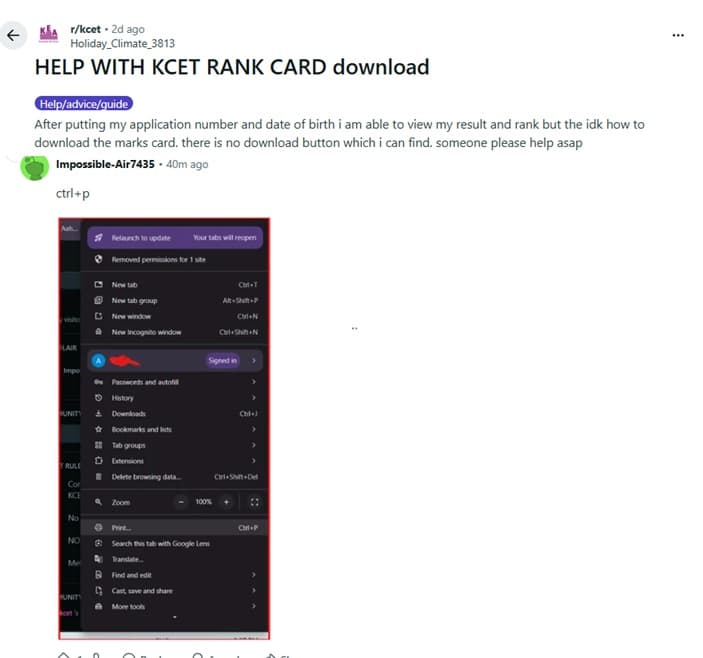
How to Download KCET Scorecard and Rank Card: Reddit Discussion
If you are wondering how you can download your KCET scorecard & rank card, as per a user on the r/kcet thread on Reddit, you can download using the print function (Ctrl + P) to download the scorecard PDF.
Related News
- Expected Colleges Choices for 80 Marks in KCET 2026
- KCET 2026: Best Choice Filling Strategy for Best Seat Allotment
- KCET 2026: Seat Upgrade vs Freeze: When to Upgrade and When to Stay?



Comments