




MHT CET 2027 login is the official candidate portal through which applicants complete their MHT CET registration up to counselling. The State Cell Maharashtra activates the MHT CET login window as per the MHT CET 2027 exam schedule.
- The login plays a vital role in filling out application, paying fees, downloading Admit Card, checking Result, and participating in counselling.
- Students need their application number and password as MHT CET 2027 login credentials to access the candidate portal.
- MHT CET login portal will be activated around October/November 2026 for registration.
- MHT CET 2027 first attempt is likely to be held in March 2027 after HSC examination.
| Direct Link for MHT CET 2027 Registration (To be Activated Soon) |
MHT CET 2027 Latest Updates:
The latest updates for MHT CET 2027 are as follows:
- MHT CET 2027 login portal is likely to open around October/ November 2026 for MHT CET 2027 First Attempt.
- The MHT CET 2027 Form Correction window will be open around December 2026.
- The MHT CET 2027 Admit Card will be released around December/ January 2026.
Related Articles:
- MHT CET Registration 2027: Expected Date, Category-Wise Application Fees, APAAR ID and How to Apply
- MHT CET 2027 Exam Date: Expected Schedule, PCM and PCB Session Dates and Registration
- MHT CET 2027 Both Attempts Rescheduled After Class 12 Board Exams
Key Summary
- If you have forgotten your MHT CET 2027 login password, you can retrieve it by clicking “Forgot Password”.
- At every step of login, MHT CET application number, password and registered email ID are required. So keep it safe until final admission.
- Candidates should check the cetcell.mahcet.org.in regularly for the latest updates once the registration process starts.
MHT CET Login 2027 Highlights
The key highlights of MHT CET Login 2027 are:
| Particulars | Details |
|---|---|
| Exam | Maharashtra Common Entrance Test |
| Conducting Body | State Common Entrance Test Cell Maharashtra |
| Official Website | cetcell.mahcet.org.in |
| Login Credentials | Application Number, Password and Registered Email ID |
| Login Portal Uses |
|
Also Check: MHT CET Eligibility Criteria Age Limit, 12th Percentage, Passing Marks, Attempts
Ques. What is the login ID in MHT CET?
Ans. The login ID in MHT CET is your registered ID when you first signed in to State Cell Maharashtra portal. Keep the login ID safe as it will be required in every step to access your candidate's login.
Benefits of MHT CET Login 2027?
The MHT CET 2027 login portal is the single official access point from the day you first register to the day you confirm your seat at an allotted institution. Every official action, from downloading your admit card to completing the final round of CAP counselling, requires you to be logged in either at cetcell.mahacet.org or mahacet.org.
- Registration & Account Creation: Your login ID is created when you register; without completing this step, you cannot access any downstream service.
- Application Form Filling: After creating your account, log in to fill and submit the application form- selecting exam group (PCM / PCB / both), preferred exam centres, medium, and category.
- Application Form Correction: During the correction window, log in to edit specific fields such as exam centre preference, category, and uploaded documents.
- Admit Card Download: Download your Hall Ticket for Session 1 and Session 2 separately from the candidate dashboard; printouts are mandatory at the exam venue.
- Response Sheet Access: Retrieve a question-wise copy of your marked answers after the exam for self-checking before the official answer key is published.
- Provisional Answer Key Download & Challenge: View subject-wise answer keys, calculate your likely percentile, and raise objections against disputed answers — all through the same login.
- Scorecard / Result Download: Access your MHT CET 2027 percentile score for PCM and PCB groups once results are declared; download the PDF scorecard for document verification.
- CAP Counselling All Rounds: Register on mahacet.org, upload required documents, fill your college–course preference list for each round, and check your seat allotment result and allotment letter.
- Institute Reporting Documents: Download the provisional admission letter and allotment letter from the counselling dashboard when reporting to the allotted institute.
MHT CET Login Direct Link 2027
The MHT CET Login Direct Link 2027 will be updated soon as per the notification released by State CET Cell, Maharashtra.
| MHT CET 2027 Login Portal | Direct Link |
|---|---|
| MHT CET Registration Login | To be Updated |
| MHT CET Admit Card Login | To be Updated |
| MHT CET Result Login | To be Updated |
Also Check: Is MHT CET 2027 December Attempt Cancelled?
Ques. How to check my MHT CET City Intimation Slip?
Ans. To check your MHT CET City Intimation Slip, visit the portal, log in to your candidate portal using your application number and password, and download your exam city allotment document from the admit card section.
How to Register and Create MHT CET Login 2027?
A step-by-step guide to how to register and create an MHT CET 2027 login is described below:
- Step 1: Visit the official State CET Cell, Maharashtra at cetcell.mahcet.org.in.
- Step 2: Click on “Register Link” or “New Registration”
- Step 3: Enter your details- email, password, mobile number and full name in the required fields.
- Step 4: Create a strong password with special characters and numbers
- Step 5: Click on “Register” option and open your Email
- Step 6: Once your Email verification is complete, you will get a pop-up on your screen for Aadhaar and APAAR ID authentication
- Step 7: Visit DigiLocker and grant permission for Aadhaar and APAAR ID documents.
- Step 8: Provide all the details, and your MHT CET registration is complete.
This step finalises your MHT CET 2027 login. You can visit the State CET Cell, Maharashtra by using your registered email ID and password created during the process.
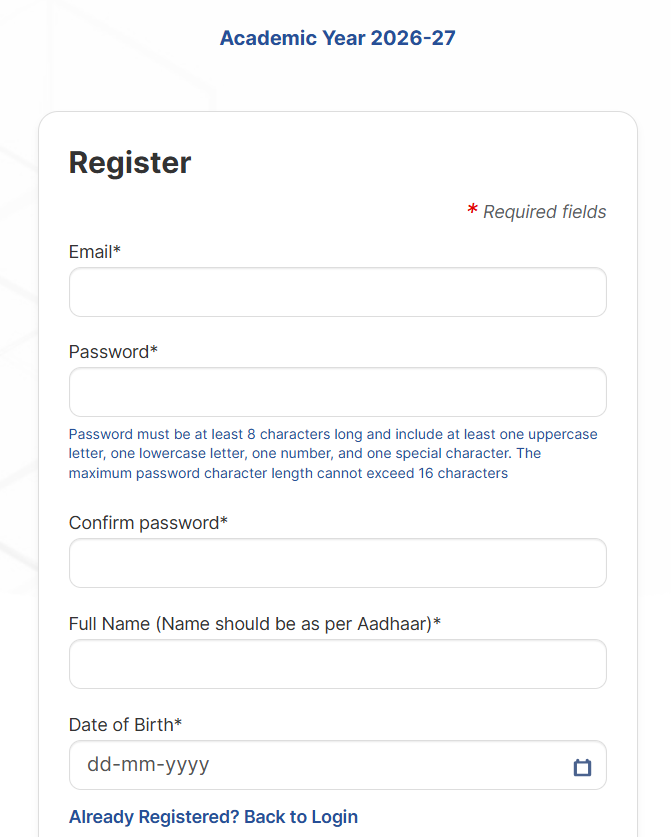
Source: cetcell.mahcet.org.in
You can watch the previous year’s video by “Knowledge Seekers” to know how to register for MHT CET Registration login 2027
MHT CET PCM Login 2027
The MHT CET PCM Login is the candidates' portal for applicants who want to appear for MHT CET to get admission to BTech colleges across Maharashtra. The MHT CET 2027 login credentials required for PCM candidates are
- Registered Email ID or Application Number
- Password generated during registration
It will help you to download MHT CET PCM Admit Card, scorecard and participate in counselling.
What is MHT CET Login ID and Password?
MHT CET Login ID and password are the initial login credentials created just after completion of the registration process. You must keep it safely as it will be required at every step of your MHT CET login portal.
Also Read: MHT CET Form Correction: Direct Link, Check Dates and Details to Edit
According to a Reddit post, a user wanted to know how to check if I have registered for MHT CET 2nd Attempt.
A Reddit user commented on this: ways to check if you have registered for MHT CET 2nd Attempt.
Log in using your credentials, check payment history, view form and scroll down to exam centre selection details to find your MHT CET registration.


Source: Reddit
Ques. How to check MHT CET exam Hall Ticket?
Ans. You can check and download your MHT CET hall ticket by visiting the official portal, logging into your candidate account with your registered credentials, and clicking the download link.
MHT CET Login Credentials 2027
The following MHT CET 2027 Login portal is used from registration and concludes with admission. But the login credentials serve different purposes and are used differently. Check out the details in the table below:
| Login Credentials | Why Required | Significance |
|---|---|---|
| Email ID | To receive verification link, OTP | Registration, password reset |
| Mobile Number | OTP and password recovery or update | Login recovery, alerts |
| Password | Primary credential | Login, Admit Card, result |
| Application Number | candidate identity | Admit card, result, Counselling |
Forgot Your MHT CET Password?
In case you forgot your MHT CET password, you can follow the steps given below:
- Step 1: Visit the official website and click on “Forgot Password”
- Step 2: Enter the Application Number, Date of Birth and Mother’s First Name.
- Step 3: Submit the details; you’ll retrieve your Password.
To retrieve the application number, click on “forgot application number” and follow the below-mentioned steps:
- Step 1: Enter Applicant’s Name and Date of Birth.
- Step 2: Enter Security Key.
- Step 3: Validate the details to retrieve the forgotten Application Number.
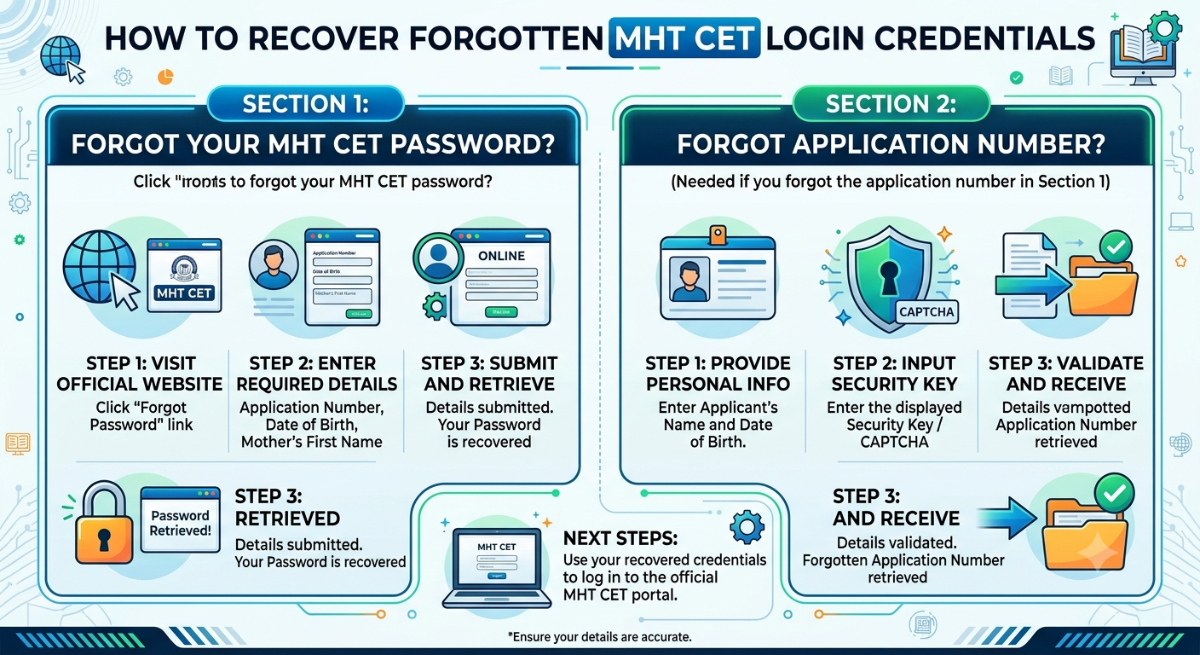
MHT CET Login with Application Number
To access the MHT CET login with application number, open the official portal of CET Cell Maharashtra. Click on the link related to MHT CET Admit Card, result or counselling to use your MHT CET login with Application Number.
MHT CET Login with Mobile Number
You cannot log into the main MHT CET login with a mobile number. Mainly, the login credentials required for MHT CET are application number, email ID and password. However, you can use your MHT CET mobile number during initial registration to recover a forgotten password via OTP verification, or to receive your login details via SMS if applicable.
Related Article: MHT CET Exam Centers 2027: District Wise City List, Allotment and Reporting Time
Ques. Do PCM and PCB candidates have different login deadlines?
Ans. The login deadlines are the same for both groups, although the exam dates differ.
- Registration window applies to both groups
- Admit cards release on different dates
- Dashboard updates depend on your selected group
Uses of MHT CET Login Window 2027
The MHT CET 2027 Login window gets updated and operates differently based on the MHT CET exam notifications.
- Fill out the Application Form
- Uploading Documents
- Payment of Registration fee
- MHT CET Admit Card Download
- MHT CET Answer Key Download and Raising Objections Against it
- MHT CET Scorecard Download
- MHT CET CAP Registration
- MHT CET Seat Allotment Process
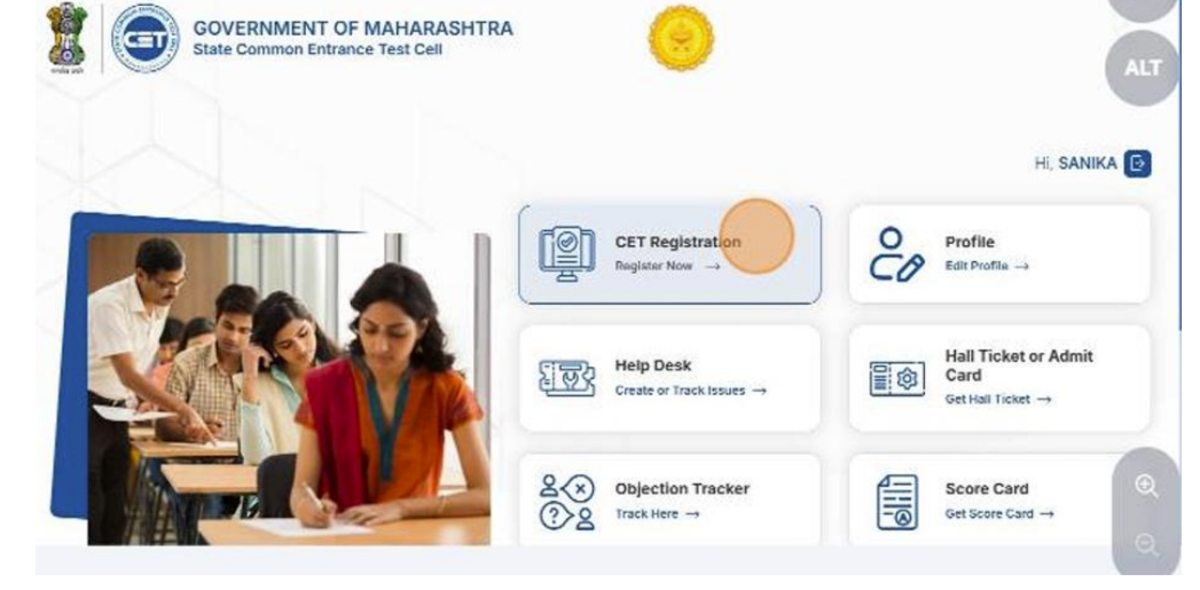
Source: cetcell.mahcet.org.in
Related Link: MHT CET Admit Card Released, Direct Link and Check How to Download
Ques. What if I face an error during MHT CET registration?
Ans. MHT CET Registration errors usually occur because of technical issues or incorrect details.
- Recheck personal information
- Try a different device or browser
- Avoid peak hours while registering
MHT CET Login 2027 to Download Admit Card
Candidates can download the MHT CET Admit Card 2027 using their registered email ID and password:
- Step 1: Open the CET Cell Maharashtra portal
- Step 2: Click on the MHT CET Admit Card 2027 login
- Step 3: Log in using the Registered Email ID and Password
- Step 4: Click on “Submit” Button
- Step 5: Your MHT CET Hall Ticket will be displayed on the screen
- Step 6: Download and take a printout of the MHT CET Admit Card
Also Check: MHT CET Admit Card Errors: List of Errors to Check and How to Fix
Ques. How to fix MHT CET account locking or too many attempts can I fix it?
Ans. The login system locks accounts temporarily after several failed attempts.
- Wait for 15 to 30 minutes.
- Use the Forgot Password recovery option after the waiting period.
- Avoid repeated attempts with wrong credentials to prevent a new lock.
- If the account remains locked for hours, contact CET support with your details.
MHT CET Login 2027 to Check Result
Candidates can download the MHT CET result login 2027 using their registered email ID and password:
- Step 1: Click on the MHT CET website - cetcell.mahacet.org
- Step 2: Click on MHT Result Login
- Step 3: Log in using your Registered Email ID and Password
- Step 4: MHT CET scorecard will be displayed on the screen after login
- Step 5: Download it and take a printout for future use
Also Read: MHT CET Result- Download PCM & PCB Scorecard @cetcell.mahacet.org, Toppers and Good Score
MHT CET Login 2027 for CAP
MHT CET CAP Counselling login portal gets activated after the scorecards are out. In this stage, candidates need their MHT CET 2027 Login for the following processes:
- Counselling registration
- Uploading documents
- Payment of counselling fees
- Check merit number
- Choice filling
- Checking seat allotment result
Also Check: MHT CET Seat Allotment: Expected Date, Download Link, & CAP Round Result
MHT CET Login Common Issues and Solutions
Some common MHT CET 2027 login issues are the server not responding and slow internet connectivity.
| Issue | Reason | Solution |
|---|---|---|
| Server Not Responding | High traffic on the official website can lead to server downtime or slow responses. | Wait for some time and attempt to log in |
| Slow Internet Connectivity | A weak or unstable internet connection can hinder the download process. | Ensure a stable and fast internet connection before initiating the download. |
| Forgotten Login Credentials | Misplacing or forgetting the Application Number or Login Password. | Use the 'Forgot Password' or 'Forgot Application Number' options on the official website to retrieve credentials. |
Ques. Can I use the same login for MHT CET CAP Counselling?
Ans.Yes. The same login works for every process
- Single login for application and payment
- New tabs appear on your dashboard during admit card and result
- Counselling options open only after results
MHT CET Important Dates 2027
The expected dates are tabulated below, which give you an idea of MHT CET 2027 login portal timelines for each use
| MHT CET Login Portals | Expected Dates |
|---|---|
| MHT CET 2027 Registration Login | October/ November 2026 |
| MHT CET 2027 Registration Last Date to Apply (without late fee) | November 2026 |
| MHT CET 2027 Registration Last Date to Apply (with late fee) | November/ December 2026 |
| MHT CET 2027 Form Correction Window Login | December 2026 |
| MHT CET 2027 City Intimation Slip Login | December 2026 |
| MHT CET 2027 Admit Card Login (Attempt 1) | January 2027 |
| MHT CET 2027 Attempt 1 | March, 2027 |
Also Check: MHT CET Exam Pattern 2027: Marking Scheme, Subject Weightage and Difficulty Level
MHT CET 2027 Login FAQs
Ques. How can I log in to MHT CET 2027?
Ans. You can log in to MHT CET portal only after completing the State Cell Maharashtra Registration process. Your application number and password are the login credentials for MHT CET portal.
Ques. How do I recover my MHT CET Password?
Ans. You can recover your MHT CET password after clicking on the Forgotten Password link. You will receive an OTP on the registered contact details, and after verifying it, create a new password.
Ques. What credentials are required for CAP Login?
Ans. For CAP Counselling, you require your application number and password to register or check seat allotment.
Ques. When will the MHT CET 2027 login portal open?
Ans. The MHT CET 2027 login portal for registration will open around September, followed by edit window and admit card portal link.



Comments
Found 3 Comments
Your user ID cannot be immediately deleted following the MHT CET exam. It will stay dormant, though, if you just stop using it. Please contact the MHT CET authorities or the appropriate support channels with any questions you may have regarding data privacy or account security. You can also ask about account deletion or data retention policies. Recall that you should never divulge your login information to third parties.
The examination fee for the MHT CET is INR 600. If you appear for two groups then INR 1,600 is charged for general and INR 1,200 for the reserved category students.
Yes, there are seat reservations for female candidates in the MHT CET examination. 65% of seats are reserved for the Maharashtra students. 51% of the total seats are given to unaided minority students.