




CAT 2026 provides an on-screen virtual calculator for candidates appearing in the computer-based examination. Candidates can access the CAT exam on-screen calculator through the test interface.
Candidates should download the official CAT 2026 Virtual Calculator Usage Guidelines to understand its features, functions and permitted usage before the exam.
- The virtual calculator is opened through the calculator icon on the test screen and works only for basic arithmetic.
- Scientific calculators, calculator watches and mobile phones are not permitted inside the exam centre.
- The calculator is most useful in Quantitative Ability (QA) and Data Interpretation and Logical Reasoning (DILR).
Note: CAT 2026 will be held on 29 November 2026 (Sunday) in three slots, conducted by IIM Indore.
Related Articles:
- CAT 2026: Exam on Nov 29, Admit Card (Released), Mock Test, Question Papers, Cutoff & Preparation
- Is Calculator Allowed in CAT 2026?
Key Summary
- The virtual calculator is part of the CAT test interface. No separate software or installation is needed.
- It has no scientific functions such as logarithms, trigonometry or exponents.
- Students get a scribble pad and pen at the centre for rough work. Own pens and paper are not allowed.
- Exact calculator behaviour should be checked on iimcat.ac.in and the CAT 2026 mock interface.
CAT 2026 Virtual Calculator: Is It Allowed?
Yes, only the virtual calculator on the test screen is allowed in CAT 2026.
- Physical calculators, including scientific calculators and calculator watches, are not allowed inside the exam centre.
- Carrying a prohibited device can be treated as a violation of exam instructions.
- The virtual calculator stays available on the screen during all three sections.
| Particulars | CAT 2026 Calculator Rules |
|---|---|
| Physical calculator | Not allowed |
| Scientific calculator | Not allowed |
| Calculator type | On-screen virtual calculator |
| Access | Calculator icon on the test screen |
| Installation | Not required |
| Rough work | Scribble pad and pen provided at the centre |
Ques. Is a scientific calculator allowed in CAT 2026?
Ans. No. Students can use only the basic virtual calculator shown on the computer screen.
Ques. Can I carry my own calculator to the CAT 2026 exam centre?
Ans. No. Physical calculators, including scientific calculators and calculator watches, are not permitted inside the examination hall.
CAT 2026 Virtual Calculator Instructions: Step-by-Step
Follow these steps to use the calculator on exam day.
- Step 1: Log in to the test screen and read the on-screen instructions before the exam starts.
- Step 2: Click the calculator icon on the test screen to open the calculator.
- Step 3: Enter the numbers with the on-screen buttons and choose the operation.
- Step 4: Note the result in your answer or on the scribble pad, then close the calculator.
- Step 5: Clear the display before the next calculation to avoid carrying over old values.
Note: The calculator may not keep values between sections, so note useful numbers on the scribble pad.
Ques. Where is the calculator icon on the CAT screen?
Ans. The icon is on the test screen near the timer, as in earlier CAT interfaces. Check the position in the mock test.
Ques. Can I practise using the CAT virtual calculator before the exam?
Ans. Yes. Candidates can use the official CAT mock test interface to become familiar with the examination screen and calculator.
Check:
- CAT 2026 Preparation Online: Coaching, Free Courses, Study Material, Online YouTube and Reddit
- CAT Topic-Wise Weightage for QA, VARC and DILR, Check Previous Years’ Questions
What the CAT Virtual Calculator Can and Cannot Do
The CAT exam on-screen calculator is intended for basic arithmetic calculations. It is not a replacement for a scientific calculator and does not provide advanced mathematical functions.
| Calculator Functions | Availability |
|---|---|
| Addition | Basic arithmetic operation |
| Subtraction | Basic arithmetic operation |
| Multiplication | Basic arithmetic operation |
| Division | Basic arithmetic operation |
| Decimal calculations | Basic calculations |
| Percentage calculations | Can be performed using basic operations |
| Logarithms | Not available |
| Trigonometric functions | Not available |
| Advanced scientific operations | Not available |
The calculator saves time on long multiplications and divisions, mainly in DILR and QA.
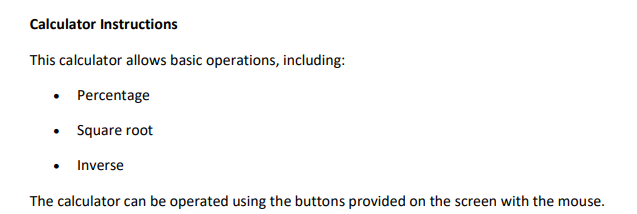
Source: CAT 2026 Virtual Calculator Usage Guidelines
Check: CAT Study Material 2026: Download Free CAT Study Material PDF for VARC, DILR, and Quant
How to Use the CAT Calculator in QA and DILR?
The virtual calculator can be useful when a question involves lengthy arithmetic calculations. However, using it for every calculation may consume valuable examination time.
| CAT Section | How the Calculator Can Help |
|---|---|
| Quantitative Ability (QA) | Multiplication, division, decimals and lengthy arithmetic |
| Data Interpretation and Logical Reasoning (DILR) | Calculations involving tables, ratios, percentages and numerical data |
| Verbal Ability and Reading Comprehension (VARC) | Usually less useful because the section focuses on reading and verbal reasoning |
Candidates should first identify the calculation required and use mental maths for simple operations. The on-screen calculator can then be used for calculations that are more time-consuming.
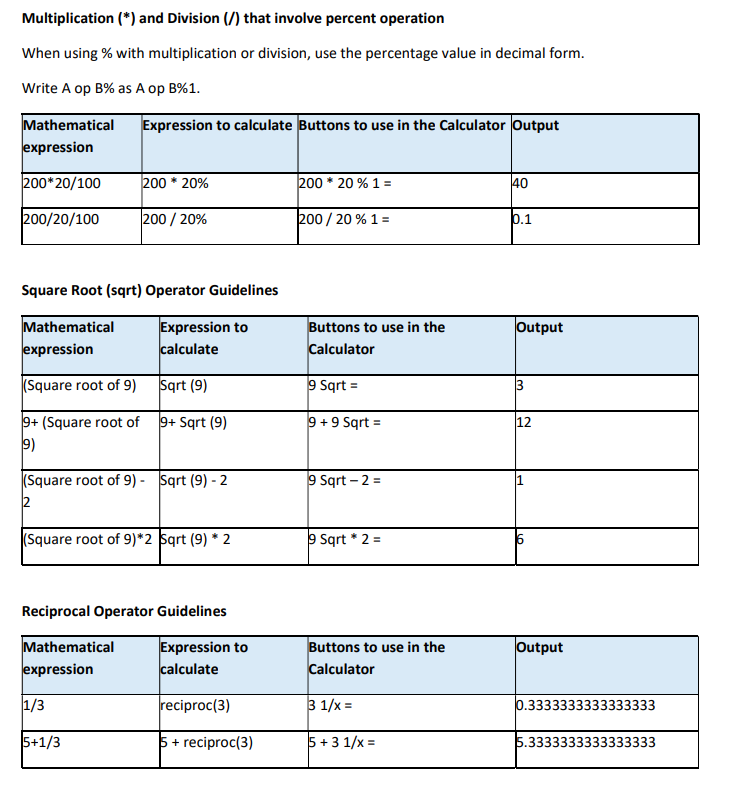
Source: CAT 2026 Virtual Calculator Usage Guidelines
Tips to Use the Virtual Calculator in CAT 2026
- Practice in mocks: Use the on-screen calculator in every mock so that opening and closing it becomes routine.
- Set up on paper first: Frame the equation on the scribble pad and use the calculator only for the final arithmetic.
- Do not over-rely on it: Mouse-based input is slower than a physical calculator, so mental maths still saves time.
- Check each entry: A wrong digit gives a wrong answer, so confirm the displayed number before moving on.
- Watch the section timer: Each section has 40 minutes and sections cannot be switched early.
Check this to know CAT 2026 Calculator Hacks during the exam
CAT 2026 Official Calculator Resources
Students can check the official calculator usage guidelines and the mock interface on the CAT website.
| Resource | Where to Find It |
|---|---|
| CAT 2026 calculator usage guidelines and mock interface | View on Official Site (iimcat.ac.in) |
Note: Documents are published by IIM Indore, the CAT 2026 conducting body. Links are updated as official documents are released.
CAT 2026 Exam Day: Key Points
- Carry a printed copy of the CAT 2026 admit card.
- Bring a valid original photo ID for verification.
- Do not carry mobile phones, smartwatches or other prohibited electronic devices into the examination hall.
- Use the scribble pad and pen provided at the examination centre for rough work.
- Do not carry personal calculators or prohibited stationery.
- Follow the invigilator's instructions before starting the examination.
CAT 2026 Virtual Calculator FAQs
Ques. Is a calculator allowed in CAT 2026?
Ans. Yes. Candidates can use the on-screen virtual calculator provided in the CAT examination interface. Physical calculators are not allowed.
Ques. Is a scientific calculator allowed in CAT 2026?
Ans. No. Scientific calculators are not permitted inside the examination hall. Candidates can use the basic virtual calculator available on the test screen.
Ques. Can I use the CAT virtual calculator in all three sections?
Ans. Candidates should refer to the official CAT 2026 examination instructions and mock interface for confirmation of calculator availability across sections.
Ques. Does the CAT virtual calculator have logarithm and trigonometric functions?
Ans. The CAT virtual calculator is intended for basic arithmetic. It does not provide advanced scientific functions such as logarithms and trigonometric operations.
Ques. How do I open the calculator during the CAT exam?
Ans. Candidates can open the calculator by clicking its icon on the computer-based test screen.
Ques. Will I get a rough sheet in CAT 2026?
Ans. Candidates receive a scribble pad and pen at the examination centre for rough calculations. They should follow the official instructions regarding personal stationery.
Ques. Can I use my mobile phone calculator during CAT 2026?
Ans. No. Mobile phones are not permitted inside the examination hall. Candidates must use the on-screen virtual calculator.
Ques. Is the CAT virtual calculator available in the official mock test?
Ans. Candidates should check the official CAT mock test interface to understand the examination screen and calculator access before the examination



Comments