




If your NEET 2026 result login is not working, the most common causes are high traffic immediately after result release, an incorrect login crediantials, or an unstable network connectivity.
NEET 2026 result has been declared on July 16, 2026 at NTA website.
- Candidates can check their NEET 2026 result using their Application Number and Date of Birth (in DD/MM/YYYY format) at neet.nta.nic.in.
- The portal might be down due to heavy traffic surge as lakhs of aspirants will attempt to check their NEET 2026 result on the same time, which may cause NEET result login not working.
- Invalid login crediantials cause NEET result login not working, so you should recheck the details in your admit card/ NTA registration email.
- Numerous attempts may cause session timeout due to unstable network so login again after sometime to check your NEET 2026 result.
- You are advised to check your network connection, switch your network to Wi- Fi or use another device to check NEET 2026 result.
This article covers the exact login steps, how to recover a lost application number, and ways to fix NEET result login not working on result day.
Related Articles:
Key Summary
- You are advised to wait for 15- 20 minutes if the portal is down as NTA servers stabilise quickly after initial traffic surge.
- DigiLocker can be used to see your ReNEET result 2026 in case you encounter a network error due to heavy traffic, as NTA officially partners with it.
- As soon as you are able to check the NEET 2026 result, download the scorecard in PDF format as it will be used in your counselling process.
- MCC will likely start the NEET Counselling 2026 around August 2026, you are advised to check the website regularly.
NEET 2026 Result Login Not Working: How to Login and Check Result
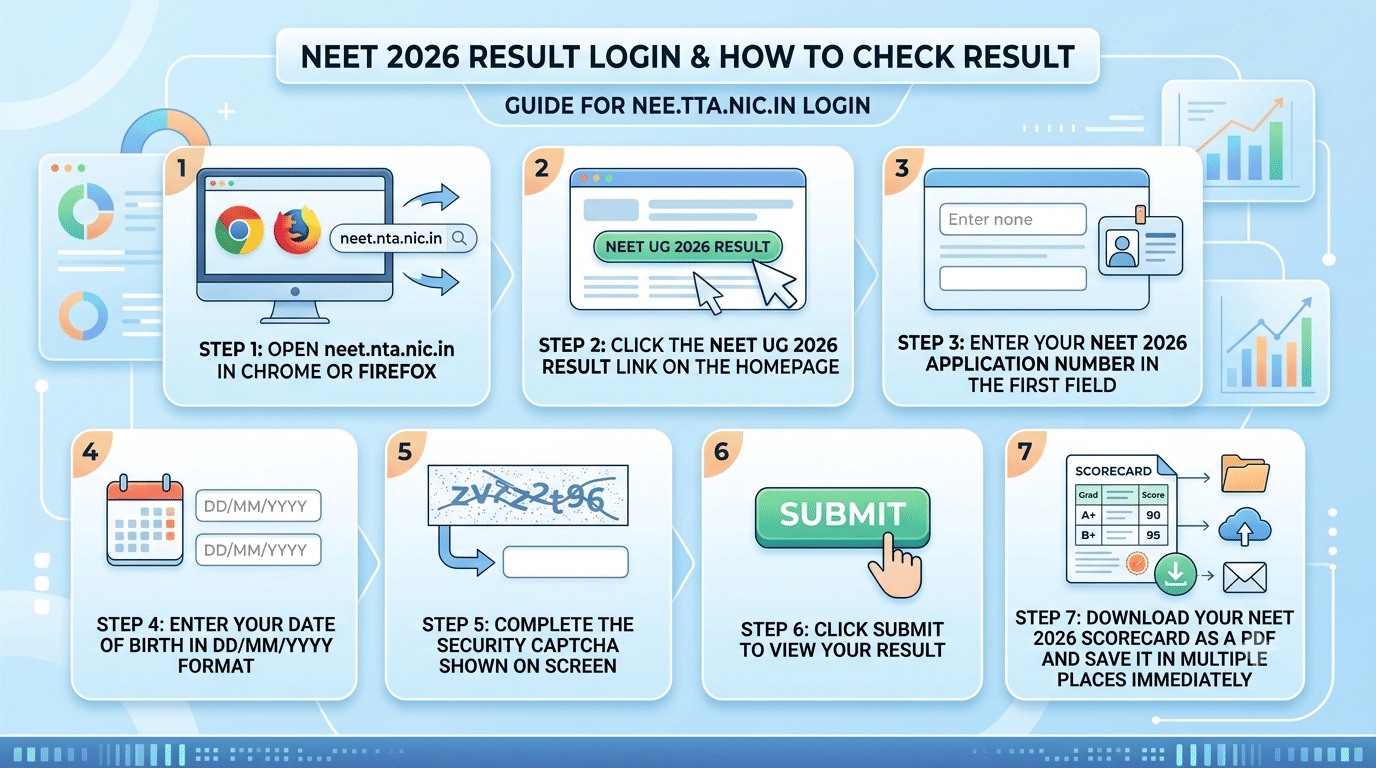
Follow these steps to know how to login and check NEET 2026 result at neet.nta.nic.in:
- Step 1: Open neet.nta.nic.in in Chrome or Firefox.
- Step 2: Click the NEET UG 2026 Result link on the homepage.
- Step 3: Enter your NEET 2026 Application Number in the first field.
- Step 4: Enter your Date of Birth in DD/MM/YYYY format.
- Step 5: Complete the security captcha shown on screen.
- Step 6: Click Submit to view your result.
- Step 7: Download your NEET 2026 scorecard as a PDF and save it in multiple places immediately.
If the page goes blank after clicking Submit, do not click the button again. Wait 30 seconds and try once more. Keep your NEET 2026 admit card nearby as your application number is printed on it and you will need it to retry the login.
Related Article: How to Check ReNEET Result 2026 on UMANG App
Ques. What credentials do I need to check my NEET 2026 result?
Ans. You need your NEET 2026 Application Number and Date of Birth (in DD/MM/YYYY format) to login at neet.nta.nic.in. Some students may also use the password created during the NEET 2026 registration process instead of date of birth.
NEET 2026 Result Login Not Working: Common NEET Portal Errors and Fixes
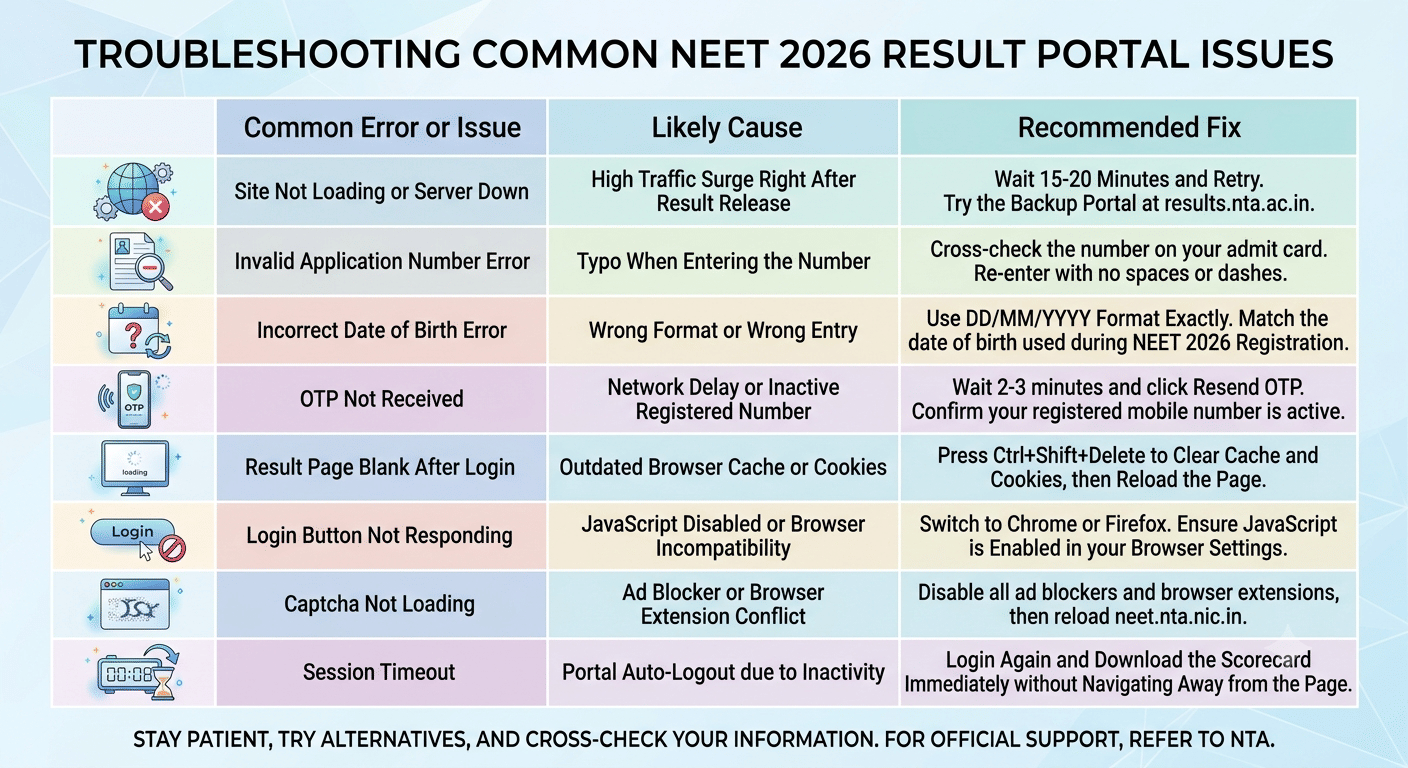
The table below list down the common login errors on NEET result day. Check out the fixes to know if your NEET result login not working:
| Error or Issue | Likely Cause | Fix |
|---|---|---|
| Site not loading or server down | High traffic surge right after result release | Wait 15-20 minutes and retry. Try the backup portal at results.nta.ac.in. |
| Invalid Application Number error | Typo when entering the number | Cross-check the number on your admit card. Re-enter with no spaces or dashes. |
| Incorrect Date of Birth error | Wrong format or wrong entry | Use DD/MM/YYYY format exactly. Match the date of birth used during NEET 2026 registration. |
| OTP not received | Network delay or inactive registered number | Wait 2-3 minutes and click Resend OTP. Confirm your registered mobile number is active. |
| Result page blank after login | Outdated browser cache or cookies | Press Ctrl+Shift+Delete to clear cache and cookies, then reload the page. |
| Login button not responding | JavaScript disabled or browser incompatibility | Switch to Chrome or Firefox. Ensure JavaScript is enabled in your browser settings. |
| Captcha not loading | Ad blocker or browser extension conflict | Disable all ad blockers and browser extensions, then reload neet.nta.nic.in. |
| Session timeout | Portal auto-logout due to inactivity | Login again and download the scorecard immediately without navigating away from the page. |
Tip: If none of the above fixes work, switch between Wi-Fi and mobile data and try from a different device. NTA activates results.nta.ac.in as a mirror server during peak traffic — this is the fastest alternative when the primary portal is unresponsive.
Related Article: Re-NEET Result 2026: By July 20, How to Check Result, Direct Link, Scorecard, Toppers List
According to a Reddit post, last year a user faced issue while trying to check NEET result. As per the discussion, another user said that website is down so check your result after sometime.
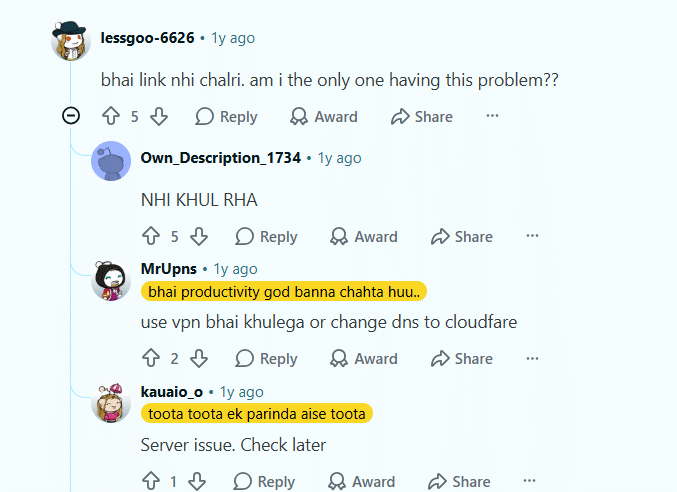
Source: Reddit
Ques. My date of birth is showing as incorrect during NEET 2026 result login. What do I do?
Ans. Make sure you are entering the date in DD/MM/YYYY format and that it matches the exact date of birth you submitted during NEET 2026 registration. If the mismatch continues, there may be a data entry error in your registration record. Contact the NTA Helpdesk at 011-40759000 to resolve it.
NEET 2026 Result Login Not Working: How to Recover NEET 2026 Application Number
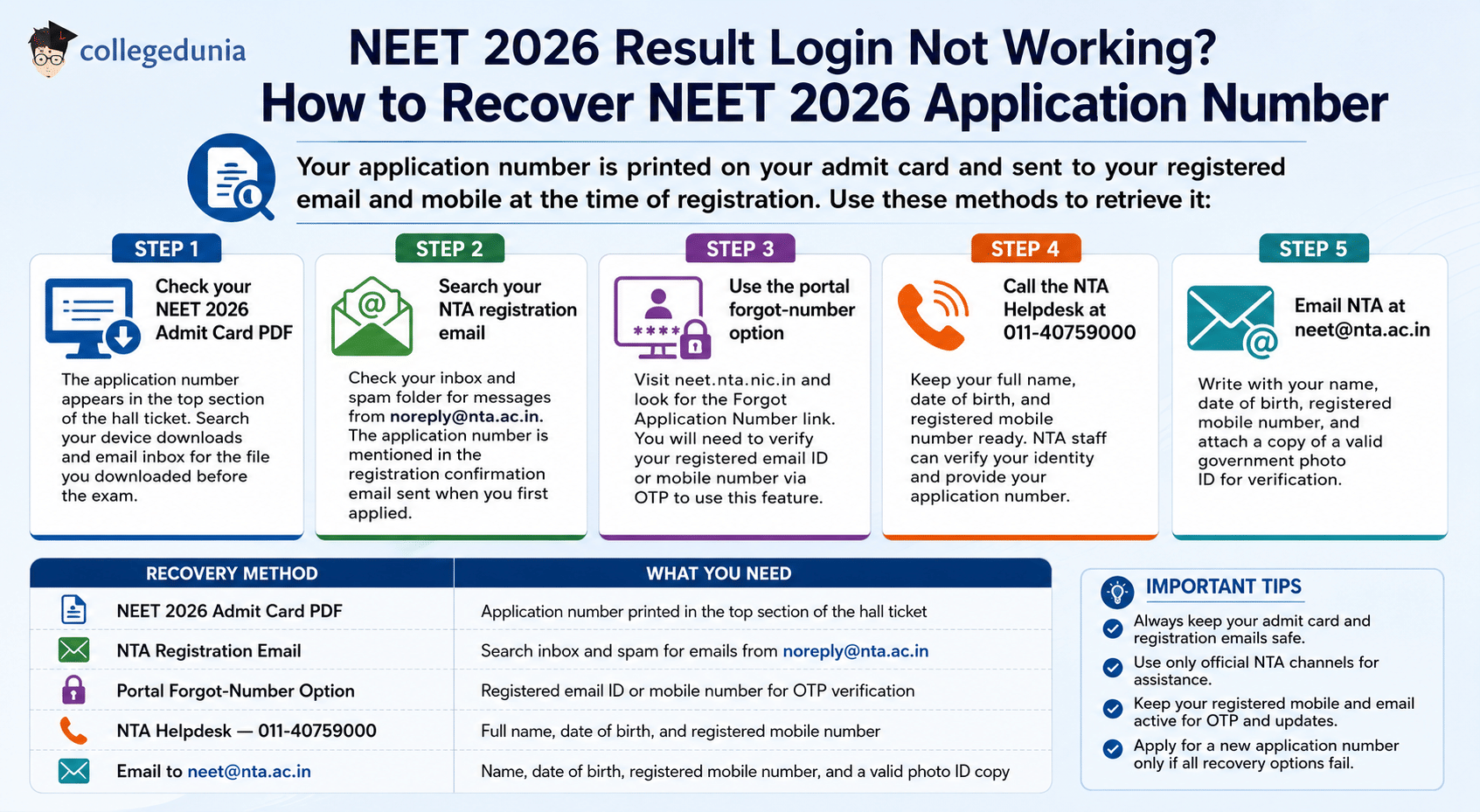
Your application number is printed on your admit card and sent to your registered email and mobile at the time of registration. Use these methods to retrieve it:
- Step 1 Check your NEET 2026 Admit Card PDF- The application number appears in the top section of the hall ticket. Search your device downloads and email inbox for the file you downloaded before the exam.
- Step 2 Search your NTA registration email- Check your inbox and spam folder for messages from noreply@nta.ac.in. The application number is mentioned in the registration confirmation email sent when you first applied.
- Step 3 Use the portal forgot-number option- Visit neet.nta.nic.in and look for the Forgot Application Number link. You will need to verify your registered email ID or mobile number via OTP to use this feature.
- Step 4 Call the NTA Helpdesk at 011-40759000- Keep your full name, date of birth, and registered mobile number ready. NTA staff can verify your identity and provide your application number.
- Step 5 Email NTA at neet@nta.ac.in- Write with your name, date of birth, registered mobile number, and attach a copy of a valid government photo ID for verification.
| Recovery Method | What You Need |
|---|---|
| NEET 2026 Admit Card PDF | Application number printed in the top section of the hall ticket |
| NTA Registration Email | Search inbox and spam for emails from noreply@nta.ac.in |
| Portal Forgot-Number Option | Registered email ID or mobile number for OTP verification |
| NTA Helpdesk — 011-40759000 | Full name, date of birth, and registered mobile number |
| Email to neet@nta.ac.in | Name, date of birth, registered mobile number, and a valid photo ID copy |
Related Article: NEET 2026 Result: How to Check Scorecard on neet.nta.nic.in
Ques. I lost my NEET 2026 application number. How do I get it back?
Ans. First, check your NEET 2026 admit card PDF, as the application number is printed on the hall ticket. Also, search your inbox and spam folder for emails from noreply@nta.ac.in. If you still cannot find it, call the NTA Helpdesk at 011-40759000 or email neet@nta.ac.in with your name, date of birth, and registered mobile number.
NEET 2026 Scorecard Details to Verify
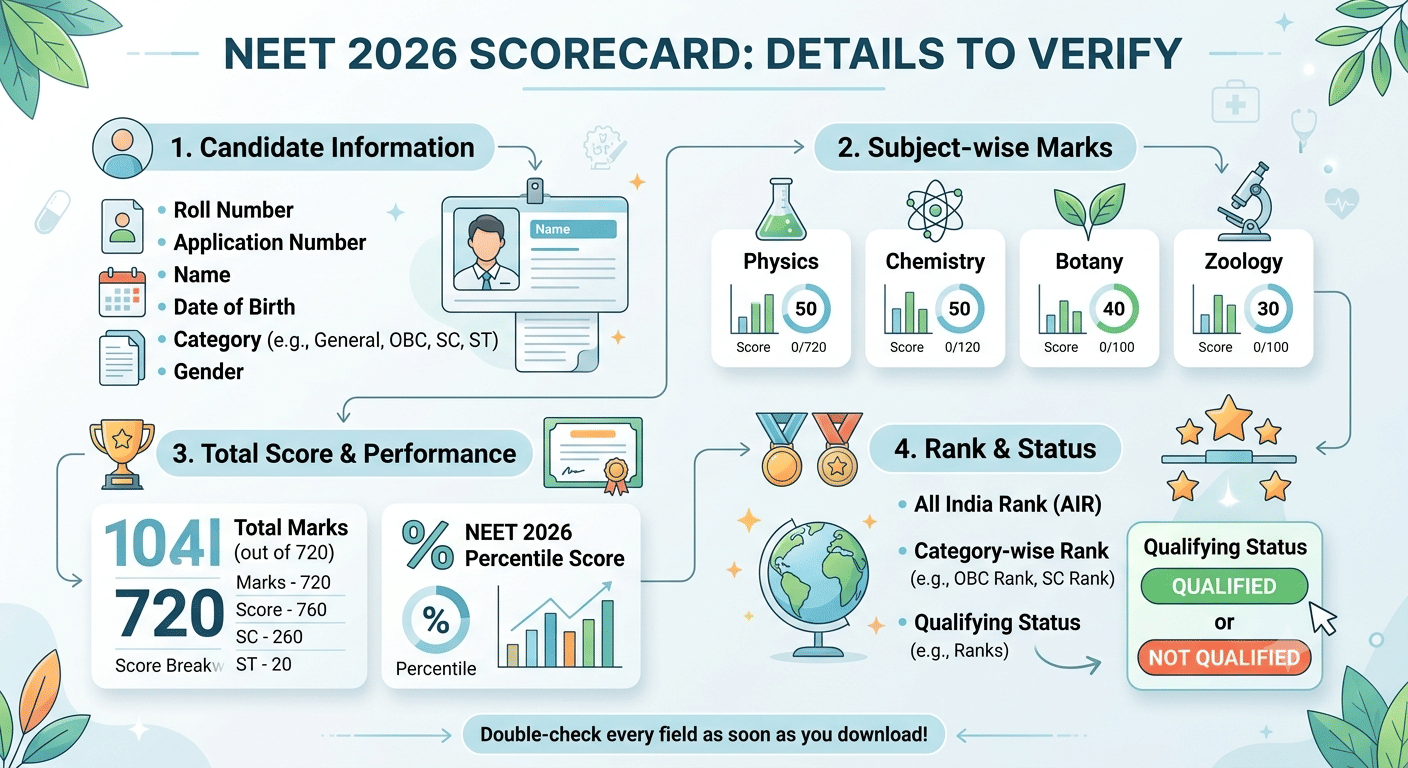
Once you log in successfully, your NEET 2026 scorecard will show the details below. Check every field carefully as soon as you download it:
- Roll Number and Application Number
- Name, Date of Birth, Category, and Gender as per your registration
- Subject-wise marks- Physics, Chemistry, Botany, and Zoology
- Total marks out of 720
- NEET 2026 Percentile Score
- All India Rank (AIR) and category-wise rank
- Qualifying status- Qualified or Not Qualified
NEET UG is out of 720 marks. If any detail on your scorecard appears incorrect, contact NTA immediately at 011-40759000 or neet@nta.ac.in. Save your NEET 2026 scorecard in multiple places you will need it for every stage of NEET 2026 counselling and college admission.
Related Article: NEET Counselling 2026: Check Dates, Eligibility, Fees & Documents Required
NEET 2026 Result Login Not Working FAQs
Ques. The NEET 2026 result portal is down. What should I do?
Ans. A portal outage right after result release is almost always caused by heavy traffic. Wait 15-20 minutes and try again. You can also try the NTA backup server at results.nta.ac.in. Avoid refreshing the main page repeatedly as it increases the load on NTA servers.
Ques. How long will the NEET 2026 scorecard be available to download?
Ans. NTA keeps the NEET scorecard accessible online for a limited period after result declaration. Download your scorecard immediately after logging in and save it on your device, in your email, and on cloud storage. You will need it at every step of the NEET 2026 counselling and admission process.
Ques. Is there a mobile app to check the NEET 2026 result?
Ans. NTA does not have an official NEET result mobile app. The result is accessible only through the official portals neet.nta.nic.in and results.nta.ac.in. Avoid third-party apps or unofficial websites claiming to show NEET 2026 results as these are unreliable.



Comments