




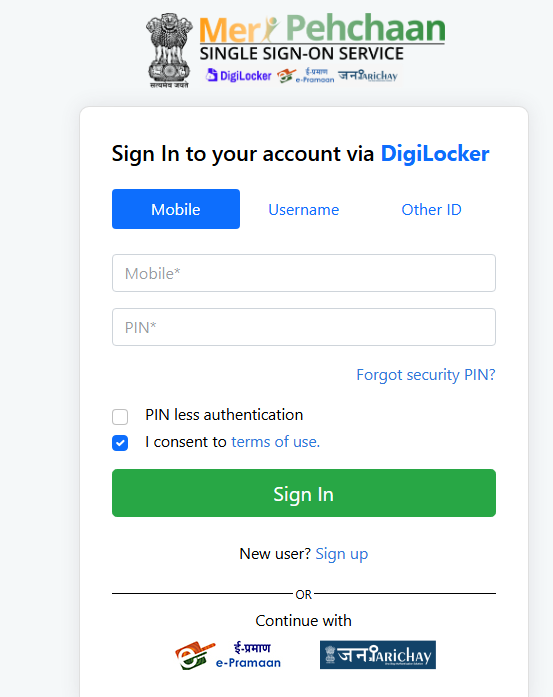
JEE Main 2027 Session 1 registration is open at jeemain.nta.nic.in, and students must now sign in through the MeriPehchaan National Single Sign-On platform to create their account and apply.
The National Testing Agency (NTA) has made the government's MeriPehchaan National Single Sign-On (NSSO) platform mandatory for identity verification during JEE Main 2027 registration.
- MeriPehchaan will help to securely fetch candidates' information directly from the integrated national database, like DigiLocker.
- It supports eKYC through Aadhaar, PAN, Driving Licence or APAAR.
- Due to this, candidates do not have to upload physical identity documents.
The last date to submit the form and pay the fee is 22 November 2026, up to 11:50 PM. Forms submitted with the late fee of Rs 500 are accepted from 23 to 26 November 2026, and the correction window opens on 27 to 29 November 2026.
Related Links:
- JEE Mains 2027 Registration (Open): Direct Link, How to Register, Fees, Documents Required
- JEE Main Cutoff 2027: Expected Marks, Percentile & Category-Wise Qualifying Cutoff for NITs, IIITs and GFTIs

What is MeriPehchaan and Why NTA Uses It for JEE Main 2027
MeriPehchaan is the National Single Sign-On (NSSO) platform of the Ministry of Electronics and Information Technology, and NTA has enabled it as the entry point for JEE Main 2027 registration.
- The platform combines JanParichay, e-Pramaan and DigiLocker, so students sign in once instead of juggling separate logins.
- eKYC on MeriPehchaan can be completed with Aadhaar, PAN, Driving Licence or APAAR.
- NTA uses Aadhaar-based verification to match the name, date of birth and gender with UIDAI records, so the details on your Aadhaar should match your Class 10 certificate.
- The aim, as reported, is to cut data-entry errors and block fake or duplicate applications.
Also Read: Changes in JEE Main 2027 Registration Process: NTA Introduces MeriPehchaan Login
Ques. Is MeriPehchaan login compulsory for JEE Main 2027?
Ans. Registration for JEE Main 2027 is enabled through MeriPehchaan, and reports describe identity verification through DigiLocker, MeriPehchaan or JanParichay as required. Students should follow the exact options shown on the NTA portal and read the Information Bulletin.
How to Create a MeriPehchaan Account and Apply for JEE Main 2027
Step 1: Complete Identity Verification
- Visit the official website, jeemain.nta.nic.in.
- Click on the JEE Main 2027 Session 1 Registration link.
- Read the instructions, accept the required declarations and proceed to the MeriPehchaan login page.
- If you already have a DigiLocker, JanParichay or e-Pramaan account, sign in using your existing credentials.
- If you are a new user, select the registration option and follow the instructions to create an account.
- Complete the required identity verification and grant permission to share the requested details with the NTA portal.
Step 2: Create Your Password and Get the Application Number
- Create a secure password for your JEE Main account. Follow the password requirements displayed on the portal.
- Note down the JEE Main 2027 application number generated during registration.
- Keep your application number and password safe, as you will need them to access your application later.
Check: JEE Main 2027 Login: Login at jeemain.nta.nic.in, How to Login and Forgot Password
Step 3: Fill Out the JEE Main 2027 Application Form
Log in using your application number and password to complete the remaining sections of the form.
- Enter your personal details, academic qualifications and category information.
- Select the examination paper: Paper 1 (BE/BTech), Paper 2A (BArch) or Paper 2B (BPlanning).
- Choose your preferred examination cities from the available options.
- Capture your live photograph using a webcam or follow the QR-code instructions to use a smartphone, if available.
- Upload your scanned photograph, signature and Class 10 certificate or marksheet in the prescribed format.
- Upload additional certificates, if applicable, such as a disability certificate.
Check all details carefully before proceeding to payment.
Step 4: Pay the Application Fee
- Pay the JEE Main 2027 application fee through an available online payment method, such as UPI, debit card, credit card or net banking.
- Check the transaction status to confirm that the payment was successful.
- Download and save the JEE Main 2027 confirmation page after successful submission and payment.
Password rules: The password must be 8 to 13 characters long with at least one uppercase letter, one lowercase letter, one number and one special character (!@#$%^&*-).
Ques. Do I need a new application number for Session 2?
Ans. No. The same application number is used for both sessions, but each session needs its own form submission and fee payment.
JEE Main 2027 Registration: Documents and Photo Size
NTA asks for a live photograph during the form and three mandatory scanned uploads, all in fixed formats and file sizes.
- The live photograph is taken through a webcam, or by scanning a QR code with a phone if the device has no camera.
- Use a white background, good lighting and keep about 80% of the face visible with ears showing and no mask.
- PwD/PwBD students with a UDID card have the details checked on the UDID portal.
| Document | Format | Size |
|---|---|---|
| Passport-size photograph (colour) | JPG/JPEG | 10 KB to 200 KB |
| Signature | JPG/JPEG | 10 KB to 100 KB |
| Class 10 certificate or marksheet | 50 KB to 300 KB | |
| Disability/UDID certificate (if applicable) | 50 KB to 300 KB | |
| Certificate of physical limitation to write (if applicable) | 50 KB to 300 KB | |
| Non-Indian passport (foreign nationals, including OCI) | 50 KB to 300 KB |
Check:
Ques. Can I use the same mobile number and email for two forms?
Ans. No. One mobile number and one email ID can be used for only one form, although a parent's number is allowed. Appearing under two application numbers is treated as unfair means.
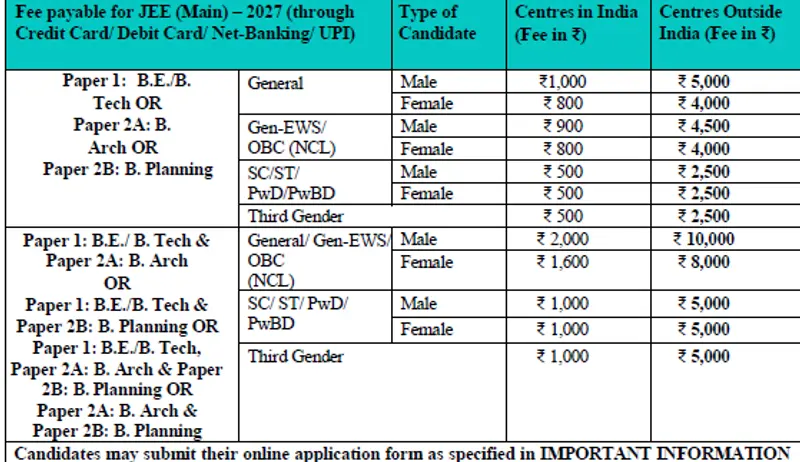
JEE Main 2027 Application Fee (One Paper)
The fee depends on category, gender, paper and exam centre location, and it is non-refundable once paid.
| Category | Male (India centres) | Female (India centres) | Male (centres outside India) | Female (centres outside India) |
|---|---|---|---|---|
| General | Rs 1,000 | Rs 800 | Rs 5,000 | Rs 4,000 |
| Gen-EWS/OBC-NCL | Rs 900 | Rs 800 | Rs 4,500 | Rs 4,000 |
| SC/ST/PwD/PwBD | Rs 500 | Rs 500 | Rs 2,500 | Rs 2,500 |
| Third gender | Rs 500 | Rs 500 | Rs 2,500 | Rs 2,500 |
Check: JEE Main 2027 Registration Fees: Category-Wise Charges, Payment Steps and Mistakes to Avoid
Ques. What if the confirmation page does not appear after payment?
Ans. Check the transaction status with your bank first. Pay again only if the bank confirms that the first payment failed.
JEE Main 2027 Registration: Common Mistakes to Avoid
- Name or date of birth mismatch: Keep the Aadhaar details consistent with the Class 10 certificate to avoid verification issues.
- Wrong file size or format: The portal rejects files outside the KB limits listed above.
- Waiting for the last day: Server load rises near 22 November, so complete the fee payment early.
- Reusing contact details: Use a unique mobile number and email that you can access, since NTA sends all updates there.
Ques. Can I edit the form after final submission?
Ans. No entry can be edited after submission. A one-time correction window from 27 to 29 November 2026 opens only the fields NTA lists at that time.
Ques. Which website should I use to apply?
Ans. Apply only at the official NTA website, jeemain.nta.nic.in. Forms submitted through any other mode are not accepted.
Important Links for JEE Main 2027
| Related Article | Link |
|---|---|
| JEE Main 2027 Application Form | Check Application Details |
| JEE Main 2027 Exam Centres | Check Exam Centres |
| JEE Main 2027 Chapter-Wise Weightage | Check Chapter-Wise Weightage |
| JEE Main 2027 Cutoff | Check Cutoff Details |
| JEE Main 2027 Mock Test | Practice Mock Tests |
| JEE Main 2027 Admit Card | Check Admit Card Updates |
| JEE Main vs JEE Advanced | Check the Differences |
| JEE Main Paper 2 Aptitude Preparation | Read the Preparation Guide |



Comments